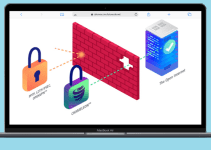
Public WiFi is everywhere these days – at coffee shops, airports, hotels, and other places. It’s really convenient when you need internet access away from home. But public WiFi can be risky for your personal information and privacy. Hackers can easily steal your data if you’re not careful. The good news is that using a VPN (Virtual Private Network) can help keep you safe.
This guide will explain the dangers of public WiFi and how a VPN can protect you. We’ll also cover how to choose the right VPN and step-by-step instructions for using one safely.
Why Public WiFi is Risky
No Protection for Your Information
When you use public WiFi, your data isn’t encrypted. This means anyone else on the same network can see what you’re doing online. They could steal your passwords, see your emails, or get your credit card information. It’s like sending postcards instead of sealed letters – anyone who intercepts them can read what’s inside.
People Can Watch Your Activity
On public networks, hackers have tools that let them see everything you do online. They can track which websites you visit, capture your login information, or even put harmful software on your device. It’s like having someone looking over your shoulder while you work.
Anyone Can Join the Network
Unlike your home WiFi that requires a password, most public networks don’t have passwords. This means strangers can connect and watch all the unencrypted traffic. There’s no way to know who else is on the network with you.
Fake Networks Exist
Sometimes hackers set up fake WiFi networks that look legitimate. You might think you’re connecting to the coffee shop’s actual network, but you’re really connecting to a hacker’s trap designed to steal your information.
How a VPN Keeps You Safe
A VPN creates a secure, private connection between your device and the internet. Here’s how it helps:
Your Data Gets Encrypted
A VPN scrambles your data so that even if someone intercepts it, they can’t read it. It’s like putting your information in a locked box before sending it. Only the right key (the VPN server) can unlock it.
Your Identity is Hidden
When you use a VPN, your internet traffic goes through a secure server first. This hides your real IP address and location. People on the public network can only see that you’re connected to the VPN, not what websites you’re visiting.
Blocks Unwanted Tracking
VPNs help stop websites and advertisers from tracking your movements across the internet. They also block many ads and pop-ups that could contain harmful software.
Safer Connections
Instead of connecting directly to the risky public WiFi, your VPN connects you to a secure server run by a trusted company. This ensures your connection is legitimate and secure.
Prevents Snooping
By putting all your online activity inside the encrypted VPN tunnel before it ever touches the public WiFi, you prevent local snooping attempts. Hackers can only see encrypted gibberish, not your actual data.
In short, without a VPN on public WiFi, your information is basically unprotected. With a VPN, you get a secure, private connection that keeps your browsing safe.
Choosing the Right VPN
Not all VPNs are created equal. Here’s what to look for when picking one for public WiFi:
Strong Encryption
Choose a VPN that uses strong encryption (AES 256-bit is standard). This is the same level of security used by banks and the military. It makes it nearly impossible for anyone to decrypt your data.
Kill Switch Feature
A good VPN has a kill switch that automatically cuts off your internet if the VPN connection drops unexpectedly. This prevents your data from being exposed if the VPN stops working.
No Logging Policy
Make sure the VPN provider doesn’t keep records of your online activities. If they don’t log your data, there’s nothing for them (or anyone who might force them to hand it over) to share.
Fast Speeds
VPNs can sometimes slow down your internet. Look for services that offer fast connections so your browsing and streaming don’t become frustratingly slow.
Works with Streaming
Some public networks block streaming services. Choose a VPN that can get around these restrictions so you can still watch your favorite shows and movies.
Multiple Device Support
You probably use more than one device (phone, laptop, tablet). Pick a VPN that lets you protect all your devices at the same time.
Good Customer Support
If you run into problems, you want help available 24/7. Look for VPNs with responsive customer support through chat or phone.
Best VPNs for Public WiFi
Based on the criteria above, here are some top VPN options to consider:
1. NordVPN
NordVPN is our top recommendation for public WiFi. It has excellent security features including a no-logging policy, strong encryption, and special servers that help avoid censorship. It works with streaming services and offers fast connections.
Price: Starts from $3.29 per month
Pros
- Excellent security
- Can connect 6 devices at once
- Over 5,000 servers worldwide
- Extra security features like double VPN
Cons
- No free version available
2. ExpressVPN
ExpressVPN is also very secure with strong encryption and a strict no-logging policy. It’s incredibly fast, making it great for streaming HD content. It works on all major devices and offers a 30-day money-back guarantee.
Price: Starts from $8.32 per month
Pros
- Very fast speeds
- Easy to use interface
- Unlimited bandwidth
- Lets you choose which apps use the VPN
Cons
- More expensive than other options
3. CyberGhost
If you’re on a budget, CyberGhost is a good choice at just $2.25 per month. It uses military-grade encryption and allows torrenting. It includes special security features for public WiFi.
Price: Starts from $2.25 per month
Pros
- Very affordable
- Allows torrenting
- 45-day money-back guarantee
- Special servers for streaming and torrenting
Cons
- Can be slow during busy times
- Not many customization options
These are great choices, but be sure to read reviews to find the VPN that best fits your needs.
How to Use a VPN on Public WiFi
Setting up and using a VPN is straightforward:
Step 1: Download and Install the VPN App
Get the VPN app from your device’s app store (like the App Store for iPhones or Google Play for Android). Install it and open the app, then log in with your account information.
Step 2: Connect to a Server
The app will show you a list of server locations around the world. Pick one that’s good for speed, access to content you want, or security. Many VPNs can automatically pick the best server for you.
Step 3: Turn On Public WiFi Protection
Some VPNs have special features for extra security on public networks. If available, make sure these are turned on. For example, CyberGhost has a specific “Public WiFi Protection” feature.
Step 4: Start Browsing Safely
Now your connection is secure through the VPN. You’ll see the WiFi icon showing you’re connected via VPN. You can now safely check email, shop online, stream media, and send information without worrying about snooping or theft.
Keep the VPN on the whole time you’re using public WiFi. You can turn it off when you get back to your trusted home network to save bandwidth.
What Happens If You Don’t Use a VPN
To show why VPNs are important, here are some real examples of what can happen without one:
Financial Theft
In 2010, criminals in London used public WiFi at cafes near financial firms to spy on employees. They stole insider trading information and used it to make illegal profits.
Email and Password Theft
Researchers in Israel found that over 68,000 email login credentials were stolen in just one day from public hotspots in Tel Aviv. Hackers used these to access people’s private accounts.
Ransomware Attacks
Hackers can manipulate public WiFi to install harmful software on your device through fake login screens or other tricks. Once infected, your files might be locked until you pay a ransom.
These are just a few examples of the real dangers of public WiFi. While it’s convenient, connecting without protection puts your data at serious risk.
Stay Safe on Any Network
Using a good VPN service makes it safe to use public WiFi anywhere. The VPN creates a secure tunnel that prevents hackers from seeing what you’re doing or stealing your information.
The VPNs we recommended have the security features and fast speeds you need to use public WiFi with confidence. When choosing a VPN, look for one that keeps up with new security threats and updates their protection regularly.
Always turn on your VPN before connecting to any unknown or public wireless network. With the right protection, you can enjoy the convenience of public WiFi without worrying about your security or privacy.
For more information about staying safe online, check out our guides on VPN vs Proxy, rotating IP addresses, and portable antivirus software to learn more about protecting yourself online.
You May Also Like
 VPN
VPNCloudflare WARP as a Free VPN Alternative: Review After Months of Daily Use
 Proxies
10 Best Public DNS Servers for Faster Browsing and Lower Gaming Latency in 2026
 VPN
VPNHow to Block Ads on FirstRowSports: A Step-by-Step Guide
 Proxies
Top 10 Free Proxy Websites in 2026: My Complete Testing Guide
 VPN
VPNCan You Use a VPN on a School Chromebook? (What Works + What’s Allowed)
 Tiktok
Does TikTok Detect VPN Usage? Everything You Need to Know
 VPN
VPNWhat Is an Obfuscated VPN? Your Complete Guide to Bypassing Blocks and Staying Private Online
 Cyber Security
What Is the Dark Web and How Can You Access It? Beware!
 VPN
VPN