With so many project management tools available today, choosing the right one for your team can feel overwhelming. In this article, I’ll compare two of the most popular options: Trello and Jira. I’ve used both tools extensively with different teams, and I’ll share my firsthand experience to help you make the best choice.
Trello is a visual project management tool that uses cards and boards to help you organize and track your work. It’s simple to use and very flexible, making it a popular choice for small teams and individuals who want to get started quickly without a steep learning curve. In 2025–2026, Trello has grown significantly with major new features including AI-powered tools, a personal inbox, and a built-in planner — making it more powerful than ever without sacrificing its signature simplicity.
Jira is a more comprehensive tool designed for larger teams working on software development projects. It offers more features and functionality than Trello, but can be more challenging to learn and set up properly. In late 2025, Atlassian made a significant terminology shift — what were previously called “Projects” in Jira are now called “Spaces” — and the platform has deeply integrated its Rovo AI across the entire product.
So, which tool is right for you? Let’s dive in and find out!
Trello vs Jira: The Big Picture

When I first started using project management tools, I was surprised by how different Trello and Jira really are. They might seem similar at first glance, but they’re built for different purposes and different types of teams. That gap has actually widened in 2025–2026, as both tools have leaned hard into AI — but in very different ways suited to their respective audiences.
Getting to Know Trello
Trello is one of those tools that just makes sense the moment you start using it. It’s a project management tool that can adapt to almost any workflow you throw at it. What I love about Trello is how user-friendly it is — you can create a board, add some lists, and start dropping in cards within minutes. It’s also very affordable, with a free plan that’s actually useful for small teams.
In 2025, Atlassian launched a major “new Trello” update, introducing personal productivity features that transform Trello from a pure team board tool into a more complete work management hub.
What Trello Does Best
Trello uses visual Kanban boards to help teams see their work at a glance. Each board represents a project, and tasks are shown as cards that you can drag from one stage to the next. For example, you might have lists called “To Do,” “In Progress,” and “Done.” It’s simple to understand and easy to learn, which makes it perfect for small teams or people who are new to project management.
Jira, on the other hand, is built with larger organizations in mind. It offers both Kanban boards and traditional scrum boards, plus lots of other features like detailed reports and connections to developer tools. While Jira can feel overwhelming at first, it provides powerful features that really help with large, complex projects.
So which tool should you choose? That depends on several factors, including the size of your projects, your team’s experience level, and how much you want to spend. If you’re not sure, I recommend trying both tools to see which one feels better for your team.
Key Features of Trello
Based on my experience using Trello with various teams, here are the main features you’ll actually use in 2026:
- Unlimited cards to track all your tasks and ideas
- Visual boards that make it easy to see what’s happening
- Drag-and-drop interface that anyone can learn in minutes
- Trello Inbox — a personal space to capture tasks from email (forward to [email protected]), Slack, Microsoft Teams, and voice commands on iOS
- Trello Planner — a built-in calendar planner that syncs with Google Calendar and Microsoft Calendar; drag and drop tasks directly from your Inbox or boards to block focus time
- Quick Capture powered by AI — AI parses forwarded messages and emails to automatically extract due dates, priorities, and action items
- Butler automation to handle repetitive tasks automatically
- 200+ Power-Ups to connect with other tools you already use
- Card Mirroring — sync a single card across multiple boards; view mirrored cards in all board views including Table, Calendar, Timeline, and Map
- Templates for common project types like marketing campaigns and product launches
- Mobile apps for iOS and Android, plus a desktop app for macOS and Windows
- Android home screen widget to add tasks to your Inbox without opening the app
- Custom fields to add specific information to your cards
- Due dates and assignees to keep everyone on track
- Checklists to break down big tasks into smaller steps
- Attachments to keep files right where you need them
- Collapsible lists and list colors (Standard and above) to keep boards tidy and prioritized
- Multiple board views (Calendar, Timeline, Dashboard, Table, Map) on Premium and above
- AI-powered card writing (Premium and above) — generate and improve card descriptions, fix grammar, and brainstorm with Atlassian Intelligence

New Trello Inbox: Capture your to-dos from anywhere.
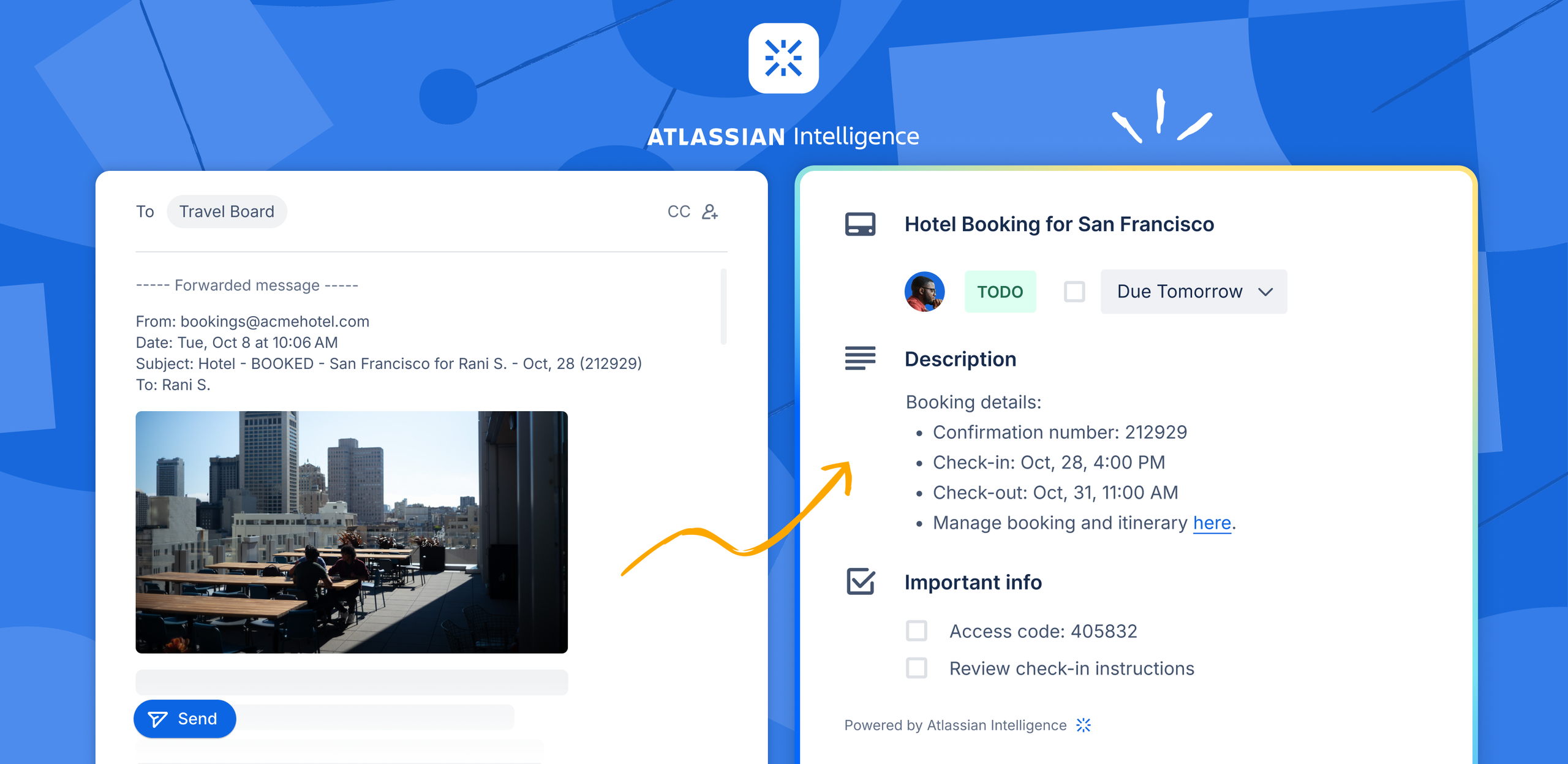
AI-powered Quick Capture extracts action items automatically.

The new Trello Planner connects your boards to your calendar.
What I Like About Trello
After using Trello with various teams, here’s what stands out:
Pros:
- Very easy to learn and use — most people get it in minutes
- Visual interface that makes work clear at a glance
- Great for small projects and simple workflows
- Flexible enough to adapt to different needs
- Generous free plan for up to 10 collaborators
- Works well for non-technical teams
- Mobile and desktop apps are simple and functional
- New Inbox and Planner make personal task management much stronger
- Butler automation helps save time on repetitive tasks
- 200+ Power-Ups let you add features as you need them
- Templates help you get started quickly
- AI features are genuinely useful without being overwhelming
Things to Consider:
- Limited to 10 boards per Workspace on free plan
- File storage limited to 10MB per file on free plan
- Can become messy with large projects
- Not ideal for complex software development workflows
- Limited reporting capabilities
- Can be hard to track progress across many boards
- AI features (card writing, Quick Capture AI) require Standard or Premium plan
Where Trello Falls Short
While I love Trello for certain projects, it does have some limitations:
Cons:
- Fewer advanced features than enterprise project management tools
- Can be difficult to maintain structure as projects grow
- Not designed for large-scale software development
- Limited automation options in the free version (250 runs/month)
- Can feel too simple for teams with complex dependencies
- No built-in time tracking
- Limited advanced reporting features — Dashboard view requires Premium
- Planner and full AI features locked behind paid tiers
Trello Pricing (2026)
Trello’s pricing structure has remained stable heading into 2026. Here’s what you’ll actually pay:
Free Plan — $0
- Up to 10 collaborators per Workspace
- Unlimited cards
- Up to 10 boards per Workspace
- Unlimited Power-Ups per board
- 10MB file storage limit per file
- 250 automation runs per month
- Trello Inbox (basic capture)
- Planner (view-only)
- Mobile apps for iOS and Android + desktop app
Standard Plan — $5 per user/month (billed annually) or $6 monthly
- Everything in Free, plus:
- Unlimited boards
- Unlimited Workspace collaborators
- 250MB file storage
- 1,000 automation runs per month
- Advanced checklists
- Custom fields
- Card mirroring
- Collapsible lists and list colors
- Quick Capture powered by AI
- Planner (full access) — drag, drop, and sync with Google/Microsoft Calendar
Premium Plan — $10 per user/month (billed annually) or $12.50 monthly
- Everything in Standard, plus:
- Unlimited file storage
- Unlimited automation runs
- Multiple board views: Calendar, Timeline, Dashboard, Table, Map
- Workspace-level views and templates
- Admin and security features (domain-restricted invites, deactivate members, Observers)
- AI features powered by Atlassian Intelligence — write, improve, and brainstorm card content
- 24/5 Premium Support
Enterprise Plan — $17.50 per user/month (billed annually)
- Everything in Premium, plus:
- Unlimited Workspaces
- Enterprise-grade security including Atlassian Guard Standard
- Power-Up administration
- Organization-wide permissions and public board management
- Attachment restrictions
- 24/7 Enterprise Admin Support
Getting to Know Jira
Jira is a powerful project management tool designed for teams that need to handle complex projects. It’s flexible and can grow with your team, making it suitable for both small businesses and large organizations. Jira is used by major companies including Adobe, Boeing, Coca-Cola, eBay, and many others.
Important 2025–2026 Update: Starting in October 2025, Atlassian rolled out a major terminology change — what were previously called “Projects” in Jira are now called “Spaces.” This is purely a terminology update; your data, workflows, and settings all remain intact. It brings Jira’s language in line with Confluence (which has always used “Spaces”) and reflects a broader Atlassian platform unification.
Additionally, Atlassian announced the end of sale for new Data Center licenses on March 30, 2026, and the end of life for Data Center on March 28, 2029 — signaling a full push to the cloud.
What Makes Jira Special
Jira stands out because it’s built specifically for software development and complex team workflows. It supports both agile and traditional project management approaches, and in 2025–2026 has become deeply AI-powered through Atlassian Rovo — the company’s flagship AI platform that integrates directly into Jira for intelligent work creation, workflow building, and agent-assisted task management.
Key Features of Jira
From my experience using Jira with development teams, here are the features that matter most in 2026:
- Spaces (formerly Projects) to organize and track work status at each stage
- List view to organize work like a spreadsheet but better
- Calendar view to see deadlines and timing
- Timeline view to understand project dependencies
- Sprints & backlog for agile teams
- Task management with all the details you need
- Dependency management to spot bottlenecks early
- Advanced reporting with charts and insights
- Custom workflows to match your team’s process
- Integration with development tools like GitHub and Bitbucket
- Mobile apps for iOS and Android
- Advanced search to find anything quickly
- Automation rules to handle routine tasks
- Dynamic & public forms with conditional logic — share forms with people outside your org (customers, vendors, agencies) without requiring a Jira login
- Preview panel — view context from Atlassian Goals, Teams, and Confluence pages directly inside a work item without switching tabs
- Custom onboarding — create tailored welcome messages and resources for each team role, embed Confluence docs and Loom videos
- Custom space templates — save any space with its settings (fields, workflows, permissions) as a reusable template
- Rovo AI — Work Creation — transform conversations from Confluence, Gmail, Slack, Microsoft Teams, or even photos of whiteboards and sticky notes into Jira work items automatically
- Rovo Workflow Builder (beta) — describe your process in plain language and Rovo configures or modifies the Jira workflow for you, no code needed
- AI Agents in Jira — assign work directly to AI agents that can act on tasks autonomously
- AI Work Breakdown (Jira Plans) — use AI to break down large initiatives and estimate release dates for cross-team projects
Dynamic & public forms with conditional logic — shareable outside your org.

Rovo Workflow Builder: describe your process in plain language, AI does the rest.

The new preview panel keeps context in view without tab switching.

What I Like About Jira
From my experience using Jira with development teams, here are the highlights:
Pros:
- Extremely powerful and feature-rich
- Excellent for software development workflows
- Highly customizable to fit specific team needs
- Great for large projects with multiple team members
- Strong reporting and analytics capabilities
- Integrates well with development tools (GitHub, Bitbucket, GitLab)
- Scales well as your team grows — up to 150 sites on Enterprise
- Multiple ways to view your work (boards, lists, timelines, calendars)
- Advanced search helps you find anything quickly
- Automation saves time on repetitive tasks
- Rovo AI is among the most capable AI assistants in any project management tool
- Public forms make it easy to collect work requests from outside the team
- Custom space templates dramatically reduce setup time for new teams
Things to Consider:
- Can be difficult to learn and set up
- More expensive than simpler alternatives
- Can be slow to navigate with many spaces/projects
- Requires more maintenance to keep organized
- Mobile app isn’t as intuitive as Trello’s
- Can feel overwhelming for small projects
- Steeper learning curve for new users
- Rovo AI credits are capped per plan tier
- May be overkill for simple task management
Where Jira Can Be Challenging
Jira isn’t perfect, though. Here are some drawbacks I’ve encountered:
Cons:
- Takes time to set up properly for your team
- Interface can feel cluttered and complex, even after the 2025 UI refresh
- Higher cost compared to simpler tools
- Requires regular maintenance to stay organized
- Can be slow with large amounts of data
- Not ideal for non-technical teams
- May require a dedicated admin to manage
- “Spaces” terminology change may confuse long-time users transitioning
- Data Center customers face end-of-life pressure to migrate to the Cloud by 2029
Jira Pricing (2026)
Jira’s Cloud pricing has been updated for 2026. Note that Data Center pricing increased 18–40% in February 2026, and new Data Center license sales end on March 30, 2026. For cloud plans:
Free Plan — $0
- Up to 10 users
- 2 GB of storage
- Basic project management features (boards, backlog, roadmap)
- 100 automation rule runs/month
- Mobile apps for iOS and Android
- Community Support
Standard Plan — $7.91 per user/month (billed annually)
- Everything in Free, plus:
- Up to 100,000 users per site
- 250 GB of storage
- 1,700 automation rule runs per month
- Advanced project management features
- User management and role controls
- Rovo AI: 25 credits per user/month (100 indexed objects per user)
- Local Business Hours support
Premium Plan — $14.54 per user/month (billed annually)
- Everything in Standard, plus:
- Unlimited storage
- 99.9% uptime SLA
- 1,000 automation rule runs per user/month
- Advanced analytics and cross-project planning
- More admin controls
- Rovo AI: 70 credits per user/month (250 indexed objects per user)
- 24/7 Premium Support
Enterprise Plan — Custom pricing
- Everything in Premium, plus:
- 99.95% uptime SLA
- Up to 150 Atlassian sites
- Unlimited automation rule runs
- Centralized billing and administration
- Advanced security, including Atlassian Guard Standard (included)
- BYOK encryption and Product Requests to manage shadow IT
- Rovo AI: 150 credits per user/month (625 indexed objects per user)
- 24/7 Enterprise Support
Head-to-Head Comparison
After using both tools extensively, here’s how they stack up against each other in 2026:
Ease of Use
Trello: Still wins this category. The new Inbox and Planner add powerful features while keeping the interface approachable. Most people are productive on day one.
Jira: Has a steeper learning curve and requires more setup time. The 2025 UI refresh and the “Spaces” rename improved consistency, but it remains a tool that rewards investment in learning.
Features
Trello: Now offers a well-rounded set of features including AI-powered task capture, a built-in planner, and 200+ Power-Ups. Excellent for individuals and small teams who want genuine productivity features without complexity.
Jira: Provides a comprehensive, enterprise-grade toolkit — Rovo AI agents, dynamic forms, custom space templates, AI work breakdown, and deep developer tool integrations. The clear winner for complex, large-scale project management.
AI Capabilities (New in 2026)
Trello: Atlassian Intelligence powers Quick Capture (extracting tasks from messages and emails), card writing assistance (generate/improve descriptions, fix grammar, brainstorm), and AI-powered Inbox sorting. Available on Standard and Premium plans.
Jira: Rovo AI is significantly more powerful — it can create work items from Slack, Gmail, Teams, Confluence, and even photos; build and modify workflows via natural language; run AI agents autonomously; and help with cross-project planning and work breakdown. Available on all paid plans, with credits scaling by tier. Rovo has surpassed 5 million monthly active users as of 2026.
Pricing
Trello: More affordable, with a generous free plan. Standard at $5/user/month is one of the best-value paid tiers in the market.
Jira: Updated pricing in 2026 — Standard at $7.91/user/month and Premium at $14.54/user/month. More expensive than Trello, especially at scale, but the feature depth justifies the cost for software and enterprise teams.
Customization
Trello: Offers customization through 200+ Power-Ups, custom fields, and Butler automation. Good flexibility for most teams.
Jira: Highly customizable with custom workflows, custom fields, custom space templates, and now Rovo Workflow Builder for AI-assisted workflow creation. Unmatched in depth.
Best For
Trello: Small teams, simple projects, visual thinkers, individuals managing personal tasks, and those new to project management.
Jira: Software development teams, large organizations, agile and scrum teams, and any project requiring complex dependencies, detailed tracking, and enterprise-grade AI.
Making Your Choice
There’s no one-size-fits-all answer when it comes to Trello vs Jira. Both tools have their strengths and weaknesses, and the best choice depends on your specific needs.
Choose Trello if:
- You have a small team or simple projects
- You want to get started quickly without much setup
- You prefer visual tools that are easy to understand
- You want personal productivity features (Inbox, Planner, AI Quick Capture) in a lightweight package
- You have a limited budget
- Your team isn’t very technical
- You need a tool that works right out of the box
Choose Jira if:
- You’re managing software development projects
- You have a large team with complex workflows and dependencies
- You need detailed reporting and tracking
- You want deep AI integration (Rovo) that can create, organize, and act on work automatically
- You want to integrate with development tools (GitHub, Bitbucket, GitLab)
- You have the budget for a more robust solution
- You need to scale your project management over time
- You operate in an enterprise environment with security and compliance requirements
My Final Thoughts
After years of using both tools with different teams — and watching both evolve significantly through 2025 and into 2026 — I’ve found that the choice between Trello and Jira still comes down to matching the tool to your team’s needs and ways of working.
For small teams, creative projects, or when you’re just starting out, Trello remains the better choice. And with the 2025 overhaul bringing Inbox, Planner, and AI Quick Capture, it’s no longer just a “simple” tool — it’s a genuinely capable personal and team productivity platform. The free plan is generous enough that many teams never need to upgrade.
For larger teams, especially those in software development, Jira’s depth is unmatched. The Rovo AI platform in particular has become a real differentiator — being able to create work items from a Slack message, a Gmail thread, or a photo of a whiteboard is a genuine productivity game-changer. The “Spaces” rebrand and new UI are also steps in the right direction for usability.
One more consideration for 2026: if your organization uses Jira Data Center, now is the time to plan your cloud migration — new Data Center license sales end March 30, 2026, and the product reaches end of life in 2029.
The best approach is to try both tools with your team. Both offer free plans, so you can get a feel for how they work before making a commitment. Remember that the goal is to find a tool that helps your team work better — not one that adds more complexity to your workflow.
Whether you choose Trello, Jira, or another management software for small business, the most important thing is that it helps your team stay organized and productive.
You May Also Like
 Best Software
Top 10 Free & Open Source Inventory Management Software in 2026: A Comprehensive Buyer’s Guide With Real-World Data
 SaaS
SaaS
11 Best VoIP Call Center Solutions for Small Business 2026 (Comparison Guide)
 Best Software
6 Best Software to Record Mouse and Keyboard Actions and Automate Repetitive Tasks
 Best Software
Jira vs Hive: Which Project Management Tool is Right for Your Team?
 Best Software
8 Best Free Registry Cleaners Tools to Clean Junk and Registry on Windows PC
 Best Software
12 Top Plumbing Management Software Solutions for 2026
 Best Software
ServiceTitan Pricing Explained: How Much Does ServiceTitan Cost for Your Business?
 Best Software
12 Best Construction Project Management Software For Your Businesses
 Best Software


