Legal case management software can help you become the best lawyer in your field. Let’s be honest, finding the best software for law practice management is tough, especially when you’re looking for free options. There aren’t many truly free solutions in the business, but I’ve found some excellent free tools that can help you in different ways. However, I need to be straight with you – don’t expect a full-featured practice management system without paying something.
In addition to traditional legal software, there are low-code tools like UI Bakery that can speed up product development and are particularly popular with startups and companies. They’re perfect when you need to launch a product quickly with minimal design and development costs.
If you’re reading this, you probably already know that legal practice management software can save attorneys countless hours on timekeeping and billing, document creation and form filling, as well as managing contacts, correspondence, and calendaring. Whether you’re just starting out and trying to keep expenses low or you’re not yet convinced that software is worth the investment, you don’t want to spend a fortune on a piece of software.
Free software generally comes with limitations, especially in the legal field. One major drawback is that most free options aren’t cloud-based. This means you’ll need to download, host, set up, update, and maintain your own installation while preparing for backups. Otherwise, when something goes wrong, you might lose everything – and that would be disastrous. Using free software doesn’t make you less professional; many successful law firms use free legal case management software too.
Many free programs claim to be free when they’re actually just trial versions. But I’ve found reliable sources for genuinely free software, including SourceForge and Debian.org. They offer numerous free legal and law practice software options. Remember that since these are free software solutions, there’s no guarantee they’re still being updated or haven’t been discontinued. Always check the source regularly for updates and news. Below is my updated list of free legal case management software for 2025.
10+ Free Legal Case Management Software for Your Legal Practice in 2025
I’ve personally tested and researched these tools to help you find the best free law case management software for your needs. Compare the following options to find what works best for you. Note: Most offer trial periods that are free, but you’ll need a license to switch to premium versions.
1. Jarvis Legal

Jarvis Legal
Jarvis Legal tops my list of free legal case management software because it offers an unlimited free version with just one limitation: data caps. With the free version, you can manage up to five simultaneous cases and use up to 5 GB of storage. For most solo practitioners or small firms just starting out, 5 cases and 5 GB of storage is actually quite generous.
I’ve found Jarvis Legal to be incredibly user-friendly with a clean interface that doesn’t overwhelm you with unnecessary features. The platform focuses on what matters most for legal professionals: case organization, document management, and client communication. Many reviewers, including recent evaluations by Capterra, give Jarvis Legal a solid 4.5/5 score – impressive for free software. If you need more features, you can upgrade to the premium version for $35 per user per month.
Key Features:
- Case and matter management
- Document storage and organization
- Client communication tools
- Time tracking capabilities
- Task management and deadlines
- Mobile access
Pros:
- Truly free version available (not just a trial)
- User-friendly interface
- Good storage allocation for free tier
- Regular updates and improvements
- Strong customer support
Cons:
- Limited to 5 cases in free version
- 5 GB storage might be restrictive for document-heavy practices
- Some advanced features require paid upgrade
Best For: Solo practitioners and small law firms just starting out who need basic case management without upfront costs.
2. Open Source Law

Open Source Law
Open Source Law is essentially a wiki platform designed specifically for lawyers and law students to share documents and collaborate. This open-source solution offers documentation revision control and a centralized repository for legal documents. While it may not be the most feature-rich option, it serves a specific purpose well.
I need to be transparent with you – Open Source Law hasn’t been updated since 2016, which raises concerns about its security and compatibility with modern systems. However, if you’re comfortable with older software and primarily need a document sharing platform, it might still serve your needs. It’s certainly not the most popular software in the legal tech space, but it’s worth considering if your needs are simple.
Key Features:
- Wiki-based document sharing
- Version control for documents
- Centralized document repository
- Collaborative editing capabilities
- Simple user interface
Pros:
- Completely free and open source
- Good for document collaboration
- Simple to use and understand
- No ongoing costs
Cons:
- Not updated since 2016
- Limited features compared to modern solutions
- Potential security concerns
- No cloud-based option
- Limited support available
Best For: Law students, academic settings, or small firms that primarily need document sharing and collaboration without advanced case management features.
3. Legal Suite

Legal Suite
Legal Suite has evolved significantly since it was first featured in this article. Originally an open-source desktop application, it now offers cloud-based solutions while maintaining its free open-source version. This comprehensive platform provides case management, document management, time tracking, and legal billing capabilities.
I’ve been impressed with Legal Suite’s development over the years. It’s ideal for lawyers seeking a complete law practice management solution on an open-source platform. Being open source means it’s completely free, and anyone can examine the source code or create custom versions if needed. Legal Suite can handle an unlimited number of cases or clients, making it scalable as your practice grows.
Key Features:
- Comprehensive case management
- Document management system
- Time tracking and billing
- Calendar and task management
- Microsoft Outlook integration
- Client contact management
- Reporting and analytics
Pros:
- Completely free and open source
- Unlimited cases and clients
- Comprehensive feature set
- Microsoft Office integration
- Regular updates and improvements
- Strong community support
Cons:
- Steeper learning curve than some alternatives
- Self-hosted (requires technical setup)
- Limited mobile functionality
- Customer support depends on community
Best For: Small to medium law firms that need comprehensive practice management without subscription costs and have some technical capability for setup and maintenance.
4. CaseBox

Free Legal Case Management Software
CaseBox, like Legal Suite, is open-source and self-hosted. It serves as document management, records management, and collaboration software. What makes CaseBox unique is its origin – it was developed by HURIDOCS, a Geneva-based NGO that provides human rights defenders with information technologies and documentation methods to organize and present data about violations. This background gives CaseBox a strong foundation in security and reliability.
In my experience, CaseBox excels at document organization and collaboration but may feel somewhat basic compared to more comprehensive legal practice management solutions. The team behind CaseBox is professional and supportive. To determine if CaseBox is right for you, I recommend emailing them at [email protected] to set up a free consultation. They’ll help you evaluate whether CaseBox meets your needs or recommend alternatives if it doesn’t.
Key Features:
- Document management system
- Records management capabilities
- Collaboration tools
- Security and access controls
- Customizable workflows
- Search and retrieval functions
Pros:
- Free and open source
- Strong security features
- Good for document-heavy practices
- Professional support available
- Reliable and stable platform
Cons:
- Limited legal-specific features
- Requires technical setup
- Less comprehensive than dedicated legal software
- Smaller user community
- Limited integration options
Best For: Law firms and legal organizations that prioritize document management and security, particularly those working with sensitive cases or human rights issues.
5. Noloco

Noloco is a newer player in the legal tech space that offers a free tier for legal case tracking. This no-code platform allows you to build custom legal matter management apps without writing a single line of code. With Noloco, you can upload CSVs, automate up to 100 workflows, and share access with up to 7 users completely free.
I’ve been particularly impressed with Noloco’s flexibility and modern approach to legal case management. Unlike traditional legal software, Noloco lets you create exactly the system you need rather than adapting your workflow to fit the software. The platform is fully secure and cloud-based, so you don’t need to worry about hosting or maintenance. For firms that want something customizable and modern, Noloco is definitely worth checking out.
Key Features:
- Custom legal matter management
- No-code platform
- Workflow automation
- Document management
- Team collaboration tools
- Client portal capabilities
- Mobile-responsive design
Pros:
- Free tier available for up to 7 users
- Highly customizable
- Manage clients
- No technical skills required
- Cloud-based (no hosting needed)
- Modern, intuitive interface
- Regular updates and new features
Cons:
- Limited to 7 users in free tier
- May require setup time to customize
- Fewer legal-specific features than dedicated software
- Learning curve for no-code concepts
Best For: Modern law firms that want customizable solutions without coding, startups, and practices that need flexibility in their case management approach.
6. CiviCRM

CiviCRM
CiviCRM remains a solid free and open-source option, particularly for legal nonprofits and organizations. It has evolved significantly and now serves as a modern replacement for the outdated Legal Case Management System (LCMS). If you were familiar with LCMS, you’ll find CiviCRM to be a substantial upgrade with better features, security, and support.
CiviCRM powers organizations managing over 189 million contacts worldwide, demonstrating its scalability and reliability. While it wasn’t originally designed specifically for legal practices, its case management features work well for legal nonprofits, legal aid organizations, and law firms that need strong contact management alongside case tracking. The platform offers both free self-hosted and cloud-hosted demo options.
Key Features:
- Contact and relationship management
- Case management system
- Document management
- Email marketing and communication
- Event management
- Reporting and analytics
- Grant tracking for nonprofits
Pros:
- Free and open source
- Excellent contact management
- Strong nonprofit focus
- Large user community
- Regular updates and security patches
- Scalable for large organizations
Cons:
- Not specifically designed for law firms
- Steeper learning curve
- Requires technical setup for self-hosted version
- Some features may be unnecessary for legal practices
Best For: Legal nonprofits, legal aid organizations, and law firms that need strong contact management alongside case tracking.
7. App4Legal

App4Legal
App4Legal continues to be one of the best free legal practice management solutions available. What I love about App4Legal is that it’s designed by lawyers, for lawyers – this really shows in how the software works and what features it prioritizes. The platform focuses on the creative, problem-solving aspects of legal work rather than just administrative tasks.
App4Legal offers a user-friendly interface with what I’ve found to be one of the easiest learning curves in the legal software market. It’s available as a web-based program with both on-server and cloud options, plus mobile applications for iOS and Android. Whether you’re a solo practitioner, part of a law firm, or working in an in-house legal department, App4Legal has features that can help you work more efficiently.
Key Features:
- Case and matter management
- Document automation
- Time tracking and billing
- Task management and deadlines
- Client communication tools
- Calendar integration
- Mobile apps for iOS and Android
Pros:
- Designed by lawyers for lawyers
- Intuitive user interface
- Short learning curve
- Mobile accessibility
- Flexible deployment options
- Strong customer support
Cons:
- Free version has limited features
- Some advanced features require paid plans
- May be too simple for complex practices
- Limited integrations with other tools
Best For: Solo practitioners, small law firms, and in-house legal departments that want an intuitive, lawyer-designed solution without a steep learning curve.
8. MyLS (My Legal Software)
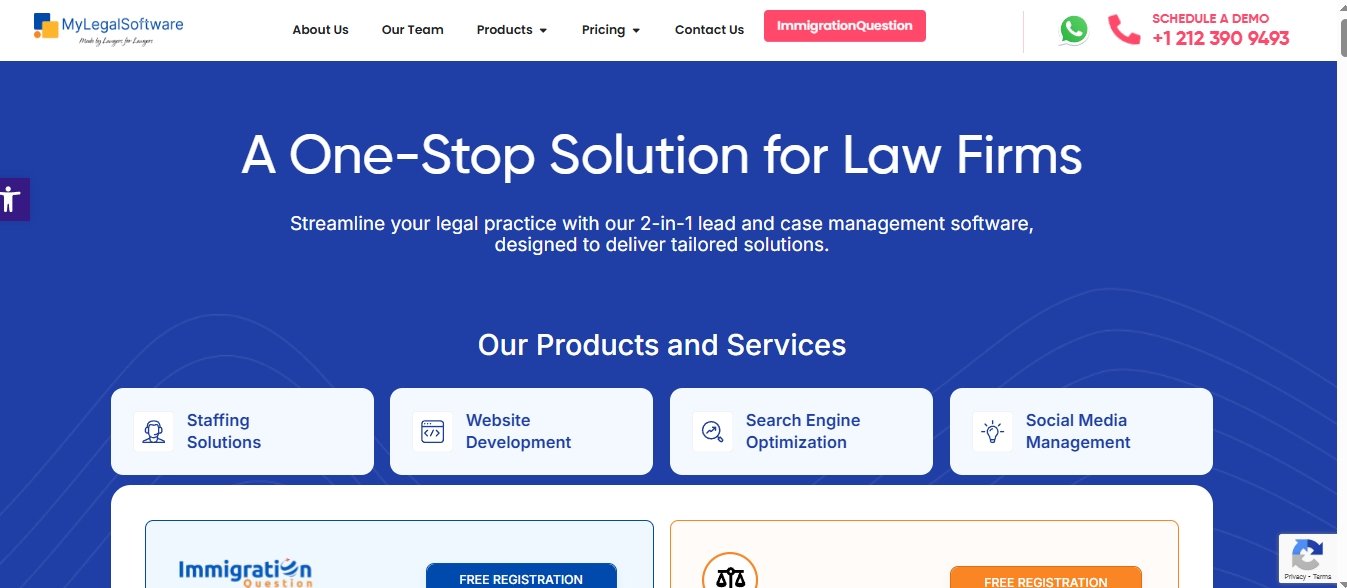
MyLS is a newer entrant to the legal software market that offers a comprehensive free trial and has been gaining popularity in 2025. While not entirely free long-term, their 14-day free trial gives you access to all features, making it easy to evaluate whether the software is worth the investment for your practice.
What stands out about MyLS is its modern approach to legal practice management. The software centralizes all client documents in one searchable location, which is crucial for immigration cases and other matter types with extensive documentation. The platform includes features specifically designed to help attorneys avoid missed deadlines – a common problem that can have serious consequences in legal practice.
Key Features:
- Comprehensive case management
- Document management and automation
- Time tracking and billing
- Calendar and deadline management
- Client communication portal
- Reporting and analytics
- Integration with legal research tools
Pros:
- Modern, intuitive interface
- Comprehensive feature set
- Strong document management
- Deadline tracking and reminders
- Free trial with full access
- Good customer support
Cons:
- Not entirely free (trial only)
- Subscription required after trial period
- May be more than needed for simple practices
- Pricing can be high for solo practitioners
Best For: Law firms that want to try a comprehensive, modern legal practice management solution before committing to a subscription.
9. Clio

Clio has become the industry leader in legal practice management software, and while it’s not free, they offer a generous free trial that lets you experience the full power of their platform. As someone who has tested numerous legal software solutions, I can tell you that Clio sets the standard for what legal practice management software should be.
Clio’s platform puts you back in control by centralizing case management, tasks, communications, and payments in one place. The software is designed specifically for the modern law firm, with features that address the real challenges attorneys face daily. Their free trial gives you access to all features, so you can thoroughly evaluate whether it’s worth the investment for your practice. They provide many law software like Personal injury case management software for law firms, Employment & Labor Law Software, Family Law, Criminal Law, Civil Litigation Law, Government Law, and much more.
Key Features:
- Complete practice management
- Client intake and communication
- Document management and automation
- Time tracking and billing
- Online payments
- Calendar and deadline management
- Mobile apps for all devices
- Extensive third-party integrations
Pros:
- Industry-leading solution
- Comprehensive feature set
- Excellent user interface
- Strong mobile apps
- Extensive integrations
- Reliable and secure
- Great customer support
Cons:
- Not free long-term (trial only)
- Higher price point than some alternatives
- May be too much for very small practices
- Requires subscription commitment
Best For: Law firms of all sizes that want the best-in-class solution and are willing to invest in a premium practice management platform.
10. Conflict Finder

Conflict Finder
Conflict Finder is a specialized Python script tool that searches XML Wikipedia archives for potential conflicts of interest. In the legal profession, you can never be too careful about conflicts, and this free tool provides an additional layer of due diligence.
I’ll be honest – Conflict Finder is quite basic and hasn’t been updated recently (created in 2012, last updated in 2016). However, for what it does, it does well. If you’re concerned about potential conflicts that might be revealed through Wikipedia connections, this simple tool can help you identify them before they become problems in your cases.
Key Features:
- Wikipedia archive searching
- Conflict of interest detection
- XML parsing capabilities
- Simple command-line interface
- Automated scanning
Pros:
- Completely free
- Simple to use
- Can find non-obvious conflicts
- Automated process
- No installation required for basic use
Cons:
- Very limited functionality
- Not updated since 2016
- Requires technical knowledge
- Only checks Wikipedia
- Limited scope of conflict detection
Best For: Attorneys who want an additional, free tool for conflict checking, particularly those dealing with high-profile cases or public figures.
11. MyCase

MyCase offers a free 10-day trial that gives you full access to their legal practice management platform. While not a long-term free solution, their trial period is generous enough to thoroughly evaluate whether the software meets your needs. MyCase has become increasingly popular among small and medium law firms for its balance of features and usability.
What I appreciate about MyCase is its focus on the entire client lifecycle, from intake through case resolution. The software includes robust client communication tools, document management, time tracking, and billing features. Their conflict checking system is particularly noteworthy, using full-text search to help identify potential conflicts that might be missed by simpler systems.
Key Features:
- Client intake and management
- Case management and tracking
- Document management
- Time tracking and billing
- Client communication portal
- Conflict checking system
- Calendar and deadline management
- Mobile apps
Pros:
- Comprehensive feature set
- Strong client communication tools
- Good conflict checking system
- User-friendly interface
- Mobile accessibility
- Good customer support
Cons:
- Not free long-term (trial only)
- Subscription required after trial
- Some advanced features in higher tiers
- May be complex for very small practices
Best For: Small to medium law firms that want a comprehensive practice management solution with strong client communication features.
Conclusion
These are the best free legal case management software options available in 2025 that can help you increase productivity and streamline your practice. Remember that some of these services provide free trials rather than completely free long-term solutions, so be sure to check their pricing for PRO features before making your final decision.
Based on my experience testing these tools, I recommend starting with the truly free options like Jarvis Legal or Legal Suite if you’re just starting out and have a limited budget. If you’re willing to invest in your practice, the trial versions of premium solutions like Clio or MyCase give you a chance to see what advanced legal practice management can do for your firm.
Whatever you choose, implementing good legal case management software will save you time, reduce errors, and help you provide better service to your clients – all essential steps toward becoming the best lawyer you can be.
You May Also Like
 Best Software
Top 10 Free & Open Source Inventory Management Software in 2026: A Comprehensive Buyer’s Guide With Real-World Data
 SaaS
SaaS
11 Best VoIP Call Center Solutions for Small Business 2026 (Comparison Guide)
 Best Software
6 Best Software to Record Mouse and Keyboard Actions and Automate Repetitive Tasks
 Best Software
Jira vs Hive: Which Project Management Tool is Right for Your Team?
 Best Software
8 Best Free Registry Cleaners Tools to Clean Junk and Registry on Windows PC
 Best Software
12 Top Plumbing Management Software Solutions for 2026
 Best Software
ServiceTitan Pricing Explained: How Much Does ServiceTitan Cost for Your Business?
 Best Software
12 Best Construction Project Management Software For Your Businesses
 Best Software