If you’re like me, you’re always looking for ways to store more data. Whether it’s photos, music, or documents, we can never seem to have enough space. That’s why I was intrigued when I heard about pCloud’s 2TB lifetime plan. But is it worth it? After testing several cloud storage services over the years, I’ll share my honest experience and help you decide if pCloud is the right choice for your needs.
pCloud Overview
pCloud is a cloud storage service that has been around since 2013. It’s headquartered in Zurich, Switzerland, which means your data is protected by strict Swiss privacy laws. The company offers both free and paid plans, with the free plan giving you 10 GB of storage just for signing up. What caught my attention was their lifetime plan option – you pay once and never worry about monthly or annual fees again.
After using pCloud for several months, I’ve found it to be a reliable solution for storing and accessing files from anywhere. The interface is clean and intuitive, making it easy even for beginners to navigate. One feature I particularly appreciate is the ability to access your files through a virtual drive on your computer, which doesn’t take up actual storage space on your device.
Key Features:
- Lifetime subscription options (no recurring fees)
- Virtual drive functionality (pCloud Drive)
- File versioning (up to 30 days for free, extended with premium)
- Client-side encryption option (pCloud Crypto)
- Media playback for videos and music
- File sharing with password protection and expiration dates
Pros:
- One-time payment for lifetime access
- Generous free plan (10GB)
- Swiss privacy protection
- User-friendly interface
- Access files without taking up device storage
Cons:
- Higher upfront cost for lifetime plans
- File versioning limited on free plan
- Crypto feature requires additional purchase
- No integrated document editing
Best For: Users who want to pay once for cloud storage and never worry about subscription fees again, especially those who value privacy and don’t need integrated office tools.
pCloud Pricing (Updated)
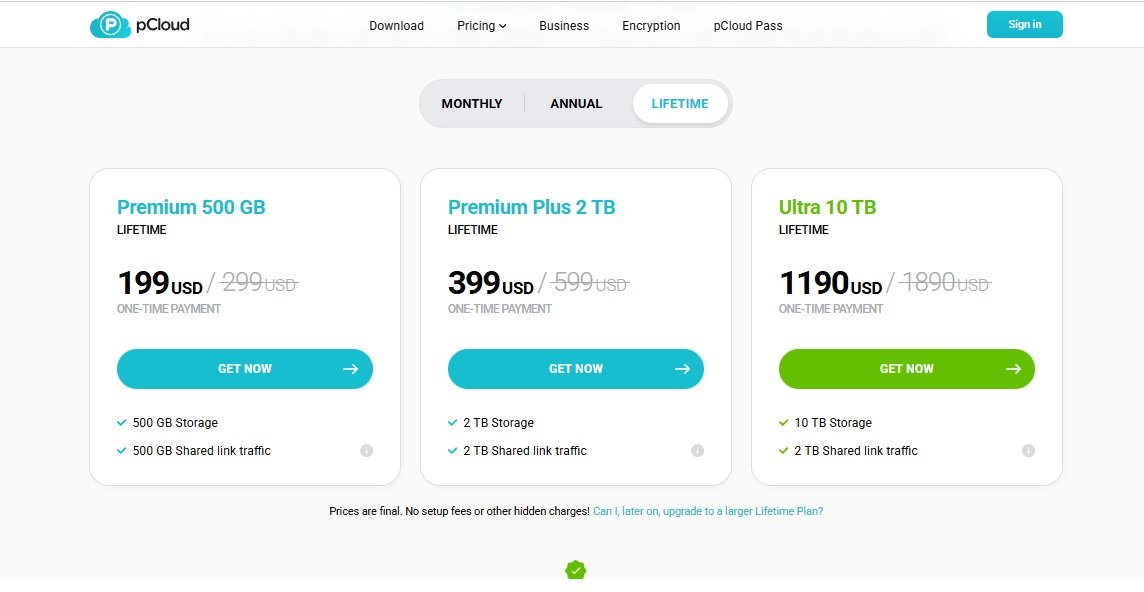
After checking pCloud’s official website, here are the current pricing options as of this writing:
- Free plan: 10 GB at $0
- Premium plan: 500 GB at $199 (one-time payment)
- Premium Plus plan: 2 TB at $399 (one-time payment)
- Ultra plan 10TB at $1190 (one-time payment)
When I first saw the $399 price tag for the 2TB lifetime plan, I’ll admit it seemed steep. But when I broke it down, it comes out to about $11.08 per month if you use it for just three years. Considering most cloud services charge monthly or annually, the lifetime option becomes a bargain the longer you use it.
The 500GB Premium plan at $199 breaks down to about $5.53 per month over three years. This makes it a good middle-ground option if you don’t need the full 2TB of storage but want more than the free plan offers.
The premium plans also include several additional features, including the ability to encrypt files, use extended file versioning (up to 360 days), and access priority customer support. These extras make the premium plan more valuable, especially if you’re storing sensitive documents or need to recover previous versions of your work.
So is pCloud’s lifetime plans worth it? From my experience, it depends on your needs and preferences. If you need a lot of storage space and you want all of the premium features without monthly payments, then the answer is probably yes. However, if you don’t need that much storage space or you don’t need all of the premium features, you might be better off with the free plan or another cloud storage service.
pCloud Storage
pCloud’s storage system is designed to be flexible and accessible. The free plan offers 10 GB of storage, which you can expand up to 20 GB through various activities like referring friends or backing up your social media accounts. The premium plans offer 500GB or 2 TB of storage, which is more than enough for most users’ photos, documents, and media files.
What I love about pCloud’s storage approach is how it handles file access. Unlike other services that sync files to your device and take up space, pCloud creates a virtual drive on your computer. This means you can access all your files without actually storing them on your device’s hard drive. For me, this was a game-changer as I have a laptop with limited storage but need access to large files regularly.
The premium plan also offers additional features, such as the ability to share files with others through links, set expiration dates for shared links, and even track who has accessed your files. The file versioning feature has saved me multiple times when I’ve accidentally overwritten important documents.
pCloud Security
When it comes to storing your personal files, security is paramount. pCloud takes this seriously with military-grade TLS/SSL encryption during file transfer and AES 256-bit encryption for storage. This means your files are protected both while moving to the cloud and while at rest on their servers.
What sets pCloud apart from many competitors is their optional client-side encryption feature called pCloud Crypto. This means your files are encrypted on your device before being uploaded to the cloud, so not even pCloud employees can access your content. Only you have the keys to decrypt your data, giving you complete control over who sees your files.
pCloud is also headquartered in Switzerland, which means your data is protected by some of the world’s strictest privacy laws. Unlike companies based in the US, Swiss providers aren’t subject to the same data disclosure laws, giving you an extra layer of protection for your sensitive information.
pCloud is a great option if you need a lot of storage space and security. The one-time fee is worth it for the peace of mind and convenience that pCloud provides, especially if you’re storing sensitive documents or personal photos that you want to keep private.
pCloud Sharing
Sharing files is an essential feature of any cloud storage service, and pCloud makes this process simple and secure. You can share files and folders with other pCloud users or create download links for people who don’t have an account.
What I appreciate about pCloud’s sharing features is the level of control you have. You can set password protection for shared links, add expiration dates so links automatically become inaccessible after a certain time, and even set download limits to prevent excessive sharing. For business users or anyone sharing sensitive information, these controls are invaluable.
pCloud also offers collaborative features, allowing multiple users to work on shared folders. While not as robust as dedicated collaboration tools, it’s sufficient for basic teamwork needs. You can also generate rich media previews for shared files, making it easier for recipients to see what they’re downloading before opening the file.
If you’re thinking about signing up for pCloud, you may be wondering if the pCloud 2TB lifetime plan is worth it. The answer to this question depends on a few factors, including how much storage you need and how often you plan on using pCloud.
In general, the pCloud 2TB lifetime plan is a good value if you need a lot of storage space and you plan on using pCloud regularly. If you only need a small amount of storage space or you don’t think you’ll use pCloud often, there are other plans available that may be more suited to your needs.
pCloud Support
Customer support can make or break your experience with any service, and pCloud offers several options for getting help when you need it. The company provides email support with a promised response time of 24 hours, though in my experience, responses usually come much faster.
For immediate assistance, pCloud has an extensive knowledge base with tutorials, FAQs, and troubleshooting guides. I’ve found this resource helpful for resolving common issues without needing to contact support directly. The company also maintains active social media profiles where you can ask questions or report problems.
Premium users get priority support, which means faster response times and dedicated assistance. This can be valuable if you’re using pCloud for business-critical functions or if you encounter an urgent issue that needs quick resolution.
pCloud is a cloud storage service that gives users 2TB of storage for a one-time fee. That’s a lot of space, but is it worth the price?
pCloud offers a number of features that make it a good choice for cloud storage. First, it has a desktop app that makes it easy to upload and download files. Second, it offers military-grade encryption for your files, so you know they’re safe. Third, it has a great customer support team that can help you with any problems you have.
However, there are some downsides to pCloud. First, the price is high compared to other cloud storage services. Second, it doesn’t have some of the advanced features that other services offer, such as collaboration tools or the ability to preview files.
Overall, pCloud is a good cloud storage service, but it may not be the best choice for everyone. If you need a lot of space and don’t mind paying a bit more, pCloud is worth considering. However, if you don’t need as much space or you want more features, you may want to choose another service.
pCloud Pros and Cons
After using pCloud extensively, I’ve compiled a list of the most important advantages and disadvantages to help you make an informed decision:
pCloud Pros:
- Lifetime subscription for 2TB of storage (no recurring fees)
- Affordable long-term value compared to monthly subscription services
- Strong security features with optional client-side encryption
- Easy to use interface with virtual drive functionality
- Swiss privacy protection for your data
- Generous free plan with 10GB storage
- File versioning and recovery options
- Cross-platform compatibility (Windows, Mac, Linux, iOS, Android)
pCloud Cons:
- Higher upfront cost for lifetime plans
- Additional fee for Crypto encryption feature
- Limited collaboration features compared to competitors
- File versioning limited on free plan
- No integrated document editing tools
- Upload speeds can be slower than some competitors during peak times
Alternatives to pCloud
While pCloud is a solid choice for cloud storage, it’s not the only option available. After testing several services, I’ve found some excellent alternatives that might better suit your specific needs:
Google Drive
Google Drive is a popular choice that integrates seamlessly with other Google services. I’ve found it particularly useful if you’re already using Gmail, Google Docs, or other Google Workspace tools. The free plan offers 15GB of storage shared across Google Drive, Gmail, and Google Photos.
Google Drive shines with its collaboration features. Multiple users can work on documents simultaneously, and the commenting system makes team projects much smoother. The search functionality is also impressive, using Google’s powerful algorithms to help you find files even if you only remember fragments of the content.
Key Features:
- 15GB free storage (shared with other Google services)
- Excellent collaboration tools
- Powerful search functionality
- Integration with Google Workspace
- Offline access capabilities
Pros:
- Generous free storage
- Seamless integration with Google ecosystem
- Real-time collaboration features
- Advanced search with image recognition
- Easy sharing with adjustable permissions
Cons:
- Storage shared across multiple Google services
- Interface can feel cluttered
- Limited advanced file management features
- Privacy concerns due to data scanning for ad targeting
Best For: Users already invested in the Google ecosystem, teams needing collaboration features, and those who want powerful search capabilities.
Dropbox
Dropbox has been around since 2007 and has built a reputation for reliability and ease of use. What I appreciate most about Dropbox is its simplicity – it just works without a lot of fuss. The file syncing is incredibly fast and reliable, even with large files.
Dropbox’s strongest feature is its syncing technology. Unlike some services that struggle with large files or slow connections, Dropbox uses block-level syncing to only upload changes rather than entire files. This makes it incredibly efficient, especially for those working with large documents or media files.
Key Features:
- Block-level file syncing (only uploads changes)
- File recovery and version history
- Smart sync (save space on your device)
- Paper (collaborative document editing)
- Advanced sharing controls
Pros:
- Extremely reliable syncing
- Simple, intuitive interface
- Fast performance even with large files
- Excellent file recovery options
- Wide range of third-party integrations
Cons:
- More expensive than competitors
- Limited free storage (2GB)
- No lifetime plans available
- Fewer advanced features compared to some rivals
Best For: Users who prioritize reliability and simplicity, those working with large files that need fast syncing, and businesses that need extensive third-party integrations.
Microsoft OneDrive
OneDrive comes integrated with Windows and Microsoft Office, making it a natural choice for many users. I’ve found it particularly useful if you’re already using Microsoft’s ecosystem, as it offers seamless integration with Office applications and Windows itself.
What sets OneDrive apart is its deep integration with Microsoft 365. If you subscribe to Microsoft’s office suite, you get 1TB of OneDrive storage included, which is excellent value. The Personal Vault feature adds an extra layer of security for your most sensitive files, requiring a second form of authentication to access.
Key Features:
- Integration with Windows and Microsoft Office
- Personal Vault for extra security
- Files On-Demand (save device space)
- Collaboration in Office apps
- 1TB included with Microsoft 365
Pros:
- Seamless integration with Windows and Office
- Excellent value with Microsoft 365 subscription
- Strong security features
- Good file sharing capabilities
- Files On-Demand saves device space
Cons:
- Can be slow on non-Windows platforms
- Limited features on free plan (5GB)
- Privacy concerns due to Microsoft’s data practices
- Interface less intuitive than some competitors
Best For: Windows users, Microsoft 365 subscribers, and those who need seamless integration with Office applications.
Sync.com
If privacy is your top concern, Sync.com is worth considering. This Canadian-based service offers zero-knowledge encryption by default, meaning not even the company can access your files. After testing several privacy-focused services, I’ve found Sync.com strikes a good balance between security and usability.
What I appreciate about Sync.com is its commitment to privacy without sacrificing functionality. The service offers end-to-end encryption for all files, both in transit and at rest. Despite this strong security, the interface remains clean and user-friendly, making it accessible even for those who aren’t tech-savvy.
Key Features:
- Zero-knowledge encryption by default
- Canadian jurisdiction (strong privacy laws)
- File versioning and recovery
- Customizable sharing permissions
- No file size limits
Pros:
- Excellent privacy protection
- User-friendly interface
- No file size limits
- Good file sharing features
- Competitive pricing
Cons:
- Limited third-party integrations
- No virtual drive option like pCloud
- Slightly higher prices than some competitors
- Fewer advanced features than mainstream services
Best For: Privacy-conscious users, those handling sensitive documents, and anyone who wants strong security without complexity.
Icedrive
Icedrive is a newer player in the cloud storage market, but it’s quickly gained attention for its modern interface and strong security features. After testing it for several weeks, I was impressed by its clean design and focus on user experience.
What stands out about Icedrive is its “Twofish” encryption, which is considered even more secure than the AES-256 encryption used by most competitors. The service also offers a unique “mount drive” feature similar to pCloud’s virtual drive, allowing you to access your files without taking up space on your device.
Key Features:
- Twofish encryption (more secure than AES-256)
- Mount drive feature (access files without using device space)
- Clean, modern interface
- File versioning
- 10GB free storage
Pros:
- Strong encryption security
- Generous free plan
- Modern, intuitive interface
- No file size limits
- Good value for money
Cons:
- Relatively new service (less established)
- Limited advanced features
- Fewer third-party integrations
- Mobile apps less polished than desktop version
Best For: Users who prioritize security and modern design, those who want a generous free plan, and early adopters looking for innovative features.
How to Choose the Right Cloud Storage Service
After testing multiple cloud storage services, I’ve learned that the “best” option really depends on your specific needs. Here are some key factors to consider when making your decision:
Storage Needs: Consider how much space you actually need. If you’re just storing documents and photos, a few hundred gigabytes might suffice. But if you have large media collections or work with video files, you’ll want more space. pCloud’s 2TB lifetime plan is excellent for heavy users, while the free plans from Google Drive or Icedrive might be enough for casual users.
Budget: Think about whether you prefer paying a one-time fee or monthly subscriptions. If you’re planning to use cloud storage long-term, pCloud’s lifetime plans can save you money. But if you’re unsure about committing, a monthly plan from Google Drive or Dropbox might be better.
Security Needs: If you’re storing sensitive documents, prioritize services with strong encryption. Sync.com and Icedrive offer excellent security features, while pCloud’s optional Crypto add-on provides extra protection for your most important files.
Integration: Consider how the cloud service fits with your existing tools. If you use Google Workspace, Google Drive makes sense. If you’re a Microsoft Office user, OneDrive integrates seamlessly. For those who want a standalone service, pCloud or Dropbox might be better choices.
Collaboration: If you frequently work with others, look at the collaboration features. Google Drive and OneDrive excel here, with real-time editing and commenting systems. pCloud and Dropbox offer basic collaboration but aren’t as robust in this area.
Final Verdict: Is pCloud 2TB Lifetime Plan Worth It?
After extensive testing and comparison with other services, I believe pCloud’s 2TB lifetime plan offers excellent value for the right user. If you need a lot of storage space and prefer paying once rather than monthly subscriptions, it’s definitely worth considering.
The lifetime plan becomes more economical the longer you use it. At $399 for 2TB, it breaks down to about $11.08 per month if you use it for three years, $6.65 per month for five years, and just $3.33 per month for ten years. Most of us keep our data much longer than that, making it a smart long-term investment.
What I appreciate most about pCloud is the combination of generous storage, strong security features, and the convenience of a virtual drive that doesn’t take up space on my devices. The Swiss privacy protection is also a significant advantage for those concerned about data security.
However, pCloud isn’t perfect. The collaboration features aren’t as robust as Google Drive or OneDrive, and the additional cost for the Crypto encryption feature is disappointing. If these aspects are important to you, you might be better off with another service.
For most users who need reliable, secure cloud storage without ongoing subscription fees, pCloud’s 2TB lifetime plan is an excellent choice. It’s especially valuable for photographers, content creators, and anyone with large media collections who want to access their files from anywhere without worrying about monthly payments.
If you’re still unsure, I recommend starting with pCloud’s free 10GB plan to test the service before committing to the lifetime option. This way, you can experience the interface and features firsthand to see if it meets your needs.
For more information on sending large files online, check out our ultimate guide to sending large files online, which covers various methods and services for transferring big files.
Ultimately, the best cloud storage service is the one that fits your specific needs and budget. pCloud’s lifetime plan offers a compelling option for those who want to pay once and never worry about storage again, but it’s worth exploring the alternatives to ensure you’re making the right choice for your situation.
You May Also Like
 Cloud Storage
Best Photo Backup for iPhone: 7 Reliable Ways to Protect Your Photos
 Cyber Security
Can Ransomware Infect iCloud? What Mac and iPhone Users Need to Know
 Data Security & Privacy
What Is a Cloud Security Scanner for AWS, Azure, and Google Cloud?
 Cloud Storage
The Ultimate Guide to Sending Large Files Online: Top 20 Services for Easy File Sharing
 Cloud Storage
7 Best Photo Backup Solutions in 2026: Which Cloud Storage Should You Trust?
 Network Security
How to Transfer Files Between Two Laptops Over Wi-Fi: What Actually Works
 Data Security & Privacy
How to Protect Your Data With Google Cloud Platform: Complete Security Guide
 Cloud Storage
13 Best Free Cloud Storage Services to Back up & Keep Your Files Secure
 Cloud Storage