You scraped a page. You got back a wall of HTML that looks like alphabet soup. Now what?
That moment, the gap between “I have the page” and “I have clean data in my database” is where data parsing lives. And honestly, it is the part most tutorials gloss over. They show you requests.get(), dump some find_all() calls, and call it a day. But parsing is where 80% of scraping bugs hide, and it is the difference between a scraper that runs for a week and one that breaks every Tuesday at 3 a.m.
You’re going to walk away from this with three things: a real working mental model of what parsing actually does, a side-by-side look at the parsing libraries worth using today, and three complete, copy-paste-runnable scrapers for Indeed, IMDb, and a couple of beginner-friendly sandbox sites. No pseudocode. No “you get the idea.”
What Is Data Parsing?
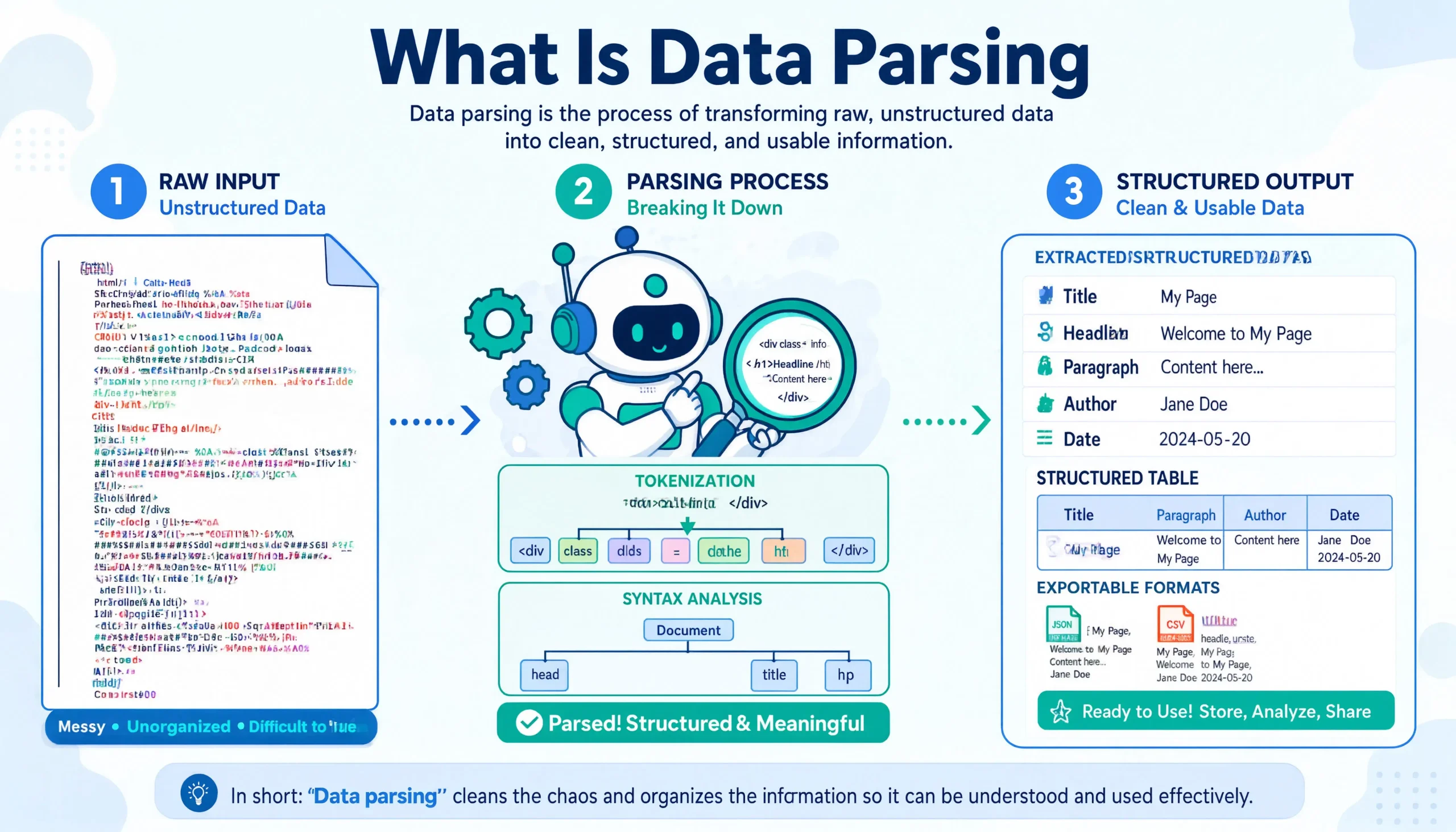
Parsing is the act of taking unstructured input, usually in raw HTML, sometimes JSON-LD blobs buried inside <script> tags, sometimes broken markup that browsers silently fix for you — and turning it into a structured tree that your code can query.
Think of it like this: scraping is fetching. Parsing is understanding. You can fetch a million pages, but if you can’t reliably pull price, title, rating, and posted_date out of each one, you have a giant pile of useless text.
The technical flow looks like this:
- Fetch the raw bytes from a URL (usually with
requests,httpx, or a headless browser). - Tokenize the HTML — break it into tags, attributes, and text nodes.
- Build a DOM tree — a hierarchical representation where every element has a parent, siblings, and children.
- Query the tree using CSS selectors, XPath, or regex (when you must).
- Normalize the extracted strings — strip whitespace, parse dates, convert “$1,299” to
1299.00. - Validate and store as JSON, CSV, or rows in a database.
The middle steps tokenizing and tree-building, are what libraries like BeautifulSoup, lxml, and parsel handle for you. The querying and normalizing are your job.
Key Features Worth Knowing (TL;DR Summary)
If you only remember five things from this whole article, make it these:
- Parsing ≠ Scraping. Scraping gets bytes. Parsing gives meaning. You need both, but they are different problems.
- CSS selectors beat XPath for readability, XPath beats CSS for power (text matching, parent traversal, conditional logic).
- JSON-LD is your secret weapon. Sites like IMDb, Amazon, and most modern e-commerce platforms embed clean structured data inside
<script type="application/ld+json">tags. Parse that first before you touch the visible HTML. - lxml is roughly 10–30x faster than BeautifulSoup’s default
html.parser, but BeautifulSoup withlxmlas its backend gives you both speed and a friendlier API. - A resilient parser uses fallbacks. Try the structured data first, fall back to a CSS selector, fall back to XPath, fall back to regex. Sites change. Your parser shouldn’t shatter on the first redesign.
The Parsing Library Lineup (And When to Use Which)
You have basically four serious options in Python. Here’s how to pick:
| Library | Best For | Speed | Learning Curve |
|---|---|---|---|
| BeautifulSoup (bs4) | Beginners, messy HTML, readable code | Moderate | Gentle |
| lxml | High-volume scraping, XPath lovers | Fastest | Steeper |
| parsel | Scrapy projects, dual CSS + XPath | Fast | Medium |
| selectolax | Insane speed (10x lxml), simple selectors | Blazing | Easy-ish |
For everything below, you’ll see BeautifulSoup with the lxml backend. It is the sweet spot for 95% of real projects — fast enough, forgiving of broken markup, and your code stays human-readable six months from now when you have to debug it at midnight.
Install once:
pip install requests beautifulsoup4 lxml pandas
Example 1: Quotes to Scrape — Your “Hello World” of Parsing
Before touching Indeed or IMDb, build confidence on a site that was literally built to be scraped. quotes.toscrape.com has clean, predictable HTML and no anti-bot protection.
Here is a complete, runnable scraper that pulls quotes, authors, and tags across all pages:
import requests
from bs4 import BeautifulSoup
import json
import time

BASE_URL = "https://quotes.toscrape.com"

def parse_quotes_page(html):
    """Parse a single page of quotes into structured dicts."""
    soup = BeautifulSoup(html, "lxml")
    quotes = []

    for block in soup.select("div.quote"):
        text = block.select_one("span.text").get_text(strip=True)
        author = block.select_one("small.author").get_text(strip=True)
        tags = [t.get_text(strip=True) for t in block.select("a.tag")]
        about_link = block.select_one("span a")["href"]

        quotes.append({
            "text": text.strip("“”\""),
            "author": author,
            "tags": tags,
            "author_url": BASE_URL + about_link,
        })

    return quotes

def get_next_page(html):
    soup = BeautifulSoup(html, "lxml")
    next_btn = soup.select_one("li.next a")
    return BASE_URL + next_btn["href"] if next_btn else None

def scrape_all_quotes():
    url = BASE_URL
    all_quotes = []

    while url:
        print(f"Fetching {url}")
        resp = requests.get(url, timeout=15)
        resp.raise_for_status()

        all_quotes.extend(parse_quotes_page(resp.text))
        url = get_next_page(resp.text)
        time.sleep(1)  # be polite

    return all_quotes

if __name__ == "__main__":
    data = scrape_all_quotes()
    print(f"\nParsed {len(data)} quotes")
    with open("quotes.json", "w", encoding="utf-8") as f:
        json.dump(data, f, indent=2, ensure_ascii=False)
    print("Saved to quotes.json")
Run it. You should pull 100 quotes across 10 pages in under 15 seconds. What just happened is the whole parsing loop in miniature: fetch → soup → select → normalize → save.
The smart move here is select_one over find. CSS selectors are how the browser itself thinks about the DOM, so your code mirrors what you see in DevTools. That alignment matters when you’re debugging.
Example 2: Books to Scrape — Pagination, Pricing, and Ratings
books.toscrape.com ramps up the difficulty. You have 1,000 books across 50 pages, prices in GBP that need to become floats, and star ratings encoded as CSS class names rather than text. That last bit is sneaky.
import requests
from bs4 import BeautifulSoup
from urllib.parse import urljoin
import csv

BASE_URL = "https://books.toscrape.com/"

RATING_MAP = {
    "One": 1, "Two": 2, "Three": 3, "Four": 4, "Five": 5
}

def parse_book(article):
    """Extract structured data from a single <article class='product_pod'>."""
    title = article.h3.a["title"]
    relative_link = article.h3.a["href"]
    detail_url = urljoin(BASE_URL + "catalogue/", relative_link)

    # Price has a leading currency symbol — strip non-numeric chars
    price_text = article.select_one("p.price_color").get_text(strip=True)
    price = float(price_text.replace("£", "").replace("Â", ""))

    # Rating is stored as a class name like "star-rating Three"
    rating_class = article.select_one("p.star-rating")["class"]
    rating_word = [c for c in rating_class if c != "star-rating"][0]
    rating = RATING_MAP.get(rating_word, 0)

    availability = article.select_one("p.availability").get_text(strip=True)
    in_stock = "In stock" in availability

    return {
        "title": title,
        "price_gbp": price,
        "rating": rating,
        "in_stock": in_stock,
        "url": detail_url,
    }

def scrape_books(max_pages=50):
    books = []
    page = 1

    while page <= max_pages:
        url = BASE_URL if page == 1 else f"{BASE_URL}catalogue/page-{page}.html"
        resp = requests.get(url, timeout=15)
        if resp.status_code == 404:
            break

        soup = BeautifulSoup(resp.text, "lxml")
        articles = soup.select("article.product_pod")
        if not articles:
            break

        for art in articles:
            books.append(parse_book(art))

        print(f"Page {page}: +{len(articles)} books (total: {len(books)})")
        page += 1

    return books

if __name__ == "__main__":
    books = scrape_books()
    with open("books.csv", "w", newline="", encoding="utf-8") as f:
        writer = csv.DictWriter(f, fieldnames=books[0].keys())
        writer.writeheader()
        writer.writerows(books)
    print(f"Saved {len(books)} books to books.csv")
Notice the small but meaningful trick on line 26 — pulling rating from a CSS class. This is the kind of thing that breaks lazy scrapers. Plenty of sites encode visual state (rating, availability, sale tags) as classes rather than text, and if you only grep for visible text you’ll miss it.
Example 3: IMDb — Why Structured Data Beats HTML Parsing Every Time
IMDb is where the real lesson lives. The site renders heavy React, the visible HTML is full of obfuscated class names like ipc-page-section--baseAlt, and those class names change constantly. Anyone scraping the visible DOM is signing up for weekly maintenance.
But here’s the thing IMDb does that most scrapers ignore — it ships JSON-LD structured data inside the page. This is the same data Google uses to build search-result rich cards. It is stable, machine-readable, and contains pretty much everything you’d want.
Here’s a parser that grabs ratings, cast, genre, and description from any IMDb title page:
import requests
from bs4 import BeautifulSoup
import json
import re

HEADERS = {
    "User-Agent": (
        "Mozilla/5.0 (Macintosh; Intel Mac OS X 10_15_7) "
        "AppleWebKit/537.36 (KHTML, like Gecko) "
        "Chrome/120.0.0.0 Safari/537.36"
    ),
    "Accept-Language": "en-US,en;q=0.9",
}

def parse_imdb_title(imdb_id):
    """Parse an IMDb title page using JSON-LD structured data."""
    url = f"https://www.imdb.com/title/{imdb_id}/"
    resp = requests.get(url, headers=HEADERS, timeout=20)
    resp.raise_for_status()

    soup = BeautifulSoup(resp.text, "lxml")

    # JSON-LD: the cleanest way to extract IMDb data
    ld_tag = soup.find("script", type="application/ld+json")
    if not ld_tag:
        raise ValueError("No JSON-LD found — IMDb may have changed structure")

    data = json.loads(ld_tag.string)

    # Normalize cast (actor field can be dict or list)
    actors = data.get("actor", [])
    if isinstance(actors, dict):
        actors = [actors]
    cast = [a.get("name") for a in actors if a.get("name")]

    # Rating is nested
    rating_info = data.get("aggregateRating", {}) or {}

    # Duration is in ISO-8601 like "PT2H22M" — convert to minutes
    duration_iso = data.get("duration", "")
    minutes = iso_duration_to_minutes(duration_iso)

    return {
        "imdb_id": imdb_id,
        "title": data.get("name"),
        "type": data.get("@type"),
        "year": (data.get("datePublished") or "")[:4],
        "genre": data.get("genre"),
        "rating": rating_info.get("ratingValue"),
        "rating_count": rating_info.get("ratingCount"),
        "description": data.get("description"),
        "cast": cast,
        "duration_minutes": minutes,
        "poster": data.get("image"),
        "url": url,
    }

def iso_duration_to_minutes(iso):
    """Convert 'PT2H22M' to 142."""
    match = re.match(r"PT(?:(\d+)H)?(?:(\d+)M)?", iso or "")
    if not match:
        return None
    hours = int(match.group(1) or 0)
    minutes = int(match.group(2) or 0)
    return hours * 60 + minutes

if __name__ == "__main__":
    # Examples — try The Shawshank Redemption, Inception, and Breaking Bad
    for tid in ["tt0111161", "tt1375666", "tt0903747"]:
        info = parse_imdb_title(tid)
        print(f"\n{info['title']} ({info['year']})")
        print(f"  Rating: {info['rating']} ({info['rating_count']:,} votes)")
        print(f"  Genre: {info['genre']}")
        print(f"  Runtime: {info['duration_minutes']} min")
        print(f"  Cast: {', '.join(info['cast'][:5])}")
Why this approach is durable:
- JSON-LD is a contract IMDb keeps with Google. They aren’t going to break it casually because it hurts their SEO.
- No CSS selector roulette. You’re not chasing
data-testidattributes that get renamed every quarter. - Cleaner output. The structured data is already typed —
ratingValueis a number,actoris a list of objects withnameandurl.
The lesson generalizes: before you write a single CSS selector, open DevTools, search the page source for application/ld+json, and see what the site is already handing you on a plate. Recipe sites, product pages, news articles, podcast episodes — they almost all embed it.
Example 4: Indeed — Parsing in a Hostile Environment
Indeed is the boss fight. It runs aggressive bot detection (Cloudflare, fingerprinting, behavioral analysis), and you will get blocked if you hammer it from a vanilla requests script. That is a fetching problem, not a parsing problem — and the two need to be separated cleanly in your head.
The parsing logic itself is straightforward. The hard part is getting the HTML through the door in the first place. For real production work you’d use a service like ScrapingBee, ScraperAPI, Bright Data, or rotate residential proxies with a headless browser. For learning, here’s the parser you’d plug into whatever fetch layer you use:
import requests
from bs4 import BeautifulSoup
import json
import re
from urllib.parse import urlencode

HEADERS = {
    "User-Agent": (
        "Mozilla/5.0 (Windows NT 10.0; Win64; x64) "
        "AppleWebKit/537.36 (KHTML, like Gecko) "
        "Chrome/120.0.0.0 Safari/537.36"
    ),
    "Accept": "text/html,application/xhtml+xml",
    "Accept-Language": "en-US,en;q=0.9",
}

def build_search_url(query, location, start=0):
    params = {"q": query, "l": location, "start": start}
    return f"https://www.indeed.com/jobs?{urlencode(params)}"

def parse_indeed_jobs(html):
    """
    Indeed embeds a big JSON blob in window.mosaic.providerData
    that contains all job results. Parse that instead of fighting
    obfuscated CSS classes.
    """
    soup = BeautifulSoup(html, "lxml")

    # Fallback 1: look for the embedded JSON
    script_pattern = re.compile(r"window\.mosaic\.providerData\[\"mosaic-provider-jobcards\"\]")
    for script in soup.find_all("script"):
        if script.string and script_pattern.search(script.string):
            match = re.search(
                r'mosaic-provider-jobcards"\]\s*=\s*({.*?});\s*window\.',
                script.string,
                re.DOTALL,
            )
            if match:
                try:
                    data = json.loads(match.group(1))
                    return extract_from_mosaic(data)
                except json.JSONDecodeError:
                    pass

    # Fallback 2: parse visible job cards
    return parse_visible_cards(soup)

def extract_from_mosaic(data):
    results = data.get("metaData", {}).get("mosaicProviderJobCardsModel", {})
    jobs_raw = results.get("results", [])

    parsed = []
    for j in jobs_raw:
        parsed.append({
            "title": j.get("title"),
            "company": j.get("company"),
            "location": j.get("formattedLocation"),
            "salary": j.get("salarySnippet", {}).get("text"),
            "summary": clean_html(j.get("snippet", "")),
            "job_key": j.get("jobkey"),
            "url": f"https://www.indeed.com/viewjob?jk={j.get('jobkey')}",
            "posted": j.get("formattedRelativeTime"),
            "remote": j.get("remoteWorkModel", {}).get("type"),
        })
    return parsed

def parse_visible_cards(soup):
    """Backup parser if the JSON blob can't be found."""
    jobs = []
    for card in soup.select("div.job_seen_beacon, li div.cardOutline"):
        title_el = card.select_one("h2.jobTitle span[title], h2.jobTitle a span")
        company_el = card.select_one("[data-testid='company-name'], span.companyName")
        location_el = card.select_one("[data-testid='text-location'], div.companyLocation")
        salary_el = card.select_one("div.metadata.salary-snippet-container, div.salary-snippet")
        snippet_el = card.select_one("div.job-snippet, td.resultContent ul")

        if not title_el:
            continue

        jobs.append({
            "title": title_el.get_text(strip=True),
            "company": company_el.get_text(strip=True) if company_el else None,
            "location": location_el.get_text(strip=True) if location_el else None,
            "salary": salary_el.get_text(strip=True) if salary_el else None,
            "summary": snippet_el.get_text(" ", strip=True) if snippet_el else None,
        })
    return jobs

def clean_html(snippet):
    return BeautifulSoup(snippet or "", "lxml").get_text(" ", strip=True)

if __name__ == "__main__":
    url = build_search_url("python developer", "Remote")
    print(f"Fetching: {url}")
    print("NOTE: For production, route through a proxy/scraping API.")

    resp = requests.get(url, headers=HEADERS, timeout=20)
    if resp.status_code != 200:
        print(f"Got status {resp.status_code} — likely blocked.")
    else:
        jobs = parse_indeed_jobs(resp.text)
        print(f"\nParsed {len(jobs)} jobs:")
        for j in jobs[:5]:
            print(f"\n• {j['title']} @ {j['company']}")
            print(f"  {j['location']} — {j.get('salary') or 'No salary listed'}")
The pattern here is what production scrapers actually look like:
- Primary path: Pull data from the embedded
window.mosaicJSON. It’s the cleanest, most complete source. - Fallback path: Visible card parsing using both modern (
data-testid) and legacy (.companyName) selectors so a partial site change doesn’t kill you. - Sanitizer: A tiny helper that turns HTML-encoded snippets back into plain text.
A scraper without fallbacks is a scraper waiting to break. Bake the redundancy in from day one.
Parsing Pitfalls That Burn People (And How You Avoid Them)
A few things that aren’t obvious until you’ve debugged them at 2 a.m.:
Whitespace lies. text.strip() removes leading and trailing whitespace, but \xa0 (non-breaking space) and \u200b (zero-width space) sneak through. Use re.sub(r"\s+", " ", text).strip() for serious cleanup.
Currency and number parsing is harder than it looks. “$1,299.00”, “€1.299,00”, “₹1,29,900” — three different formats, three different decimal conventions. Use the babel library or locale module rather than rolling your own.
Dates are a swamp. “2 days ago”, “Posted Jan 3”, “2026-01-15T10:30:00Z” all need different strategies. dateparser handles natural language; python-dateutil handles ISO-ish strings.
get_text() joins everything. If a <p> contains <span>Hello</span><span>World</span>, get_text() gives you "HelloWorld". Use get_text(separator=" ", strip=True) to keep words apart.
Encoding mismatches. If you see £ instead of £, the response was decoded as Latin-1 when it was actually UTF-8. Set resp.encoding = resp.apparent_encoding after the request.
When You Should Reach Past BeautifulSoup
BeautifulSoup is the right default. It’s also the wrong tool for some specific jobs:
- Parsing 100,000+ pages? Switch to
selectolaxor rawlxmlwithetree.HTMLParser(). The speed difference compounds. - Need to query with complex logic like “find a div whose text contains X and whose parent has class Y”? XPath via lxml is built for this.
- Working inside Scrapy? Use parsel — it’s what Scrapy uses internally, and you get both CSS and XPath in one selector object.
- Page is rendered entirely client-side? No HTML parser will help you. You need Playwright or Selenium to get the DOM after JavaScript runs, then parse it.
The Honest Truth About Production Parsing
Here’s what the tutorials don’t tell you. A scraper that runs once and produces a CSV is a weekend project. A scraper that runs every day for a year requires:
- Schema validation on every output (use
pydantic— your future self will thank you) - Monitoring for selector drift (log when a field is
Nonemore than 5% of the time) - Versioned parsers because the site you’re scraping today is not the site you’ll be scraping in six months
- Rate limiting that respects the target —
time.sleep()is fine, exponential backoff is better - Robots.txt awareness and terms-of-service review before you ship anything commercial
Parsing isn’t a one-time write. It’s a maintained piece of code, the same as any other production system. Treat it that way and your data pipelines stay healthy.
Where to Take This Next
If you ran every code block above and they all worked — congratulations, you understand more about parsing than most people who call themselves scrapers. From here:
- Add async with
httpx+asyncioto crawl thousands of URLs concurrently - Move to Scrapy when you need pipelines, middlewares, and retry logic out of the box
- Layer in Playwright for sites that render with JavaScript
- Learn XPath properly — it pays off the moment you hit a page with awful HTML
- Build a parser registry — a small system where each site has its own parser module, versioned and testable independently
The single most valuable habit you can build is this: every time you write a selector, ask yourself what happens if this returns nothing? If your code crashes, you have a fragile parser. If it logs the miss and falls through to the next strategy, you have a resilient one.
That mindset — defensive, layered, and a little paranoid — is the line between scraping as a hobby and scraping as infrastructure.
You May Also Like
 Proxies
What Are Residential Proxies: Use Cases and Best Providers in 2026
 Web Scraping
What is Web Scraping and How Can It Benefit Your Business?
 JavaScript
PhantomJS vs Puppeteer: Which Browser Tool Should You Use?
 Proxies
10 Best Free Proxy Scrapers in 2025 (Top Free Proxy List)
 SEO Tools
SEO Tools and Web Scraping For SEO Expert and Blogger
 SEO Tools
8 Best Free Online Word Cloud Generator & Tag Cloud Creator
 Cyber Security
Is Guardio Legit? A 2026 Review of the Browser Security Extension
 Cyber Security
Is KashKick Legit in 2026? An In-Depth KashKick Review for Earning Real Money
 Cyber Security