Have you ever published a piece of content, waited a few weeks, and then had absolutely no idea whether it was actually moving in Google?
That was me for longer than I’d like to admit. I’d write the article, hit publish, and then rely on gut feeling — or the occasional vanity search from an incognito window — to figure out whether any of it was working. Spoiler: that approach tells you almost nothing useful.
Rank tracking tools changed that completely. Once you can see exactly where your keywords sit in Google, how those positions move week over week, and where your competitors are gaining ground, you stop guessing and start making decisions based on actual data.
After testing a range of tools across real client campaigns and my own sites, I’ve put together this guide to the 8 best rank tracker tools available right now. There are free options, budget-friendly picks, and professional-grade platforms for agencies and large teams. Whatever your situation, something on this list will fit.
The quick answer: the best rank tracker tools are SE Ranking, Semrush, Ahrefs, Nightwatch, Mangools SERPWatcher, Moz Pro, AccuRanker, and Google Search Console. But the right one for you depends on how many keywords you’re tracking, whether you need local or global data, and how deep into reporting you actually need to go.
Let’s break all of them down.
What Is a Rank Tracker And Why Do You Actually Need One?
A rank tracker is a tool that monitors where your website appears in Google (and other search engines) for specific keywords. You tell it which keywords to watch, and it checks regularly — daily, weekly, or on demand — and shows you the exact position your pages are sitting at.
Here’s why that matters in practice:
You can’t fix what you can’t measure. If you published 10 articles last quarter and two of them moved from position 18 to position 4 but the other eight barely moved, you need to know that — because it tells you exactly what kind of content is working and what isn’t. Without rank tracking, you’re flying blind.
Google doesn’t tell you the full picture. Google Search Console gives you average position data, but it averages across all searches, all devices, and all locations. A dedicated rank tracker shows you clean, specific daily position data for each keyword on each device. The difference in clarity is significant.
Competitor intelligence becomes actionable. Every rank tracker on this list lets you track competitor keyword positions alongside your own. When a competitor jumps from position 12 to position 2 on a keyword you care about, you want to know about it immediately — not three months later when you notice your traffic has dropped.
You can see the ROI of your SEO work. When a client asks “is the SEO actually doing anything,” rank tracking data is how you answer with evidence rather than estimates.
How I Evaluated These Rank Tracking Tools
I tested each tool on live projects — not demos. Here’s what I looked at:
- Accuracy. Does the rank data match what you actually see in incognito search? Tools that show inflated or inconsistent positions are worse than useless because they give you false confidence.
- Update frequency. Daily updates are the standard I expect from any paid tool. Some tools (Ahrefs’ base plans) default to weekly, which I find genuinely frustrating when you’re monitoring time-sensitive campaigns.
- Location and device tracking. Global tracking is the baseline. Local tracking — down to city, ZIP code, or even neighborhood — is where you separate the average tools from the serious ones.
- SERP feature tracking. Can the tool tell you when your keyword owns a featured snippet, appears in a local pack, or shows in an AI Overview? Those features matter a lot for traffic estimates.
- Reporting. Especially important if you’re working with clients. Can you generate clean, white-labeled reports? Can you schedule them automatically?
- Value for money. I always compare total cost against what you actually get. A $39/month tool that does the job is a better decision than a $140/month tool with features you’ll never touch.
The 8 Best Rank Tracker Tools In 2026
1. SE Ranking

SE Ranking is my top pick for rank tracking because it combines serious accuracy with one of the cleanest interfaces I’ve used, at a price point that makes sense for solo SEOs, agencies, and everyone in between.
The rank tracking dashboard inside SE Ranking is genuinely well thought out. You can see current positions, historical movement, estimated traffic changes, and SERP feature appearances — all in one view without having to dig through multiple menus. It tracks across more than 37 different SERP features, including AI Overviews, which matters more and more as Google’s search results keep evolving.
Here’s how I typically set it up for a new client project. I add the target website, drop in the keyword list (imported from a CSV or typed directly), select the target country and device, and the first data comes back within a few hours. From that point, daily updates run automatically. The comparison view that shows competitor rankings against your own is one of the cleaner implementations I’ve seen — you can see at a glance who’s gaining and who’s losing across the same keyword set.
The cannibalization report is a feature I don’t see talked about enough. It automatically identifies which of your own pages are competing against each other for the same keywords. I’ve used this on several site audits and almost always find at least two or three conflicts that the client had no idea existed.
For agencies, the white-label reporting and client dashboard features are solid. You can build scheduled reports, brand them with a client’s logo, and send them automatically. That’s a few hours per month saved per client on reporting alone.
The per-query pricing on the Keyword Grouper (which I covered in the keyword clustering article) is a separate cost on top of the subscription — something to factor in if you’re using that feature heavily. But for rank tracking on its own, SE Ranking’s plans are well-structured.

Key Features:
- Daily keyword ranking updates across Google, Bing, and Yahoo
- 37+ SERP feature tracking including AI Overviews
- Local rank tracking down to city level
- Desktop and mobile tracking
- Competitor rank tracking (multiple competitors per project)
- Keyword cannibalization detection
- Traffic forecasting alongside rankings
- White-label reports and scheduled reporting
- 14-day free trial
Pricing:
- Core: $129/month (~$103/month billed annually)
- Growth: $279/month
- 14-day free trial available
Pros:
- Best accuracy-to-price ratio of any tool I’ve tested
- Clean, intuitive interface — easy to get started quickly
- SERP feature tracking is genuinely comprehensive
- Strong agency features: white-label, client dashboards, scheduled reports
- 14-day free trial with no credit card required
Cons:
- No free plan after trial ends
- Keyword Grouper has an additional per-query cost
- Enterprise data depth doesn’t quite match Semrush or Ahrefs
Best for: SEO freelancers, agencies, and in-house teams who want accurate daily rank tracking with a full SEO suite at a reasonable price.
2. Semrush Position Tracking

If you’re running SEO inside a company and need rank tracking that connects directly to your broader marketing data, Semrush is the platform that ties everything together most cleanly.
Semrush’s Position Tracking tool tracks daily Google rankings for mobile and desktop, monitors SERP features, and connects seamlessly with Looker Studio for custom dashboards and executive reporting. The cannibalization view — which Semrush calls the “Cannibalization” page — shows which of your own pages are fighting each other for the same queries, which is a genuinely useful diagnostic for sites with large content libraries.
What makes Semrush stand out for in-house use specifically is the integration layer. Your rank tracking data feeds directly into the same platform where you’re doing keyword research, running site audits, monitoring backlinks, and tracking competitor ad spend. Nothing has to be exported or re-imported. Everything lives in one place, and the cross-tool insights (like seeing that a keyword you’re tracking just got a boost from a competitor’s new backlink campaign) become visible in ways that isolated tools can’t replicate.
The AI Overviews tracking is another addition that I’ve started relying on more. Google’s AI-generated summaries are affecting click-through rates significantly on certain query types, and being able to see whether your site is appearing in those results — and for which keywords — is valuable data that most standalone rank trackers are still catching up on.
The honest limitation is price. At $139.95/month for the Pro plan, Semrush is only justifiable if you’re using it across multiple SEO functions. If rank tracking is all you need, there are far cheaper options on this list. But if you’re already paying for a full SEO suite and rank tracking is part of that, Semrush does it very well.

Key Features:
- Daily rank tracking for Google desktop and mobile
- SERP feature monitoring (featured snippets, local packs, AI Overviews)
- Cannibalization detection for competing pages
- Competitor position tracking and share of voice metrics
- Looker Studio integration for custom dashboards
- Estimated traffic alongside rank data
- Automated PDF reporting and custom alerts
- Connects to Semrush keyword research, backlink analysis, and site audit
Pricing:
- Pro: $139.95/month
- Guru: $249.95/month
- Business: $499.95/month
- Limited free plan available
Pros:
- Deepest integration of any tool with a full SEO suite
- AI Overviews tracking is well implemented
- Estimated traffic data adds context to raw position numbers
- Looker Studio integration makes custom reporting easy
- Reliable, accurate data from one of the largest databases in SEO
Cons:
- Expensive if you only need rank tracking
- Learning curve is real — lots of features to navigate
- Heavy tool that can feel like overkill for small sites
Best for: In-house SEO and marketing teams who already use or are considering a full SEO platform and want rank tracking as part of a connected ecosystem.
3. Ahrefs Rank Tracker

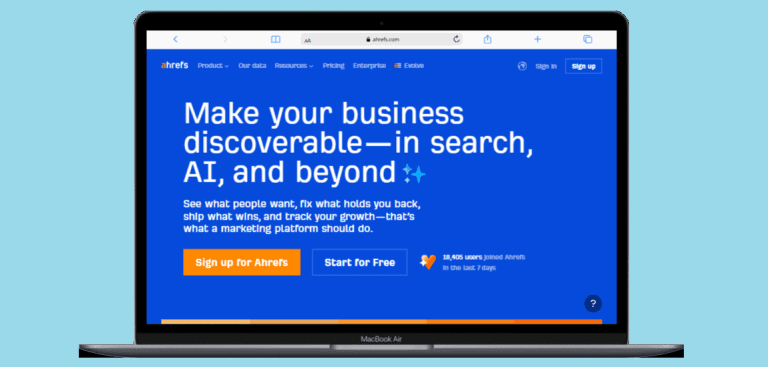
Ahrefs has one of the most powerful sets of competitor tracking features I’ve come across inside a rank tracker — and it connects directly to the backlink and keyword research data that makes Ahrefs one of the most-used SEO tools around.
The Rank Tracker inside Ahrefs tracks keywords across 190+ locations, on both desktop and mobile, and monitors 19 SERP features including AI Overviews. The position distribution view — which groups your tracked keywords into buckets (#1–3, #4–10, #11–20, and so on) — gives you a fast visual sense of where your rankings sit across an entire campaign without having to read through hundreds of individual keyword rows.
Where Ahrefs genuinely stands apart is in competitor tracking. You can add up to 10 competitors to any project and track all the keywords driving traffic to their best-performing pages, not just the keywords you specifically chose to monitor. When a competitor starts climbing on keywords you should own, you see it. The “newcomers and fast climbers” alert specifically tracks domains that are sneaking up on queries you care about — that’s a feature that’s saved me from being caught off-guard more than once.
The historical data portability is also worth mentioning. If you’ve used Ahrefs’ Site Explorer in the past, you can import that historical ranking data directly into Rank Tracker, keeping your full ranking history intact when you start a new tracking project. That’s the kind of practical workflow detail that saves hours of manual work.
The main frustration I have with Ahrefs’ Rank Tracker is update frequency. The base plans — Lite at $129/month and Standard at $249/month — default to weekly updates. If you need daily updates, you have to add the Project Boost add-on, which adds cost. For active campaigns where things are moving fast, weekly is simply not frequent enough.
Key Features:
- Tracking across 190+ locations (country, city, ZIP code)
- Desktop and mobile rank tracking
- 19 SERP features tracked including AI Overviews
- Track up to 10 competitors per project
- Position distribution view (buckets by ranking range)
- Share of voice metric across tracked keywords
- Chart notes to annotate SEO initiatives and changes
- Historical ranking data import from Site Explorer
- Integration with full Ahrefs suite (backlinks, keyword research, site audit)
Pricing:
- Lite: $129/month (750 tracked keywords, weekly updates)
- Standard: $249/month (2,000 tracked keywords)
- Advanced: $449/month (5,000 tracked keywords)
- Daily updates available via Project Boost add-on
- Free Ahrefs Webmaster Tools available (limited)
Pros:
- Outstanding competitor tracking features
- 190+ location tracking with deep granularity
- Connects directly to Ahrefs’ best-in-class backlink and keyword data
- Share of voice gives a clean top-level campaign metric
- Historical data portability from Site Explorer
Cons:
- Weekly updates by default on base plans — daily costs extra
- One of the higher starting prices on this list
- Can feel like overkill for small sites with limited keyword budgets
Best for: SEO professionals and agencies who already use or are considering Ahrefs as their primary platform and want deep competitor intelligence built into their rank tracking.
4. Nightwatch

Nightwatch is the most accurate local rank tracker I’ve tested, and it’s the tool I reach for whenever a project involves serious local SEO or multi-location tracking.
The headline feature is the location granularity. Nightwatch supports rank tracking across more than 100,000 locations worldwide — not just countries or cities, but specific ZIP codes, postal codes, DMA regions, and neighborhoods. If you’re running SEO for a chain of local businesses, a franchise operation, or any client where local visibility matters at a hyper-specific geographic level, nothing on this list comes close to what Nightwatch offers.
Beyond local, Nightwatch also tracks rankings across Google, Bing, and YouTube in a single dashboard. The AI tracking integration — which shows how your content appears in AI Overviews alongside traditional organic positions — is one of the cleaner implementations I’ve seen. You’re not switching between tabs or tools; it all shows up in the same campaign view.
The reporting setup is where Nightwatch really earns its place for agency work. Reports are white-labeled, customizable, schedulable, and genuinely clean enough to send directly to clients without reformatting. The multi-site dashboard handles up to 50 websites, which covers most agency workloads without needing to juggle multiple accounts.
The 14-day free trial is genuinely useful here — Nightwatch gives you full feature access during the trial with no credit card required, which is how every trial should work. I’d recommend using that time to set up a real project with actual client keywords rather than a test list, so you can see how the accuracy holds up before committing.

Key Features:
- 100,000+ location tracking (ZIP codes, cities, countries, DMA regions)
- Google, Bing, and YouTube rank tracking from one dashboard
- AI Overviews tracking alongside traditional organic positions
- Desktop and mobile tracking
- White-label reports with customizable branding
- Competitor tracking with side-by-side visualization
- Multi-site management (up to 50 websites)
- Website SEO audit tool included
- 14-day free trial, no credit card required
Pricing:
- Starts at $39/month
- 14-day free trial (full feature access, no credit card)
Pros:
- Best local rank tracking granularity available — 100,000+ locations
- AI Overviews and traditional rankings in a single view
- Extremely accurate data with daily updates
- White-label reports are client-ready out of the box
- Multi-site support makes it practical for agency scale
Cons:
- Can get expensive as keyword volume scales up
- Interface has a learning curve for new users
- Less robust keyword research features than all-in-one tools like Semrush
Best for: SEO agencies managing local clients, multi-location businesses, and any team that needs hyper-local rank tracking combined with clean client reporting.
5. Mangools SERPWatcher

Mangools SERPWatcher is the tool I point beginners and budget-conscious site owners toward when they want rank tracking that actually makes sense to use without a three-hour onboarding session.
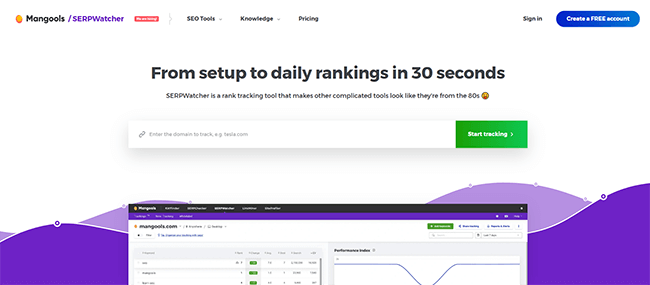
The interface is genuinely the cleanest of any tool on this list. Everything is visual, color-coded, and laid out in a way that tells you what you need to know without burying you in data tables. The Performance Index — a unique metric Mangools developed — gives you a single score that combines your keyword positions with their search volumes to represent your overall organic traffic potential. Instead of looking at hundreds of individual keyword movements, you can check one number and immediately understand whether your site’s overall visibility is trending up or down.
Daily rank updates run automatically, and email alerts notify you when keywords hit significant position changes — useful for catching both drops and wins without having to log in every day. The interactive report sharing feature lets you send clients or teammates a live link to your ranking data instead of a static PDF, which is a small but genuinely useful touch.
The tool is part of the full Mangools suite, which also includes KWFinder for keyword research, SERPChecker for SERP analysis, LinkMiner for backlink analysis, and SiteProfiler for domain metrics. That combination at Mangools’ price point — starting at $29/month on an annual plan — is outstanding value for someone just getting serious about SEO.
The main limitation to be honest about: Mangools SERPWatcher tracks Google only. If you need Bing, YouTube, or any other search engine in your rank tracking, you’ll need to look elsewhere. And while 65,000+ location options covers most needs, the local tracking depth doesn’t match what Nightwatch offers for hyper-local campaigns.
Key Features:
- Daily rank updates with historical data
- Performance Index metric (unique aggregate score for overall visibility)
- 65,000+ location tracking options (cities, districts, countries)
- Desktop and mobile rank tracking
- Top gainers and losers view (quick visibility into what’s moving)
- Email alerts for significant ranking changes
- Interactive shareable reports via link
- SERP previews alongside position data
- Part of full Mangools SEO suite (KWFinder, SERPChecker, LinkMiner, SiteProfiler)
Pricing:
- Entry: $19.90/month (billed annually)
- Basic: $29.90/month (billed annually)
- Premium: $44.90/month (billed annually)
- 10-day free trial available
Pros:
- Cleanest, most beginner-friendly interface of any tool tested
- Performance Index makes trend analysis instantly readable
- Exceptional value — full SEO suite at a fraction of Semrush’s price
- Daily updates with no add-on fee
- 10-day free trial, no credit card required
Cons:
- Google only — no Bing, YouTube, or other search engines
- Local tracking depth doesn’t match Nightwatch
- Limited advanced reporting features for large agency workflows
Best for: Bloggers, small business owners, freelancers, and anyone new to SEO who wants clean, accurate rank tracking without needing an instruction manual to use it.
6. Moz Pro Rank Tracking

Moz Pro has been one of the most trusted names in SEO for over a decade, and its rank tracker is backed by the same reliable metrics — Domain Authority, Page Authority, MozBar data — that SEOs have relied on for years.
The rank tracking in Moz Pro tracks keyword positions across multiple search engines in 200+ countries, with both national and local tracking available for desktop and US mobile. What I appreciate about the Moz approach is the context it puts around ranking data. Alongside your position number, you can see SERP feature opportunities — whether a featured snippet is available for a keyword, who currently owns it, and what you’d need to do to take it. That competitive intelligence layer, combined with the Competition and Opportunities menus, makes Moz Pro useful not just for tracking where you are but for figuring out what to do next.
The 30-day free trial is one of the more generous offers in this category. Most tools give you 7 or 14 days — Moz gives you a full month, which is enough time to run a real SEO cycle and see actual movement data before you commit.
The interface is functional, though I’ll be honest — it’s not the most visually polished tool on this list. If you’ve used Nightwatch or Mangools, Moz Pro feels more utilitarian. But the data is reliable, the Domain Authority metric integrates usefully into ranking analysis, and the tool has earned its reputation through consistent, quality results rather than fancy dashboards.
Key Features:
- Keyword rank tracking across 200+ countries
- Desktop and US mobile tracking (national and local)
- SERP feature opportunity identification
- Competitor rank tracking and gap analysis
- Competition and Opportunities menus for action-oriented insights
- Page Authority and Domain Authority data alongside rankings
- MozBar Premium integration for in-browser SERP data
- 30-day free trial
Pricing:
- Starter: $49/month (1 campaign, basic rank tracking)
- Standard: $99/month (3 campaigns, 300 tracked keywords)
- Medium: $179/month (10 campaigns, 900 tracked keywords)
- Large: $299/month (25 campaigns, 1,900 tracked keywords)
- 30-day free trial on all plans
Pros:
- 30-day free trial — the most generous of any tool on this list
- Trusted, consistent data backed by proprietary DA/PA metrics
- SERP feature opportunity view goes beyond just tracking position
- Good competitor gap analysis built in
- Well-established tool with a large knowledge base and community
Cons:
- Interface is functional but not the most visually modern
- Starter plan is quite limited for real campaign work
- Not the strongest choice if you need deep local tracking
Best for: SEO practitioners and small teams who value established, trusted metrics and want a rank tracker backed by Moz’s proprietary authority scoring.
7. AccuRanker

AccuRanker is the fastest rank tracker I’ve used, and it’s the one I’d reach for if I were managing a large-scale programmatic SEO site or an enterprise campaign with thousands of keywords that need monitoring in near real-time.
The platform offers on-demand rank updates — not just daily scheduled checks, but immediate refreshes you can trigger manually whenever you need fresh data. For a content publisher that just pushed a major update and wants to see how Google responds within the hour, that matters. For an agency that needs to pull accurate data before a client call that afternoon, it matters. Most tools make you wait until the next scheduled update cycle. AccuRanker doesn’t.
The dynamic keyword tagging system is genuinely impressive at scale. You can tag keywords by category, campaign phase, content type, funnel stage, or whatever taxonomy makes sense for your operation — and then filter and analyze rankings across those tags. When you’re managing 10,000+ keywords, the ability to instantly segment “blog content in the consideration phase” versus “product pages targeting transactional intent” is the difference between data you can act on and a spreadsheet that overwhelms you.
The search intent classification built into the keyword dashboard adds a layer of strategic context. Knowing that a cluster of keywords you’re tracking is classified as navigational intent helps you understand why those positions might behave differently than commercial intent keywords in the same niche.
The main trade-off with AccuRanker is that it’s a pure rank tracker. There’s no keyword research tool, no content editor, no site audit, no backlink analysis. You’re paying specifically for excellent, fast, high-volume rank tracking — and if that’s what you need, it’s the best available. If you want an all-in-one suite, this isn’t it.
Pricing is also worth noting: AccuRanker’s Professional plan starts at $224/month, making it one of the most expensive tools on this list. That price makes sense for large agencies and enterprise teams — it becomes less defensible for small sites with modest keyword lists.
Key Features:
- On-demand rank updates (not just daily scheduled)
- Dynamic keyword tagging and advanced filtering
- Search intent classification per keyword
- Daily rank updates as standard
- Google Analytics and Google Search Console integration
- Google Looker Studio integration (Expert plan and above)
- Clean, focused ranking reports
- AI CTR estimation (Expert plan)
- 14-day free trial
Pricing:
- Professional: $224/month (contact for keyword limit)
- Expert: $764/month (adds dynamic tagging, Looker Studio, AI CTR)
- Enterprise: Custom pricing for 25,000+ keywords
- 14-day free trial available
Pros:
- Fastest rank updates of any tool tested, including on-demand refreshes
- Dynamic tagging is exceptional for managing large keyword sets
- Clean, focused interface built specifically for rank tracking
- Reliable accuracy consistently praised across reviews
- 14-day free trial
Cons:
- Expensive — hard to justify for small sites
- Pure rank tracker: no keyword research, site audit, or backlink features
- Pricing structure requires contacting sales for specifics
Best for: Large agencies, enterprise SEO teams, and programmatic SEO operations managing thousands of keywords who need the fastest, most accurate rank tracking available.
8. Google Search Console

Google Search Console is the only rank tracking tool on this list that gives you data straight from Google itself — completely free, with no usage limits, for every site you own.
I put Google Search Console on this list deliberately, because it’s genuinely useful and far too many SEOs treat it as a secondary data source rather than the foundational tool it is. The Performance report inside GSC shows you average position, clicks, impressions, and click-through rate for every query your site appears for in Google Search — broken down by keyword, page, device, country, and date range. That’s a significant amount of data, at no cost, verified by the source itself.
Here’s how I use it practically. When I’m auditing an existing site, GSC is always my first stop before I open any paid tool. It shows me which keywords the site already ranks for (even the ones nobody intentionally targeted), which pages are getting impressions but few clicks (usually a CTR optimization opportunity), and which keywords have been declining in position over a specific time window. That context shapes every decision I make about where to focus next.
The limitations are real and worth being honest about. GSC averages your position across all searches for a query — different users in different locations get different results, and GSC averages all of that together. You can’t track specific competitor keywords. You can’t get daily position snapshots in the granular way a dedicated tool provides. The data goes back 16 months and stops there. And there’s no alert system that notifies you when rankings change.
But as a free starting point, as a sanity check against paid tool data, and as a source of first-party traffic and click data that no third-party tool can replicate — it belongs in every SEO workflow, regardless of what paid tools you’re also using.
Key Features:
- Search performance data: clicks, impressions, CTR, average position
- Filter by query, page, country, device, and date range
- Index coverage report (see which pages are and aren’t indexed)
- Core Web Vitals and page experience data
- Manual action and security issue alerts
- URL inspection tool for individual page crawl data
- Completely free — no keyword or site limits for verified properties
- 16 months of historical data
Pricing:
- 100% Free — no paid tiers, no limits on verified sites
Pros:
- Completely free, no usage caps
- First-party data directly from Google — the most accurate source possible
- Shows every query your site appears for, including ones you didn’t target
- CTR and impressions data that no third-party tool can replicate
- No learning curve — accessible to complete beginners
Cons:
- Averages position data — no clean daily snapshot per keyword
- Can’t track competitor keywords
- No alert system for ranking changes
- 16-month data cap
- Doesn’t track Bing, YouTube, or other search engines
Best for: Every website owner and SEO — as a free foundation and sanity check alongside any paid rank tracking tool.
Comparison Table: 8 Best Rank Tracker Tools at a Glance
| Tool | Update Frequency | Starting Price | Best For | Free Option |
|---|---|---|---|---|
| SE Ranking | Daily | $129/mo ($103 annually) | Best overall value | ✅ 14-day trial |
| Semrush | Daily | $139.95/mo | In-house teams, full suite | ✅ Limited free plan |
| Ahrefs | Weekly (daily w/ add-on) | $129/mo | Competitor intelligence | ✅ Webmaster Tools |
| Nightwatch | Daily | $39/mo | Local SEO, agencies | ✅ 14-day trial |
| Mangools SERPWatcher | Daily | $19.90/mo | Beginners, budget SEOs | ✅ 10-day trial |
| Moz Pro | Daily | $49/mo | Trusted metrics + tracking | ✅ 30-day trial |
| AccuRanker | Daily + on-demand | $224/mo | Large scale, speed | ✅ 14-day trial |
| Google Search Console | Ongoing | Free | Every SEO as a baseline | ✅ Always free |
How to Choose the Right Rank Tracker for Your Situation
The honest answer is that the best rank tracker is the one you’ll actually use consistently. Here’s how I think about matching tool to situation:
If you’re just starting out and have zero budget, start with Google Search Console. It’s free, it’s accurate, and understanding how to read its data properly will make every paid tool you use later more effective.
If you’re a blogger or small business owner who wants clean, daily tracking without complexity, Mangools SERPWatcher at $19.90/month (annual billing) is the best value I’ve found. The interface alone is worth the price.
If you’re an SEO freelancer or small agency who wants the best balance of features, accuracy, and price, SE Ranking is my consistent recommendation. The 14-day trial includes everything, the reporting is genuinely good for client work, and the price is reasonable for what you get.
If you need serious local rank tracking for multi-location businesses or local clients, Nightwatch’s 100,000+ location support is in a different league. Start with their free trial and test it against a real local project before committing.
If you already use Semrush or Ahrefs for keyword research, backlinks, and site auditing, you’re already paying for position tracking. Use it rather than adding another subscription on top.
If you’re running programmatic SEO or an enterprise campaign with thousands of keywords and need on-demand refresh capability, AccuRanker is the tool built specifically for that scenario. The price is high, but for the right team it’s worth it.
Pro Tips for Getting More Out of Your Rank Tracker
Having the data is one thing. Here’s how to actually use it to move rankings:
1. Don’t track too many keywords at once when you start.
I’ve seen people dump 2,000 keywords into a tracker on day one and then feel overwhelmed by the noise. Start with your 50 most important keywords, understand how they move, and expand from there. Quality of insight matters more than volume of data.
2. Segment your keywords by page type or funnel stage.
Use tags or groups inside your rank tracker to separate blog content from product pages, informational queries from commercial ones. When you look at aggregate movement, you want to know whether it’s your top-of-funnel content or your conversion pages that are shifting.
3. Set up alerts for your highest-priority keywords.
Most tools let you configure email notifications when a keyword drops below a certain position. I set alerts for any keyword that drops below position 10 on a page that’s generating meaningful traffic. That way I don’t need to check the dashboard daily to catch problems early.
4. Track competitors who just started ranking for keywords you care about.
Most rank trackers let you add competitors. Add the two or three sites you compete with most directly, and check who’s gaining on your priority keyword set every couple of weeks. When a competitor starts climbing fast, it usually means they published something new worth analyzing.
5. Use position distribution as your top-level health check.
Instead of reading through every individual keyword row, look at the distribution view: how many of your keywords sit in positions 1–3, 4–10, 11–20, 21–50? When the proportion of keywords in the top 3 bucket grows over time, your SEO is working. When it shrinks, something needs attention.
6. Always pair rank tracking data with Google Search Console.
Rank trackers show you position. GSC shows you clicks and impressions. Sometimes a keyword moves from position 8 to position 6 but clicks actually increase significantly — because you earned a featured snippet in the process. You’d miss that story if you only looked at one data source.
Frequently Asked Questions
What is the best rank tracker tool?
SE Ranking is my top pick for most users because it combines daily accuracy, clean reporting, SERP feature tracking, and a full SEO suite at a price that makes sense for solo SEOs and agencies alike. For pure speed and scale, AccuRanker leads. For beginners, Mangools SERPWatcher is the easiest to start with.
Is there a free rank tracker?
Yes — Google Search Console is completely free and shows you average position data for every query your site appears for in Google. It's not a replacement for a dedicated rank tracker, but it's an essential free baseline. Mangools, SE Ranking, Nightwatch, and Moz Pro all offer free trials ranging from 10 to 30 days.
How often should rank tracking update?
Daily is the standard I'd expect from any paid rank tracker. Weekly updates — which is Ahrefs' default on base plans — are enough to spot long-term trends but not fast enough for active campaigns where you need to catch drops and react quickly.
Can rank trackers track local rankings?
Yes, though with varying granularity. Nightwatch is the leader here, supporting 100,000+ locations down to ZIP code level. SE Ranking, Mangools, and Semrush all offer city-level local tracking. For serious multi-location local SEO, Nightwatch is in a different category from the rest.
Does Ahrefs have a free rank tracker?
Ahrefs offers free Webmaster Tools for verified site owners, which includes limited rank tracking data. It's not as full-featured as a paid plan, but it gives you some position data for your own site at no cost.
Should I use Google Search Console instead of a paid rank tracker?
You should use Google Search Console alongside a paid rank tracker, not instead of one. GSC gives you first-party data on impressions, clicks, and CTR that no third-party tool can replicate. But its averaged position data, lack of daily snapshots, inability to track competitors, and limited historical range make it insufficient as a standalone rank tracking solution.
Conclusion
The 8 best rank tracker tools are SE Ranking, Semrush, Ahrefs, Nightwatch, Mangools SERPWatcher, Moz Pro, AccuRanker, and Google Search Console. Each one does something specific well, and the right choice depends entirely on your scale, budget, and workflow.
Here’s what I’d take away from everything I’ve tested:
Start with Google Search Console — it’s free, it’s accurate, and understanding it deeply makes everything else work better. It’s not optional; it’s the foundation.
Match the tool to your actual use case. Nightwatch for local. AccuRanker for scale. Mangools for simplicity. SE Ranking for the best overall balance. Paying for features you’ll never use is money wasted every month.
Track fewer keywords, more carefully. A focused list of 50 keywords you actually care about and check regularly will move your SEO further than a database of 2,000 keywords you never look at.
Pair position data with click data. Rankings tell you where you sit. Google Search Console tells you whether that seat is actually sending traffic. You need both stories to make good decisions.
Rank tracking is one of the few things in SEO where the feedback loop is clear. You make a change, you track the result, you learn from it, and you do it again. Get that feedback loop working properly, and it compounds quickly.
You May Also Like
 SEO Tools
8 Best Free Online Word Cloud Generator & Tag Cloud Creator
 SEO Tools
50+ Best Free SEO Tools That SEO Experts Actually Use In 2026
 SEO Tools
7 Best SERP Checkers to Monitor & Track Your Keyword Rankings
 SEO Tools
How to Use Ahrefs for Free: 11 Free SEO Tools
 SEO Tools
11 Best Keyword Clustering Tools: Free & Paid Options Tested and Compared
 SEO Tools
11 Best Keyword Generator (Free Keyword Research Tools)
 SEO Tools
How to Block AhrefsBot From Crawling Your Website
 SEO Tools
8 Best On-Page SEO Checkers to Improve Your SEO
 Online Services


