Ahrefs can be used for free through 11 free SEO tools — including Ahrefs Webmaster Tools, Free Keyword Generator, Free Backlink Checker, Free SERP Checker, and AI Visibility Checker — all available without a paid subscription.
Here’s something most beginners don’t know: you don’t need to spend a single dollar to get real, useful data from Ahrefs. Most people see the price tag — $129/month for the entry-level Lite plan — and close the tab immediately. That’s a mistake, because Ahrefs quietly gives away some of its most useful tools for free. No credit card. No trial period. No expiration.
I’ve personally used Ahrefs’ free tools to audit websites, find low-competition keywords, and analyze what competitors are doing — all without paying anything. This guide explains each free tool, what it actually does, who it’s for, and how to make the most of it. Think of this as your honest, practical roadmap to getting real SEO results without a budget.
What Is Ahrefs and Who Uses It?
Ahrefs is an SEO software platform that helps website owners improve their Google rankings by analyzing backlinks, keywords, competitor traffic, and technical site health.
It was founded in 2010 and has since built one of the largest web crawlers in the world — second only to Google itself. SEO professionals, content marketers, and agencies rely on it daily because the data is consistently accurate and updated frequently.
What makes Ahrefs different from tools like Semrush or Moz is its backlink database. It indexes over 500 billion web pages and updates backlink data every 15 to 30 minutes. Its keyword database pulls from 8 billion queries across Google, YouTube, Amazon, and Bing.
The paid plans start at $29/month (Starter) and go up to $1,499/month (Enterprise). But — and this is the whole point of this guide — you can access a meaningful set of tools completely free.
What Are the Free Ahrefs Tools Available Right Now?
Ahrefs offers 11 free SEO tools, split into two categories: tools you can use instantly without an account, and tools available through a free Ahrefs Webmaster Tools account.
Free Tools That Require Zero Signup
These 5 tools work the moment you open the page. No login. No credit card. Just open, enter your keyword or domain, and get data:
- Free Keyword Generator — generates up to 150 keyword ideas from Ahrefs’ database of 8 billion queries, across Google, YouTube, Amazon, and Bing
- Free Keyword Difficulty Checker — shows how hard it is to rank in Google’s top 10 for any keyword, on a scale from 0 to 100
- Free Website Traffic Checker — estimates how much organic traffic any website or page gets, plus their top keywords and top pages
- Free Rank Checker — shows where your website currently ranks for a specific keyword in any selected country
- AI Visibility Checker — shows whether your website appears in AI-generated search results on Google AI Mode, Gemini, and Microsoft Copilot
Free Tools Available with a Free Ahrefs Account (No Payment Required)
These tools need a free account and, for some, website ownership verification. But they’re significantly more powerful:
- Ahrefs Webmaster Tools (AWT) — gives free access to Site Audit, Site Explorer, and Web Analytics for any website you verify and own
- Free Backlink Checker — shows the top 100 backlinks pointing to any URL, including Domain Rating and anchor text data
- Free Broken Link Checker — finds dead pages on competitor websites that you can use for link building opportunities
- Free SERP Checker — shows the actual top 10 search results for any keyword in 243+ countries, with traffic data for each result
- Ahrefs SEO Toolbar — a free Chrome and Firefox extension that shows SEO metrics for every page you visit while browsing
- GBP Monitor — manages and monitors your Google Business Profile, and alerts you to any unwanted changes
Ahrefs Free vs. Paid Plans: What’s the Real Difference?
Before diving into each tool, here’s an honest look at where the free version ends and where paid plans begin.
Ahrefs Pricing (2026)
| Plan | Monthly Price | Best For |
|---|---|---|
| Webmaster Tools | Free (forever) | Website owners, bloggers, freelancers |
| Starter | $29/mo | Beginners wanting limited paid access |
| Lite | $129/mo | Small businesses and solo SEOs |
| Standard | $249/mo | Growing teams and agencies |
| Advanced | $449/mo | Larger teams needing deeper data |
| Enterprise | $1,499/mo | Enterprise and Fortune 500 teams |
Note: Annual billing saves up to 17% on paid plans. For example, Lite drops to $99/month when paid annually. Source
Free vs. Paid: Key Differences at a Glance
| Feature | Free (AWT) | Paid (Lite+) |
|---|---|---|
| Verified websites | Unlimited | Unlimited |
| Unverified (competitor) websites | 0 | 5–100+ |
| Backlinks visible at once | 1,000 | All known links |
| Keywords visible at once | 1,000 | All known keywords |
| Site Audit crawl credits | 5,000/month | 100,000–1.5M+/month |
| Historical data | None | 6 months to unlimited |
| Keyword Explorer (full) | Not included | Included |
| Content Explorer | Not included | Standard+ only |
| Rank Tracker (automated) | Not included | Included |
The free version is your own website only. The moment you need to deeply analyze a competitor’s full keyword list or export bulk data, you need a paid plan. But for most beginners and small website owners, the free tools cover a surprising amount of ground.
Ahrefs Webmaster Tools: The Most Powerful Free Option
Ahrefs Webmaster Tools (AWT) gives you permanent free access to Site Audit, Site Explorer, and Web Analytics for any website you own — with no expiration date.
This is the single most valuable thing Ahrefs offers for free. It’s not a trial. It doesn’t expire. You verify your website once, and it works forever.
How to Set It Up
- Visit ahrefs.com/webmaster-tools and click “Sign Up for Free”
- Create your account using an email address — no credit card needed
- Verify your email through the confirmation Ahrefs sends you
- In your dashboard, click “Add New Project” and enter your website URL
- Choose a verification method: HTML tag, HTML file upload, or Google Search Console import
- Complete verification — Ahrefs confirms ownership within minutes
- Your first crawl starts automatically, and data appears within 15–30 minutes
The Google Search Console import method is the fastest if you already use GSC. It pulls historical search data into your AWT dashboard instantly.
Once set up, you get access to three tools inside AWT:
11 Ahrefs Free Tools You Can Use
Site Audit

Site Audit scans your entire website and flags 170+ types of technical and on-page SEO issues, then gives your site a Health Score from 0 to 100.
A Health Score above 85 means your site is in good shape. Anything below 70 needs attention.
Common issues Site Audit finds and flags:
- Broken internal links — pages on your own site linking to 404 error pages. These waste crawl budget and create a poor user experience
- Missing meta descriptions — pages with no meta description tag. Google may auto-generate one, but it’s often poor quality
- Duplicate title tags — two or more pages using identical title tags, which confuses Google about which page to rank
- Missing H1 tags — pages with no primary heading. This hurts Google’s ability to understand your page topic
- Images without alt text — images Google cannot read, which misses both SEO and accessibility value
- Redirect chains — URLs that redirect through 3 or more hops before reaching the final destination, slowing load speed
- Pages blocked by robots.txt — content that accidentally prevents Google from crawling important pages
- Orphaned pages — pages with no internal links pointing to them, making them invisible to Google’s crawlers
Fix errors (red) first. Then work through warnings (orange). Notices (blue) are lower priority but still worth addressing over time.
Free limit: 5,000 crawl credits per project per month. This covers most websites under 5,000 pages comfortably.
Site Explorer

Site Explorer inside AWT shows every keyword your website ranks for and every backlink pointing to you — up to 1,000 of each at a time, for free.
What you can see:
- All keywords your website ranks for in Google, with position, search volume, and traffic estimate
- Which of your pages get the most organic traffic from search
- Which websites link to you, including their Domain Rating (DR) and anchor text
- Whether each backlink is dofollow or nofollow
- Your overall Domain Rating (DR) and URL Rating (UR)
The main restriction: Site Explorer in AWT only works on your verified websites. To analyze a competitor’s full backlink profile or keyword rankings, you need a paid account. For a quick competitor check, use the Free Backlink Checker or Free Website Traffic Checker instead (both described below).
Web Analytics

Web Analytics in AWT tracks real-time visitor data, traffic sources, and top pages — without cookies and without collecting personal data.
This is Ahrefs’ privacy-focused alternative to Google Analytics. It shows:
- Top traffic sources broken down by organic search, direct, referral, and social
- Top visited pages on your website
- Visitor locations by country
- Traffic from LLMs — a unique feature that tracks visits coming from AI tools like ChatGPT
- Device type and browser data
Free limit: Up to 1 million events per project per month — more than enough for most small and medium-sized websites.
Free Keyword Generator

The Free Keyword Generator produces up to 150 keyword ideas for any seed keyword from Ahrefs’ 8-billion-query database — across Google, YouTube, Amazon, and Bing, with zero signup required.
This is the tool to start with if you’re doing keyword research on a budget. You type a broad topic word, hit search, and get a real list of keyword ideas with actual metrics.
What the tool returns for each keyword:
- Search Volume — average monthly searches for that keyword in your target country
- Keyword Difficulty (KD) — a score from 0–100 showing how hard it is to rank in the top 10
- Traffic Potential — estimated total clicks to the top-ranking page, not just to the keyword itself
It also includes a dedicated “Questions” tab that shows question-based versions of your keyword. These are gold for FAQ sections, featured snippets, and “People Also Ask” boxes in Google.
For new websites, target keywords with a KD score below 30. These are realistically achievable without an established backlink profile. Once you build some authority, you can go after mid-range KD keywords (30–50).
Free Keyword Difficulty Checker

The Free Keyword Difficulty Checker shows how hard it is to rank for a specific keyword on a scale of 0–100, plus how many backlinks you’d need to reach the top 10 in Google.
This is your sanity check before writing a 2,000-word article. It stops you from spending hours on content for a keyword you have no realistic chance of ranking for right now.
| KD Score | Difficulty | Realistic For |
|---|---|---|
| 0–10 | Very Easy | Brand new websites |
| 11–30 | Easy | Sites under 12 months old |
| 31–50 | Medium | Sites with growing authority |
| 51–70 | Hard | Established sites with active link building |
| 71–100 | Very Hard | Major brands and high-DR domains |
The “referring domains needed” number is particularly useful. It tells you the average number of unique websites linking to pages that currently rank in the top 10. If a keyword needs 200+ referring domains and your site has 15, it’s not the right target right now.
Free Website Traffic Checker
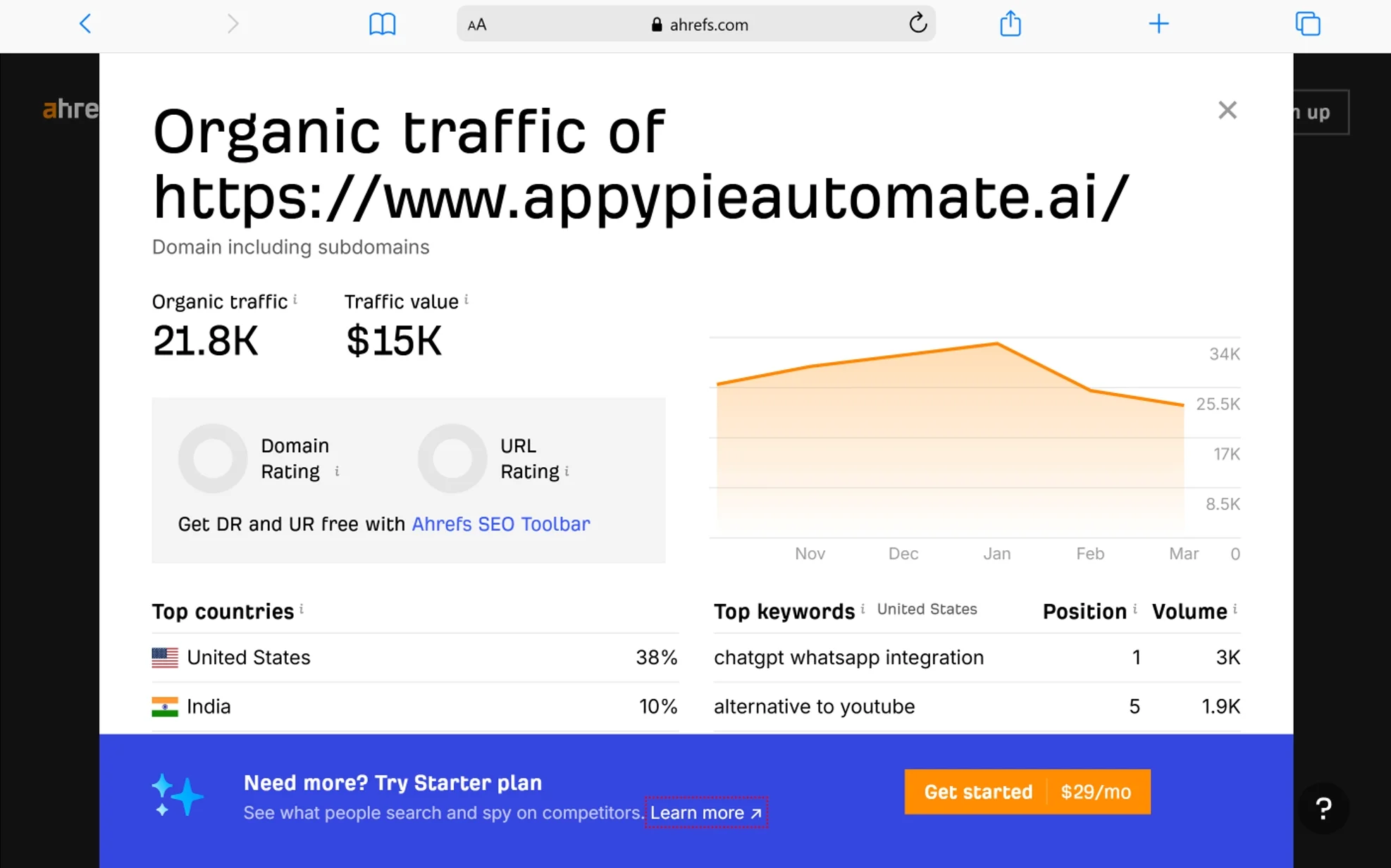
The Free Website Traffic Checker estimates how much organic traffic any website or specific URL receives each month — including their top keywords and top pages — no login needed.
This is one of the most practical tools for competitive research. There are 3 ways to use it:
- Analyze a full competitor domain — paste in a competitor’s domain (e.g., example.com) to see their total estimated organic traffic, the countries they rank in, their top pages, and their top keywords with positions
- Analyze a specific competitor page — paste in a specific URL (e.g., example.com/blog/best-running-shoes) to see exactly how much traffic that single page gets and what keywords drive it. This is useful for reverse-engineering high-performing content
- Check your own website — use it to track your own estimated organic traffic month over month, especially useful before you set up AWT
One practical use: find a competitor’s top-traffic page, look at what keywords it ranks for, and use those same keywords as targets for your own content. You’re not copying — you’re identifying proven demand.
Free Backlink Checker

The Free Backlink Checker shows the top 100 backlinks pointing to any URL — including Domain Rating, anchor text, and whether each link is dofollow or nofollow — no login required.
Backlinks remain one of Google’s strongest ranking signals. Understanding who links to you, and who links to your competitors, directly informs your link-building strategy.
What the free report shows:
- Domain Rating (DR) of the linking website — a score from 0–100 reflecting the overall authority of that domain
- URL Rating (UR) of the specific linking page
- The exact anchor text used in the link
- Whether the link is dofollow (passes SEO value) or nofollow (does not pass SEO value)
- The date Ahrefs first discovered the link
- Total number of referring domains and total backlinks to the target URL
Two link types matter most when analyzing backlinks:
Editorial links — inserted naturally within articles, blog posts, and news stories. These carry the most SEO value because they’re given based on content quality, not paid placement.
Natural links — brand mentions and links from social media or other websites given without being requested. These build genuine authority over time.
Free Broken Link Checker

The Free Broken Link Checker finds the top 10 broken pages on any competitor’s domain and shows which websites link to those dead pages — creating link-building opportunities for you.
This is the foundation of a strategy called broken link building. Here’s the logic: if a competitor has a page that no longer exists (404 error) but other websites still link to it, those linking websites have a broken link they’d probably want to fix. You can offer your own relevant content as a replacement.
How to use it for link building:
- Go to ahrefs.com/broken-link-checker
- Enter a competitor’s domain
- Switch the view to “Broken inbound links” mode
- Review the list of dead pages — look for ones that are topically relevant to your content
- Note which websites are linking to those dead pages
- Create (or check if you already have) a relevant piece of content on your own site that covers the same topic
- Reach out to those linking websites, let them know the link is broken, and suggest your content as a replacement
This works because you’re doing the website owner a favor first. You’re not cold-pitching a link — you’re pointing out a real problem on their site and offering a solution.
Free SERP Checker

The Free SERP Checker shows the actual top 10 Google results for any keyword in 243+ countries, along with traffic estimates and SEO metrics for each result — without needing a VPN.
When you’re deciding whether to target a keyword, it’s not enough to look at the KD score alone. You need to see who is ranking and why. The SERP Checker shows you:
- The 10 URLs currently ranking for your target keyword in a specific country
- Domain Rating (DR) and URL Rating (UR) for each result
- Estimated organic traffic each result gets from that keyword
- Number of referring domains pointing to each ranking page
- The word count of each ranking page (approximate)
If the top 10 results are all major brand domains with DR scores above 80, that keyword is out of reach for now. If you see some results with DR scores in the 20–40 range ranking on page one, you have a realistic shot with quality content and some targeted link building.
Ahrefs SEO Toolbar

The Ahrefs SEO Toolbar is a free browser extension for Chrome and Firefox that shows SEO metrics for every page you visit — including Domain Rating, backlinks, organic traffic, and on-page data.
Install it once, and it works passively in the background. Every time you open a webpage or Google search results page, you see SEO data overlaid directly.
What it shows while browsing:
- Domain Rating (DR) and URL Rating (UR) of any page you visit
- Estimated organic traffic to that page
- Number of backlinks and referring domains to that page
- All on-page elements: title tag, meta description, H1–H6 headings, canonical tag, word count, and more
- Redirect chains — shows every step in a redirect sequence so you can spot chains immediately
- All outgoing links on a page, color-coded by type: dofollow (green), nofollow (orange), sponsored, and UGC
- Local SERP simulator — lets you see Google results as if you’re searching from a different country or city, no VPN needed
Download it from the Chrome Web Store or Firefox Add-ons store by searching “Ahrefs SEO Toolbar.” It’s completely free and works whether you’re logged into an Ahrefs account or not.
AI Visibility Checker

The AI Visibility Checker shows whether your website appears in AI-generated search results on Google AI Mode, Microsoft Copilot, ChatGPT, AI Overviews, Perplexity, and Google Gemini — completely free.
This is one of Ahrefs’ newest free tools, and it addresses something that’s becoming increasingly important in 2026: AI search optimization (AEO). As more users get answers directly from AI tools instead of clicking through to websites, showing up in AI responses is becoming just as valuable as ranking on page one.
The tool shows:
- Whether your domain is cited in AI-generated responses across major AI platforms
- Total number of AI citations your site has received
- Citations broken down per AI model (Google AI Mode, Copilot, ChatGPT, AI Overviews, Perplexity, Gemini)
- A monthly visibility trend graph showing whether your AI presence is growing or shrinking
- Top topics your site is cited for in AI results
- Your top-cited pages in AI responses
You can also run the same check on any competitor’s domain to compare your AI visibility side by side.
How to Build a Real Free SEO Workflow with Ahrefs
Here’s how all these tools work together in a practical sequence. This is a workflow you can run every month with zero budget:
- Find keyword opportunities — Start with the Free Keyword Generator. Enter your main topic. Look through the results for keywords with KD below 30 and search volume between 100 and 2,000. Save a shortlist of 10–15 targets.
- Validate each keyword — Run each shortlisted keyword through the Free Keyword Difficulty Checker. Review the top 10 SERP results and check whether your site can realistically compete. Remove anything with KD above 50 until your Domain Rating is stronger.
- Research top-ranking competitors — Use the Free SERP Checker to study the current top 10 for your best keyword targets. Look at what type of content is ranking — listicles, how-to guides, product pages. Use the Free Website Traffic Checker to analyze top competitor pages and identify content gaps.
- Audit your site for technical issues — Set up AWT (one time only) and run Site Audit. Fix errors in priority order: broken links first, missing tags second, redirect chains third. A technically clean website gives every piece of content a better starting point.
- Monitor your backlinks and rankings — Use Site Explorer inside AWT to see your backlink growth over time. Use the Free Rank Checker to spot-check your position for specific keywords after publishing new content.
- Find link-building targets — Run competitor domains through the Free Broken Link Checker monthly. Build a list of dead pages with inbound links that your existing content could replace. Reach out to those linking sites.
- Track AI visibility — Run your domain through the AI Visibility Checker monthly. As AI search grows, knowing whether you appear in AI responses helps you prioritize which content to update and expand.
This full workflow — keyword discovery, competition validation, competitor research, technical auditing, rank monitoring, link building, and AI visibility tracking — is available at zero cost.
Limitations of Ahrefs Free Tools
The free tools are genuinely useful, but they have clear limits worth knowing upfront:
- You cannot analyze unverified (competitor) websites in Site Explorer — only your own verified domains
- The Free Backlink Checker shows only the top 100 backlinks — paid users see all known links without limit
- Historical data is not available in the free plan — you cannot compare rankings or traffic over periods longer than the current snapshot
- The Free Keyword Generator returns up to 150 keyword ideas per search — Keywords Explorer (paid) returns thousands
- Bulk keyword exports are not available in the free plan
- Automated rank tracking (where Ahrefs monitors your rankings daily or weekly automatically) requires a paid subscription — the free Rank Checker is manual only
- Content Explorer, which lets you find the most-shared and most-linked content on any topic, is not included in any free plan
For freelancers, bloggers, small business owners, and anyone learning SEO, the free tools handle a significant amount of real work. The limitations only become significant when you’re managing multiple client websites at scale or need deep historical data for reporting.
Frequently Asked Questions
Is Ahrefs really free, or is there a catch?
Yes, Ahrefs has genuinely free tools with no hidden catch. Five tools — Keyword Generator, Keyword Difficulty Checker, Website Traffic Checker, Rank Checker, and AI Visibility Checker — work without any account at all. Ahrefs Webmaster Tools is also permanently free with a verified website. The free tools do have data limits compared to paid plans, but they are not time-limited trials. You can use them indefinitely without paying anything.
Do I need a credit card to use Ahrefs for free?
No. The free tools require no credit card. You only need a credit card if you choose to subscribe to a paid plan (Starter at $29/mo or above). Even creating a free Ahrefs Webmaster Tools account requires no payment information.
Can I check competitor websites with the free Ahrefs tools?
Yes, partially. The Free Website Traffic Checker, Free Backlink Checker, Free SERP Checker, and Free Broken Link Checker all work on any domain — including competitors — without an account. The limitation is data depth: you see top 100 backlinks instead of all backlinks, and traffic estimates instead of full keyword lists. Site Explorer inside AWT only works on your own verified websites.
How accurate is Ahrefs free data compared to the paid version?
The underlying data source is the same. Ahrefs uses identical crawl data for both free and paid tools. The difference is in how much data you can access at once. Free users see a filtered or limited view (e.g., top 100 backlinks, top 150 keywords), while paid users see the complete dataset. The data itself is not less accurate — it's just less complete.
What is the best Ahrefs free tool for a complete beginner?
The Free Keyword Generator is the best starting point for beginners. It requires no account, works immediately, and gives you practical keyword data with Keyword Difficulty scores right away. After that, setting up Ahrefs Webmaster Tools is the most impactful second step — it gives you a full technical audit and backlink view of your own website for free.
Can I use Ahrefs free tools for YouTube or Amazon keyword research?
Yes. The Free Keyword Generator supports Google, YouTube, Amazon, and Bing. You switch the search engine selector before running your search. This makes it one of the few free tools that covers keyword research outside of Google — particularly useful for content creators targeting YouTube or sellers researching Amazon product keywords.
When should I upgrade from free to a paid Ahrefs plan?
Upgrade to a paid plan when you need to analyze competitor websites in depth, export bulk keyword data, access historical ranking trends, or manage more than one website's SEO at scale. The Starter plan at $29/month gives limited paid access and is a reasonable first step. The Lite plan at $129/month (or $99/month billed annually) is the standard entry point for full professional use.
Conclusion
Ahrefs is not just a premium SEO tool hidden behind a paywall. It gives away 11 genuinely useful tools, and five of them don’t even require you to create an account.
If you’re just getting started with SEO, begin with the Free Keyword Generator to find realistic targets. Set up Ahrefs Webmaster Tools to audit your own website. Use the Free Backlink Checker and Free Website Traffic Checker to understand what your competitors are doing. Check your AI search visibility with the AI Visibility Checker, because that’s where search is heading in 2026.
The free tools won’t replace a paid subscription for agencies or professionals managing large client portfolios. But for bloggers, small business owners, freelancers, and anyone building their first SEO strategy, Ahrefs free gives you more than enough to make real, measurable progress — at no cost.
Start with one tool today. Pick the Free Keyword Generator, enter your main topic, and see what comes back. That’s how most good SEO strategies begin — with a single search.
You May Also Like
 SEO Tools
7 Best SERP Checkers to Monitor & Track Your Keyword Rankings
 SEO Tools
8 Best Rank Tracker Tools: Free & Paid Options Tested and Compared
 SEO Tools
11 Best Keyword Clustering Tools: Free & Paid Options Tested and Compared
 SEO Tools
11 Best Keyword Generator (Free Keyword Research Tools)
 SEO Tools
How to Block AhrefsBot From Crawling Your Website
 SEO Tools
8 Best On-Page SEO Checkers to Improve Your SEO
 Online Services
10 Best Tumblr Alternatives For Free To Use
 SEO Tools
16 Best Free AI Plagiarism Checkers For School & Digital Marketing
 SEO Tools