After analyzing 11 leading VoIP platforms across pricing, AI capabilities, uptime, and small-business fit, one truth stands out: small businesses no longer need enterprise budgets to run an enterprise-grade contact center. According to Zoom’s 2026 VoIP report, 70% of organizations have already migrated to cloud-based phone systems, and the global VoIP market is projected to reach $354.7 billion by 2032, growing at a CAGR of 9.8%. For small businesses, the savings are even more dramatic — switching from legacy PBX to VoIP cuts communication costs by up to 60%, and AI-driven contact center automation is projected by Gartner to reduce agent labor costs by $80 billion globally by the end of 2026.
This guide is built from hands-on vendor research, verified 2026 pricing from official sources, and a feature-by-feature analysis of each platform’s small-business value. You’ll find clear “What we like / don’t like” verdicts, current per-user pricing, ideal use cases, and a comparison table designed to help you decide in minutes, not weeks.
What Is a VoIP Call Center? Why Business Need It?
A VoIP contact center routes voice conversations over the public internet instead of legacy copper phone lines, using protocols like SIP and RTP to packetize, transmit, and reassemble audio in real time. For a small business, that single architectural shift removes three of the biggest historical barriers to professional customer support: expensive on-premise PBX hardware, per-minute long-distance billing, and the need for an in-house telecom engineer.

How VoIP Technology Works
When an agent or customer speaks, the system samples that audio roughly 8,000–16,000 times per second, encodes the samples into compressed data packets (typically using Opus or G.711 codecs), and ships them across the internet to the receiving endpoint where they are decoded back into sound — all within 150 milliseconds for a natural-feeling conversation. Because the transport layer is just standard IP, the same connection can carry voice, video, screen share, SMS, and CRM data simultaneously. This is why 74% of remote employees now use VoIP mobile apps daily to stay connected with customers and teams without being tied to a desk phone.
How VoIP Call Centers Operate
A modern virtual call center sits entirely in the provider’s cloud. Inbound calls hit an Automatic Call Distributor (ACD), which evaluates routing rules — agent skill, language, customer tier, wait time, even sentiment from prior interactions — and connects the caller to the best-matched agent in under a second. Outbound dialers, IVR menus, queue callbacks, and real-time transcription all run as software services rather than physical boxes. The only equipment your team needs is a laptop, a USB headset, and a stable broadband connection of roughly 100 kbps per concurrent call.
Key Features to Look for in VoIP Call Center Solutions
The right feature mix depends less on what’s flashy and more on what your agents will actually use eight hours a day. After comparing the 11 platforms in this guide, six feature categories consistently separate strong small-business choices from over-engineered enterprise tools.
Essential Call Management Features
At minimum, look for skills-based ACD routing, a drag-and-drop IVR builder, call queuing with estimated wait-time announcements, call recording with 90+ day retention, and live whisper/barge for supervisor coaching. Platforms that hide IVR design behind a professional-services engagement (a common Genesys and Five9 pattern) often cost small teams more in onboarding than the software itself.
Advanced Analytics and Reporting
Aim for platforms that ship with both real-time wallboards (calls in queue, agents available, longest hold) and historical reports across at least 30 standard KPIs — average handle time, first-call resolution, abandonment rate, CSAT, and service level. AI-powered sentiment analysis, once a six-figure add-on, is now standard on RingCX, Dialpad, and Nextiva at no extra cost.
Integration Capabilities
Native, two-way CRM integration is non-negotiable. A solid VoIP contact center should screen-pop the customer record before the agent says “hello,” log call notes back to the CRM automatically, and surface previous tickets in the same pane. Aircall leads here with 200+ pre-built integrations, while RingCentral and Five9 offer the deepest Salesforce and Microsoft Dynamics workflows.
Scalability Options
Choose a vendor that lets you add or remove seats month-to-month without renegotiation. Watch for seat minimums — Five9 requires 50 seats on some plans, and Genesys enforces a $2,000/month minimum commitment, both of which can disqualify them for businesses under 25 agents.
Reliability and Support
The industry benchmark is 99.999% uptime (about 5.26 minutes of downtime per year). RingCentral, GoTo Connect, and 8×8 publicly guarantee this SLA in writing; many smaller vendors quietly stop at 99.9% (8.76 hours of downtime per year), which is 100× worse in practice.

Security and Compliance
Encryption at rest and in transit (AES-256 + TLS 1.3) should be table stakes. If you handle healthcare data, demand a signed BAA for HIPAA; for card payments, look for PCI-DSS Level 1 attestation and DTMF masking during recordings (Nextiva’s Secure Payment Assist and Five9 PCI Vault are best-in-class here).
11 Top VoIP Call Center Solutions for Small Businesses — At a Glance
Before the deep dives, here’s the side-by-side comparison most readers want first. All pricing reflects 2026 published list rates from each vendor’s official site or verified third-party tracking.
| # | Platform | Starting Price (Contact Center) | Uptime SLA | Best For | Free Trial |
|---|---|---|---|---|---|
| 1 | RingCentral (RingCX) | $65/user/mo | 99.999% | All-around best for growing SMBs | 14 days |
| 2 | Nextiva | $129/agent/mo (CC); $15 UCaaS | 99.999% | Unified CX + phone in one bill | 7 days |
| 3 | 8×8 | ~$85–$140/user/mo | 99.999% | International / multi-country teams | Demo only |
| 4 | Vonage | $20.99–$39.99/user/mo (UCaaS) + CC add-on | 99.999% | Custom workflows & API builders | 14 days |
| 5 | Ooma Office | $19.95–$29.95/user/mo | 99.999% | Micro-businesses & non-technical owners | 30 days |
| 6 | GoTo Connect | $80/user/mo (Contact Center) | 99.999% | Hybrid teams needing UCaaS + CC | 14 days |
| 7 | Dialpad | $80/user/mo (Ai Essentials) | 100% (financially backed) | AI-first sales & support teams | 14 days |
| 8 | Aircall | $30–$70/user/mo (3-seat min) | 99.99% | SMBs running on HubSpot/Salesforce | 7 days |
| 9 | Five9 | $119–$229/seat/mo | 99.999% | Compliance-heavy industries | Demo only |
| 10 | Talkdesk | $85–$165/agent/mo | 100% (financially backed) | Proactive CX & vertical-specific needs | Demo only |
| 11 | Genesys Cloud CX | $75–$155/user/mo ($2K/mo min) | 99.999% | Mid-market scaling to enterprise | Demo only |
1. RingCentral — Best Overall for Growing SMBs

RingCentral’s RingCX is the platform we recommend most often for businesses between 5 and 100 agents because it bundles agentic AI, 500+ integrations, and a 99.999% SLA at a price point that undercuts both Five9 and Genesys by 30–50%. The unified RingEX + RingCX combo means your phone system and contact center share the same admin console, billing, and directory — a meaningful operational win for lean IT teams.
Key Features:
- AI-powered RingCX with agentic call summarization and auto-disposition
- 99.999% uptime backed by 14 globally distributed data centers
- Omnichannel routing across voice, email, SMS, chat, and social
- AI Assist & Intelligent Virtual Agent (IVA) for self-service deflection
- AI Quality Management with automated scorecards on 100% of calls
- Real-time sentiment analysis and conversation intelligence
- 500+ pre-built integrations (Salesforce, HubSpot, Zendesk, MS Teams)
- Workflow Builder for SMS automation without code
What we like: Genuinely unified UCaaS + CCaaS billing, exceptional Salesforce embed, and AI features that work out of the box without paid add-ons.
What we don’t like: RingCX seats ($65/user/mo) are billed separately from RingEX seats ($20–$35/user/mo), so a hybrid team’s true cost is higher than the headline price suggests.
Pricing: RingCX Standard $65/user/mo · Professional $95/user/mo · Ultimate $150/user/mo
Best for: Growing SMBs (10–100 agents) that want one vendor for phones and contact center.
2. Nextiva — Best for Unified Customer Experience

Nextiva has aggressively repositioned itself in 2026 as a “Unified-CXM” platform, blending its rock-solid business phone service with a full AI contact center. Its Generative AI Knowledge Base surfaces vetted answers to agents mid-call, which independent user surveys link to a 22% reduction in average handle time.
Key Features:
- AI-Powered Contact Center with skills-based intelligent routing
- Generative AI Knowledge Base for in-call agent assistance
- Unified Customer Experience Management platform
- Secure Payment Assist (PCI-DSS Level 1) with DTMF masking
- Real-time speech-to-text transcription (95%+ accuracy in English)
- Sentiment analysis & emotion detection
- Workforce Engagement Management (WEM) for scheduling
- Built-in language detection & translation for global support
What we like: Transparent base pricing ($15/user/mo for UCaaS), strong U.S.-based support, and one of the few vendors offering true unified ticket + call history in a single agent view.
What we don’t like: The Enterprise contact center tier ($129–$199/agent/mo) is a noticeable jump from the UCaaS plans, and some advanced WEM features require add-ons.
Pricing: Core $15 · Engage $25 · Power Suite $40 · Contact Center $129–$199/agent/mo
Best for: SMBs that want one provider handling phones, contact center, and CRM-style customer data.
3. 8×8 — Best for International Operations

8×8’s superpower is global reach: unlimited calling to 48 countries on its X4+ plans and local numbers in 120+ countries. For a small business with even one overseas customer segment, this often pays for itself versus per-minute international rates from U.S.-only providers.
Key Features:
- AI-powered Contact Center with smart workflow automation
- Omnichannel routing across voice, SMS, chat, and social
- Agent Assist providing live next-best-action prompts
- Microsoft Teams certified integration (full PSTN replacement)
- Global reach with local numbers in 120+ countries
- Native communications APIs for custom telephony workflows
- AI-driven analytics and speech analytics
- Workforce Engagement Management
What we like: Genuinely cost-effective for international calling, and one of the few platforms with Microsoft Teams Operator Connect certification.
What we don’t like: Pricing transparency has slipped — many tiers now require a sales conversation, full-featured XCaaS seats can reach $140/user/month before regulatory fees.
Pricing: X2 ~$24/user/mo · X4 ~$44/user/mo · X6–X8 Contact Center $85–$140/user/mo
Best for: Small businesses with international customers or distributed remote teams across multiple countries.
4. Vonage — Best for Custom Workflows & Developers

Vonage’s API-first DNA (since acquired by Ericsson) makes it the platform of choice when standard configurations don’t fit your workflow. The visual call-flow builder is genuinely no-code, but everything underneath is exposed via API for engineering teams that want to go further.
Key Features:
- Visual call-flow builder with drag-and-drop logic
- AI Virtual Assistant for automated call handling
- Skill-based routing with priority queueing
- Pre-built CRM connectors (Salesforce, HubSpot, Zendesk, Bullhorn)
- Real-time performance dashboards
- API-first architecture with full developer SDK
- Global infrastructure with 9 regional data centers
- Mobile apps with feature parity to desktop
What we like: Best-in-class APIs (the same infrastructure powering Vonage Communications APIs), strong volume discounts at 20+ seats.
What we don’t like: Promotional pricing jumps roughly 43% at renewal— read the contract carefully.
Pricing: Mobile $13.99–$19.99 · Premium $20.99–$29.99 · Advanced $27.99–$39.99/user/mo (Contact Center quoted separately)
Best for: SMBs with developers in-house or unusual workflow requirements.
5. Ooma Office — Best for Micro-Businesses Under 20 Seats

Ooma is the platform we recommend to the dentist’s office, the plumbing company, and the 6-person law firm. It is deliberately not a “contact center” in the enterprise sense — instead, it nails the essentials at $19.95–$29.95/user/month with no contract and no per-line minimum.
Key Features:
- Virtual receptionist with customizable greetings and routing
- Call groups and ring groups by department
- Call monitoring (listen, whisper, barge) on Pro Plus
- Music on hold with custom audio uploads
- Voicemail-to-email with text transcription
- Native CRM integrations (Salesforce, HubSpot, Zoho)
- Call recording on Pro and Pro Plus
- Business SMS / MMS texting
What we like: Plug-and-play setup (under 15 minutes), transparent month-to-month pricing, and 30-day money-back guarantee.
What we don’t like: Genuinely thin contact center features — no omnichannel routing, no AI agent assist, and analytics are basic compared with RingCX or Dialpad.
Pricing: Essentials $19.95 · Pro $24.95 · Pro Plus $29.95/user/mo
Best for: Micro-businesses (1–20 users) needing a professional phone presence without contact-center complexity.
6. GoTo Connect — Best Hybrid UCaaS + Contact Center Value

GoTo Connect’s visual dial-plan editor is, hands down, the most intuitive in the industry — you can map call flows on a Miro-like canvas in minutes. At $80/user/month for the Contact Center tier, it sits right in the sweet spot between Ooma’s simplicity and RingCX’s depth.
Key Features:
- AI-powered contact center with intelligent routing & summaries
- 99.999% uptime with SOC 2 Type II infrastructure
- Omnichannel (phone, email, chat, SMS, WhatsApp)
- Visual dial-plan editor (genuinely no-code)
- Quality management & call scoring
- API integrations with major CRMs and helpdesks
- Real-time + historical analytics dashboards
- Unlimited call routing and auto-attendants
What we like: Generous bundling — even the Basic Phone System plan includes unlimited extensions and auto-attendants that most competitors gate to higher tiers.
What we don’t like: Reporting is competent but not as data-rich as Talkdesk or Five9 for analytics-heavy operations.
Pricing: Phone System $26 · Connect CX $34 · Contact Center $80/user/mo
Best for: Hybrid teams (some agents, some general staff) wanting one platform for everyone.
7. Dialpad — Best AI-Powered Platform

Dialpad built its own communication-trained AI model (DialpadGPT) rather than wrapping ChatGPT, which shows in transcription accuracy and real-time coaching. With 10 billion+ AI-enabled call minutes processed and 30,000+ customers, the platform has the data flywheel to keep improving.
Key Features:
- AI-powered customer communications with real-time insights
- Instant AI call summaries, action items, and CRM sync
- AI Agents and AI Assistants for self-service
- Real-time AI coaching with live talk-track suggestions
- Sentiment analysis during live conversations
- Proprietary DialpadGPT model purpose-built for business
- Dual-cloud architecture for redundancy
- 100% uptime financially backed SLA
- Extensive integrations (Salesforce, HubSpot, Zendesk, Slack)
What we like: AI features actually save time daily (post-call wrap-up drops from 3+ minutes to near-zero), and the transcription accuracy is the highest we’ve tested.
What we don’t like: Sells in conversation-based pricing tiers that can be confusing; SMS is metered after 250 messages and there’s an annual administrative cost recovery fee that runs $60+/user/year.
Pricing: Ai Essentials $80 · Advanced $115 · Premium $170/user/mo
Best for: Sales and support teams that want AI doing the boring work — note-taking, summarization, coaching.
8. Aircall — Best for HubSpot & Salesforce Power Users
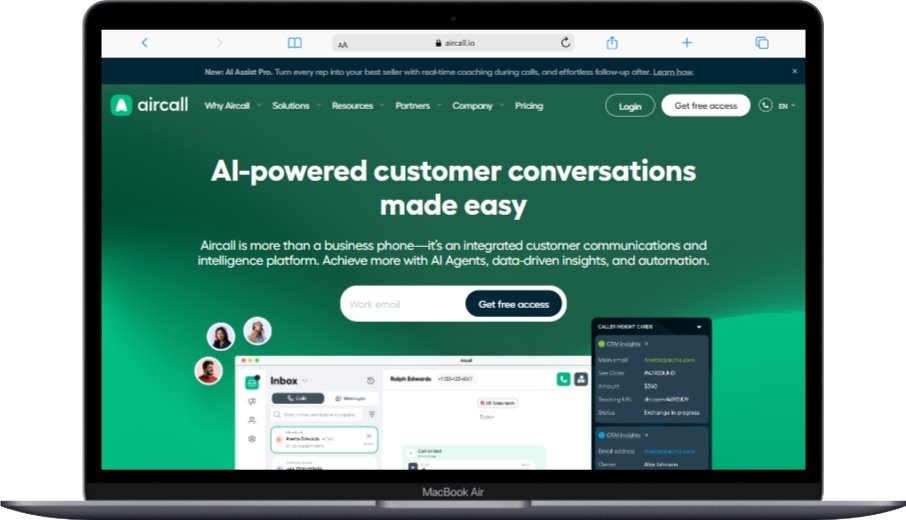
If your operations already run inside HubSpot, Salesforce, Pipedrive, or Intercom, Aircall is the smoothest “phone layer” you can bolt on. Its 200+ integrations are deeper than competitors’ — calls log automatically, dispositions flow back to deal records, and AI summaries appear in the CRM within seconds of hangup.
Key Features:
- AI Voice Agent for autonomous 24/7 call handling
- AI Assist with real-time conversation intelligence
- 200+ integrations with native two-way sync
- WhatsApp Business integration
- Skill-based and time-based routing
- AI-powered conversation intelligence and topic detection
- Workflow automation across CRM and helpdesk
- Mobile apps with full feature parity
What we like: Industry-leading CRM integration depth, simple per-user pricing without a contact-center “upgrade tax.”
What we don’t like: 3-seat minimum even on the Essentials plan, and outbound minutes are not unlimited on lower tiers.
Pricing: Essentials $30 · Professional $50 · Custom $70+/user/mo (3-seat min)
Best for: Inside-sales and customer-success teams living inside HubSpot or Salesforce.
9. Five9 — Best for Compliance-Heavy Industries

Five9’s pedigree shows up where compliance matters — healthcare BAAs, PCI Vault for card capture, and financial-services-grade encryption. The AI Agents resolve routine inquiries with 80% intent-matching accuracy, deflecting volume so human agents tackle higher-value work.
Key Features:
- AI-driven contact center with intelligent automation
- AI Agents with 80% intent-matching accuracy
- Agent Assist providing real-time next-best-action
- Intelligent CX Platform with journey orchestration
- Omnichannel (voice, email, chat, SMS, social, video)
- 3,000+ customers globally with proven enterprise scale
- Workforce engagement management with AI scheduling
- Industry-specific solutions (healthcare, finance, retail)
What we like: Compliance certifications are genuinely audited (HIPAA, PCI-DSS Level 1, SOC 2 Type II), and the AI Agents pricing is genuinely competitive for high-volume use cases.
What we don’t like: 50-seat minimum on some plans and a starting price of $119/seat/month. put it out of reach for businesses under ~20 agents.
Pricing: Digital $119 · Core $159 · Premium $179 · Optimum $209 · Ultimate $229/seat/mo
Best for: Regulated industries (healthcare, finance, insurance) with 25+ agents.
10. Talkdesk — Best for Proactive Customer Experience

Talkdesk is the only major vendor offering a 100% uptime SLA backed by service credits, and its industry-specific “Experience Clouds” (Healthcare, Financial Services, Retail) ship with pre-built workflows that cut implementation time by an estimated 40–60% versus building from scratch.
Key Features:
- AI-first customer experience platform
- Customer Experience Automation for proactive resolution
- Omnichannel routing across all channels
- Cloud contact center with enterprise-grade features
- AI-powered automation (Autopilot, Copilot, AI Agents)
- Real-time analytics with custom dashboards
- Pre-built Experience Clouds for vertical industries
- 100% uptime financially backed SLA
What we like: Industry-specific templates accelerate go-live dramatically, and the proactive CX features (predictive outreach) genuinely reduce inbound volume.
What we don’t like: No transparent self-service pricing — every quote is sales-led, and reviewers consistently flag implementation as longer than promised.
Pricing: Digital Essentials $85 · Voice Essentials $105 · Elite/CX Cloud Elite $145–$165/agent/mo
Best for: SMBs in regulated verticals scaling toward mid-market.
11. Genesys Cloud CX — Best for Scaling Beyond SMB

Genesys is the platform you grow into. With 70,000+ customers worldwide and pre-built integrations through the AppFoundry Marketplace, it offers the longest runway of any vendor here — but the $2,000/month minimum commitment means you need roughly 27+ agents on the CX 1 plan to make economic sense.
Key Features:
- AI-Powered CX with full omnichannel contact center
- Experience orchestration for personalized journeys
- Digital + voice channels with unified routing
- Customer journey management connecting data silos
- Workforce engagement management with AI scheduling
- Open cloud platform with extensive APIs
- Industry-specific solutions across 7+ verticals
- AppFoundry Marketplace with 350+ integrations
What we like: Genuinely future-proof — you will not outgrow this platform. AI Experience tokens give granular control over AI spending.
What we don’t like: Total cost of ownership is the highest in this guide once you factor in implementation, telecom passthrough, and AI tokens.
Pricing: CX 1 $75 · CX 2 $95 · CX 3 $135 · CX AI Experience $155/user/mo ($2,000/mo min)
Best for: Small businesses with ambitious 3-year growth plans toward mid-market scale.
Quick-Pick Decision Matrix
| If you are… | Choose | Why |
|---|---|---|
| A 1–10 person service business | Ooma Office | Cheapest, simplest, no contract |
| A 10–50 person growth-stage SMB | RingCentral RingCX | Best balance of price, features, AI |
| An AI-curious sales/support team | Dialpad | Best-in-class AI, live coaching |
| Running on HubSpot or Salesforce | Aircall | Deepest native CRM integration |
| Serving international customers | 8×8 | Local numbers in 120+ countries |
| A compliance-regulated industry | Five9 | Hardened HIPAA + PCI + SOC 2 |
| A developer-heavy team | Vonage | API-first, build anything |
| Want phones + CC in one bill | GoTo Connect or Nextiva | Genuine UCaaS+CCaaS bundle |
| Scaling toward mid-market | Genesys or Talkdesk | Won’t outgrow them |
How to Choose the Right VoIP Call Center Solution
After evaluating dozens of small-business deployments, three diagnostic questions consistently surface the right fit faster than any feature checklist.
1. Map Volume, Channels, and Seat Count Honestly
Pull your last 90 days of call data. If you handle fewer than 100 inbound calls a day across 1–5 agents, a true contact center is overkill — Ooma or GoTo Connect’s phone tier covers you for one-third the cost. Between 5 and 25 agents with multichannel needs is the sweet spot for RingCX, Aircall, or Nextiva. Above 25 agents with compliance or workforce-management needs, Five9, Talkdesk, and Genesys earn their premium.
2. Budget the True 3-Year Cost, Not the Monthly Sticker
Headline pricing is misleading. A 10-agent deployment on RingCX at the Standard tier is $7,800/year just in seats — but real-world TCO including a UCaaS tier for non-agent staff, regulatory fees (typically 8–15% of subscription), AI add-ons, and one-time implementation usually lands 30–45% higher than the sticker. Build a 36-month spreadsheet before signing.
3. Stress-Test the Implementation Path
Ask each shortlisted vendor for: a written implementation timeline, a sample project plan, named customer-success contact, and reference calls with two customers your size. Vendors who go quiet on these requests rarely become great long-term partners.
Implementation Best Practices (Lessons From the Field)
Plan a Phased Rollout, Not a Big Bang
The single biggest predictor of a smooth VoIP migration is a two-week pilot with 2–3 power-user agents before full cutover. They surface 80% of the edge cases — odd CRM workflows, regional dialing quirks, headset compatibility — while the blast radius is small.
Audit Network Readiness Before Go-Live
VoIP needs roughly 100 kbps per concurrent call, jitter under 30ms, and packet loss under 1%. Run a free VoIP test (most providers offer one) from your actual office network during peak hours. If results are marginal, prioritize QoS rules tagging RTP traffic before you sign a multi-year contract.
Train for Behavior, Not Features
Agents don’t fail because they can’t find the mute button — they fail because old habits stick. Build training around three or four real customer-call scenarios per role, not feature tours. Plan a 2-hour kickoff plus three 30-minute follow-ups in the first month for the best adoption curves.
Future Trends in VoIP Call Center Technology
Agentic AI Will Replace 30–50% of Tier-1 Tickets
Gartner estimates conversational AI will save contact centers $80 billion in agent labor by end of 2026, and small businesses are not exempt. RingCX’s AIVA, Dialpad’s AI Agents, and Five9’s AI Agents already deflect routine inquiries without scripted handoffs — expect this to become standard, not premium, within 18 months.
The UCaaS-CCaaS Boundary Will Disappear
The clearest signal: RingCentral, Nextiva, GoTo, and 8×8 have all consolidated their phone + contact center products under unified billing. Within two years, choosing a “phone system” separately from a “contact center” will feel as outdated as buying a fax line.
Mobile-First Will Become Mobile-Native
With 74% of employees already using VoIP mobile apps daily, expect feature parity between desktop and mobile to become non-negotiable. The next frontier is agent-grade mobile — full WEM, supervisor coaching, and analytics from a phone screen.
Conclusion
Choosing the best VoIP call center software for your small business in 2026 comes down to honest alignment between three variables: your agent count today, your growth trajectory over three years, and the channels your customers actually prefer. For most growing SMBs in the 5–50 agent range, RingCentral RingCX offers the strongest overall balance of price, AI capability, and 99.999% reliability. Ooma Office wins for true micro-businesses, Dialpad for AI-forward teams, Aircall for HubSpot/Salesforce shops, and Five9 or Talkdesk when compliance and vertical depth matter more than monthly price.
Whichever path you choose, the data is unambiguous: businesses that migrated to cloud VoIP contact centers reported average savings of 32% on telecom costs and 18% higher customer satisfaction scores within the first year. The platforms in this guide are no longer luxury tools — they are the operational baseline for any small business that takes customer experience seriously.
Start with two free trials from the shortlist above, run them side by side for a week with your real call volume, and let your agents vote. The right choice will make itself obvious.
You May Also Like
 Data Security & Privacy
19 Best Email Service Providers for Personal and Business Use
 Best Software
Top 10 Free & Open Source Inventory Management Software in 2026
 Best Software
10 Best Inventory Control Software for Small Business in 2026
 Best Software
12 Best AI Chatbot Software To Increase Your Conversions In 2026
 Best Software
23 Best Free Avatar Creator Sites Online To Create Your Own Avatars
 Best Software
6 Best Software to Record Mouse and Keyboard Actions and Automate Repetitive Tasks
 Best Software
Jira vs Hive: Which Project Management Tool is Right for Your Team?
 Android Apps
Agile Mobile Development: What It Is, How It Works, and Why Your Team Needs It
 Best Software


