AhrefsBot is the web crawler behind Ahrefs, a popular SEO tool used by marketers and website owners. This bot visits websites to collect backlink data, keyword metrics, and page information for the Ahrefs database. You can block AhrefsBot from crawling your site using robots.txt rules, server-level blocks, or firewall settings. Blocking this bot will not affect your Google search rankings, but it will stop Ahrefs from updating your site data in its platform.
Some website owners want to block AhrefsBot to save server resources, protect private content, or prevent competitors from analyzing their backlink profile. Others block it because fake bots spoof the AhrefsBot name to scrape content. This guide explains every method to stop AhrefsBot, from simple robots.txt edits to advanced firewall rules. Each section gives you clear steps you can apply today.
What Is AhrefsBot and why does it visit your site?
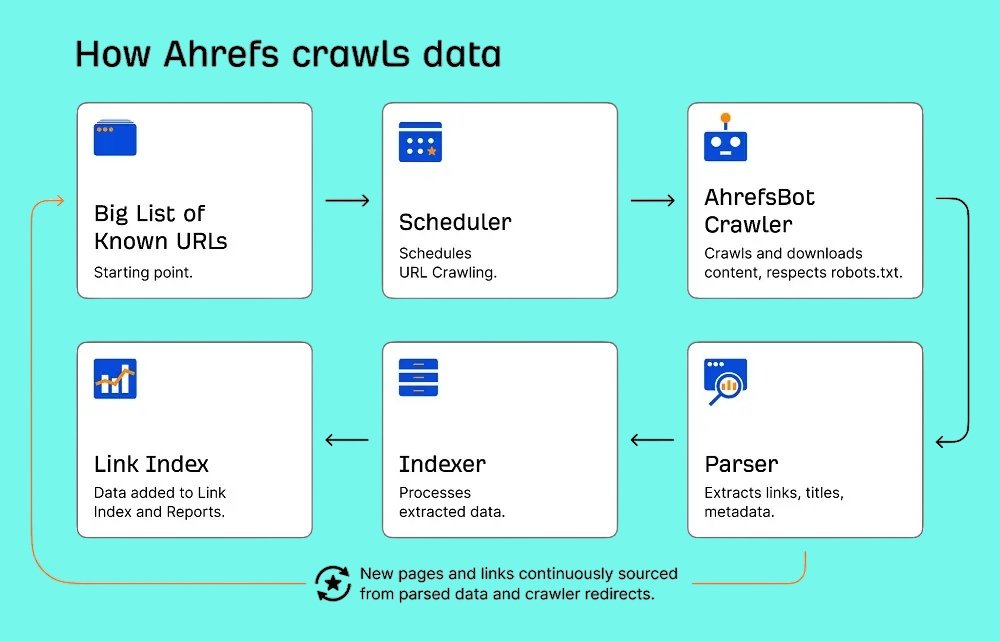
AhrefsBot is an automated crawler built by Ahrefs. It scans web pages to find links, content updates, and technical SEO data. The bot feeds this information into Ahrefs tools like Site Explorer, Site Audit, and Keywords Explorer. AhrefsBot also powers the Yep.com search engine index.
The bot uses GET requests only. It does not submit forms, click buttons, or trigger destructive actions on your server. It follows links found on the web and does not invent random URLs. AhrefsBot respects robots.txt rules, including disallow and crawl-delay directives.
The AhrefsBot User-Agent String
You can identify AhrefsBot in your server logs by its user-agent string. A typical entry looks like this:
Mozilla/5.0 (compatible; AhrefsBot/7.0; +http://ahrefs.com/robot/)
The key token for robots.txt is AhrefsBot. Ahrefs also runs a second crawler called AhrefsSiteAudit for on-demand site audits. Its user-agent looks like this:
Mozilla/5.0 (compatible; AhrefsSiteAudit/6.1; +http://ahrefs.com/robot/site-audit)
Both bots follow the same robots.txt standards. You can block them together or separately.
How AhrefsBot Crawls Your Pages
AhrefsBot discovers pages by following links from other websites. It does not use a sitemap to find URLs, though it may reference one if available. The bot revisits sites on a schedule based on site authority, content freshness, and link popularity. High-authority sites get crawled daily. Newer sites with few backlinks may wait weeks between visits.
The crawler reduces speed automatically if your server returns many 4xx or 5xx errors. This auto-throttle protects your server, but it also means crawl data in Ahrefs becomes outdated during outages.
Why Website Owners Block AhrefsBot?
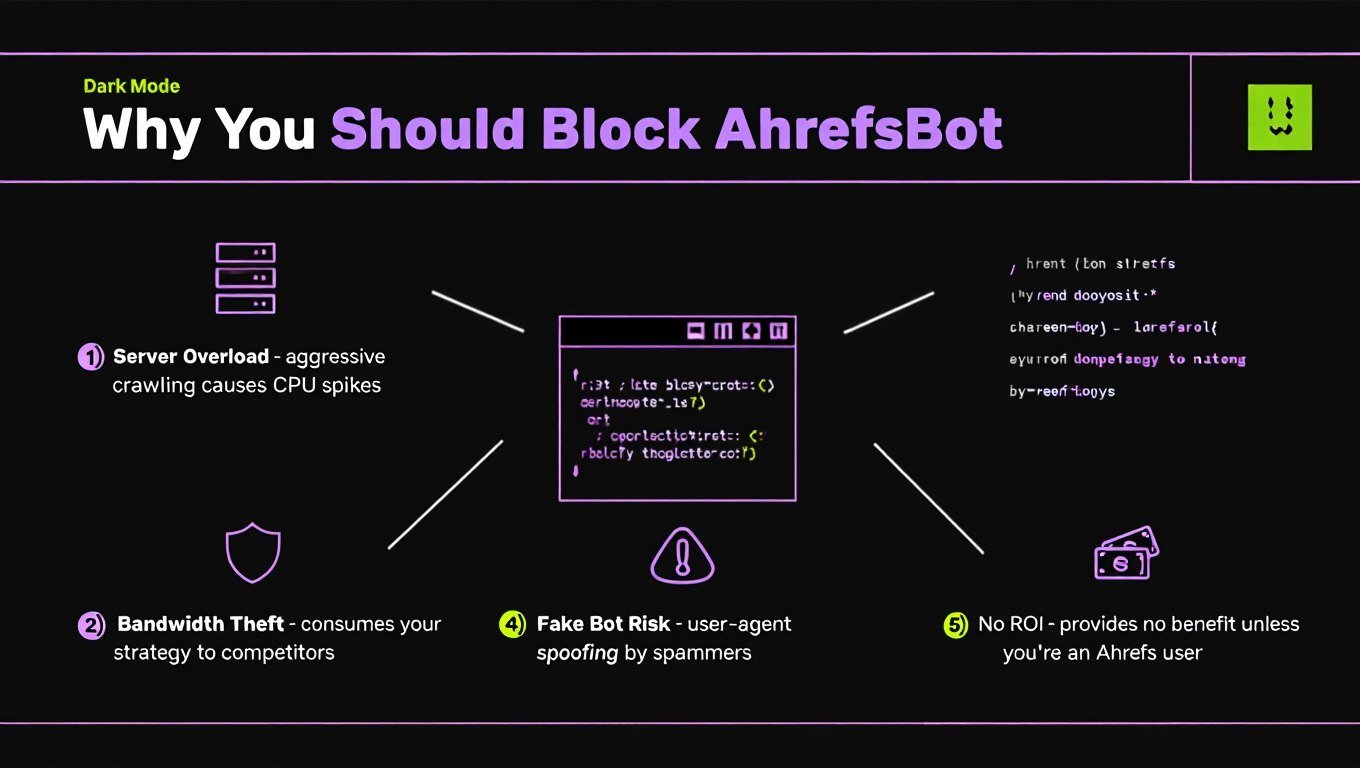
Not every site wants AhrefsBot to crawl its pages. The reasons fall into three main categories: server load, privacy, and security.
Server Resource Concerns
AhrefsBot sends many requests. For small websites on shared hosting, these visits can spike CPU usage and bandwidth. An eCommerce store with 10,000 product pages may see heavy crawl traffic that slows page load times for real visitors. Blocking or slowing the bot reduces this load.
Privacy and Competitive Intelligence
AhrefsBot collects backlink data. Competitors use Ahrefs to study your link profile, top pages, and traffic estimates. Some website owners block the bot to hide this data from rival analysis. This is common in competitive niches like finance, legal services, and affiliate marketing.
Blocking Fake Bots Posing as AhrefsBot
Scrapers and malicious bots often fake the AhrefsBot user-agent to avoid detection. These fake bots do not follow robots.txt and may steal content or probe for vulnerabilities. Blocking the real AhrefsBot user-agent at the server level can stop both legitimate and fake traffic, though IP verification is the safer way to separate them.
How to Block AhrefsBot Using robots.txt
The robots.txt file is the standard way to control crawler access. It sits in your website root directory. AhrefsBot obeys robots.txt rules, so this is the easiest blocking method.
1. Block AhrefsBot From Your Entire Website
To stop the bot from accessing any page on your domain, place these 2 lines of code into your robots.txt file:
User-agent: AhrefsBot
Disallow: /
Place this rule above or below your other user-agent blocks. Save the file and upload it to your root domain. AhrefsBot checks robots.txt before each crawl cycle, but changes may take days to take effect. You can request a recrawl via Ahrefs tools if you need faster confirmation.
2. Block AhrefsBot From Specific Folders
You can block AhrefsBot from certain sections while allowing the rest of your site. This is useful for staging areas, admin panels, or private report pages. Add folder paths like this:
User-agent: AhrefsBot
Disallow: /admin/
Disallow: /staging/
Disallow: /internal-reports/
Each Disallow line covers that folder and all subfolders. This method keeps your public SEO data fresh in Ahrefs while hiding sensitive areas.
3. Allow AhrefsBot but Reduce Crawl-Delay
If you do not want a full block, use the crawl-delay directive to reduce server load. This tells AhrefsBot to wait a set number of seconds between requests. Example:
User-agent: AhrefsBot
Crawl-delay: 8
A 8-second delay reduces request volume by 90% compared to default speeds. Values between 5 and 20 seconds work well for most sites. Combine crawl-delay with partial disallows for fine-grained control.
How to Block AhrefsBot at the Server Level
Server-level blocks stop AhrefsBot before it reaches your application. These methods are stronger than robots.txt because they return a 403 forbidden response immediately.
Apache .htaccess Method
For Apache servers, add this code to your .htaccess file in the root directory:
RewriteEngine On
RewriteCond %{HTTP_USER_AGENT} AhrefsBot [NC]
RewriteRule .* - [F,L]
This checks every request for the AhrefsBot user-agent and blocks it with a 403 error. The [NC] flag makes the match case-insensitive. The [F,L] flags tell Apache to forbid access and stop processing further rules.
Nginx Server Block Method
For Nginx servers, add this inside your server {} block:
if ($http_user_agent ~* "AhrefsBot") {
    return 403;
}
The ~* operator performs a case-insensitive match. This rule returns a 403 forbidden response to any request matching the AhrefsBot string. Restart Nginx after saving the configuration file.
PHP-Based Blocking
You can block AhrefsBot at the application level using PHP. Add this snippet to the top of your main template or header file:
<?php
$user_agent = $_SERVER['HTTP_USER_AGENT'];
if (stripos($user_agent, 'AhrefsBot') !== false) {
    header('HTTP/1.0 403 Forbidden');
    exit('Access Denied');
}
?>
This method works on any PHP-based site, including WordPress. It checks the user-agent string and exits with a 403 error if AhrefsBot is detected. However, PHP blocks use more server resources than .htaccess or Nginx rules because the application must load first.
How to Block AhrefsBot Using a Firewall or CDN
Firewalls and CDNs offer the strongest protection. They block bots at the network edge before requests reach your server.
Cloudflare Firewall Rules
Cloudflare users can create custom firewall rules to block or challenge AhrefsBot. Log in to Cloudflare, go to Security > WAF, and create a rule with this logic:
- Field: User Agent
- Operator: Contains
- Value: AhrefsBot
- Action: Block
You can also use the “Known Bots” feature to verify legitimate crawlers. Cloudflare maintains a list of verified good bots. If AhrefsBot appears there, you can create an exception or rate-limit rule instead of a full block.
IP-Based Blocking and Verification
Ahrefs publishes the IP ranges its crawlers use. You can block these IPs at the server firewall or CDN level. However, IP ranges change over time, so you must update your rules regularly.
A safer approach is to verify real AhrefsBot traffic using reverse DNS. Real AhrefsBot IPs resolve to hostnames ending in ahrefs.com or ahrefs.net. Fake bots using the AhrefsBot name will fail this check. Use this verification to build an allowlist or blocklist based on IP reputation rather than user-agent alone.
How to Verify Real AhrefsBot Traffic
User-agent strings are easy to fake. You should verify whether an AhrefsBot visit is genuine before applying permanent blocks.
Check Reverse DNS
Run a reverse DNS lookup on the visiting IP address. Real AhrefsBot IPs resolve to hostnames like crawler-xxx.ahrefs.com or crawler-xxx.ahrefs.net. If the hostname does not match, the bot is likely an imposter.
Compare Against Official IP Ranges
Ahrefs publishes current crawler IP ranges in its help documentation. Compare the visiting IP against this list. Keep your firewall rules updated when Ahrefs adds new IPs. Blocking outdated ranges may let fake bots through, while blocking current ranges stops legitimate crawls.
What Happens When You Block AhrefsBot
Blocking AhrefsBot from your website has specific effects on your site’s visibility in SEO tools. It does not affect Google search performance.
- Ahrefs data freezes. Your backlink count, referring domains, and keyword rankings in Ahrefs stop updating. Existing data remains visible, but new links and content changes will not appear.
- Site Audit tools break. If you or your agency uses Ahrefs Site Audit, the tool cannot crawl your domain. You must use alternative audit tools or remove the block temporarily.
- Competitors lose visibility. Rivals using Ahrefs cannot see your latest backlink acquisitions or content updates. This protects your strategy but also removes your site from competitive benchmarks.
- Server load drops. Blocking the bot reduces bandwidth and CPU usage, especially on large sites or shared hosting plans.
Frequently Asked Questions
Does blocking AhrefsBot hurt Google rankings?
No. Blocking AhrefsBot does not affect Google rankings. AhrefsBot is a third-party SEO crawler, not a search engine bot. Googlebot operates independently and does not read your AhrefsBot robots.txt rules. Your search visibility in Google, Bing, or other engines stays the same.
Can AhrefsBot ignore robots.txt?
No. AhrefsBot strictly respects robots.txt disallow and allow rules. It also follows crawl-delay directives. If you block it in robots.txt, the bot will stop crawling your site. Server-level blocks are only needed if you suspect fake bots or need faster enforcement.
Is AhrefsBot dangerous?
No. AhrefsBot is a legitimate SEO crawler used by millions of professionals. It does not hack sites, inject malware, or steal private data. The only risks are server load and competitive data exposure. Fake bots pretending to be AhrefsBot are dangerous, but the real bot is safe.
Can I block only AhrefsSiteAudit?
Yes. You can target AhrefsSiteAudit separately in robots.txt. Use this rule:
User-agent: AhrefsSiteAudit
Disallow: /
This blocks the on-demand audit bot while allowing the main AhrefsBot to crawl for backlink updates. Site owners who want fresh link data but no audit scans use this method.
Does AhrefsBot use a fixed IP address?
No. AhrefsBot uses a range of IP addresses that change over time. Ahrefs publishes these ranges, but they are not fixed to a single address. You should check Ahrefs documentation for current IPs rather than blocking individual addresses permanently.
Can fake bots pretend to be AhrefsBot?
Yes. Scrapers and malicious bots often spoof the AhrefsBot user-agent to bypass simple filters. You can catch these fakes by verifying reverse DNS and checking official IP ranges. Always verify bot identity before whitelisting or blocking based on user-agent alone.
Conclusion
You can block AhrefsBot from crawling your website using robots.txt, server rules, or firewall settings. The robots.txt method is the simplest and most standard approach. Add User-agent: AhrefsBot and Disallow: / to your root robots.txt file to stop all crawling. For stronger protection, use Apache .htaccess or Nginx rules to return a 403 error. Firewalls and CDNs like Cloudflare offer network-level control with IP verification.
Blocking AhrefsBot reduces server load and hides your backlink data from competitors. It does not hurt your Google rankings or search engine visibility. Choose the blocking method that matches your technical skill level and server setup. Verify real bot traffic using reverse DNS to avoid blocking legitimate visitors or letting fake scrapers through. Apply these steps today to control how AhrefsBot interacts with your website.
You May Also Like
 SEO Tools
50+ Best Free SEO Tools That SEO Experts Actually Use In 2026
 SEO Tools
7 Best SERP Checkers to Monitor & Track Your Keyword Rankings
 SEO Tools
How to Use Ahrefs for Free: 11 Free SEO Tools
 SEO Tools
8 Best Rank Tracker Tools: Free & Paid Options Tested and Compared
 SEO Tools
11 Best Keyword Clustering Tools: Free & Paid Options Tested and Compared
 SEO Tools
11 Best Keyword Generator (Free Keyword Research Tools)
 SEO Tools
8 Best On-Page SEO Checkers to Improve Your SEO
 Online Services
10 Best Tumblr Alternatives For Free To Use
 SEO Tools