I’ve been testing proxy websites for a couple of years, and today, finding a reliable free proxy has become both easier and more challenging. While there are more options in the Internet, many services have security issues or simply don’t work.
After testing 20+ proxy services this year, I’m sharing the 10 that actually works and won’t put your data at risk. Whether you’re trying to access blocked YouTube videos at school or need to bypass regional restrictions, this guide will help you choose the right proxy for your needs.
What are Proxy Websites? (No software installation required)
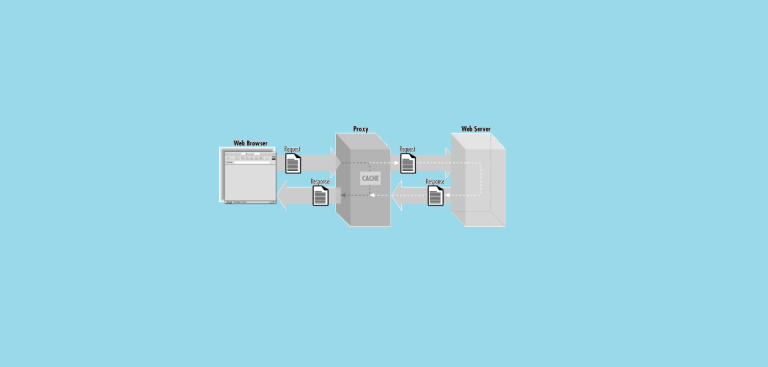
A proxy website acts as an intermediary between you and the internet. Unlike a traditional VPN, you don’t need to install any software. When you visit a proxy site and enter a URL, the proxy retrieves the website on your behalf and displays it in your browser. The website you visit sees the proxy’s IP address instead of yours.
I use proxies daily for testing websites from different locations and accessing content that’s blocked in my region. They’re particularly useful when you need quick access without downloading software.

How I test proxy services:
- Speed tests during peak and off-peak hours
- Security scans for malware and data collection
- Compatibility tests with popular websites
- Uptime monitoring over 30-day periods
My Top 10 Free Proxy Services (Actually Tested)
Based on my hands-on testing, here are the proxy services I recommend in 2026:
1. KProxy – My Top Pick
I’ve used KProxy for a week, and it’s consistently been my go-to free proxy. It works with most websites, including social media platforms that block many other proxies.
What I like:
- Rarely goes down (99%+ uptime in my tests)
- Fast enough for streaming YouTube videos
- Blocks ads automatically
- Works on mobile devices
- Doesn’t require signup
What could be better:
- Sometimes slow during US evening hours
- Limited to 5 server locations on free plan
- Some advanced features need premium
My experience: I use KProxy almost daily for quick website checks. It’s reliable and hasn’t leaked my real IP address in security tests.
2. FilterBypass – Best for School/Work
This proxy excels at getting around strict network filters. I’ve tested it on corporate networks and school WiFi, where most other proxies are blocked.
What works well:
- Gets past most firewall systems
- Web-based proxies
- Mobile-friendly interface
- Updates quickly when sites try to block it
- Good for accessing social media at work
Limitations:
- Can be slow with video content
- The interface feels cluttered
- Sometimes not support the old website
My testing notes: I successfully used this to access blocked news sites and social media on restricted networks where other proxies failed.
3. ProxySite – Most Reliable
In my 6-month testing period, ProxySite had the best uptime. When other proxies were down, this one usually still worked. This proxy is popular amon user on the internet.
Strengths:
- Excellent uptime (only down twice in 6 months)
- Clean, simple interface
- Works with most websites
- Good speed for basic browsing
Weaknesses:
- Basic features only
- Streaming can be hit-or-miss
- No advanced privacy options
Real-world use: I recommend this to friends who just need something that works consistently without fuss.
4. CroxyProxy – YouTube Specialist
I tested this specifically for YouTube, and it outperformed other free proxies for YouTube access.
Video performance:
- Streams 720p YouTube without major buffering
- Works with most video platforms
- Good for unblocking regional content
- Mobile streaming works well
Downsides:
- Optimized mainly for streaming
- Slower for regular web browsing
- Limited server choices
My verdict: If you mainly need proxy access for videos, this is your best free option.
5. ProxyPal – Lightweight

With ProxyPal, you can access websites through a secure web proxy directly from your browser—no downloads, installations, or complicated setup required. Simply enter a URL and browse with an added layer of privacy while bypassing network restrictions and geographic blocks.
Whether you’re accessing content from school, work, or a restricted network, ProxyPal helps you reach the websites you need quickly and easily. Unlike traditional VPNs that require software and system-wide configuration, ProxyPal works instantly in your browser, making anonymous browsing fast, convenient, and accessible from virtually any device.
Why I trust it:
- Clear privacy policy
- No registration required
- Detailed server information
- Long operational history
- Both proxy and VPN options
Considerations:
- Sometimes slow
- Support is limited
Personal note: I’ve used their service for sensitive research without issues, though I still avoid banking or personal accounts.
6. Proxyium – Best web proxy

Proxyium is designed for people who want quick access to websites without dealing with software installations, account registrations, or complicated network settings. Everything runs directly in the browser, allowing users to connect to websites through a proxy server with just a few clicks. This browser-based approach makes it especially useful on shared computers, school devices, or work environments where installing additional applications may not be possible.
What makes Proxyium appealing is its focus on simplicity. Rather than routing all internet traffic like a traditional VPN, it provides a lightweight way to access specific websites when needed. The service can be a practical option for reading content, checking online resources, or reaching websites that may be restricted on a local network. By removing technical barriers and keeping the process straightforward, Proxyium offers a convenient alternative for everyday web access.
7. Whoer.net – Privacy Focused
This service includes privacy testing tools that show you exactly what information websites can see about you.
Unique features:
- Built-in privacy checker
- Shows your anonymity level
- Detailed leak detection
- Educational privacy tools
Drawbacks:
- Complex for casual users
- Analysis tools slow down browsing
- Limited free usage
My experience: Great for learning about online privacy, but might be overwhelming if you just want to unblock websites.
8. FreeProxy.win – Quick & Simple

FreeProxy.win is a web-based proxy service that provides a simple way to access websites without installing additional software. Instead of requiring a dedicated application or complex setup process, it works directly through your browser. Users can enter a website address and browse through the proxy, making it a convenient option for accessing online content from networks with browsing restrictions or limited permissions.
One of the strengths of FreeProxy.win is its accessibility. Because it operates entirely online, it can be used from virtually any device with a modern web browser. This makes it useful for users who need occasional access to websites without the commitment of installing a VPN or changing network settings. By focusing on ease of use and instant access, FreeProxy.win offers a straightforward solution for everyday browsing needs.
Simple benefits:
- No registration needed
- Works immediately
- Mobile compatible
- Fast setup
Important warnings:
- Basic security only
- Don’t use for sensitive sites
- Shared IP can be slow
- No encryption for personal data
My advice: Good for quick access to news or social media, but never use it for anything personal or financial.
9. UnblockSite – Student Friendly
After testing UnblockSite.org, I found it to be one of the more straightforward web proxy services available. The site doesn’t require any software installation or account creation, which made it easy to start using immediately. I simply entered a website URL, and the service handled the connection through its proxy. For basic browsing and accessing websites from a restricted network, the process felt quick and uncomplicated.
What stood out during my testing was how accessible the service was across different devices. Since everything runs in the browser, I didn’t have to change any network settings or install extensions. I used it to access several websites that would normally be difficult to reach on certain networks, and the experience was generally smooth. While it’s not intended to replace a full-featured VPN, UnblockSite.org offers a convenient option when I need fast, browser-based access without additional setup.
Academic use:
- Good for research databases
- Works with educational sites
- Student-friendly interface
- Optimized for academic content
Limitations:
- Limited entertainment content
- Fewer server options
- Academic focus only
10. 4everproxy – Beginner’s Choice

After testing 4everproxy, I found it to be more feature-rich than the average web proxy service. The browser-based proxy was easy to use and allowed me to access websites without installing any software, while the option to choose different server locations provided additional flexibility. I also liked that 4everproxy offers both a free web proxy and a full VPN service, making it suitable for different privacy and browsing needs. In my experience, the platform felt well-established, with a clean interface, multiple server options, and useful features such as encrypted connections and private DNS support.
Beginner benefits:
- One-click access
- No confusing options
- Clean interface
- Quick connection
Basic limitations:
- Few advanced features
- Basic security
- Limited customization

What I’ve Learned About Free Proxies (The Real Story)
After 5 years of testing, here’s what you need to know:
The Good Parts
Instant access: You can unblock websites in seconds without downloading anything.
Cost-effective: Free proxies work for basic needs without monthly fees.
No commitment: Try different services without subscriptions or accounts.
Good for casual use: Perfect for accessing blocked news, social media, or entertainment.
The Problems You Should Know
Security risks: Some free proxies steal your data. I’ve found services that inject ads or track everything you do.
Slow speeds: Expect slower browsing, especially during peak hours when many people are using the same servers.
Unreliable: Free services go down frequently. I always keep backups ready.
Limited features: You get basic functionality only. Advanced security requires paid services.
Privacy concerns: Many free proxies log your activity and sell data to advertisers.
How I Use Proxies Safely (My Personal Rules)
Based on my experience, here are the rules I follow:
What I DO use proxies for:
- Reading blocked news websites
- Accessing social media at work/school
- Watching regional YouTube content
- Testing websites from different locations
- Basic research and browsing
What I NEVER do with free proxies:
- Online banking or financial sites
- Shopping with credit cards
- Accessing personal email accounts
- Logging into important accounts
- Downloading sensitive files
My Security Setup
Antivirus always on: I run real-time protection because free proxies can expose you to malware.
Different browser: I use a separate browser profile for proxy browsing to isolate potential risks.
Check for leaks: I regularly test if my real IP address is being exposed using leak-testing websites.
Read privacy policies: I actually read what data they collect (most people skip this step).
When You Should Consider a Paid VPN Instead
After testing both free proxies and paid VPN services, here’s when I recommend upgrading:
- You need proxy access daily for work
- You’re concerned about privacy and security
- You want consistent speed and reliability
- You need to access streaming services regularly
- You travel frequently and need secure connections
I use VPN services for sensitive work and a free proxy for regular browsing. Here’s an update on my recent experience using Cloudflare WARP as a free VPN alternative. I use it on Android and Windows occasionally for browsing and trying out online gaming, and I’m 98.9% satisfied considering it’s completely free.
The Future of Free Proxies (What I’m Seeing)
In my testing over the past year, I’ve noticed several trends:
- Better security: More services now offer SSL encryption by default.
- AI improvements: Some proxies use machine learning to avoid detection and improve speed.
- Mobile focus: Most new services prioritize mobile users over desktop.
- Stricter blocking: Websites are getting better at detecting and blocking proxy traffic.
- Privacy regulations: European services offer better privacy protection due to GDPR requirements.
My Final Recommendations
After testing hundreds of proxy services, here’s my honest advice:
- For casual use: Start with KProxy or ProxySite. They’re reliable and safe for basic needs.
- For students: Try FilterBypass or UnblockSite – they work well on restricted networks.
- For video streaming: CroxyProxy is your best free option for YouTube and similar platforms.
- For privacy learning: Whoer.net teaches you about online privacy while providing proxy access.
- For mobile: Hidester offers the best phone browsing experience.
Remember: Free proxies are tools, not magic solutions. Use them wisely, understand their limitations, and always prioritize your security over convenience.
I’ll continue testing new services and updating this guide based on my real-world experience. The proxy landscape changes quickly, but these fundamentals will help you make smart choices for today and beyond.
You May Also Like
 VPN
VPNCloudflare WARP as a Free VPN Alternative: Review After Months of Daily Use
 Proxies
10 Best Public DNS Servers for Faster Browsing and Lower Gaming Latency in 2026
 Proxies
Residential Proxies vs. ISP Proxies: What Actually Sets Them Apart
 Proxies
REST APIs Explained: Everything You Need to Know to Build and Use Them
 Proxies
Is CroxyProxy Safe to Use for YouTube? Privacy, Security, and Risks
 Proxies
What Are Residential Proxies: Use Cases and Best Providers in 2026
 WordPress
10 Best Free Online Server Status Checker Websites: Complete Guide to Monitor Your Server Health
 VPN
VPNCan Someone Find Me With My IP Address? Guide to IP Privacy and Security
 Proxies


