Building a website with an attractive design isn’t enough. Making sure it’s up and running without errors like 502 Bad Gateway is also important. But checking your website yourself can be hard work.
To make this easier, you can use a website monitoring tool. These tools check your site’s performance automatically and let you know when there’s a problem. There are many uptime monitoring tools with different features, testing locations, and prices.
In this guide, I’ll share what I’ve learned from using the top website monitoring tools in 2025. I’ll include some new tools that have become popular. Whether you run a small business, work as a developer, or manage IT for a big company, I’ll help you pick the right tool for your needs.
1. Pingdom

Pingdom has been my favorite website monitoring tool for years, and it’s no surprise that big companies like Netflix and Spotify use it. Pingdom keeps getting better and now offers website, NGINX server, and Java application monitoring. What I like most about Pingdom is its easy-to-use dashboard that turns complicated data into simple, useful information.
From testing many monitoring tools, Pingdom stands out for its good alert system and detailed performance reports. The tool now has smart features that help find problems before they affect your users. With monitoring locations in North America, Europe, and Asia Pacific, you can check your website from around the world.
Key Features:
- Smart problem detection and alerts
- Real-user monitoring with speed tracking
- Custom alerts via email, SMS, Slack, and webhooks
- Ready-made monitoring setups for different types of businesses
- Automatic problem-finding tools
Pros:
- Easy-to-use screen with color-coded information
- Reliable and accurate uptime tracking
- Detailed reports with past data analysis
- Good mobile app for checking on the go
- Works well with other DevOps tools
Cons:
- Costs more than some other tools
- Can be confusing for new users because of many features
- Some advanced features only come with expensive plans
Best For: Medium to large businesses that need detailed monitoring with good reports and worldwide coverage. If you care about website performance and have the money to spend, Pingdom works well.
Price: From $10/month with a 30-day free trial.
2. Datadog

Datadog is more than just a monitoring tool—it’s a full system watch platform that I’ve found very useful for tracking many parts of a website. What makes Datadog special in 2025 is its smart features that automatically find unusual activity and predict possible issues before they cause problems. I’ve used Datadog for everything from simple websites to systems with many parts, and it always works well.
The platform’s user monitoring, system tracking, and database monitoring work together to show you how healthy your system is. Datadog has monitoring spots in America, Asia Pacific, and Europe, and you can also set up private locations for internal checks. The new smart incident management has helped me fix problems much faster.
Key Features:
- Smart detection of unusual activity and predictions
- Full system watching with app, server, and log tracking
- Real-user monitoring with session replay
- Smart incident management and automatic fixes
- Over 600 connections to other tools and services
Pros:
- Very flexible and grows with your needs
- Advanced smart features
- Many ways to see your data with custom screens
- Good community and lots of help documents
- Excellent API for custom connections
Cons:
- Gets expensive as you add more features
- Takes time to learn for new users
- Pricing can be hard to understand at first
Best For: DevOps teams and big companies that need to watch their entire system. If you manage many parts of a website and want smart insights, Datadog is worth the money.
Price: Free version available, with paid plans starting at $15/host/month.
3. Sematext

When I first started using Sematext, I liked how it combines many monitoring tools into one. Big companies like Walmart and Microsoft trust Sematext, and it has become my top choice for all-in-one monitoring including user tracking, transaction tracing, server monitoring, and log management. In 2025, they’ve made their smart features better, making it easier to find and fix performance issues.
What I really like about Sematext is its focus on user experience and real-time analysis. The platform now has better speed monitoring and improved support for modern websites built with React, Angular, and Vue.js. After testing it a lot, I can say that Sematext gives you useful information instead of just raw numbers.
Key Features:
- Real-user monitoring with detailed session analysis
- Smart suggestions for making your site faster
- Complete log management with smart analysis
- Server and app performance monitoring
- Custom screens with predictive information
Pros:
- Good value with many features in one tool
- Strong focus on user experience and speed
- Easy to set up compared to big company tools
- Helpful customer support with expert advice
- Prices that grow with your needs
Cons:
- Fewer connections to other tools than some competitors
- Advanced features need more expensive plans
- Mobile app could have more features
Best For: Companies of any size that want a full monitoring tool without the high cost and difficulty of enterprise platforms. If you care about user experience and want smart insights, Sematext is a great choice.
Price: From $2.8/month with a 14-day free trial.
4. Uptime.com

Uptime.com has been a helpful tool in my monitoring kit, especially when I need to make public status pages for clients. What I like about Uptime.com is how it balances powerful features with ease of use. The platform offers user monitoring, website monitoring, port monitoring, page speed monitoring, API monitoring, real user monitoring (RUM), and synthetic monitoring, all with an interface that’s easy for new users.
In my experience, Uptime.com is good at avoiding false alarms—a common problem with many monitoring tools. Their Uptimebots technology makes sure you only get messages about real problems, which has saved me many unnecessary late-night alerts. With test points from the USA to Singapore and Australia, you get good worldwide coverage, and their 24/7 support has always been helpful when I needed it.
Key Features:
- Advanced synthetic monitoring with real browser testing
- Public and private status page creation
- Multi-location monitoring from 30+ global locations
- Smart alerting with message routing
- API monitoring with automatic testing
- Email, SMS Alerting, and 20+ Integrations
Pros:
- Very easy-to-use interface
- Reliable monitoring with few false alerts
- Excellent customer support available 24/7
- Flexible prices for businesses of all sizes
- Strong focus on keeping websites working well
Cons:
- Fewer advanced features than enterprise tools
- Some advanced monitoring needs expensive plans
- Mobile app could be better
Best For: Small to medium businesses that need reliable monitoring with good support and status pages. If you want a monitoring tool that works well without being complicated, Uptime.com is a solid choice.
Price: From $7/month with a 21-day free trial.
5. Hyperping (NEW)
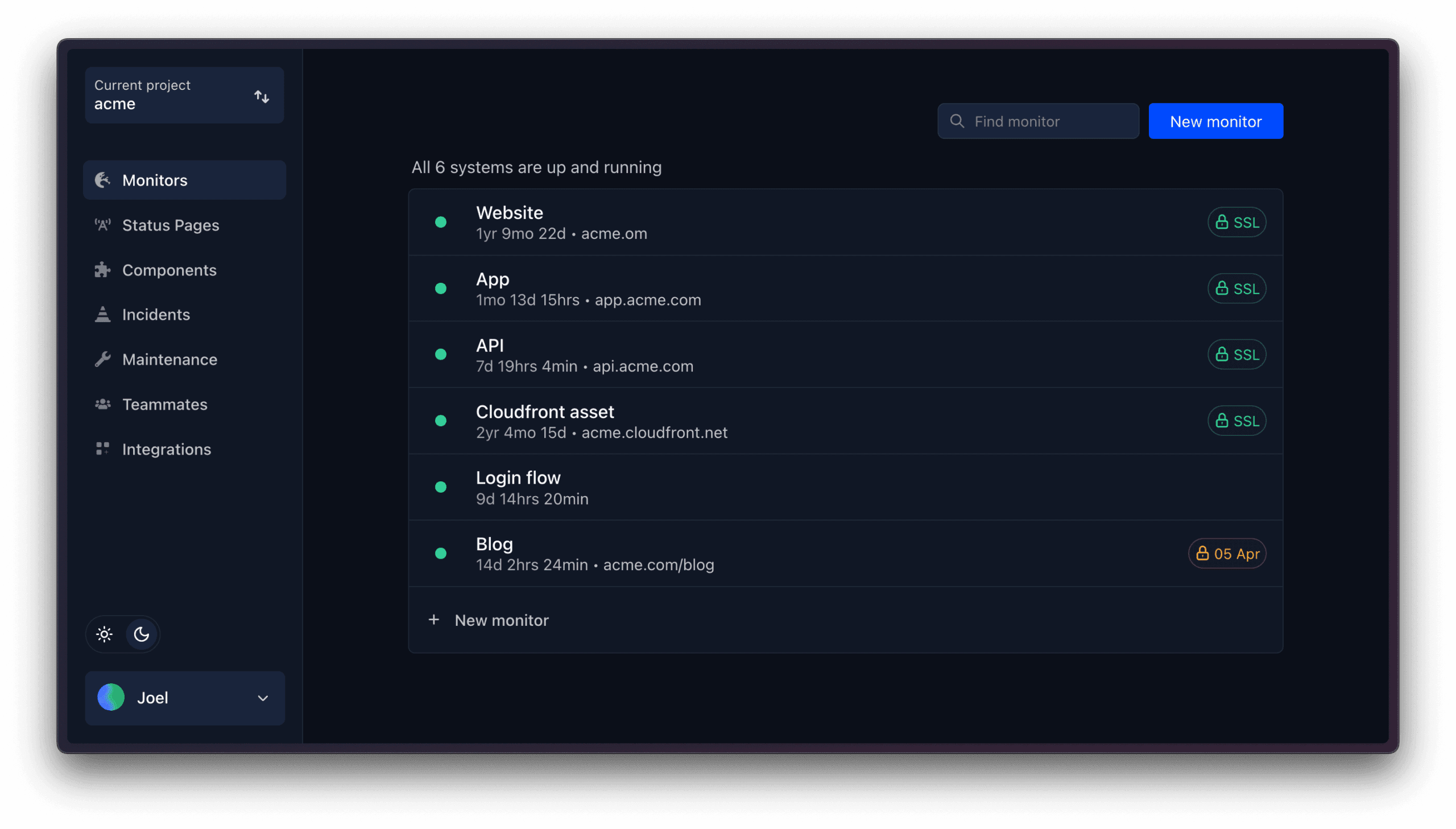
Hyperping has quickly become one of my go-to monitoring tools, especially for teams that want reliable monitoring without the high cost of enterprise solutions. What I like about Hyperping is how it offers professional-grade features while keeping things simple and affordable. I’ve been using it for several projects, and I’m always impressed by how reliable it is and how it doesn’t overwhelm you with unnecessary complexity.
What makes Hyperping special is its focus on giving teams everything they need in one package. The platform offers 24 different types of monitoring checks from 19 regions around the world, with checks running as fast as every 10 seconds on higher plans. You get detailed status pages, smart alerting, and team collaboration features all working together. While it’s not completely free, their free forever plan gives you a good starting point, and their paid plans offer excellent value for the features you get.
Key Features:
- 24 types of monitoring checks including HTTPS, SSL/Certificate, ICMP, SSH, SMTP, TCP Port, Cron jobs, Synthetic monitoring, Text assertion, and API monitoring
- Fast monitoring with checks as often as every 10 seconds (30 seconds on most plans)
- Multi-location monitoring from 19 global regions
- Full-featured status pages with custom domains, components, multi-language support, and subscriber management
- Smart escalation policies and team notifications
- Integrations with Slack, Microsoft Teams, email, phone, and webhooks
- Synthetic browser checks for testing user flows
- REST API for custom integrations
- Single Sign-On (SSO) support
- GDPR compliant with EU data hosting
- Team member invitations and role-based access
- Incident management with detailed logs
- Weekly and monthly reports
- Mobile-responsive dashboard
Pros:
- Very reliable and accurate monitoring with minimal false positives
- Excellent value for money with comprehensive features
- Easy to set up and use with clean, modern interface
- Free forever plan available for getting started
- Fast check frequencies even on lower-tier plans
- Good team collaboration features
- Strong focus on privacy and GDPR compliance
- Works well with popular team tools like Slack
- Excellent customer support and documentation
- No per-user pricing on most plans
Cons:
- Limited to 5 monitors on free plan with 3-minute check frequency
- No phone support on lower-tier plans
- Some advanced features like audit logging are still in development
- Fewer third-party integrations than some enterprise tools
- Mobile app could be more feature-rich
- Status page customization options could be more extensive
Best For: Small to medium businesses, startups, and DevOps teams that need reliable monitoring with good team features and status pages. If you want professional-grade monitoring without enterprise pricing, Hyperping is an excellent choice.
Price:
- Free Forever: 5 monitors, 3-minute frequency, 1 limited status page
- Hobby: $12/month (yearly billing) – 15 monitors, 30-second frequency, 1 status page
- Startup: $24/month (yearly billing) – 50 monitors, 30-second frequency, 1 status page, 3 browser checks, 1 team member
- Pro: $74/month (yearly billing) – 100 monitors, 30-second frequency, unlimited status pages, 10 browser checks, 5 team members
- Business: $164/month (yearly billing) – 1000 monitors, 10-second frequency, unlimited status pages, 25 browser checks, 15 team members
- Enterprise: Custom pricing
6. Site24x7
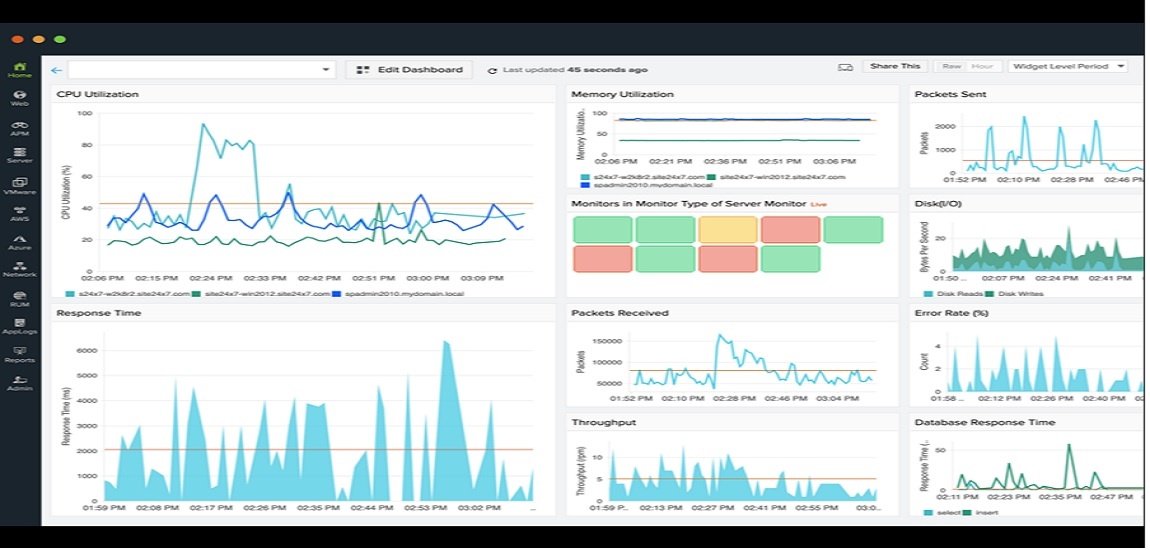
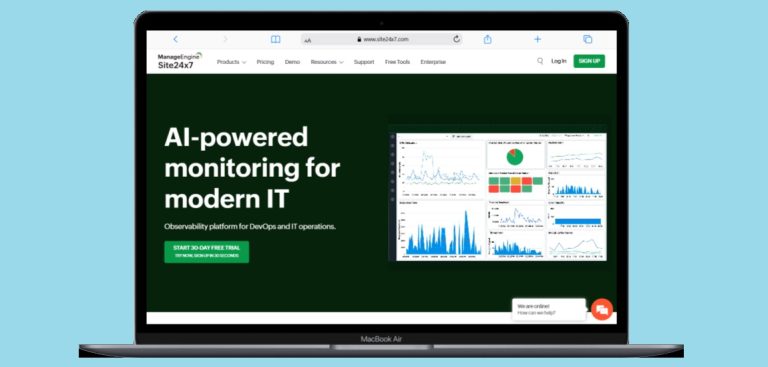
Site24x7 has been my top choice when I need to monitor everything from websites to cloud systems. What I like most about Site24x7 is that it does everything in one place—you get website monitoring, server monitoring, app monitoring, user monitoring, and cloud monitoring all together. This has been very helpful when managing systems with many parts.
In 2025, Site24x7 has improved its smart features, especially for predicting problems and finding their causes automatically. With servers in over 110 locations around the world, you get accurate performance data from everywhere. I’ve found their mobile app very useful for checking on the go, with notifications that tell me about problems right away.
Key Features:
- Complete monitoring for websites, servers, and apps
- Real-user monitoring with detailed session analysis
- Cloud system monitoring for AWS, Azure, and Google Cloud
- Smart detection of unusual activity and predictions
- Many connections to other tools like Zapier, PagerDuty, and Jira
Pros:
- Very complete monitoring features
- Excellent worldwide coverage with 110+ locations
- Good mobile app with full features
- Prices that grow with your needs
- Works well with many other tools
Cons:
- Can be too much for beginners because of many features
- Higher-priced plans can get expensive
- Interface could look more modern
Best For: IT teams and businesses that need to monitor websites, servers, and cloud systems all together. If you manage many types of systems and want everything in one place, Site24x7 is a great choice.
Price: From $9/month with a 30-day free trial.
7. UptimeRobot
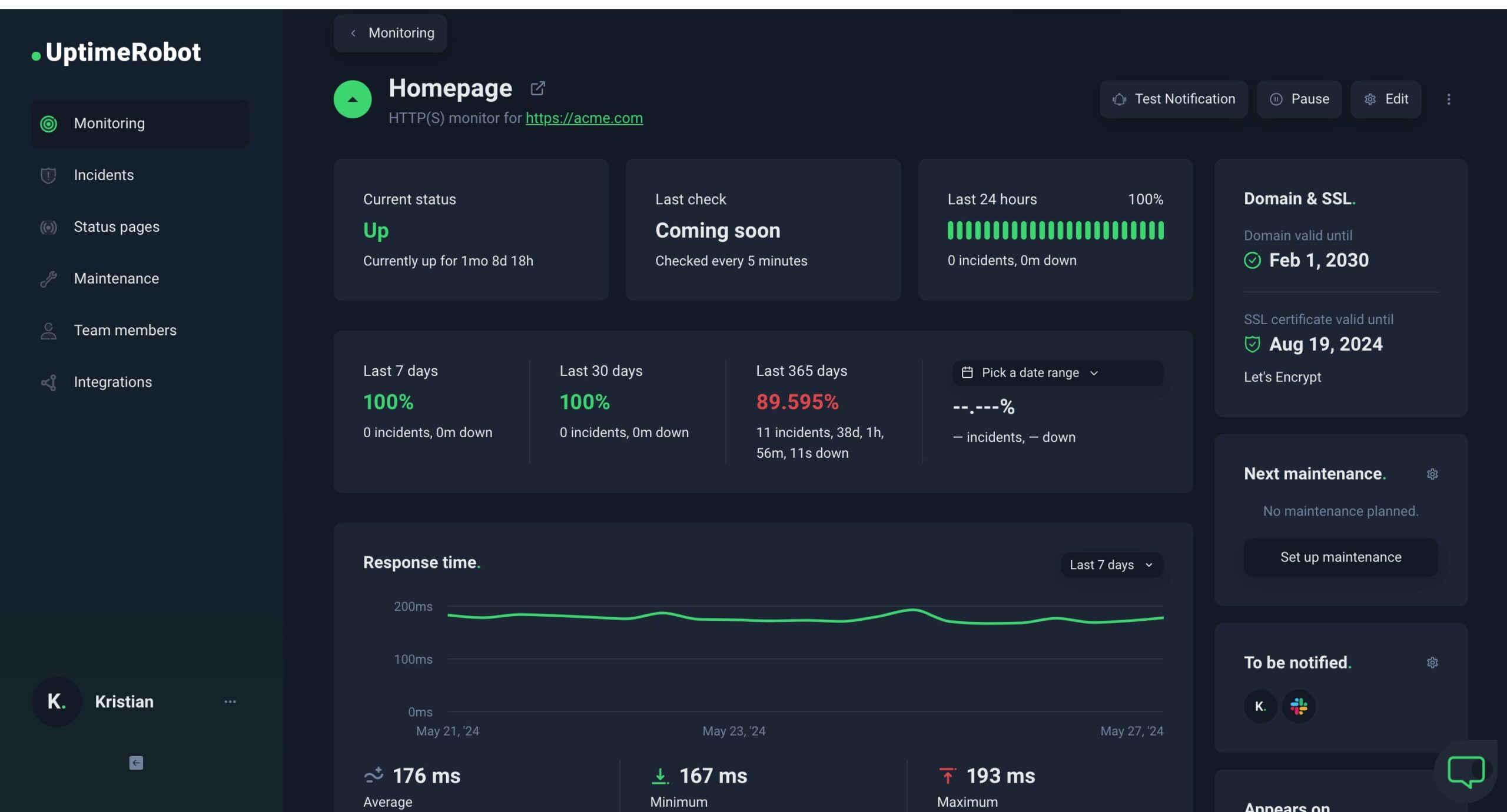
UptimeRobot has been a reliable workhorse in my monitoring toolkit for years, and it continues to be one of the most popular monitoring services with over 2.5 million users. What I appreciate most about UptimeRobot is how it balances simplicity with powerful features. The platform offers multiple types of monitoring services, all delivered through a clean, straightforward interface that makes it easy to keep track of your websites and services.
In my experience, UptimeRobot is perfect for those who want reliable monitoring without getting overwhelmed by complexity. The alert system is robust and supports notifications through many different channels. With monitoring locations around the world, you get good global coverage for basic monitoring needs. Their free plan is surprisingly generous, offering 50 monitors which is more than enough for many small businesses and personal projects.
Key Features:
- 9 types of monitoring: Website monitoring, Response time monitoring, DNS monitoring, SSL monitoring, Domain expiration monitoring, Cron job monitoring, Port monitoring, Ping monitoring, and Keyword monitoring
- 50 free monitors with 5-minute check intervals
- 20+ integrations including email, SMS, voice calls, Slack, Zapier, Telegram, webhooks, Discord, and Microsoft Teams
- Public status pages with customization options
- Maintenance windows to avoid false alerts during planned downtime
- Custom HTTP requests with specific methods, headers, and request bodies
- Multi-location checks to monitor from specific regions
- Response time monitoring with customizable alert thresholds
- SSL certificate expiration alerts (30, 14, and 7 days before expiration)
- Team member invitations with three access levels: read, write, and notify-only
- Mobile app for on-the-go monitoring and management
- Location-specific monitoring to identify regional issues
- Slow response alerts for performance issues
- White-labeled status pages on paid plans
Pros:
- Extremely generous free plan with 50 monitors
- Very easy to use and set up
- Reliable monitoring with accurate alerts
- Many notification options including SMS and voice calls
- Good mobile app for monitoring on the go
- Team collaboration features
- Maintenance scheduling to avoid false positives
- Custom HTTP request support for advanced users
- Good documentation and customer support
- No credit card required for free plan
Cons:
- 5-minute monitoring interval on free plan (60 seconds on paid plans)
- Limited status page customization on free plan
- Some advanced features only available on higher-tier plans
- No phone support
- Limited to 9 integrations on lower-tier plans
- Basic reporting and analytics compared to enterprise tools
Best For: Small businesses, bloggers, developers, and hobbyists who need simple, reliable monitoring without complexity. If you want a set-it-and-forget-it solution that just works and offers great value, UptimeRobot is perfect.
Price:
- Free: 50 monitors, 5-minute intervals, basic status pages, 9 integrations
- Solo: $7/month (billed yearly) – 10 monitors, 60-second intervals, advanced features, location-specific monitoring
- Team: $29/month (billed yearly) – 100 monitors, 60-second intervals, full-featured status pages, all integrations
- Enterprise: $54/month (billed yearly) – 200 monitors, 30-second intervals, 5 team member seats, all features
Official URL: https://uptimerobot.com
8. Checkly

As a developer, I’ve found Checkly to be the perfect monitoring solution built specifically for people like me. What makes Checkly stand out is its “Monitoring as Code” approach, which lets you define and manage your monitoring using code instead of clicking through web interfaces. The platform has become an essential part of my development workflow, allowing me to catch issues before they reach production.
In 2025, Checkly has enhanced its developer experience with powerful integrations with Playwright and OpenTelemetry (OTEL). I particularly love how Checkly enables AI coding assistants to programmatically generate and scale monitoring infrastructure using JavaScript/TypeScript. With monitoring locations powered by AWS data centers worldwide, you get excellent global coverage for your monitoring needs. The platform unifies testing, monitoring, and observability in a single workflow that fits perfectly into modern development practices.
Key Features:
- Monitoring as Code with JavaScript/TypeScript support
- API monitoring with custom assertions and scripting
- End-to-end browser monitoring powered by Playwright
- Uptime monitoring for URLs, TCP, and Heartbeats
- Infrastructure as Code support with Terraform and Pulumi providers
- Checkly CLI for command-line management
- Round Robin and Parallel scheduling options
- Automatic retries for failed checks
- Powerful tracing for faster root cause analysis
- Customizable status pages for customer communication
- Multi-channel alerting (email, Slack, SMS, webhooks)
- Dashboards for visualizing monitoring metrics and trends
- Private locations for internal monitoring
- Integration with AI coding assistants
- OpenTelemetry support for observability
- Real-time alerting with detailed error information
Pros:
- Excellent developer experience with code-first approach
- Flexible usage-based pricing
- Strong integration with development tools and workflows
- Powerful scripting capabilities for custom monitoring
- Good documentation and community support
- Free tier available for getting started
- Supports modern frameworks like Playwright
- AI-powered development workflow integration
- Detailed tracing for quick problem resolution
- Scalable infrastructure that grows with your needs
Cons:
- Steeper learning curve for non-developers
- Limited UI-based configuration options
- Can become expensive with high-volume monitoring
- Not as suitable for non-technical users
- Some features require coding knowledge
- Limited to 4 monitoring locations on lower-tier plans
- Browser checks can get expensive with high usage
Best For: Developers and DevOps teams who want to integrate monitoring into their development workflows using code. If you love working with code and want to monitor your applications programmatically, Checkly is the perfect choice.
Price:
- Hobby: Free – 1 user, 10 uptime monitors, 2-minute frequency, 4 locations, 1,000 browser checks, 10,000 API checks
- Starter: $24/month – 3 users, 20 uptime monitors, 1-minute frequency, 4 locations, 3,000 browser checks, 25,000 API checks
- Team: $64/month – 10 users, 50 uptime monitors, 30-second frequency, 22 locations, 12,000 browser checks, 100,000 API checks
- Enterprise: Custom pricing – Custom users, monitors, and features
Official URL: https://checklyhq.com
9. Dotcom-Monitor
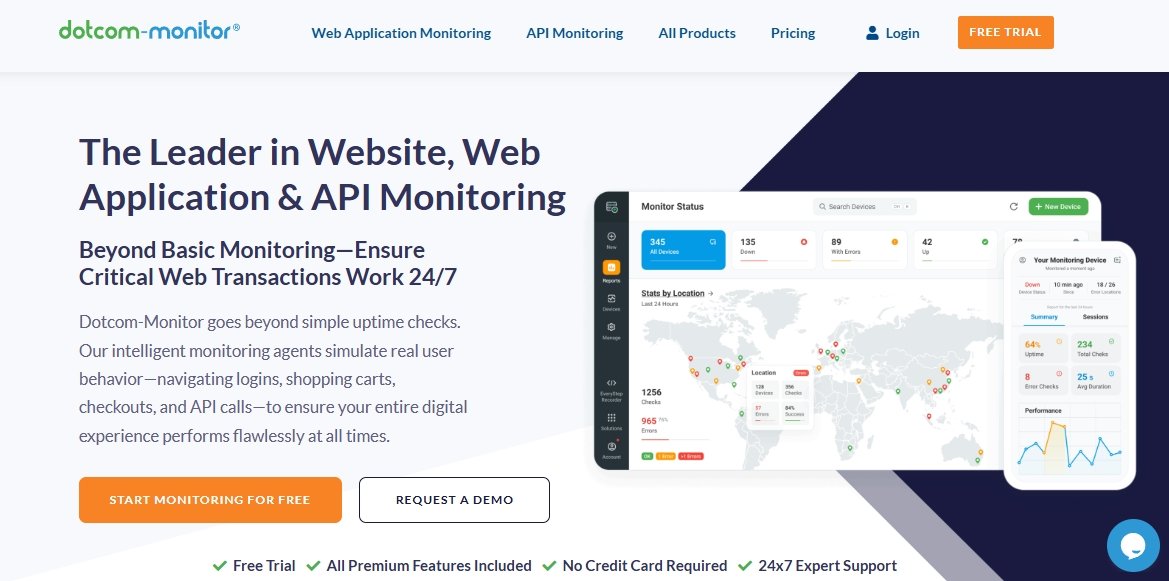
Dotcom-Monitor has been a trusted name in website monitoring since 1998, and I’ve found it to be an excellent solution for businesses that need more than just basic uptime checks. What I like most about Dotcom-Monitor is how it goes beyond simple pings to actually simulate real user behavior—testing everything from login forms to shopping carts and checkout flows. I’ve used it for several e-commerce projects, and it has helped catch issues that would have seriously affected sales.
What makes Dotcom-Monitor special is its focus on testing actual functionality rather than just availability. The platform uses real browser agents to step through your most critical workflows, ensuring that every part of your website works as expected. With monitoring from dozens of global locations, you get a true picture of how your site performs for users around the world. The detailed diagnostics and waterfall reports have saved me countless hours when trying to track down performance issues.
Key Features:
- Full website functionality monitoring with real browser testing
- Web application monitoring for complex user workflows (logins, checkouts, forms)
- Comprehensive API monitoring with support for REST, SOAP, JSON, and XML
- Page performance monitoring with detailed waterfall views and Lighthouse insights
- SSL certificate monitoring and expiration alerts
- Global monitoring from dozens of locations worldwide
- Real browser testing (Chrome, Firefox, IE, Edge) on desktop, mobile, and tablet
- Video capture of monitoring sessions for visual debugging
- Content verification and DOM element timing analysis
- Postman and Insomnia script import for API testing
- Multi-step transaction monitoring for complex workflows
- Image verification for visual regression testing
- Advanced alerting with actionable diagnostics
- Integration with Slack, PagerDuty, Teams, ServiceNow, and webhooks
- Mobile app for real-time notifications
- Private agent options for internal network monitoring
Pros:
- Excellent real browser monitoring that simulates actual user behavior
- Very detailed diagnostics and waterfall reports for quick problem-solving
- Comprehensive monitoring covering websites, apps, and APIs in one platform
- Global monitoring locations provide worldwide performance insights
- Video capture of failed transactions helps visualize issues
- Good integration with popular DevOps and incident response tools
- Reliable and accurate monitoring with minimal false positives
- Excellent customer support with 24/7 expert assistance
- Flexible monitoring frequencies from 1 minute to 3 hours
- Supports both public cloud and private network monitoring
Cons:
- Higher pricing compared to basic monitoring tools
- Can be complex to set up for advanced transaction monitoring
- Some advanced features require technical knowledge
- Mobile app could be more feature-rich
- Learning curve for getting the most out of all features
- Additional costs for private agents and advanced features
- Interface could be more modern and user-friendly
Best For: E-commerce businesses, enterprises, and companies that need comprehensive monitoring of complex web applications and user workflows. If you run a website where functionality is critical and you need detailed insights into user experience, Dotcom-Monitor is an excellent choice.
Price:
- Websites and APIs: Starting at $19.99/month – HTTP/S, Web API, SSL certificates, Ping, Port monitoring
- Page Performance: Starting at $29.96/month – Browser-based page speed monitoring with detailed waterfalls
- Web Applications: Starting at $38.95/month – Real browser transaction monitoring with video capture
- Internet Infrastructure: Starting at $40.00/month – FTP, SMTP, DNS, VoIP, and other protocol monitoring
Official URL: https://www.dotcom-monitor.com
10. StatusCake

StatusCake has been a reliable monitoring tool in my kit, particularly when I need to check websites very often. This London-based company offers many monitoring services including uptime, page speed, domain, server, and SSL monitoring. What I like most about StatusCake is its flexibility and the ability to check sites as often as every five seconds on more expensive plans.
In 2025, StatusCake has improved its reporting features and added better alerting options. I’ve found their custom reporting tool very useful for keeping people informed about website performance. The platform’s 43 test locations in 30 countries give you excellent worldwide coverage, and the ability to protect status pages with passwords or IP limits adds security for sensitive information.
Key Features:
- High-frequency monitoring with checks as often as every 5 seconds
- Complete monitoring including uptime, page speed, and SSL
- Custom reporting with daily, weekly, or monthly reports
- Good alerting with many notification options
- Status page protection with passwords and IP limits
Pros:
- Very frequent monitoring intervals
- Good value for money
- Complete monitoring features
- Easy to use with simple interface
- Good worldwide coverage with 43 test locations
Cons:
- Interface could look more modern
- Some advanced features need more expensive plans
- Fewer connections to other tools than competitors
- Mobile app could be better
Best For: Businesses that need frequent monitoring and detailed reports. If you run important websites that need constant checking, StatusCake’s high-frequency checks are very helpful.
Price: Free version available, with paid plans starting at $24/month.
11. Montastic

Montastic has been my go-to recommendation for people who are new to website monitoring or just need something simple that works without any hassle. What I appreciate about Montastic is how it stays true to its core purpose—letting you know when your website is down—without trying to be everything to everyone. I’ve set it up for friends who run small blogs and for local business owners who aren’t tech-savvy, and they all love how straightforward it is.
What makes Montastic stand out in 2025 is how it’s grown while keeping its simple approach. The platform now offers detailed response time analytics, which is a nice addition for those who want a bit more insight without getting overwhelmed. The new status pages feature is particularly useful for small businesses that want to show their customers they’re on top of any issues. I also like that they offer free lifetime business plans for open-source projects, which shows they care about supporting the developer community.
Key Features:
- Simple website uptime monitoring with instant notifications
- Detailed response time analytics and performance tracking
- Beautiful status pages that you can embed on your website
- Email and SMS alerts when your site goes down or comes back up
- Support for monitoring URLs with custom ports and endpoints
- HTTP authentication support for protected pages
- Team grouping for larger organizations
- Incident management and subscriber notifications
- REST API for custom integrations
- Mobile-responsive dashboard for checking on the go
- Historical uptime data and performance trends
- Free lifetime business plans for open-source projects
Pros:
- Extremely easy to set up and use, even for non-technical people
- Generous free plan that’s actually useful for small websites
- Clean, simple interface that doesn’t overwhelm you
- Reliable notifications that actually work when you need them
- New status pages feature adds professional touch for small businesses
- Good response time analytics without being too complex
- Supports open-source projects with free business plans
- No credit card required to start
- Works well for both personal and business use
- Mobile-friendly interface for checking status on any device
Cons:
- Limited to basic uptime and performance monitoring
- Fewer advanced features compared to comprehensive monitoring tools
- Monitoring intervals might be longer than some businesses need
- Limited customization options for alerts and notifications
- No advanced integrations with other tools and services
- Basic reporting without deep analytics
- Some newer features might still be in development
Best For: Beginners, bloggers, small business owners, and anyone who wants simple, reliable monitoring without complexity. If you’re just starting out with website monitoring or run a small site and don’t need all the bells and whistles, Montastic is perfect.
Price: Free plan available with generous features. Business plans are available with additional features and team support. Open-source projects can get free lifetime business plans.
Official URL: https://www.montastic.com
Conclusion: Choosing the Right Website Monitoring Tool in 2025
After using many website monitoring tools over the years, I can say that no single tool is best for everyone. The right tool depends on what you need, how much you know about technology, and how much you can spend. Whether you run a simple blog by yourself or manage many systems for a big company, there’s a monitoring tool that’s right for you.
Here’s my quick suggestion based on different needs:
- For Beginners and Small Sites: Start with Freshping or Montastic for free, simple monitoring that’s easy to set up.
- For Developers: Checkly offers the best experience for developers with API-first monitoring and excellent workflow integration.
- For Small to Medium Businesses: Uptime.com and Site24x7 provide the best mix of features and reasonable prices.
- For Big Companies and Complex Systems: Datadog and Pingdom offer the most complete monitoring with advanced smart features.
- For Problem Management: Better Uptime combines good monitoring with modern problem handling.
Remember that website monitoring isn’t just about knowing when your site is down—it’s about understanding performance, finding issues before they affect users, and keeping your visitors’ trust. Even a few minutes of downtime can hurt your reputation and income.
If you’re having connection problems with your services or need to keep your website secure, think about using a VPN on your iPhone for safe remote access to your monitoring tools.
Choosing the right monitoring tool is one of the best things you can do for your website. Start with a tool that meets your current needs, and upgrade as your needs grow. You’ll be glad to know your website is being watched 24/7.
You May Also Like
 SEO Tools
8 Best Free Online Word Cloud Generator & Tag Cloud Creator
 SEO Tools
50+ Best Free SEO Tools That SEO Experts Actually Use In 2026
 SEO Tools
7 Best SERP Checkers to Monitor & Track Your Keyword Rankings
 SEO Tools
How to Use Ahrefs for Free: 11 Free SEO Tools
 SEO Tools
8 Best Rank Tracker Tools: Free & Paid Options Tested and Compared
 SEO Tools
11 Best Keyword Clustering Tools: Free & Paid Options Tested and Compared
 SEO Tools
11 Best Keyword Generator (Free Keyword Research Tools)
 SEO Tools
How to Block AhrefsBot From Crawling Your Website
 WordPress


