User Acceptance Testing (UAT) is the final checkpoint before any software product reaches the hands of its end-users. Imagine spending months developing what you believe is the perfect software solution, only to find out that it doesn’t quite meet the actual needs of those who will use it daily. That’s where UAT comes in to save the day! This essential testing phase bridges the gap between technical functionality and real-world usability, ensuring that your software not only works as intended but also delivers value to its intended audience.
When you think about software development, you might picture developers writing code, testers finding bugs, and project managers keeping everything on track. But there’s a crucial phase that often gets overlooked until the last minute: User Acceptance Testing. This is the stage where actual users put the software through its paces in a real-world environment to determine if it meets their needs and expectations. Without proper UAT, even the most technically sound software can fail to gain user adoption, leading to wasted resources, frustrated customers, and ultimately, project failure. Understanding the broader development context, including backend development technologies, helps you appreciate why UAT is so essential in the development lifecycle.
What is User Acceptance Testing?
User Acceptance Testing, often abbreviated as UAT, is the final phase of the software testing process where actual software users test the product to ensure it can handle required tasks in real-world scenarios, according to specifications. It’s the moment of truth where the software is put to the test by the very people who will use it day in and day out. Think of it as a dress rehearsal before the big show – the developers have done their part, the internal testers have given their approval, but now it’s time for the audience (the users) to have their say.
The main purpose of UAT is to validate that the software solution meets business requirements and is ready for deployment. Unlike other forms of testing that focus on technical aspects, UAT zeroes in on usability, functionality, and the overall user experience. When you conduct UAT, you’re essentially asking: “Does this software do what the users need it to do, and can they use it effectively?” This phase is crucial because it uncovers issues that might not be apparent during technical testing but could significantly impact user satisfaction and adoption rates.
UAT typically takes place in a controlled environment that mimics the production setting as closely as possible. During this phase, users work through predefined test cases that represent real business scenarios. They provide feedback on whether the software meets their needs, is intuitive to use, and performs as expected. This feedback is invaluable because it comes from the perspective of those who will actually interact with the software daily, not just those who built it. While full-stack developers focus on building robust applications, UAT ensures those applications truly serve their intended purpose.

The Importance of UAT in Software Development
User Acceptance Testing plays an important role in the software development lifecycle, acting as the final gatekeeper before a product goes live. When you skip or rush through UAT, you’re essentially rolling the dice with your software’s success. Consider the case of a major retail company that launched a new inventory management system without proper UAT, only to discover that store employees couldn’t process returns efficiently during the holiday rush. The result? Long customer wait times, frustrated staff, and a significant hit to the company’s reputation. This scenario illustrates why UAT isn’t just a box to check – it’s a critical safeguard against real-world business disruptions.
The benefits of conducting thorough UAT extend far beyond catching last-minute bugs. When you implement UAT effectively, you:
- Increase user adoption and satisfaction: Users who have tested the software feel a sense of ownership and are more likely to embrace the new system.
- Reduce post-deployment issues: Problems identified during UAT are much cheaper and easier to fix than those discovered after launch.
- Validate business requirements: UAT ensures that the software actually solves the business problems it was designed to address.
- Build stakeholder confidence: Successful UAT demonstrates to decision-makers that the software is ready for prime time.
- Mitigate project risks: By catching issues before deployment, you avoid the costs and reputational damage associated with failed launches.
On the flip side, skipping UAT can lead to disastrous consequences. Beyond the obvious risk of deploying software that doesn’t meet user needs, you also face potential financial losses, decreased productivity as users struggle with inadequate tools, and damage to your organization’s credibility. In today’s competitive business environment, where user experience can make or break a product, neglecting UAT is simply not worth the risk. According to the Software Engineering Institute, poor user acceptance is one of the leading causes of software project failures.
Types of User Acceptance Testing
User Acceptance Testing isn’t a one-size-fits-all process. Depending on your project’s nature, scope, and requirements, you might employ different types of UAT to ensure comprehensive validation. Understanding these variations will help you choose the most appropriate approach for your specific situation and ensure that you’re covering all the necessary bases before giving the green light for deployment.
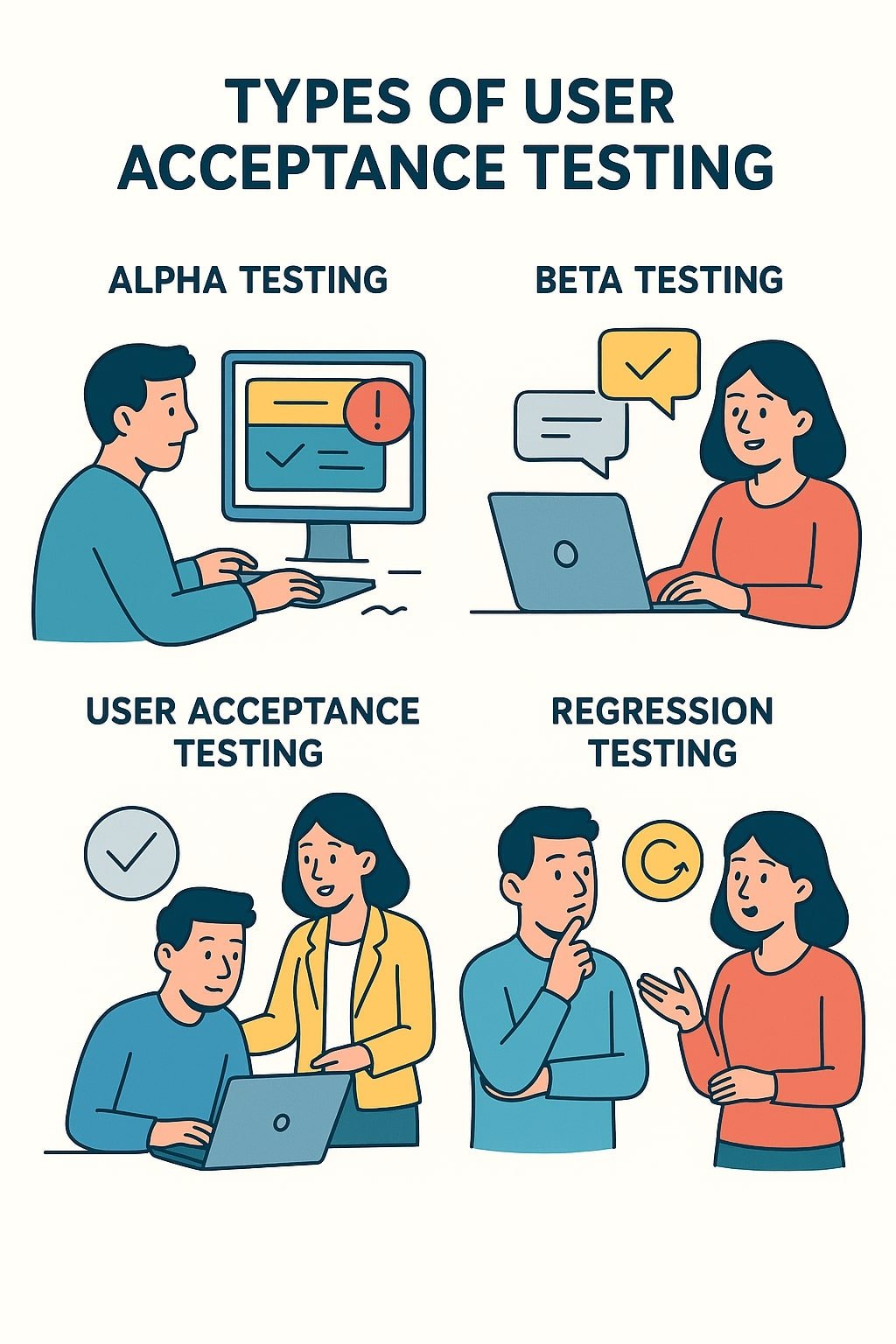
Alpha Testing
Alpha testing represents the first round of UAT, typically conducted by internal staff who aren’t directly involved in the development process. These might include employees from other departments, such as marketing or sales, who can provide a fresh perspective on the software. When you carry out alpha testing, you’re essentially asking: “Does this software make sense to people who understand our business but haven’t been part of the development journey?” This phase helps catch obvious usability issues and functional gaps before the software is exposed to external users.
Beta Testing
Beta testing takes UAT to the next level by involving real end-users outside the organization. These users test the software in their own environments, using their own hardware and under real-world conditions. When you roll out a beta version, you’re gathering invaluable feedback on how the software performs in diverse scenarios that you couldn’t possibly replicate internally. Beta testing can be open (available to anyone interested) or closed (limited to a select group of users), depending on your project’s needs and confidentiality requirements. Companies like Google frequently use beta testing to refine their products before full release.
Contract Acceptance Testing
Contract Acceptance Testing comes into play when software is developed under a contract with specific acceptance criteria. In this type of UAT, the software is tested against these predefined criteria to ensure it meets the contractual obligations. When you’re dealing with contract-based development, this form of testing is non-negotiable – it’s often tied to payment milestones and final sign-off. The testing is usually formal and well-documented, with clear pass/fail criteria outlined in the contract itself.
Regulation Acceptance Testing
For industries subject to strict regulations – such as healthcare, finance, or aviation – Regulation Acceptance Testing is crucial. This type of UAT verifies that the software complies with all relevant laws, standards, and regulations. When you operate in a regulated industry, you can’t afford to overlook this step, as non-compliance can result in severe penalties, legal action, or even the inability to use the software at all. This testing often involves specialized knowledge of the regulatory landscape and may require input from compliance experts or legal advisors. The FDA, for example, has strict guidelines for software used in healthcare settings.
Operational Acceptance Testing
Operational Acceptance Testing (OAT) focuses on the operational readiness of the software. This includes aspects like backup and recovery, performance under load, security measures, and compatibility with existing systems. When you conduct OAT, you’re ensuring that the software not only functions correctly but also integrates smoothly into your operational environment and can be maintained effectively once deployed. This type of testing is particularly important for enterprise systems where downtime or performance issues can have significant business impacts.
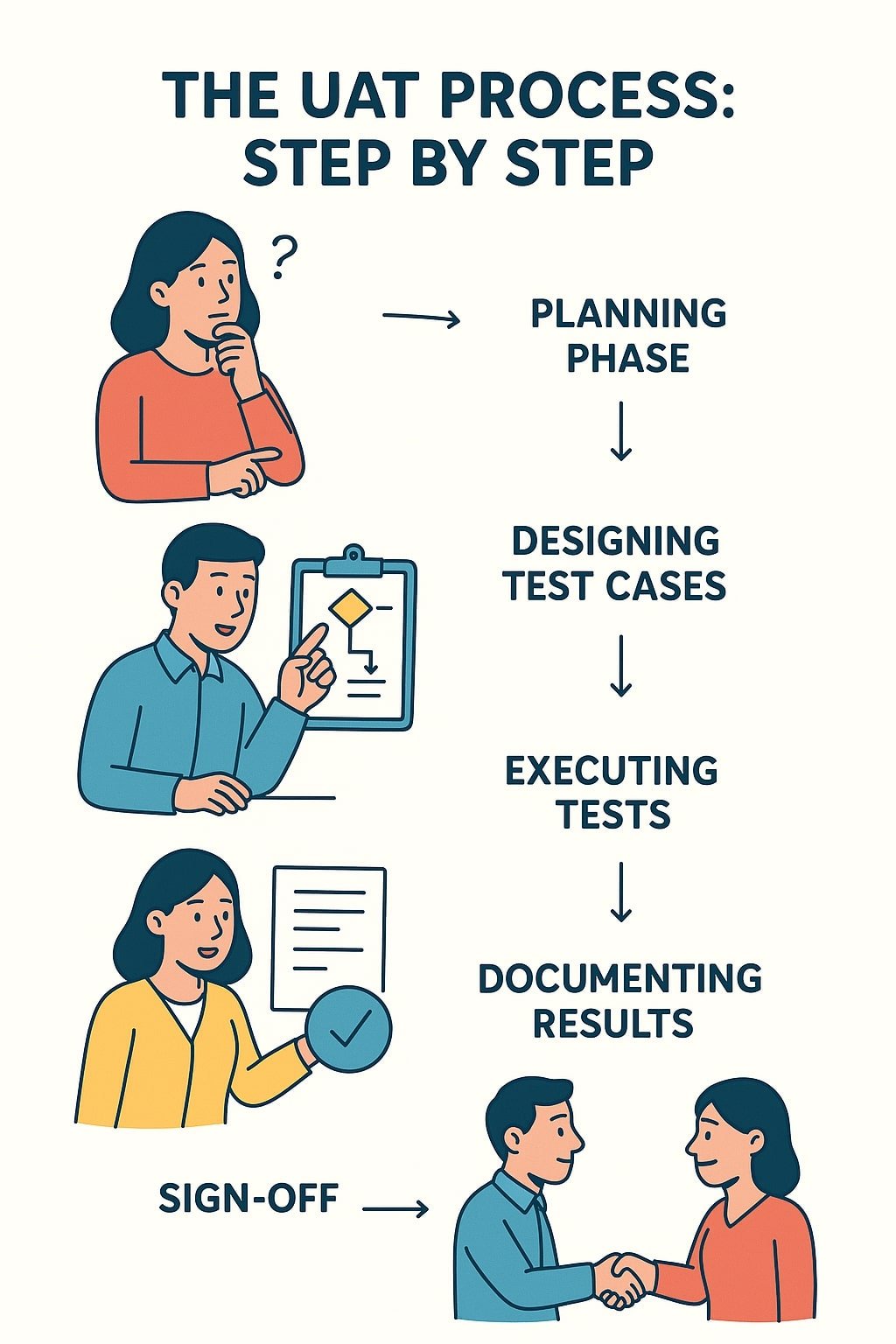
The UAT Process: Step by Step
User Acceptance Testing follows a structured process to ensure thorough validation of the software before its release. When you break down UAT into manageable steps, it becomes less daunting and more effective. Let’s walk through each phase of the UAT process, highlighting what you need to do at each stage to ensure a successful outcome.
Planning Phase
The planning phase sets the foundation for effective UAT. During this stage, you need to define the scope, objectives, and success criteria for the testing. You’ll want to identify who will participate in the testing, what resources they’ll need, and how long the process will take. When you plan carefully, you ensure that everyone involved understands their roles and responsibilities, and that the testing aligns with business goals. Key activities in this phase include:
- Defining test objectives and success criteria
- Identifying and recruiting test participants
- Scheduling test sessions and allocating resources
- Preparing the test environment and data
- Developing communication plans for feedback collection
Designing Test Cases
Once planning is complete, it’s time to design the test cases that users will work through. These test cases should represent real-world scenarios that the software will handle once deployed. When you create effective test cases, you focus on typical user workflows rather than just technical functionality. Good test cases are:
- Based on actual business requirements
- Representative of real user tasks
- Clear and easy to understand
- Accompanied by expected outcomes
- Comprehensive enough to cover critical functionality
Remember, the goal isn’t to test every possible feature exhaustively but to ensure that the software supports the key tasks users need to perform in their daily work.
Executing Tests
With test cases in hand, it’s time to put the software to the test. During this phase, users work through the test cases, documenting their actions and results. When you execute UAT, it’s important to create an environment that feels as close to the real production setting as possible. This means using realistic data, standard hardware configurations, and typical network conditions. As users work through the tests, they should be encouraged to:
- Follow the test cases precisely
- Note any deviations from expected results
- Record any additional issues they encounter
- Provide feedback on usability and overall experience
- Suggest improvements or enhancements
Documenting Results
Thorough documentation is crucial during UAT. Every test result, whether pass or fail, should be recorded along with any relevant comments or suggestions. When you document results effectively, you create a clear trail of evidence that supports your go/no-go decision for deployment. Good documentation should include:
- Detailed descriptions of any issues found
- Steps to reproduce problems
- Screenshots or other evidence, where applicable
- Severity ratings for identified issues
- Suggestions for resolution
This documentation serves multiple purposes: it helps developers understand and fix problems, provides a record for stakeholders, and creates a knowledge base for future projects. While API automation testing focuses on automated validation of interfaces, UAT documentation captures the human element of software validation.
Sign-off
The final step in the UAT process is obtaining sign-off from the appropriate stakeholders. This indicates that the software has met the acceptance criteria and is ready for deployment. When you reach the sign-off stage, you should have addressed all critical issues identified during testing and have a plan for resolving any remaining minor issues. The sign-off typically involves:
- Reviewing all test results and documentation
- Confirming that the acceptance criteria have been met
- Agreeing on any remaining work or known limitations
- Formal approval from business stakeholders
- Documentation of the sign-off decision
Remember, sign-off isn’t just a formality – it’s a critical business decision that should be made carefully, with full awareness of any remaining risks or limitations.
Best Practices for Effective UAT
User Acceptance Testing can make or break your software project, so it’s essential to follow best practices that ensure its success. When you implement these proven strategies, you significantly increase the likelihood that your UAT will uncover important issues while maintaining project momentum. Let’s explore the key best practices that will help you get the most out of your User Acceptance Testing efforts.
Selecting the Right Users
The success of UAT hinges on having the right people involved in the testing process. When you select participants, you should look for users who:
- Represent the actual end-user population
- Have the necessary domain knowledge
- Possess the required technical skills
- Can commit adequate time to testing
- Can provide clear, constructive feedback
It’s tempting to involve only tech-savvy users or those who are readily available, but this approach can skew your results. Instead, aim for a diverse group that reflects your actual user base. This might include power users, average users, and even those who struggle with technology – each perspective brings valuable insights. When you bring together the right mix of testers, you ensure that the software will work for everyone, not just the technically inclined.
Creating Comprehensive Test Cases
Effective test cases are the backbone of successful UAT. When you develop test cases, focus on real-world scenarios rather than technical specifications. The best test cases:
- Mirror actual business processes
- Cover both common and edge cases
- Include clear step-by-step instructions
- Specify expected outcomes
- Are prioritized based on business importance
Avoid the temptation to create overly complex test cases that try to test too many things at once. Instead, break down complex workflows into smaller, manageable test cases. This approach makes it easier to pinpoint where issues occur and ensures that each aspect of functionality receives proper attention. When you create comprehensive yet focused test cases, you set your testers up for success and gather more meaningful feedback.
Providing Adequate Training
Never assume that your test participants will intuitively understand how to approach UAT. When you onboard testers, provide clear training that covers:
- The purpose and importance of UAT
- How to use the test management tools
- The process for documenting issues
- What kind of feedback is most valuable
- Who to contact with questions or problems
Consider creating a short video tutorial or conducting a live training session to walk testers through the process. The more comfortable and confident your testers feel, the higher the quality of feedback you’ll receive. When you invest time in proper training, you’re not just ensuring better testing results – you’re also showing respect for your testers’ time and expertise.
Managing Feedback Effectively
During UAT, you’ll likely receive a flood of feedback – some valuable, some less so. When you manage this feedback effectively, you can separate the signal from the noise and focus on what truly matters. Establish a clear process for:
- Collecting feedback in a centralized location
- Triaging issues based on severity and impact
- Responding promptly to tester questions and concerns
- Providing regular updates on issue resolution
- Acknowledging and appreciating tester contributions
Consider using a dedicated UAT tool or a simple issue tracking system to organize feedback. This makes it easier to track progress, identify trends, and ensure that no important issues fall through the cracks. When you manage feedback well, you not only improve the software but also maintain tester engagement and motivation throughout the process.
Common Challenges in UAT and How to Overcome Them
User Acceptance Testing rarely goes off without a hitch. Even with the best planning and preparation, you’re likely to encounter challenges that can derail your UAT efforts. When you anticipate these common obstacles and have strategies in place to address them, you’ll be better equipped to keep your UAT on track and ensure a successful outcome. Let’s explore some of the most frequent challenges in UAT and practical solutions for overcoming them.
User Availability
One of the most persistent challenges in UAT is securing sufficient time and attention from your test participants. Users often have their regular job responsibilities to attend to, making it difficult for them to dedicate adequate time to testing. When you face this challenge, consider these strategies:
- Schedule testing well in advance and coordinate with managers to ensure users’ availability
- Break testing into manageable sessions rather than expecting users to commit to long blocks of time
- Offer incentives for participation, such as recognition, small rewards, or early access to new features
- Provide flexible testing options, including remote testing capabilities
- Clearly communicate the importance of UAT and how users’ contributions will benefit the organization
Remember that user availability isn’t just about time – it’s also about mental bandwidth. When users are pulled in too many directions, the quality of their testing suffers. By being respectful of their time and making the process as convenient as possible, you increase the likelihood of meaningful participation.
Incomplete Requirements
UAT becomes significantly more challenging when the requirements are unclear, incomplete, or constantly changing. When testers don’t have a clear understanding of what the software is supposed to do, they can’t effectively validate its functionality. To address this issue:
- Ensure that requirements are finalized and approved before UAT begins
- Provide testers with clear documentation that outlines expected behaviors
- Include business analysts or product owners in the UAT process to answer questions
- Use visual aids like wireframes or mockups to clarify expected functionality
- Establish a clear process for handling requirement-related questions during testing
When requirements are ambiguous, encourage testers to focus on whether the software makes sense from a business perspective, even if it doesn’t match their initial expectations. Sometimes, the most valuable feedback comes from users questioning whether the requirements themselves are aligned with actual business needs.
Environment Setup Issues
Nothing derails UAT faster than technical problems with the test environment. When testers encounter issues with access, performance, or data quality, they can become frustrated and disengaged. To prevent environment-related challenges:
- Set up the test environment well before UAT begins and conduct thorough technical testing
- Ensure that the test environment closely mirrors the production environment
- Provide realistic test data that represents actual business scenarios
- Establish clear procedures for reporting and resolving environment issues
- Have technical support personnel available during testing sessions to address problems quickly
When environment issues do arise (and they often do), respond promptly and keep testers informed about resolution progress. Transparency about technical challenges helps maintain tester trust and engagement, even when things don’t go smoothly.
Communication Gaps
Effective communication is essential for successful UAT, yet it’s often an area where projects fall short. When testers, developers, business stakeholders, and project managers aren’t on the same page, misunderstandings arise and important feedback gets lost. To bridge communication gaps:
- Establish a clear communication plan that outlines who should be contacted for different types of issues
- Use a centralized platform for all UAT-related communications and documentation
- Schedule regular check-ins to discuss progress, address concerns, and align on next steps
- Encourage open dialogue and create a safe environment for raising issues
- Provide clear channels for escalating urgent problems when they arise
Remember that communication is a two-way street. When you actively listen to tester feedback and demonstrate that their input is valued, you create a collaborative atmosphere that leads to better testing outcomes. Regular updates about how feedback is being used also help maintain engagement and show testers that their contributions are making a difference.
UAT Tools and Technologies
User Acceptance Testing has evolved significantly over the years, with a growing array of tools and technologies available to streamline the process. When you leverage the right UAT tools, you can enhance efficiency, improve collaboration, and gain deeper insights into user feedback. Let’s explore the landscape of UAT tools and how to choose the ones that best fit your project needs.
Popular UAT Tools
The market offers numerous tools designed specifically to support User Acceptance Testing. When you’re evaluating options, consider these widely used solutions:
- UserTesting: This platform allows you to get feedback from real users as they interact with your software, providing video recordings of their sessions and detailed insights.
- TestRail: A comprehensive test management tool that helps you organize, track, and manage your UAT efforts with customizable test cases and detailed reporting.
- Jira with Xray or Zephyr: These plugins extend the popular Jira platform to support test management, making it easier to integrate UAT with your overall development workflow.
- PractiTest: A flexible test management solution that supports UAT with features like requirements management, test case design, and reporting.
- QASymphony: Now part of Tricentis, this tool offers test management capabilities specifically designed for agile teams, including UAT support.
Each of these tools brings unique strengths to the table, so when you’re making a selection, consider factors like your team size, project complexity, integration requirements, and budget constraints.
Features to Look for in UAT Tools
When you’re evaluating UAT tools, certain features can significantly enhance the effectiveness of your testing process. Look for solutions that offer:
- Intuitive user interface: Your testers come from various backgrounds and technical skill levels, so the tool should be easy for everyone to use.
- Collaboration capabilities: Features that enable communication between testers, developers, and stakeholders help ensure that feedback is properly addressed.
- Comprehensive reporting: Robust reporting features make it easier to analyze test results, identify trends, and make informed decisions about deployment.
- Integration options: The ability to integrate with other tools in your development ecosystem (like project management, bug tracking, or documentation tools) creates a more seamless workflow.
- Mobile accessibility: Support for mobile devices allows testers to provide feedback anytime, anywhere, which can increase participation rates.
When you prioritize these features, you select a tool that not only supports the technical aspects of UAT but also enhances the human elements of collaboration and communication.
Integrating UAT Tools with Other Development Tools
The true power of UAT tools emerges when they’re integrated with your broader development ecosystem. When you connect your UAT tool with other systems, you create a more efficient workflow and ensure that valuable user feedback doesn’t get lost in the shuffle. Key integrations to consider include:
- Project management tools: Connecting UAT results with project management platforms helps track the progress of issue resolution and overall project status.
- Bug tracking systems: Integration with bug tracking tools ensures that issues identified during UAT are properly logged, prioritized, and assigned for resolution.
- Documentation platforms: Linking test cases and results to relevant documentation creates a comprehensive knowledge base for future reference.
- Communication tools: Integration with team communication platforms facilitates real-time discussions about test results and issues.
- Analytics and reporting tools: Connecting UAT data with analytics systems enables deeper insights into testing patterns and outcomes.
When you establish these integrations, you break down silos between different aspects of the development process, creating a more cohesive and efficient workflow. This integration ensures that the valuable insights gained during UAT flow seamlessly into the development and deployment phases, ultimately leading to better software outcomes.
UAT vs. Other Testing Types
User Acceptance Testing is just one piece of the software testing puzzle, and understanding how it differs from other testing types is crucial for implementing a comprehensive quality assurance strategy. When you can distinguish between various testing approaches, you’re better equipped to ensure that your software receives thorough validation at every level. Let’s explore how UAT compares to other common testing types and why each plays a unique role in the software development lifecycle.
UAT vs. System Testing
System testing and User Acceptance Testing are often confused, but they serve distinct purposes. System testing focuses on verifying that the software meets specified technical requirements and functions correctly as a whole system. When you conduct system testing, you’re primarily concerned with questions like:
- Does the software perform all intended functions?
- Are there any technical defects or bugs?
- Does the software meet performance criteria?
- Is the system stable under various conditions?
UAT, on the other hand, centers on whether the software meets business needs and is usable for the intended audience. When you perform UAT, you’re asking:
- Does the software solve the business problems it’s meant to address?
- Can users accomplish their tasks efficiently and effectively?
- Is the software intuitive and easy to learn?
- Does the software fit into users’ existing workflows?
While system testing validates technical correctness, UAT validates business value. Both are essential, but they answer different questions about the software’s readiness for deployment. As the IEEE standards note, both types of testing are necessary components of a comprehensive quality assurance program.
UAT vs. Unit Testing
Unit testing represents the most granular level of testing, focusing on individual components or units of code in isolation. When developers write unit tests, they’re verifying that small, specific pieces of functionality work as expected. These tests are typically automated and run frequently throughout the development process. Unit testing asks:
- Does this specific function return the expected output for given inputs?
- Does this component handle edge cases correctly?
- Does this piece of code meet its design specifications?
UAT operates at the opposite end of the spectrum, examining the software as a complete product from the user’s perspective. While unit testing validates the building blocks of the software, UAT validates the finished structure. When you conduct UAT, you’re not concerned with individual code components but with whether the overall system enables users to achieve their goals.
The key difference is perspective: unit testing looks inward at technical implementation, while UAT looks outward at user experience and business value. Both are important, but they serve different purposes in the quality assurance process.
UAT vs. Integration Testing
Integration testing focuses on verifying that different components or systems work together correctly. When you perform integration testing, you’re checking the interfaces between modules, services, or systems to ensure they exchange data and trigger actions as expected. Integration testing addresses questions like:
- Do different modules communicate effectively?
- Is data passed correctly between system components?
- Do integrated systems maintain data integrity?
- Are there any issues with handoffs between different parts of the application?
UAT, by contrast, isn’t concerned with how the software achieves its functionality internally but rather with whether it delivers value to the end user. While integration testing validates the connections between technical components, UAT validates the connection between the software and its users.
Think of it this way: integration testing ensures that the gears of the machine mesh together properly, while UAT ensures that the machine as a whole helps users accomplish their tasks. Both types of testing are necessary to deliver a quality software product, but they focus on different aspects of the system.
The Future of User Acceptance Testing
User Acceptance Testing continues to evolve as software development methodologies, technologies, and user expectations change. When you look ahead, several emerging trends are poised to transform how we approach UAT in the coming years. Understanding these trends will help you stay ahead of the curve and ensure that your UAT practices remain effective and relevant in a rapidly changing landscape.
Emerging Trends in UAT
The field of User Acceptance Testing is being reshaped by several key trends that reflect broader shifts in software development and user expectations. When you examine these emerging patterns, you can see how UAT is adapting to meet new challenges and opportunities:
- Shift-left testing: Organizations are moving UAT earlier in the development cycle, conducting it in parallel with development rather than waiting until the end. This approach allows for earlier feedback and reduces the risk of major issues being discovered late in the process.
- Continuous UAT: In line with DevOps and continuous delivery practices, UAT is becoming more continuous, with smaller, more frequent testing cycles rather than one large phase at the end of development.
- User-centric design integration: UAT is increasingly being integrated with user experience (UX) design processes, blurring the lines between validation and design improvement.
- Crowdsourced testing: More organizations are turning to crowdsourced testing platforms to access diverse user perspectives and scale their UAT efforts.
- Context-aware testing: UAT is becoming more sophisticated in considering the context of use, including different devices, environments, and user scenarios.
These trends reflect a broader shift toward more agile, user-centered approaches to software development, where feedback is gathered continuously and acted upon quickly. The DevOps Institute highlights continuous testing as a key practice in modern software development.
Impact of AI and Automation
Artificial intelligence and automation are transforming virtually every aspect of software development, and UAT is no exception. When you consider how these technologies are changing the testing landscape, several key developments stand out:
- AI-powered test case generation: Machine learning algorithms can analyze user behavior and requirements to automatically generate test cases that cover the most critical user scenarios.
- Intelligent bug detection: AI tools can identify potential issues by analyzing patterns in user interactions and system responses, often catching problems that human testers might miss.
- Automated user behavior analysis: Advanced analytics can process large volumes of user interaction data to identify usability issues and areas for improvement.
- Natural language processing for feedback analysis: AI can help categorize and prioritize user feedback, making it easier to identify trends and focus on the most significant issues.
- Virtual user personas: AI can simulate different types of users and their interactions with the software, helping to identify potential issues before real users encounter them.
While these technologies offer exciting possibilities, they’re not replacing human testers. Instead, they’re augmenting human capabilities, allowing testers to focus on more complex, creative aspects of testing while AI handles repetitive or data-intensive tasks.
Evolving Methodologies
As software development methodologies continue to evolve, so too does the practice of User Acceptance Testing. When you look at the changing landscape of software development, several methodological shifts are influencing how UAT is conducted:
- Agile and DevOps integration: UAT is being more tightly integrated into agile and DevOps workflows, with testing becoming a continuous activity rather than a separate phase.
- Exploratory testing emphasis: There’s growing recognition of the value of unscripted, exploratory testing alongside structured test cases, as this approach often uncovers unexpected issues.
- Collaborative testing approaches: UAT is becoming more collaborative, with developers, testers, and users working together throughout the process rather than in separate silos.
- Outcome-focused testing: Rather than focusing solely on whether features work correctly, UAT is increasingly concerned with whether the software delivers the desired business outcomes.
- Remote and distributed testing: The rise of remote work has led to more distributed UAT practices, with testers participating from various locations and using cloud-based tools to collaborate.
These evolving methodologies reflect a broader shift toward more flexible, collaborative, and outcome-focused approaches to software development and testing. When you embrace these changes, you position your UAT practices to deliver maximum value in an increasingly complex and fast-paced development environment.
FAQ
Is UAT necessary for all software projects?
Yes. User Acceptance Testing is essential for all software projects because it validates that the software meets actual user needs and business requirements. Without UAT, you risk deploying software that may function technically but fails to deliver value to its intended users. Even small projects benefit from some form of user validation to ensure that the software solves the problems it was designed to address.
Can UAT be completely automated?
No. While certain aspects of UAT can be supported by automation tools, the core purpose of UAT—validating that software meets human needs and expectations—requires human judgment and perspective. Automated tools can assist with test execution, data collection, and analysis, but they cannot replace the insights that come from actual users interacting with the software in realistic scenarios.
Should developers participate in UAT?
No. Developers should not be primary participants in UAT because they lack the objectivity needed to evaluate the software from a user’s perspective. Developers are too close to the technical implementation and may make assumptions about how the software should be used. UAT should involve actual end-users or business representatives who can provide unbiased feedback based on real-world needs and expectations.
Is UAT only performed at the end of a project?
No. While traditional approaches often position UAT at the end of the development cycle, modern methodologies advocate for earlier and more continuous user testing. By involving users earlier in the process, you can gather feedback when it’s easier and less costly to implement changes. This shift-left approach to UAT helps ensure that the final product aligns with user needs from the beginning.
Does UAT guarantee a successful software launch?
No. While UAT significantly increases the likelihood of a successful launch by identifying issues before deployment, it cannot guarantee success on its own. Many factors contribute to software success, including market conditions, user adoption strategies, ongoing support, and continuous improvement. UAT is a critical risk mitigation tool, but it’s just one component of a comprehensive approach to software delivery.
Can UAT be skipped to save time on a tight project schedule?
No. Skipping UAT to save time is a false economy that often leads to greater delays and costs down the road. Issues that would have been caught during UAT typically surface after deployment, when they’re more expensive and time-consuming to fix. The short-term time savings of skipping UAT are far outweighed by the long-term costs of addressing user dissatisfaction, emergency fixes, and potential project failure.
Conclusion
User Acceptance Testing stands as an indispensable phase in the software development lifecycle, serving as the final checkpoint before software reaches its intended audience. Throughout this comprehensive guide, we’ve explored the multifaceted nature of UAT—from its fundamental concepts and various types to best practices, common challenges, and future trends. When you implement effective UAT, you’re not just testing software; you’re validating that it delivers real value to users and meets business objectives.
As we’ve seen, UAT differs significantly from other testing types in its focus on business value and user experience rather than technical functionality. While system testing verifies that the software works correctly, and unit testing validates individual components, UAT answers the crucial question: “Does this software help users accomplish their goals effectively?” This user-centered perspective is what makes UAT so valuable in ensuring software success.
The landscape of UAT continues to evolve, with emerging trends like shift-left testing, continuous UAT, and AI-powered tools reshaping how we approach user validation. When you stay informed about these developments and adapt your practices accordingly, you position your projects for success in an increasingly competitive and fast-paced environment.
Remember that effective UAT requires careful planning, the right participants, comprehensive test cases, and robust communication. By following the best practices outlined in this guide and learning from common challenges, you can overcome obstacles and ensure that your UAT efforts yield meaningful results.
As you move forward with your software projects, keep in mind that UAT isn’t just a box to check—it’s an opportunity to engage with users, validate your solutions, and build software that truly makes a difference. When you embrace UAT as a collaborative, value-added activity rather than a final hurdle, you unlock its full potential to transform good software into great solutions that users love.
You May Also Like
 JavaScript
20 JavaScript Frameworks and Libraries for Modern Web Development
 WordPress
12 Best Cheap SSL Certificate Providers To Secure Your Website
 Proxies
REST APIs Explained: Everything You Need to Know to Build and Use Them
 Best Software
Jira vs Hive: Which Project Management Tool is Right for Your Team?
 Android Apps
How Are Apps Made? The Complete Step-by-Step Process Behind Every App on Your Phone
 Best Software
8 Best Free Registry Cleaners Tools to Clean Junk and Registry on Windows PC
 Best Software
The 10 Best Payroll Software for Small Business in 2026
 Cloud Storage
Cloud Backup vs Cloud Storage: What’s the Difference?
 Software