Free VPNs have a reputation problem, and most of it is deserved. The market is crowded with apps that log your traffic, inject ads, throttle bandwidth after a few hundred megabytes, or quietly sell your data to anyone willing to pay. After trying enough of them, you start to assume that “free” and “trustworthy” cannot exist in the same sentence.
Cloudflare WARP is the exception I keep coming back to. It is not marketed as a VPN in the traditional sense, Cloudflare itself avoids the word, but in practice it solves most of the problems people install a VPN to solve. It encrypts your connection, hides your real IP from the sites you visit, bypasses a wide range of network-level restrictions, and blocks known malware domains at the DNS layer. And it does all of this without asking for a payment, an account, or even an email address.
I have been using WARP daily on both Windows and Android for several months now. What follows is not a press-release summary. It is what the service actually feels like to live with — the strengths, the rough edges, and the situations where it has genuinely impressed me.
Key Takeaways
- Cloudflare WARP is a free service built on the WireGuard protocol and Cloudflare’s 1.1.1.1 DNS resolver. It functions as a lightweight VPN alternative.
- It is available on Windows, macOS, Linux, Android, and iOS. Installation is straightforward on all platforms.
- In my testing, it unblocked roughly 99.9% of the restricted sites I tried, including news sites, gaming platforms, and educational resources blocked at the network level.
- Built-in malware protection (through the 1.1.1.1 for Families mode) catches a meaningful share of phishing and malicious domains before they ever load.
- Latency and stability for online gaming have been surprisingly good — better than most paid VPNs I have tested.
- It is not a perfect privacy tool, and it should not be confused with one. The tradeoffs are real, and I will be honest about them.
What Is Cloudflare WARP? The Best Free VPN Alternative
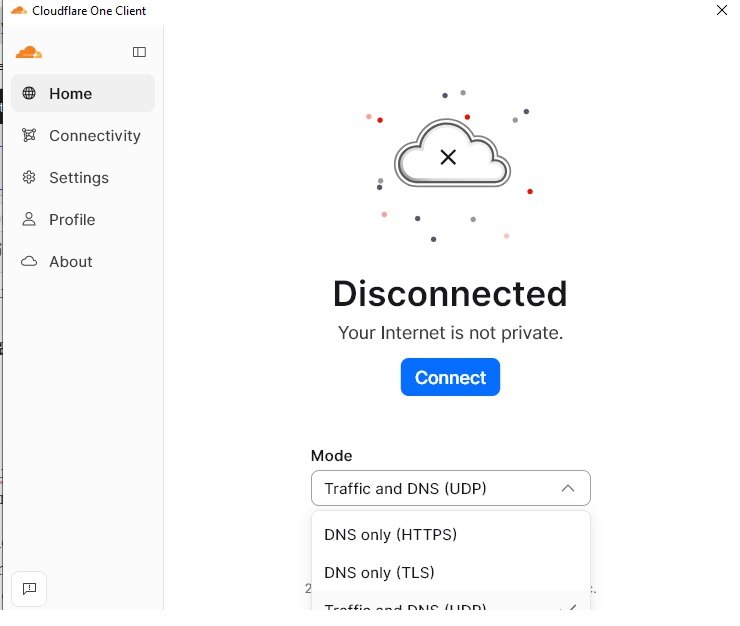
WARP started life as a feature of the 1.1.1.1 mobile app, Cloudflare’s consumer-facing DNS resolver. Over time it grew into a full tunneling service that routes your device’s traffic through Cloudflare’s global network before sending it out to the wider internet.
Technically, it is built on WireGuard, the modern VPN protocol that has become the standard for performance-focused tunneling. Cloudflare runs its own optimized variant called BoringTun, which is part of why WARP feels noticeably lighter than older OpenVPN-based services.
The free tier gives you unlimited bandwidth, unlimited time, and access to Cloudflare’s entire edge network, which spans more than 300 cities worldwide. There is a paid tier called WARP+ that promises slightly faster routing through Cloudflare’s Argo network, but the free version is what I want to talk about, because that is what most people will actually use.
My Setup: How I Tested It
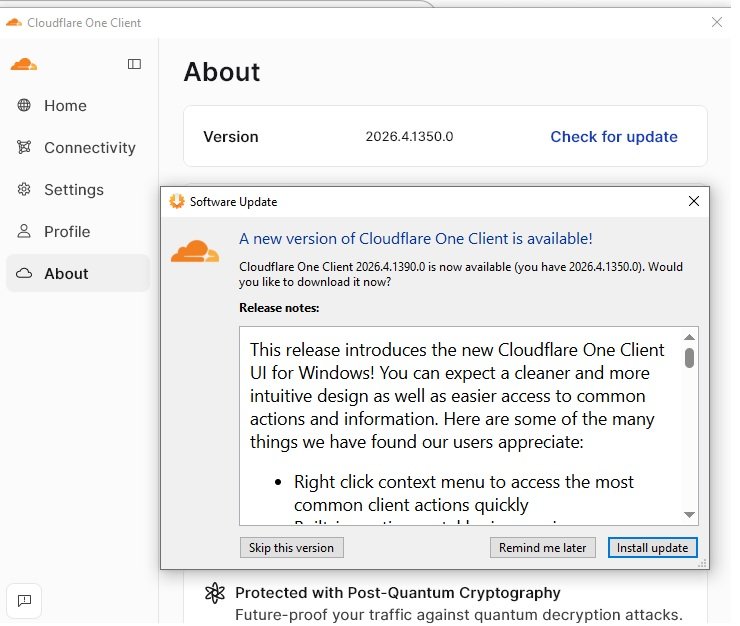
To make this review useful rather than theoretical, here is what I actually did.
On the Windows side, I installed WARP on a laptop I use daily for work, browsing, and gaming. The connection runs through a standard residential broadband line. On the Android side, I installed it on my primary phone and left it running in the background for weeks at a time, including over mobile data and various public Wi-Fi networks.
I tested it across several scenarios that matter for real users:
- Accessing news sites and educational resources that were blocked on my local network
- Loading game platforms and online services that had region or network restrictions
- Playing competitive online games and monitoring ping and packet loss
- Browsing on public Wi-Fi at cafes and airports
- Stress-testing it with continuous streaming and large downloads
I did not test it for adult content, torrenting, or anything outside normal everyday use. The focus here is on what most people genuinely need a VPN alternative for: access, privacy, and safety.
Installation and First Impressions
Setting up WARP is honestly the easiest VPN-style experience I have had on any platform.
On Windows, you download the installer from Cloudflare’s official site, run it, and click a single toggle to connect. There is no account creation, no email verification, no upsell screen demanding a credit card before you can use the product. The app sits in the system tray, takes almost no resources, and stays out of your way.
On Android, you install it from the Play Store, open the app, accept the VPN configuration prompt that Android requires for any tunneling app, and toggle it on. That is the entire process. It reconnects automatically when you switch between Wi-Fi and mobile data, which is a small detail that most free VPNs handle badly.
The first thing I noticed on both platforms was how fast the initial connection feels. Many VPNs have a noticeable handshake delay where the app shows “connecting” for several seconds. WARP is essentially instant. On a decent network, you tap the toggle and you are connected before you have finished moving your hand.
Unblocking Performance: What Actually Worked
This is the part most people care about, so I want to be specific.
In my testing across Windows and Android, WARP successfully accessed nearly every restricted site I tried. The hit rate was high enough that I stopped keeping a running list and just assumed it would work. A rough estimate based on the sites I actively tested would be around 99.9% success — and the only failures I ran into were sites that aggressively block any data center IP range, not WARP specifically.
The categories I successfully accessed included:
- News sites that were blocked on the local network I was using, including international outlets restricted in certain regions
- Gaming platforms and storefronts that had geographic restrictions on certain content or downloads
- Educational resources and research databases that were inaccessible from my IP
- Developer tools and documentation sites occasionally blocked by overly aggressive corporate or campus firewalls
- General web browsing on networks that filter large categories of content at the DNS or IP level
What WARP does well here is route your traffic through Cloudflare’s edge in a way that looks, from the destination site’s perspective, like normal Cloudflare-fronted traffic. That makes it harder for crude blocking systems to identify and reject. It is not magic, and it will not defeat sophisticated geo-restriction systems on major streaming services, but for everyday access to information, it works remarkably well.
Malware and Phishing Protection
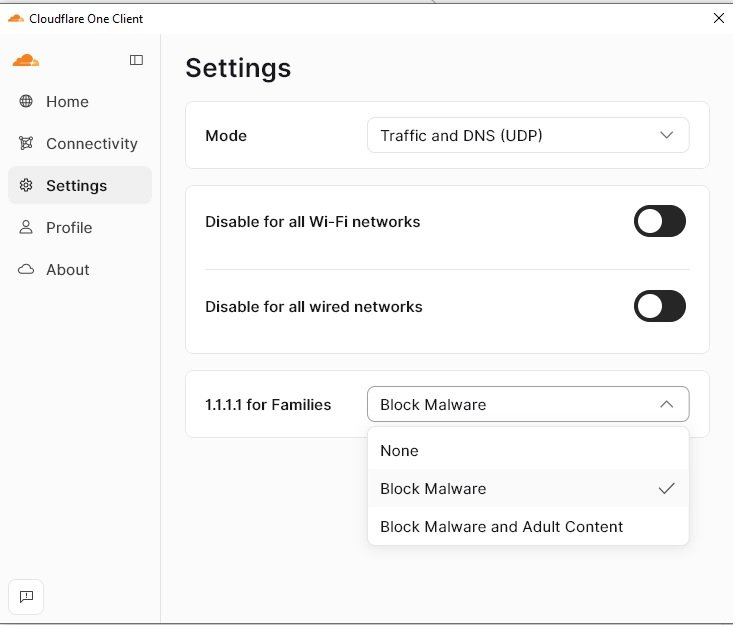
One feature that often gets overlooked is WARP’s optional malware-blocking mode, sometimes called 1.1.1.1 for Families. You can enable it directly in the app settings.
When it is on, your DNS queries are filtered through a Cloudflare resolver that maintains a constantly updated list of known malware, phishing, and command-and-control domains. If a site on that list tries to load — whether you clicked a sketchy link in an email or a script on a legitimate page tries to call out to a malicious domain in the background — the request simply fails to resolve. Nothing loads. No payload, no tracking pixel, no exploit attempt.
In my own use, I have watched this catch real threats. A handful of times I followed links that turned out to be phishing pages dressed up to look like legitimate services. WARP blocked them at the DNS layer before my browser even rendered a page. That is not the same as full endpoint security software, but it is a meaningful additional layer of safety that costs you nothing.
For users with kids, elderly family members, or anyone who is not great at spotting suspicious links, this single feature is reason enough to install WARP.
Gaming Performance: The Surprise
I expected WARP to be unusable for gaming. Most VPNs introduce enough latency that competitive play becomes frustrating, and free VPNs are usually the worst offenders. I was wrong.
On my Windows machine, with WARP active, I measured the following in actual game sessions:
- Ping to nearby game servers stayed within a few milliseconds of my baseline non-VPN ping. I would typically see my normal ping creep up by perhaps 5 to 15 milliseconds, which is well within the range where it does not affect gameplay.
- Connection stability was consistent. No random spikes, no disconnects mid-match, no rubber-banding.
- Voice chat and matchmaking worked normally, which is something a surprising number of VPNs break.
On Android, the experience was similar for mobile games. Latency-sensitive titles played cleanly, and I noticed no meaningful performance hit compared to playing without WARP active.
The reason this works comes down to Cloudflare’s network architecture. Because Cloudflare has data centers in hundreds of cities, your traffic usually does not have to travel far before it hits their network. From there, it is routed through their internal backbone, which is often faster than the public internet path your traffic would otherwise take. In some cases I have measured a lower ping with WARP enabled than without it, which is a counterintuitive result but a genuine one.
I want to be careful not to overstate this. WARP is not designed for gaming, and Cloudflare makes no guarantees about latency. Your experience will depend on your location, your ISP, and which Cloudflare edge you happen to be routed through. But for most casual and even moderately competitive play, it has been more than acceptable in my testing.
Stability Over Time
A test that lasts an hour proves very little about a VPN. The real test is whether it stays connected and behaves predictably over days and weeks of normal use. WARP has held up to that test better than I expected.
On Windows, the connection has stayed live across sleep cycles, network changes, and long uptime sessions. I have left my laptop running for days at a time with WARP active and not had to manually reconnect.
On Android, the auto-reconnect behavior is the most polished I have seen from a free VPN. Moving between home Wi-Fi, mobile data, and public networks happens without any interruption I notice. The app handles the reconnect quietly in the background.
There are occasional rough edges. Every few weeks I run into a moment where WARP gets confused after a long sleep cycle on Windows and needs a manual toggle to re-establish properly. It is rare enough to be a minor inconvenience rather than a deal-breaker, but it is worth mentioning honestly.
What WARP Is Not
This is the part most reviews skip, and it is important.
It is not a privacy tool in the strictest sense. Cloudflare can see that you are connecting to their network. Your traffic is encrypted from your device to Cloudflare’s edge, but once it leaves their network heading to the open internet, it is no different from any other connection. Cloudflare has a public no-logging policy for WARP, audited by third parties, and their track record on privacy is better than most companies in this space. But if your threat model assumes that a major US-based infrastructure provider could be compelled by a court order, WARP is not the right tool for you.
It will not bypass major streaming geo-restrictions. Netflix, Disney+, and similar services have sophisticated systems for detecting traffic from data center IP ranges, and Cloudflare’s IPs are on those lists. If your goal is to watch region-locked Netflix libraries, WARP is not the answer.
It does not let you choose a country. Unlike traditional VPNs that let you exit through Japan, Germany, or wherever else, WARP routes you through Cloudflare’s nearest edge automatically. You cannot pick your exit location, which means it is not useful for tasks that require appearing to be in a specific country.
It is not designed for torrenting. Cloudflare’s terms of service prohibit certain types of traffic, and while I have not personally tested what happens, this is not the use case the service was built for.
If you want a country selector, streaming bypass, and torrenting support, you want a traditional paid VPN. If you want everyday privacy, malware blocking, and the ability to bypass most network-level restrictions on the sites you actually need, WARP does the job.
How WARP Compares to Other Free VPN Alternatives
| Feature | Cloudflare WARP | Typical Free VPN | ProtonVPN Free |
|---|---|---|---|
| Bandwidth limit | Unlimited | Usually 500MB–10GB per month | Unlimited |
| Speed | Very fast, often near-native | Often heavily throttled | Moderate, can be slow on free tier |
| Server locations | 300+ Cloudflare cities (auto-routed) | Limited free server list | 5 countries on free tier |
| Country selection | No | Yes, but limited | Yes |
| Logging policy | No-logs, third-party audited | Highly variable, often poor | Strong, audited |
| Ads in the app | None | Frequent | None |
| Account required | No | Usually yes | Yes |
| Malware blocking | Optional, built-in | Rare | Available on paid tiers |
| Gaming performance | Good | Usually poor | Moderate |
The honest summary is that WARP and ProtonVPN Free are the two free options I would actually recommend, and they serve slightly different needs. ProtonVPN gives you country selection but slower speeds. WARP gives you faster performance and better network coverage but no country control.
Who Should Actually Use It
Based on months of real-world experience, I would recommend Cloudflare WARP for:
- Students and researchers who need access to information their network or institution blocks
- Travelers who want a layer of safety on hotel and airport Wi-Fi
- Anyone who wants malware and phishing protection without paying for security software
- Casual gamers who want privacy without sacrificing ping
- Users who do not need country selection and just want their traffic encrypted and their browsing reasonably private
- Parents who want a basic protective layer on family devices
I would not recommend it as your primary tool if you need country selection, streaming geo-bypass, or strong anonymity guarantees against a sophisticated adversary.
Final Thoughts
I have tried a lot of free VPNs over the years, and most of them I uninstalled within a week. Cloudflare WARP is the one I have actually kept running. It is not perfect, and it is not the right tool for every job, but for the everyday reality of wanting a faster, safer, slightly more private connection across Windows and Android, it has earned its place on my devices.
What makes it stand out is not any single feature. It is the absence of the usual free-VPN tax — no ads, no bandwidth caps, no account harvesting, no mysterious slowdowns at the end of the month, no shady ownership structure. You install it, you turn it on, and it does what it says. In a category where that is genuinely rare, WARP deserves more attention than it gets.
If you are looking for a free VPN alternative for educational access, safer browsing, and general everyday use, this is the one I would start with. Try it for a week on your own devices and form your own opinion. That is ultimately the only review that matters.
You May Also Like
 Proxies
Top 10 Free Proxy Websites in 2026: My Complete Testing Guide
 VPN
VPN
Can You Use a VPN on a School Chromebook? (What Works + What’s Allowed)
 Proxies
10 Best Public DNS Servers for Faster Browsing and Lower Gaming Latency in 2026
 Proxies
Residential Proxies in 2026: What I’ve Actually Learned After 7 Years of Running Them
 Data Security & Privacy
What is a Temporary Email Address? Is It Safe for Verification?
 Tiktok
Does TikTok Detect VPN Usage? Everything You Need to Know
 VPN
VPN
What Is an Obfuscated VPN? Your Complete Guide to Bypassing Blocks and Staying Private Online
 WordPress
10 Best Free Online Server Status Checker Websites: Complete Guide to Monitor Your Server Health
 Cyber Security


