Ask several proxy providers to explain the difference between residential and ISP proxies, and you’ll likely get several different explanations — and a few of them won’t agree with each other. That’s not because the subject is inherently confusing. It’s usually because a lot of the content floating around this topic was copied from somewhere else that got a detail wrong, and nobody bothered to fact-check it afterward.
The distinction actually comes down to two concrete things: where the IP address physically lives, and who it’s officially registered to. Once that’s clear, everything else — pricing, performance, and when to reach for one over the other — becomes much easier to reason about.
One clarification up front: neither of these is a VPN, and neither is Tor. A VPN sends all your traffic through one provider’s servers under a single shared identity. Tor routes your connection through a series of volunteer-operated relays. A proxy is different — you’re assigned a specific IP address, often selectable by country or city, which is exactly why proxies are the go-to tool for anyone who needs to appear as if they’re browsing from a particular location, whether for geo-testing, price monitoring, or large-scale data collection.
Residential Proxies vs. ISP Proxies
| Residential Proxy | ISP Proxy | |
|---|---|---|
| IP source | Real home internet connection | Leased from an ISP, hosted on data center servers |
| Registered to | An actual household via a consumer ISP | A residential ISP (on paper only) |
| Physical infrastructure | Someone’s router/device | Data center hardware |
| Address stability | Rotates (per request, timer, or sticky session) | Static — stays the same for the life of the plan |
| Typical billing | By data volume (usage-based) | Per dedicated IP (subscription) |
| Speed | Variable, depends on the exit node | Fast and consistent |
| Pool size | Very large and geographically broad | Smaller, limited to what’s been leased |
What Is a Residential Proxy?
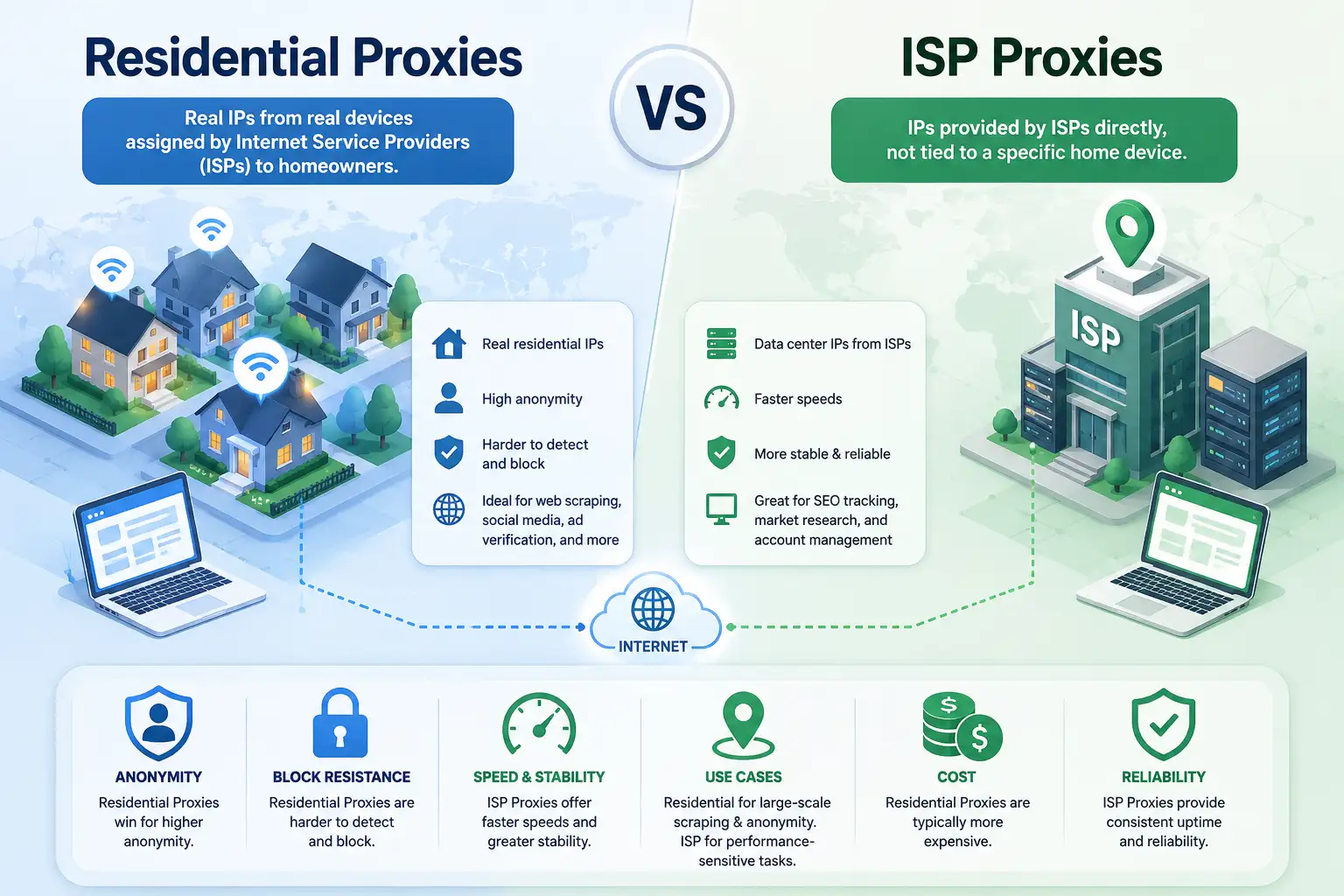
A residential proxy sends your traffic through an IP address that a real Internet Service Provider assigned to an actual home connection — the kind linked to someone’s router, not a server in a data center. Instead of your request hitting the target site directly, it first passes through that home connection, so the website ends up seeing the homeowner’s IP rather than yours.
The reason this matters comes down to how most detection systems operate: they check who owns the IP making the request. Data center IP ranges are registered to hosting companies, which is easy to identify and block. A residential IP, on the other hand, is registered to an everyday consumer ISP — just like the one powering your own home network — so there’s nothing unusual for a site to flag. You come across, in practical terms, like an ordinary person browsing from home.
Most large residential proxy networks build their IP pools by partnering with real users — typically through an app or SDK people opt into, often in exchange for a free service — and then routing a portion of their idle bandwidth through the network. Scale that across millions of devices globally, and you get a pool broad and varied enough to cover almost any country you might need.
When That Diversity Is Worth Paying For
| Scenario | Why Residential Fits |
|---|---|
| You need to see how a site or ad renders in a specific city or country | Real IPs in that exact location give you an authentic view |
| You’re collecting data at scale | Large pools mean you’re far less likely to get flagged after a few hundred requests |
| You keep hitting CAPTCHAs or IP-based rate limits | These defenses usually target known data center ranges, which residential IPs avoid |
Advantages of Residential Proxies
| Advantage | Explanation |
|---|---|
| Trusted by default | Registered under a consumer ISP’s ASN rather than a hosting company, so systems built to catch known proxy/hosting ranges have nothing to flag |
| Large, genuinely varied pool | Addresses come from real users across countless ISPs and subnets, so you’re not confined to one hosting company’s block — better geo-targeting, lower risk of a total lockout |
| Rotation works in your favor | Providers cycle IPs per request, on a timer, or via a sticky session you control, making it much harder for fingerprinting or bot-detection systems to spot a pattern |
| Holds up for demanding work | Well suited to large-scale web scraping, ad verification, rank tracking, or multi-region price monitoring |
Disadvantages of Residential Proxies
| Disadvantage | Explanation |
|---|---|
| Costly | You’re paying for real bandwidth and the infrastructure to route it responsibly; most plans bill by data volume, which adds up quickly on larger jobs |
| Speed depends on someone else’s connection | Local congestion, CGNAT setups, an aging router, or a device going offline can all disrupt your session — one exit node might be on fiber, the next on rural DSL |
| More to manage | Rotating IPs, sticky sessions for anything requiring a stable address (like a login flow), and whitelisting or credential-based authentication all add operational overhead |
| Latency builds up | Especially when the exit node is far from the destination server — routing through a home connection on another continent takes noticeably longer than a direct data center route |
What Is an ISP Proxy?
This is where a lot of guides get imprecise, so it’s worth being exact. An ISP proxy — more accurately called a static residential proxy — isn’t simply “a proxy from your own internet provider.” It’s more specific than that: the IP itself runs on fast, stable data center hardware, but it’s registered to a residential ISP instead of a hosting or cloud company. Providers achieve this by leasing address blocks directly from ISPs and routing them through their own servers.
The practical result is an address that looks residential to anyone checking ownership records, while the connection behind it runs on infrastructure as reliable as a standard data center proxy. You get the credibility of a home IP combined with the performance of a server — which explains why these have become popular wherever people need both qualities simultaneously.
Unlike most residential setups, ISP proxies typically stay fixed. You keep the same address for the duration of your plan, which suits anything requiring a consistent identity over time — managing an account, for instance, or an automated process that shouldn’t appear to log in from a new location every hour. Most reputable providers also run these as high-anonymity (“elite”) proxies, meaning they don’t leak headers that reveal a proxy is even involved, and they typically support IP whitelisting or username/password authentication alongside HTTP, HTTPS, and SOCKS5.

Advantages of ISP Proxies
| Advantage | Explanation |
|---|---|
| Fast and consistently so | Runs on data center infrastructure rather than a home router, so you’re not affected by consumer-grade bandwidth swings — the clear winner when uptime and response time matter |
| Predictable costs | Typically sold per dedicated IP rather than by the gigabyte, making budgeting easier, especially for data-heavy jobs where per-GB residential pricing gets expensive |
| Static address simplifies operations | Running social accounts, managing affiliate campaigns, or keeping a service logged in over days or weeks is easier without constant re-authentication or suspicious-login flags |
| Useful beyond block avoidance | Reliable access to region-locked services, single-point monitoring, inventory or sneaker bots, brand-protection sweeps — anything benefiting from a dedicated, location-specific presence |
Disadvantages of ISP Proxies
| Disadvantage | Explanation |
|---|---|
| Smaller, narrower pool | Providers can only offer what they’ve actually leased, so country- or city-level options are far more limited than a residential network drawing on millions of real users |
| Static IPs eventually get noticed | Repeatedly hitting the same site from the same address — even a residential-looking one — can let a sophisticated anti-bot or fingerprinting system catch on to the behavioral pattern itself |
| Coverage gaps | If a provider hasn’t leased addresses in the country or carrier network you need, that option simply isn’t available |
| Some protocols may be restricted | Depending on the provider’s agreements with underlying ISPs, certain ports or protocols like FTP or SOCKS5 might be limited |
| Still a real expense | Cheaper than premium residential bandwidth for heavy use, but a dedicated address in an uncommon location can carry a real premium |
How They Actually Stack Up
Once you understand what’s happening underneath each type, comparing them becomes far less abstract.
| Factor | Residential Proxies | ISP Proxies |
|---|---|---|
| Cost structure | Billed by data volume — you’re renting distributed bandwidth from real users, so usage drives cost | Billed per dedicated IP on subscription — more predictable, often cheaper for high-volume, low-diversity work |
| Best for | Touching many different addresses across regions (large-scale scraping, ad verification) | A handful of stable identities running continuously |
| Speed | More variable — depends on the exit node and how far it sits from the target server | Faster and more consistent, backed by dedicated bandwidth and predictable uptime |
| Security posture | Blends in with ordinary traffic, but routes through a third party’s device/infrastructure — stick with a reputable, transparent provider | Runs on dedicated, provider-controlled infrastructure with more predictable, auditable security, at the cost of some invisibility since a static IP can eventually be profiled |
| Reliability definition | Wins at the network level — losing one of millions of exit nodes barely registers | Wins at the individual-connection level — the same IP keeps working day after day |
A cheap proxy that keeps getting blocked or dropping mid-task ends up costing more in wasted time than a pricier, more reliable option ever would — price shouldn’t be the only variable you weigh.
Neither type replaces basic security hygiene: use HTTPS wherever possible, keep sensitive credentials off unencrypted channels, and vet a provider’s reputation before committing.
Picking the Right One for the Job
Rather than asking which is “better” in the abstract, it’s more useful to match the tool to what your project actually needs.
| Choose Residential If… | Choose ISP If… |
|---|---|
| You need to look like a real user across many cities, regions, or countries | You need a consistent, stable IP tied to one identity or account over time |
| You’re running large-scale data collection against aggressive anti-bot or CAPTCHA defenses | Speed and uptime matter more than sheer geographic reach |
| Avoiding detection matters more than squeezing out maximum speed | You’re managing a smaller number of accounts or automated tasks that benefit from a dedicated presence |
| Your workload can tolerate some variability in connection quality | You’d rather have predictable monthly costs than usage-based billing |
Many people who work with proxies regularly don’t settle on just one — they run both: ISP proxies for stable, long-running tasks like account management, and residential proxies for anything needing scale or heavier anti-detection work, such as large scraping jobs. It also helps to understand how proxies relate to nearby tools, like the difference between a SOCKS and HTTP proxy, or when a plain public proxy is honestly good enough for a low-stakes task instead of paying for either of these.
What to Look for in a Provider
Whichever type you settle on, a few things are worth verifying before committing to a plan:
| Checklist Item | What to Look For |
|---|---|
| Pool size and coverage | Genuine presence, subnet variety, and IPv4/IPv6 support in the regions you actually need — not just a handful of major countries on a homepage |
| Rotation and session control | The ability to rotate on demand or hold a sticky session depending on the task |
| Transparent sourcing | A clear explanation of how the provider obtains its residential IPs; vague or evasive answers are a warning sign |
| Protocol and authentication support | Confirmed HTTP(S) and SOCKS5 handling, plus IP whitelisting or username/password authentication that fits your existing tools |
| Support and documentation | Responsive help, since proxy setups get technical fast, especially when integrating with scraping frameworks or headless browsers |
| Trial options | A test window to check real speed, uptime, and success rates for your specific use case, not just marketing numbers |
Providers like Bright Data offer a useful reference point for seeing how a mature residential network structures its plans around IP count, traffic volume, and geographic targeting. Comparing several established providers side by side gives a clearer sense of realistic pricing than relying on any single source.
Bottom Line
Residential and ISP proxies solve overlapping problems in different ways. Residential proxies offer scale, diversity, and a strong ability to blend in as a genuine user — at the cost of less predictable speed and usage-based pricing. ISP proxies offer speed, stability, and predictable costs through static, data-center-hosted IPs registered to appear residential — at the cost of a smaller pool and less geographic flexibility.
| If Your Priority Is… | Go With… |
|---|---|
| Broad, anonymous access across many regions, up against aggressive anti-bot defenses | Residential proxies |
| A dependable, consistent presence for long-running tasks or account management | ISP proxies |
| Both scale and stability, depending on the task | A mix of both |
Whatever you choose, don’t take a provider’s word for it — understand what’s actually happening under the hood, test before committing at scale, and match the tool to your specific problem.
Frequently Asked Questions
What’s the real difference between residential and ISP proxies?
Residential proxies route traffic through real home connections and consumer devices, appearing fully authentic to websites but subject to real-world internet ups and downs. ISP proxies run on stable data center infrastructure while being registered under a residential ISP’s name, combining data-center speed with an IP that still reads as residential.
How do I know which type is right for me?
It depends on your priority. Broad geographic coverage and strong anti-bot resistance point to residential proxies. A fast, stable, predictable connection tied to one identity — like managing an account or a long-term automated process — points to ISP proxies.
What are the advantages and disadvantages of residential proxies?
Advantages: a large, diverse IP pool, strong site trust, and better block resistance through rotation. Disadvantages: higher usage-based costs, less predictable speed, and more day-to-day management than a static setup.
Are ISP proxies faster than residential proxies?
Generally yes — running on dedicated data center infrastructure gives ISP proxies more consistent speed and less latency variance than residential proxies, which depend on whatever connection quality the current exit node happens to have.
Can I use both types together?
Yes, and many experienced users do — ISP proxies for stable, long-running tasks needing a consistent identity, and residential proxies for large-scale, high-diversity work like web scraping or geo-testing where you need to appear as many different real users across many locations.
You May Also Like
 VPN
VPNCloudflare WARP as a Free VPN Alternative: Review After Months of Daily Use
 Proxies
10 Best Public DNS Servers for Faster Browsing and Lower Gaming Latency in 2026
 Proxies
REST APIs Explained: Everything You Need to Know to Build and Use Them
 Proxies
Is CroxyProxy Safe to Use for YouTube? Privacy, Security, and Risks
 Proxies
Top 10 Free Proxy Websites in 2026: My Complete Testing Guide
 Proxies
What Are Residential Proxies: Use Cases and Best Providers in 2026
 WordPress
10 Best Free Online Server Status Checker Websites: Complete Guide to Monitor Your Server Health
 VPN
VPNCan Someone Find Me With My IP Address? Guide to IP Privacy and Security
 Proxies