We share private details online every day. You may send a client a contract by email, message your family on WhatsApp, talk with a coworker on Slack, make a FaceTime call, or share files through Google Drive. Most of us expect those conversations to stay between the people involved.
But online messages do not move directly from one person to another. They travel through internet networks, mobile carriers, cloud servers, Wi-Fi connections, and messaging platforms. Without the right protection, private communication can be exposed to hackers, service providers, account takeovers, data breaches, or people using an unsecured network.
End-to-end encryption is one of the strongest ways to protect online communication. It keeps messages, video calls, shared photos, and files unreadable while they move from your device to the person you are communicating with.
The simple version is this: your message is locked before it leaves your device, and it is unlocked only on the recipient’s device.
That does not mean end-to-end encryption makes us invisible online. It does not stop someone from taking a screenshot. It does not protect an unlocked phone. It does not fix weak passwords or stop phishing scams. But it gives us an important layer of privacy when we use messaging apps, email, video calls, cloud storage, and business communication tools.
What Does End-to-End Encryption Mean on Messenger?

End-to-end encryption, often called E2EE, is a form of secure communication that allows only the sender and intended recipient to read a message or access a shared file.
When you send an end-to-end encrypted message, your device converts the readable content into unreadable code. This process is called encryption. The encrypted message then moves across the internet. It may pass through the servers of WhatsApp, Signal, iMessage, Telegram, or another messaging platform, but the message content stays locked.
When the message reaches the recipient’s phone, tablet, or laptop, their device decrypts it. Decryption turns the protected data back into readable text, audio, video, or files.
A normal end-to-end encrypted conversation follows these steps:
- You write a message or start a call.
- Your app encrypts the content on your device.
- The encrypted data moves through the internet.
- The messaging platform helps deliver the data.
- The recipient’s device receives the encrypted content.
- The recipient’s app decrypts the content.
- The recipient reads, watches, or hears the message.
The service delivering the message can still do its job without being able to read the message itself. That is the main point of end-to-end encryption.
The Importance of Secure Communication
Secure communication matters because messages can hold more private information than we realize. A few lines in a chat may include a customer address, a business price, a family problem, a medical detail, a payment discussion, or a document that should not be public.
We often share sensitive information through:
- WhatsApp messages
- Signal chats
- iMessage conversations
- Gmail and Outlook email
- Zoom meetings
- FaceTime calls
- Microsoft Teams messages
- Slack channels
- Cloud storage links
- Shared documents
- Online banking messages
- Customer support platforms
For business owners, communication privacy affects more than personal comfort. If someone gets access to private business messages, they may see client records, project details, employee information, invoices, pricing plans, supplier agreements, or payment instructions.
That can lead to financial loss, fraud, damaged client trust, and reputational harm.
For individuals, private messages can include health details, travel plans, family conversations, photographs, financial information, and login recovery details. We should not have to assume that every private message can be seen by people outside the conversation.
Encryption helps create a safer space for normal, everyday communication.
How Encryption Keys Work
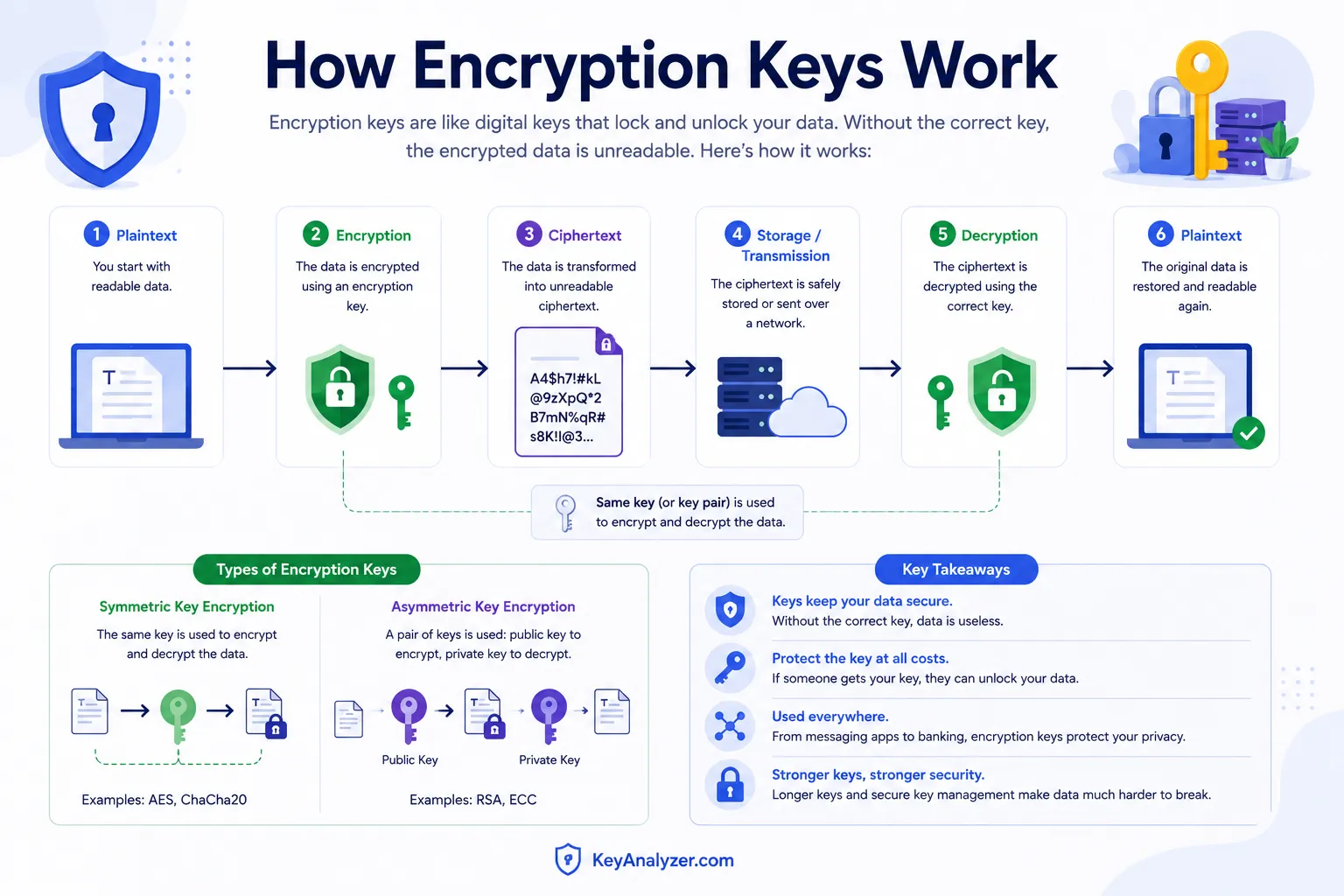
End-to-end encryption works through cryptography. Cryptography is the practice of protecting information by turning it into a form that unauthorized people cannot read.
Messaging apps use digital encryption keys to lock and unlock data. We do not usually see or manage those keys because the app handles the process in the background.
Many secure messaging services use two connected keys:
- A public key
- A private key
A public key can be shared. It helps other people send encrypted information to you. A private key stays protected on your device and helps unlock messages meant for you.
When someone sends you an encrypted message, their messaging app uses the right key information to protect the message. Your device uses its private key to decrypt it after it arrives.
The company behind the app can deliver the encrypted data, but it should not have the private key required to read the message content.
This process makes encrypted communication safer than sending plain text across the internet. If someone intercepts the encrypted data, they should see unreadable information instead of a conversation they can understand.
End-to-End Encryption vs. Encryption in Transit
Not every app or website that says it is secure uses end-to-end encryption. Many services use encryption in transit instead.
Encryption in transit protects data as it moves between your device and a company’s server. You may see this when a website starts with https and displays a lock icon in your browser.
That security is useful. It helps protect your information from people who may be watching the network, such as someone on public Wi-Fi or a person trying to intercept data.
But there is a difference. With encryption in transit, the company may be able to access the data once it reaches its server. The message is protected while traveling, but the service provider may be able to read, process, store, or scan the content.
End-to-end encryption goes further. It is designed so that only you and the recipient can access the content.
| Type of protection | What it protects | Who may access the message content? |
|---|---|---|
| No encryption | Little or no data protection | Anyone who gains access may be able to read it |
| Encryption in transit | Data moving between devices and servers | The service provider may still access it |
| Encryption at rest | Data stored on servers or devices | The service provider may still access it |
| End-to-end encryption | Content from sender to recipient | Only the intended conversation participants should access it |
We want both strong transport security and end-to-end encryption. Transport encryption protects the connection. End-to-end encryption protects the content itself.
How WhatsApp Uses End-to-End Encryption

WhatsApp uses end-to-end encryption for personal messages, voice calls, video calls, photos, videos, documents, voice notes, and location sharing.
When you send a WhatsApp message to someone, the app is designed so that the message can be read only by you and the other person in the chat. WhatsApp helps deliver the message, but the content is encrypted during delivery.
This makes WhatsApp useful for private family conversations, client messages, team chats, and one-to-one business communication.
However, we should understand what end-to-end encryption does not cover.
WhatsApp may still collect some metadata. Metadata is information about communication rather than the actual message content. It can include your phone number, device information, contact activity, message timing, account details, and network information.
WhatsApp encryption also cannot stop the person receiving your message from:
- Taking a screenshot
- Forwarding the message
- Copying the text
- Downloading a file
- Recording a call
- Showing the conversation to someone else
Encryption protects the message while it travels. It cannot control what happens after someone reads it.
WhatsApp backups need attention as well. Chat backups stored in iCloud or Google Drive may have a different level of protection from your live messages. WhatsApp offers end-to-end encrypted backups, but we need to turn that option on and safely store the backup password or encryption key.
Signal, Privacy, and Safety Numbers
Signal is known for private communication because end-to-end encryption is built into its messages, calls, group chats, photos, files, and voice notes.
Signal also gives users a way to verify who they are talking to. Each conversation has a safety number. This number helps confirm that the encryption connection is between you and the intended person.
You can verify a safety number by comparing it with the other person in a trusted way. For example, you may scan their QR code while you are together or compare the number during a phone call you trust.
Most people do not need to verify every conversation. But it can be a useful step when discussing sensitive topics, such as:
- Legal issues
- Business contracts
- Financial information
- Health details
- Private family matters
- Security incidents
- Sensitive client work
Signal also offers disappearing messages. You can choose how long messages remain in a conversation before the app removes them.
Disappearing messages can reduce how long private information stays visible in the chat. But they do not guarantee that the information cannot be saved. The other person can still take a screenshot, copy the content, photograph the screen, or record the conversation.
We should use disappearing messages to reduce stored chat history, not as a replacement for trust.
Telegram, Cloud Chats, and Secret Chats
Telegram is often described as a secure messaging platform, but it is important to understand the difference between its regular chats and Secret Chats.
Regular Telegram chats are cloud chats. They are encrypted between your device and Telegram’s servers, but they are not end-to-end encrypted by default. Telegram stores these conversations in the cloud, which makes it easy to access them from multiple devices.
Telegram Secret Chats work differently. They use end-to-end encryption between the people in the conversation. Secret Chats are designed to remain on the devices involved in the chat and can include self-destructing messages.
If you want end-to-end encryption in Telegram, you need to start a Secret Chat. A regular Telegram conversation does not provide the same privacy model.
This is a useful lesson for all communication apps: do not assume every feature is end-to-end encrypted. Check whether encryption applies to private messages, group chats, calls, media files, cloud storage, and backups.
Is Gmail or Outlook Email End-to-End Encrypted?
Most standard email is not end-to-end encrypted.
Gmail, Outlook, Yahoo Mail, and many business email systems use encryption in transit. That protects messages while they move between your device and email servers. It is better than sending unprotected data, but it is not the same as end-to-end encryption.
Standard email providers may be able to access message content in ways that an end-to-end encrypted app cannot. Email messages may also be stored on servers for a long time, forwarded to other accounts, downloaded to devices, or included in backups.
For everyday work, regular email can be practical and reasonably secure. But we should avoid sending highly sensitive information through plain email.
Be careful with:
- Passwords
- Two-factor authentication codes
- Bank account numbers
- Tax records
- Passport copies
- Social Security numbers
- Private medical documents
- Client login details
- Legal files
- Payment information
If you need to send a sensitive file, use a safer process. You can use a protected cloud-sharing service, limit file access to specific people, add a password to the document, and share the password through another trusted channel.
Some privacy-focused email services, such as Proton Mail, provide end-to-end encryption between users of the same service. They may also provide options for protected messages to outside recipients. Other tools use PGP encryption, which can offer strong email privacy but may be difficult for everyday users to set up and manage.
iMessage, SMS, and FaceTime Privacy
Apple’s iMessage uses end-to-end encryption for messages sent between Apple devices. FaceTime calls are also end-to-end encrypted.
On an iPhone, blue message bubbles generally indicate iMessage. These messages use Apple’s messaging service and can be end-to-end encrypted when sent between compatible Apple devices.
Green message bubbles generally indicate SMS or MMS messages. Traditional SMS text messages use mobile carrier systems and do not offer the same end-to-end encryption as iMessage.
This distinction matters when you are sharing sensitive information. A message that looks like a normal text may have different privacy protections depending on the device, network, and messaging standard being used.
For private conversations, avoid sending passwords, account numbers, recovery codes, or sensitive documents through standard SMS.
Newer messaging standards, such as RCS, may offer stronger protections in some situations. But security can vary based on the devices, apps, and carriers involved. If privacy is essential, use a messaging service that clearly states it provides end-to-end encryption.
Zoom, Microsoft Teams, Slack, and Video Call Security
Video calls can contain highly sensitive information. We may discuss business plans, customer accounts, legal matters, job interviews, medical information, or family issues during a call.
Zoom offers end-to-end encryption for meetings when users turn on the relevant setting. However, some meeting features may not work in the same way when end-to-end encryption is enabled. Always check the meeting settings before a sensitive call.
Microsoft Teams, Slack, Google Meet, and other workplace tools use security controls and encryption, but their privacy models can be different from a personal end-to-end encrypted messaging app. Businesses may need to store, search, archive, or review communication for legal, compliance, or operational reasons.
That does not automatically make these tools unsafe. It means we should understand what level of privacy they provide and who may have administrative access.
For sensitive video meetings, follow these habits:
- Use a meeting password
- Share meeting links only with expected attendees
- Use waiting rooms or lobbies
- Check the participant list
- Lock the meeting after everyone joins
- Remove unknown attendees
- Avoid recording unless there is a clear reason
- Store recordings securely
- Review video-call encryption settings
- Keep meeting software updated
Encryption is useful, but access control matters too. A secure call is not private if an unknown person is allowed into the meeting.
What Metadata Is and Why It Still Matters
Metadata is data about your communication. It does not usually show the content of your message, but it can still reveal useful information.
Even if a message is end-to-end encrypted, some metadata may remain available to the service or network. Depending on the platform, metadata can include:
- When a message was sent
- When a message was delivered
- When a message was read
- The size of a message or file
- The device you used
- Your IP address
- Your phone number
- Who you communicated with
- How often two accounts communicate
- The people included in a group chat
For example, encryption may hide the words inside a WhatsApp message, but it may not hide that you sent a message to someone at a certain time.
Metadata does not make end-to-end encryption useless. The message content is still protected. But it reminds us that privacy is more than just message text.
If privacy is important to you, review the app’s privacy controls. Limit what you share publicly. Check location permissions. Avoid connecting apps to unnecessary accounts. Use strong account security and be careful with public Wi-Fi.
What End-to-End Encryption Does Not Protect
End-to-end encryption is powerful, but it has limits. We should understand those limits so we do not assume an encrypted app makes every action safe.
End-to-end encryption does not protect us when:
- Someone has access to our unlocked device
- Our phone or computer contains malware
- We enter a password on a phishing website
- We share a verification code with a scammer
- We approve a login request we did not make
- The person receiving our message takes a screenshot
- We send information to the wrong person
- Our cloud backups are not protected
- Someone knows our device passcode
- We use a weak account password
- We leave a device unattended in public
Encryption protects data while it is being sent and delivered. It cannot protect information before we send it or after someone receives it.
For example, if a criminal gains access to your unlocked phone, they may be able to read your messages just as you can. That is why device security matters.
Use a strong phone passcode. Turn on biometric security if you are comfortable with it. Enable automatic screen lock. Keep your operating system and apps updated. Use two-factor authentication on important accounts.
End-to-End Encryption and Cloud Backups
Backups are one of the most overlooked parts of secure communication.
Your live WhatsApp or Signal messages may be protected by end-to-end encryption. But if you create a cloud backup, the backup may have different security settings.
A backup can be useful when you replace a phone, lose a device, or restore old messages. But it can also create another copy of your private conversations.
Before turning on chat backups, ask:
- Is the backup end-to-end encrypted?
- Is the backup protected by a separate password?
- Who controls the encryption key?
- Can the cloud provider access the backup?
- What happens if I forget the backup password?
- Can someone with access to my cloud account restore the chat?
Some apps give us the option to create an encrypted backup. This can offer stronger privacy, but it also means we need to protect the backup password or recovery key. If we lose it, we may not be able to restore the data.
The right choice depends on what matters most to you: easy recovery, maximum privacy, or a balance between both.
How Businesses Can Use End-to-End Encryption
Businesses can use end-to-end encryption to reduce risk when sharing private information with clients, employees, contractors, and partners.
It is particularly useful when discussing:
- Customer data
- Payment details
- Contracts
- Legal information
- Employee records
- Product designs
- Financial planning
- Account recovery details
- Internal business strategy
- Confidential project files
But encryption should be part of a wider security process. A business can use encrypted communication and still face problems if passwords are weak, employees share logins, or old devices remain connected to company accounts.
A practical security routine includes:
- Use a password manager for unique passwords.
- Turn on two-factor authentication for every important account.
- Use encrypted messaging for sensitive conversations.
- Limit access to people who need it.
- Remove former employees and contractors quickly.
- Keep work devices updated.
- Train the team to spot phishing messages.
- Use secure cloud-sharing settings for files.
- Avoid sending passwords or verification codes through chat or email.
- Review access and recovery settings regularly.
We do not need to make every business conversation complicated. We simply need to match the level of protection to the type of information being shared.
How to Use End-to-End Encrypted Apps Safely
End-to-end encryption works best when we use it with basic privacy habits. The app can protect message content, but we still need to protect our devices and accounts.
Use these steps to improve secure communication:
- Choose apps that clearly explain their encryption practices.
- Turn on end-to-end encrypted features where they are not enabled by default.
- Use a strong device passcode.
- Keep apps and operating systems updated.
- Turn on two-factor authentication for your email and cloud accounts.
- Use a password manager to avoid password reuse.
- Do not share verification codes with anyone.
- Check the recipient before sending sensitive information.
- Review backup settings before storing chat history in the cloud.
- Verify a contact’s security number for highly sensitive conversations.
- Avoid public Wi-Fi for sensitive work when possible.
- Log out of old devices and remove unused app access.
These steps do not require advanced technical knowledge. They are simple habits that make secure tools more effective.
Frequently Asked Questions About End-to-End Encryption
Is WhatsApp end-to-end encrypted?
Yes. WhatsApp uses end-to-end encryption for personal messages, calls, photos, videos, documents, and voice messages. However, we should still review backup settings because cloud backups may have separate protection options.
Is Signal more private than regular text messaging?
Yes. Signal uses end-to-end encryption for messages and calls. Standard SMS messages do not use the same end-to-end encryption model and can have weaker privacy protection.
Is Gmail end-to-end encrypted?
No. Standard Gmail messages are not end-to-end encrypted. Gmail uses encryption in transit, but regular email content may still be accessible through the service’s systems. Avoid sending highly sensitive information through ordinary email.
Are Telegram messages end-to-end encrypted?
Not all Telegram messages are end-to-end encrypted. Regular Telegram chats are cloud chats. Telegram Secret Chats use end-to-end encryption.
Can hackers read end-to-end encrypted messages?
Usually, hackers cannot read messages they intercept during delivery because the content is encrypted. However, they may still access messages if they steal an unlocked device, infect it with malware, steal account details through phishing, or gain access to an unprotected backup.
Does end-to-end encryption hide our identity?
No. End-to-end encryption protects the content of communication. It may not hide metadata, such as when a message was sent, who communicated, what device was used, or an IP address.
Can someone screenshot an end-to-end encrypted chat?
Yes. Encryption does not stop the recipient from taking a screenshot, forwarding a message, copying text, or recording a call. It protects the communication while it travels, not what someone does after receiving it.
Final Thoughts on End-to-End Encryption
End-to-end encryption gives us a stronger way to protect private conversations online. It helps keep messages, calls, photos, and files unreadable to people outside the conversation.
Apps such as WhatsApp, Signal, iMessage, FaceTime, and encrypted email services can help us communicate more privately. But the app alone is not enough. We also need strong passwords, two-factor authentication, secure backups, updated devices, and caution around phishing scams.
The most useful approach is simple: use end-to-end encryption for sensitive communication, protect your devices, and think carefully before sharing private information online. When we combine these habits, we make it much harder for the wrong person to access the conversations and information that matter to us.
You May Also Like
 Cyber Security
Can Ransomware Infect iCloud? What Mac and iPhone Users Need to Know
 Data Security & Privacy
Two-Factor Authentication (2FA): How It Works, Which Method to Use, and How to Stay Safe
 Data Security & Privacy
Is a Password Manager Safe? How to Use One Securely
 Data Security & Privacy
19 Best Email Service Providers for Personal and Business Use
 WordPress
12 Best Cheap SSL Certificate Providers To Secure Your Website
 Data Security & Privacy
Is Password Protection the Same as Encryption? Differences in Data Security
 Data Security & Privacy
How Your Digital Footprint Can Make or Break Your Career Opportunities
 Data Security & Privacy
What Is a Cloud Security Scanner for AWS, Azure, and Google Cloud?
 Cyber Security