Asymmetric encryption is a cybersecurity method that uses two different keys — a public key and a private key — to encrypt and decrypt data. This system ensures secure communication over insecure networks like the Internet. Unlike symmetric encryption, which uses one shared key, asymmetric encryption separates the locking and unlocking functions. One key locks the data, and only the matching key can unlock it. This separation improves security and enables digital signatures, secure email, and safe online transactions. Pioneered by Whitfield Diffie and Martin Hellman in 1976 and formalized by RSA in 1977, asymmetric encryption revolutionized cryptography by eliminating the need for secure key exchange channels, a major advancement over earlier symmetric systems.
You might be wondering why this matters to you. Every time you log into your bank account, send a private message, or buy something online, asymmetric encryption is likely working behind the scenes. It protects your passwords, credit card numbers, and personal messages from hackers. Without it, online shopping, banking, and even messaging apps would be far less secure. Understanding how it works helps you appreciate the invisible shields keeping your digital life safe and empowers you to make safer choices, like using secure websites or encrypted apps.
This guide breaks down asymmetric encryption into simple parts. We’ll explain how public and private keys work, where this technology is used daily, why it’s safer than older methods, and what its limits are. You don’t need to be a tech expert. If you can send an email or use a smartphone, you’re ready to understand this. By the end, you’ll know exactly how your data stays private — even when it travels across the world — and how to leverage it for better security.
How Does Asymmetric Encryption Work?
Asymmetric encryption works by using a pair of mathematically linked keys: one public and one private. The public key can be shared with anyone. It encrypts data. The private key must be kept secret. It decrypts data. Only the matching private key can unlock what the public key has locked. This is why it’s called “asymmetric” — because the keys are not the same.
Imagine you want to send a locked box to a friend. You don’t have their key. Instead, they send you an open padlock — their public key. You lock the box with it and send it back. Only your friend has the key to open that specific padlock — their private key. Even if someone steals the box during delivery, they can’t open it. That’s the basic idea.
The math behind this involves complex algorithms like RSA (Rivest-Shamir-Adleman) or ECC (Elliptic Curve Cryptography). These algorithms create key pairs that are nearly impossible to reverse-engineer. For example, RSA uses large prime numbers. Multiplying two primes is easy. But figuring out which two primes were used — when you only have the product — is extremely hard for computers. This is called a “trapdoor function.” It’s easy to go one way, but nearly impossible to go back.
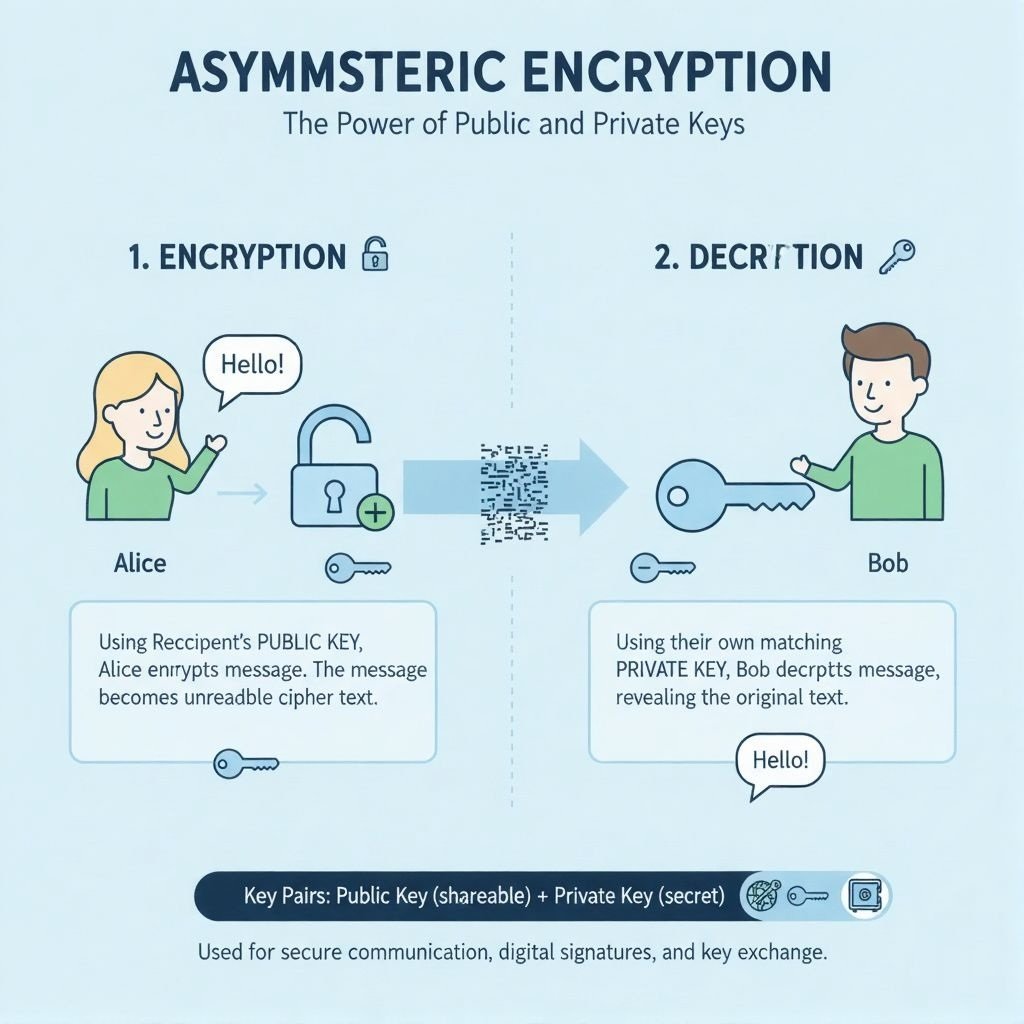
Here’s how the process flows:
- Key Generation: A user creates a key pair — one public, one private.
- Key Distribution: The public key is shared openly. The private key is stored securely, ideally in a Hardware Security Module (HSM) or a device like YubiKey.
- Encryption: Someone uses the public key to encrypt a message or file.
- Transmission: The encrypted data travels over the internet or any network.
- Decryption: Only the holder of the private key can decrypt and read the data.
This system solves a major problem in older encryption: key sharing. With symmetric encryption, both parties need the same secret key. Sending that key safely is risky. Asymmetric encryption removes that risk. You never need to send the private key. You only share the public one — which can’t decrypt anything on its own.
Why Is Asymmetric Encryption Important for Online Security?
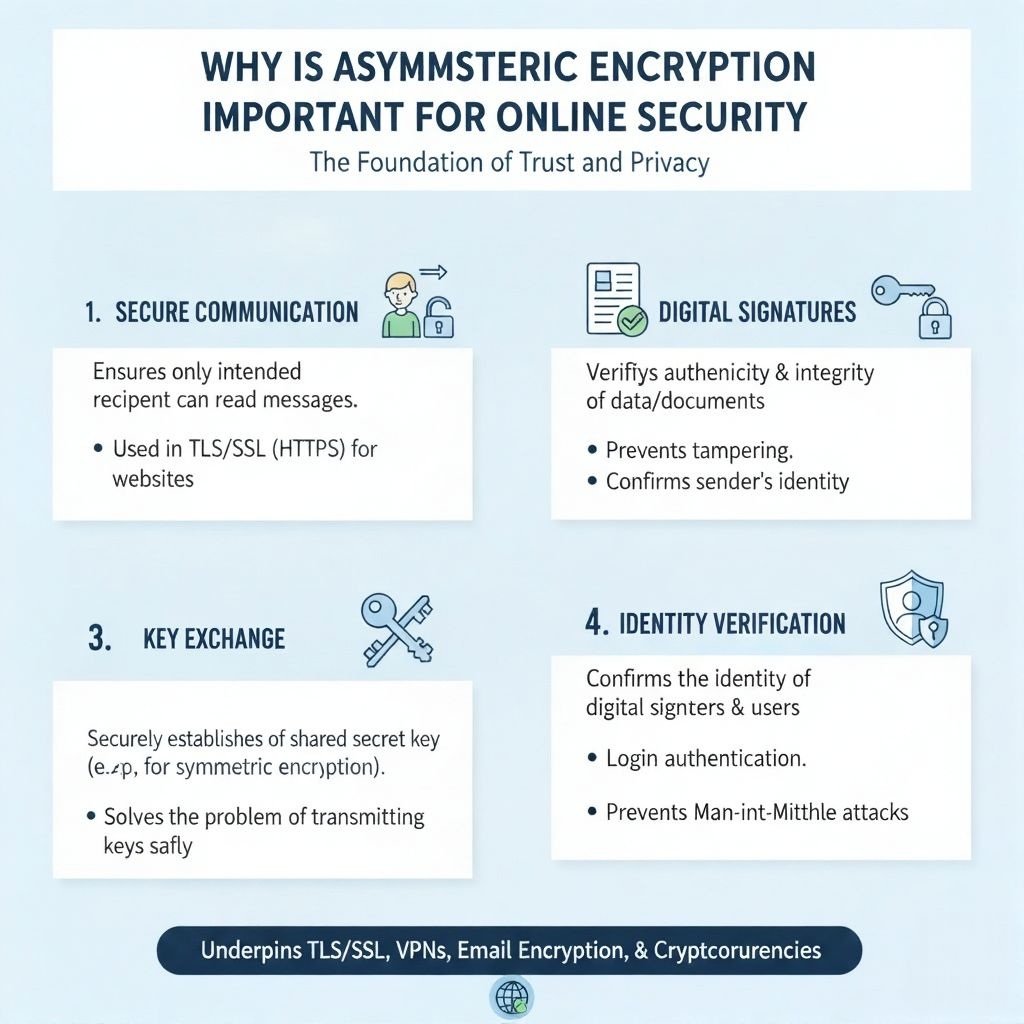
Asymmetric encryption is important because it enables secure communication without requiring prior trust or secret exchanges. It powers the lock icon in your browser, protects your emails, and verifies software downloads. Without it, the internet would be far more vulnerable to eavesdropping, fraud, and identity theft.
Here are 5 key areas where asymmetric encryption plays a critical role:
- Secure Websites (HTTPS): When you visit a site that starts with “https://”, your browser and the server use asymmetric encryption to set up a secure connection. The server sends its public key. Your browser uses it to encrypt a temporary session key. Only the server’s private key can unlock it. After that, faster symmetric encryption takes over — but the initial handshake is asymmetric.
- Email Privacy (PGP, S/MIME): Tools like Pretty Good Privacy (PGP) let you encrypt emails. You encrypt a message using the recipient’s public key. Only their private key can open it. Even your email provider can’t read it.
- Digital Signatures: Asymmetric encryption allows you to “sign” documents or software. You use your private key to create a signature. Anyone with your public key can verify it came from you — and that it hasn’t been changed. This is used in software updates, legal documents, and code signing.
- Cryptocurrencies (Bitcoin, Ethereum): Wallets use asymmetric keys. Your public key is your wallet address. People send funds to it. Your private key lets you spend those funds. Lose the private key, and you lose access permanently.
- Authentication Systems: Many login systems, like SSH (Secure Shell), use asymmetric keys instead of passwords. You generate a key pair. The server stores your public key. You log in using your private key, which never leaves your device.
These uses show why asymmetric encryption is the backbone of modern cybersecurity. It doesn’t just hide data. It also proves identity and ensures data hasn’t been tampered with. That’s called “non-repudiation” — meaning proof of authorship, like signing a letter, so you can’t deny sending a signed message. Asymmetric encryption often works with hashing (e.g., SHA-256) for data integrity and symmetric encryption for efficiency in protocols like TLS.
What Are Public Keys and Private Keys?
Public keys and private keys are mathematically related codes used in pairs to lock and unlock encrypted data. The public key is like a mailbox slot — anyone can drop a letter in, but only the owner can open the box. The private key is like the physical key to that mailbox — kept secret and used only by the owner.
Public Key
- Shared openly with anyone
- Used to encrypt messages or verify digital signatures
- Can be posted on websites, email signatures, or public directories
- Cannot decrypt what it encrypts — only the matching private key can
Private Key
- Kept secret by the owner
- Used to decrypt messages or create digital signatures
- Must be stored securely — in devices like YubiKey or Hardware Security Modules (HSMs), as theft compromises the system and loss prevents data access
- Never shared or transmitted over networks
These keys are generated together using cryptographic algorithms. They are linked in such a way that what one encrypts, only the other can decrypt. But you cannot guess one key from the other, even if you know the algorithm and have the public key. The math makes reverse-engineering practically impossible with today’s computers.
For example, in RSA encryption, keys are based on multiplying two very large prime numbers —say, 300-digit numbers. The public key includes the product. The private key includes the original primes. Multiplying the primes is easy. Factoring the product back into primes? That could take billions of years with current technology.
This is why key length matters. Common key sizes are:
- RSA: 2048-bit or 4096-bit keys (longer = more secure)
- ECC: 256-bit or 384-bit keys (shorter but equally strong due to advanced math)
Shorter keys are faster and use less computing power. But they must still be long enough to resist brute-force attacks — where hackers try every possible key until one works. Regular key rotation and secure backups are critical to maintaining security.
What Are the Most Common Asymmetric Encryption Algorithms?
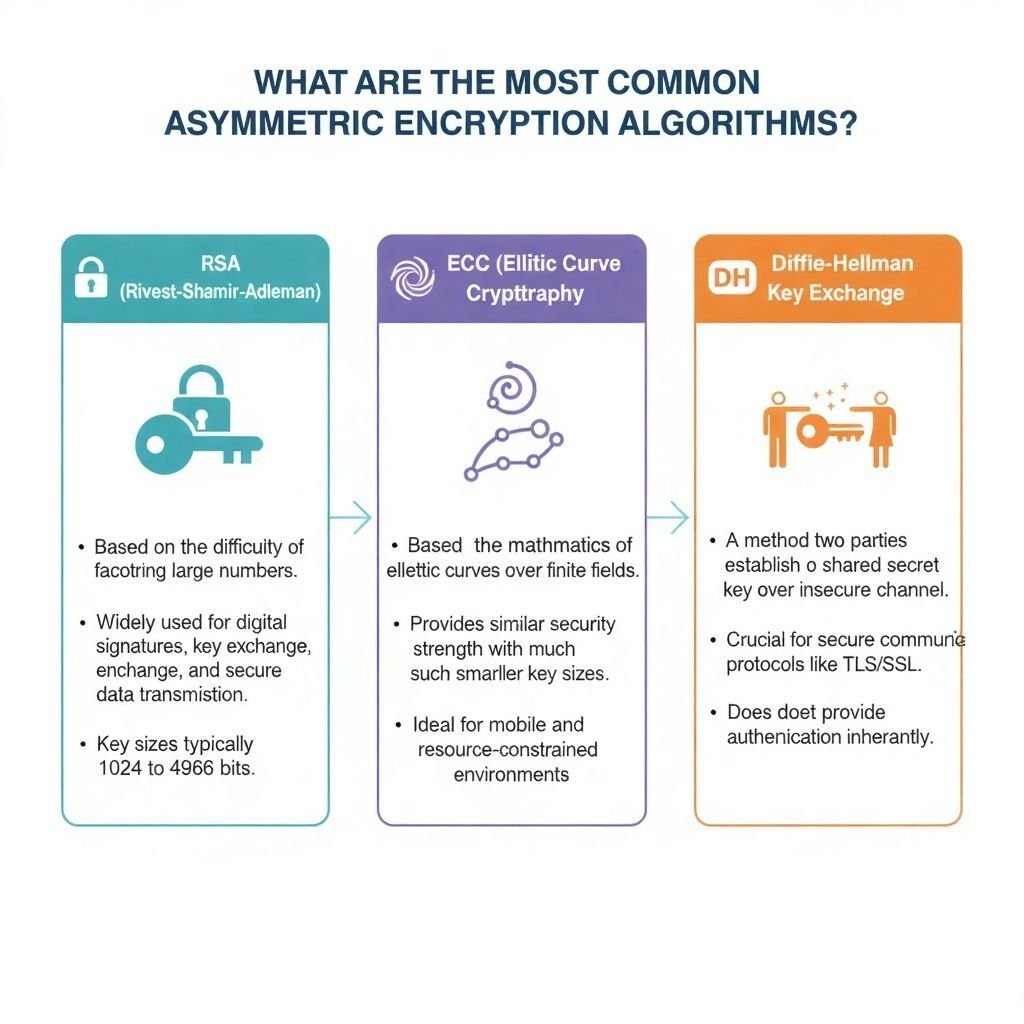
The most common asymmetric encryption algorithms are RSA, ECC, and Diffie-Hellman. Each uses different math to generate secure key pairs. They vary in speed, key size, and use cases.
RSA (Rivest-Shamir-Adleman)
- Invented: 1977
- Key Size: 2048-bit or 4096-bit recommended
- Use Cases: SSL/TLS, digital signatures, email encryption
- Strengths: Well-tested, widely supported
- Weaknesses: Slower than ECC (100–1000 times slower than AES for large data), requires longer keys for the same security
ECC (Elliptic Curve Cryptography)
- Invented: 1985, widely adopted in the 2000s
- Key Size: 256-bit equals 3072-bit RSA in strength
- Use Cases: Mobile devices, cryptocurrencies, IoT devices
- Strengths: Faster, uses less power and bandwidth
- Weaknesses: Less tested than RSA, complex to implement correctly
Diffie-Hellman Key Exchange
- Invented: 1976
- Key Size: Varies (often 2048-bit or higher)
- Use Cases: Secure key exchange in VPNs, TLS, SSH
- Strengths: Allows two parties to create a shared secret over public channels
- Weaknesses: Doesn’t encrypt data directly — only sets up keys for symmetric encryption
Each algorithm has trade-offs. RSA is the old standard — reliable but heavy. ECC is the new favorite — efficient and strong. Diffie-Hellman isn’t encryption by itself, but enables secure key sharing for other systems. Developers choose based on device capability, speed needs, and compatibility. For example, smartphones and smartwatches often use ECC because it’s lighter. Web servers may still use RSA because it’s universally supported.
What Are the Advantages of Asymmetric Encryption?
The advantages of asymmetric encryption include secure key exchange, digital signatures, scalability, and non-repudiation. These benefits make it essential for modern digital communication.
Here are 6 major advantages:
- No Shared Secret Required: You don’t need to send a secret key over the network. Public keys can be shared openly. This removes a major security risk.
- Digital Signatures: You can prove a message came from you and hasn’t been changed. This is vital for contracts, software updates, and legal documents.
- Scalability: One public key can be used by thousands of people to send you encrypted messages. You don’t need a separate key for each sender.
- Non-Repudiation: Because only you hold your private key, you can’t deny sending a signed message. This is useful in legal and financial contexts.
- Supports Hybrid Systems: Asymmetric encryption is often used to set up secure channels, then hands off to faster symmetric encryption (e.g., AES). This gives you both security and speed.
- Widely Trusted and Standardized: Used in global standards like TLS, PGP, S/MIME, and SSH. Backed by decades of research and testing.
These advantages explain why asymmetric encryption is built into nearly every secure system online. It’s not perfect — but its strengths solve critical problems that symmetric encryption alone cannot.
What Are the Disadvantages of Asymmetric Encryption?
The disadvantages of asymmetric encryption include slower speed, larger key sizes, complexity, and vulnerability to quantum computing. While powerful, it’s not ideal for all situations.
Here are 5 key limitations:
- Slower Performance: Asymmetric encryption requires more computing power. For example, RSA can be 100–1000 times slower than AES for encrypting large data sets, making it impractical for bulk encryption or streaming. That’s why it’s often used only to exchange keys.
- Larger Key Sizes: RSA keys need to be 2048-bit or longer to stay secure. That takes more storage and bandwidth than symmetric keys, which can be 128-bit or 256-bit.
- Complex Implementation: Setting up and managing key pairs correctly is harder than using a single password or key. Mistakes can lead to security holes, as seen in the Heartbleed bug (2014), which exposed private keys in vulnerable OpenSSL implementations.
- Private Key Management: If your private key is lost, you lose access to your data. If it’s stolen, attackers can impersonate you or decrypt your messages. Secure storage in devices like YubiKey is essential.
- Quantum Computing Threat: Future quantum computers could break current asymmetric algorithms like RSA and ECC using Shor’s Algorithm. Researchers are developing post-quantum cryptography, such as lattice-based algorithms like CRYSTALS-Kyber, to address this.
Because of these limits, asymmetric encryption is rarely used alone. It’s combined with symmetric encryption in a “hybrid cryptosystem.” The asymmetric part sets up the secure connection. The symmetric part handles the actual data transfer. This gives you the best of both worlds.
Where Is Asymmetric Encryption Used in Everyday Life?
Asymmetric encryption is used daily in web browsing, email, banking, apps, and even smart devices. You may not see it, but it’s working every time you do something secure online.
Here’s where you encounter it:
- Online Shopping: When you enter your credit card on a site, asymmetric encryption helps set up a secure tunnel so your data isn’t stolen.
- Mobile Banking Apps: Your login and transactions are protected using key pairs — often ECC for speed and efficiency.
- Messaging Apps: Apps like Signal and WhatsApp use asymmetric keys to set up end-to-end encryption. Only you and the recipient can read messages.
- Software Updates: When your phone or computer downloads an update, it checks a digital signature using asymmetric encryption to make sure it’s real and hasn’t been tampered with.
- Smart Home Devices: Devices like smart locks or cameras use asymmetric keys to authenticate with your phone or cloud service securely.
- Government and Healthcare: Secure portals for taxes, medical records, or licenses often rely on digital certificates and key pairs for identity verification.
Even if you don’t understand the math, you benefit from it. It’s like electricity — you don’t need to know how it’s generated to turn on a light. But understanding the basics helps you make smarter choices about your digital safety. For example, always check for the HTTPS padlock in your browser, use encrypted apps like Signal, or enable two-factor authentication with cryptographic keys like YubiKey.
How Is Asymmetric Encryption Different from Symmetric Encryption?
Asymmetric encryption uses two keys (public and private), while symmetric encryption uses one shared key. This difference affects security, speed, and how keys are managed.
| Feature | Asymmetric Encryption | Symmetric Encryption |
|---|---|---|
| Number of Keys | Two (public + private) | One (shared secret) |
| Speed | Slower (100–1000 times slower than AES) | Faster |
| Key Distribution | Easy (public key can be shared) | Hard (secret key must be sent securely) |
| Use Cases | Key exchange, digital signatures | Bulk data encryption, file storage |
| Examples | RSA, ECC, Diffie-Hellman | AES, DES, 3DES |
| Security Risk | Private key theft | Key interception during sharing |
Symmetric encryption is like a locked diary. You and your friend both have the same key. If someone steals it, they can read everything. Asymmetric encryption is like a mailbox. Anyone can drop mail in (using your public key), but only you can open it (with your private key).
In practice, most secure systems use both. For example, when you visit a banking website:
- Your browser and the server use asymmetric encryption (RSA or ECC) to agree on a temporary secret key.
- Then they switch to symmetric encryption (AES) to send your account data quickly and securely.
This hybrid approach gives you strong security without slowing things down.
What Is a Digital Certificate and How Does It Use Asymmetric Encryption?
A digital certificate is an electronic document that proves the ownership of a public key, using asymmetric encryption to verify identity. It’s like a digital passport for websites, software, or people.
Certificates are issued by trusted organizations called Certificate Authorities (CAs) — like DigiCert, Let’s Encrypt, or GlobalSign. They check the identity of the requester before issuing a certificate. However, compromised CAs, like DigiNotar in 2011, can lead to fraudulent certificates, highlighting the need to rely on reputable CAs.
A certificate includes:
- The owner’s name (e.g., google.com)
- The owner’s public key
- The issuing CA’s digital signature (created with the CA’s private key)
- Expiration date
- Serial number
When you visit a secure website, your browser:
- Downloads the site’s certificate
- Uses the CA’s public key (built into your browser) to verify the signature
- Confirms the certificate is valid and not expired
- Uses the site’s public key to start a secure connection
If any step fails — like an invalid signature or expired date — your browser shows a warning. This stops fake websites from tricking you.
Digital certificates are also used for:
- Signing software (so you know it’s from Microsoft or Adobe)
- Securing email (S/MIME certificates)
- Authenticating employees in corporate networks
Without certificates, anyone could claim to be your bank or favorite app. Asymmetric encryption makes these claims verifiable.
Can Asymmetric Encryption Be Broken?
Asymmetric encryption can theoretically be broken, but not with current technology — unless keys are poorly managed or quantum computers become practical.
Breaking RSA or ECC requires solving math problems that today’s computers can’t handle in a reasonable time. For example:
- Breaking a 2048-bit RSA key would take a classical computer longer than the age of the universe.
- Breaking a 256-bit ECC key is equally hard — even though the key is shorter.
But there are risks:
- Poor Key Management: If a private key is stored insecurely or shared, the system fails. For example, the Heartbleed bug (2014) exposed private keys in OpenSSL, allowing attackers to impersonate websites.
- Implementation Flaws: Bugs in software can leak keys or allow side-channel attacks.
- Quantum Threat: Quantum computers could use Shor’s Algorithm to break RSA and ECC in hours or minutes. To counter this, researchers are developing post-quantum cryptography, like lattice-based algorithms (e.g., CRYSTALS-Kyber), which NIST is standardizing for future use.
To stay safe:
- Use long, well-generated keys (2048-bit RSA or 256-bit ECC minimum)
- Keep private keys offline or in secure hardware (like a YubiKey or HSM)
- Update systems to support post-quantum algorithms when available
For now, properly implemented asymmetric encryption remains one of the strongest tools in cybersecurity.
FAQ: Quick Answers About Asymmetric Encryption
Is asymmetric encryption slower than symmetric encryption?\
Yes. Asymmetric encryption, like RSA, can be 100–1000 times slower than symmetric encryption (e.g., AES) for large data sets.
Can I use asymmetric encryption to encrypt large files?\
No. It’s too slow. Use it to exchange a key, then switch to symmetric encryption like AES for the actual file.
Is my private key stored on the internet?
No. Your private key should never leave your device. Only your public key is shared.
Can someone guess my private key from my public key?
No. The math makes it practically impossible with current computers.
Will quantum computers break asymmetric encryption?
Yes, eventually. But post-quantum algorithms like CRYSTALS-Kyber are being developed to replace RSA and ECC.
Do all websites use asymmetric encryption?
Yes, if they use HTTPS. The padlock icon means asymmetric encryption helped set up your secure connection.
Is asymmetric encryption used in Bitcoin?
Yes. Bitcoin wallets use ECC key pairs. Your public key is your address. Your private key lets you spend funds.
Can I create my own asymmetric keys?
Yes. Tools like OpenSSL, GPG, or built-in OS utilities can generate key pairs for you.
Practical Tips for Using Asymmetric Encryption
To leverage asymmetric encryption in your daily life:
- Check for HTTPS: Always ensure websites use HTTPS (look for the padlock icon in your browser) to confirm secure connections.
- Use Encrypted Apps: Choose messaging apps like Signal or WhatsApp for end-to-end encryption to protect your communications.
- Enable Two-Factor Authentication: Use cryptographic keys (e.g., YubiKey) for secure logins to services like email or banking.
- Learn More: Explore beginner-friendly resources, like Khan Academy’s cryptography tutorials, to deepen your understanding.
Conclusion: Why Asymmetric Encryption Is Important
Asymmetric encryption matters because it keeps your online life private, authentic, and secure — without you having to do anything. It’s the invisible engine behind secure websites, private messages, digital signatures, and safe transactions. You don’t need to understand prime numbers or elliptic curves. You just need to know that when you see a padlock in your browser or get a “signed” email, asymmetric encryption is at work.
This system solved one of the oldest problems in cryptography: how to share secrets over insecure channels. Before it, people had to meet in person or use risky methods to exchange keys. Now, you can send encrypted data to someone you’ve never met — and only they can read it.
As technology evolves, so does encryption. Quantum computers may one day break today’s algorithms. But scientists are already building the next generation, like lattice-based cryptography, to stay ahead. What won’t change is the core idea: separating the lock from the key. That simple concept protects billions of people every day.
Stay curious. Stay safe. And next time you log in or shop online, remember — asymmetric encryption is working quietly in the background, keeping your data yours.
You May Also Like
 Cyber Security
Can Ransomware Infect iCloud? What Mac and iPhone Users Need to Know
 Data Security & Privacy
Two-Factor Authentication (2FA): How It Works, Which Method to Use, and How to Stay Safe
 Data Security & Privacy
Is a Password Manager Safe? How to Use One Securely
 Data Security & Privacy
19 Best Email Service Providers for Personal and Business Use
 WordPress
12 Best Cheap SSL Certificate Providers To Secure Your Website
 Data Security & Privacy
Is Password Protection the Same as Encryption? Differences in Data Security
 Data Security & Privacy
How Your Digital Footprint Can Make or Break Your Career Opportunities
 Data Security & Privacy
What Is End-to-End Encryption? Your Complete Guide to Secure Communication
 Data Security & Privacy