Ransomware protection needs multiple security layers. You need data backups, access controls, employee training, and threat monitoring to stop attacks that lock your files and demand money. Good ransomware prevention mixes technical security with user awareness training to create strong cyber defenses.
Ransomware attacks jumped significantly in recent years, with the FBI’s 2024 Internet Crime Report showing ransomware complaints increased by 9% from 2023 to 2024. According to Cybersecurity Ventures, global ransomware damage costs reached $42 billion in 2024. These attacks hit businesses of all sizes – from small shops to major corporations and government agencies. The financial damage goes way beyond ransom payments. You also face recovery costs, lost productivity, and damaged reputation.
This guide shows you exactly how to protect your organization from ransomware attacks. You’ll learn proven ways to prevent infections, set up secure backup systems, train employees to spot threats, and respond well if an attack happens. These protection methods work together to create strong defenses that cut your ransomware risk significantly.
What Is Ransomware and How Does It Work?
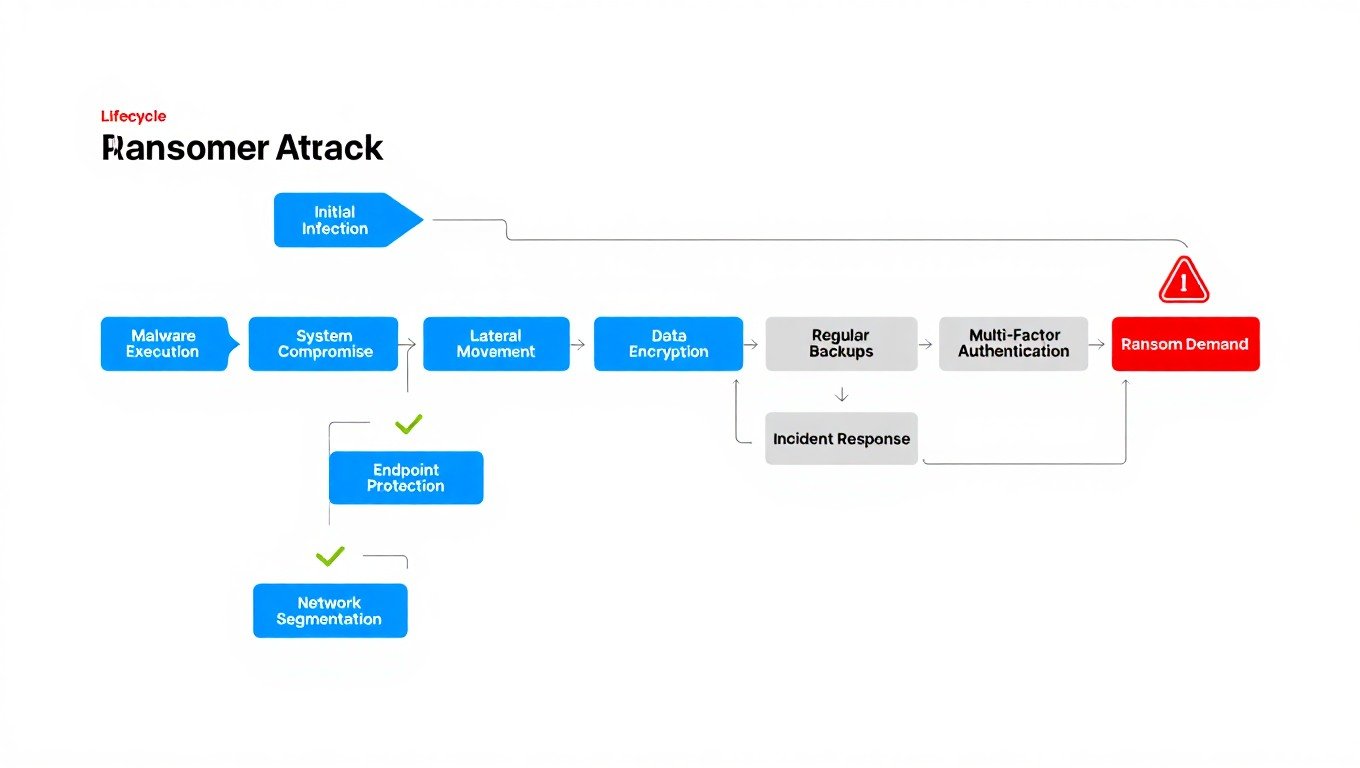
Ransomware is bad software that locks your files and demands payment for the unlock key. Attackers usually get in through fake emails, software holes, or stolen passwords. Then they spread through your network to cause maximum damage.
Common Ransomware Attack Methods
Fake emails remain the top way ransomware gets in. These messages trick users into clicking bad links or downloading infected files that install ransomware on their computers. The emails often look like they come from trusted sources like banks, shipping companies, or coworkers.
Remote access problems give attackers another common way in. They scan for systems with weak passwords, old software, or wrong remote access setups. Once inside, they can install ransomware and move sideways through your network.
Supply chain attacks target software vendors and service providers to reach multiple victims at once. Attackers break into trusted software updates or managed services to spread ransomware to many organizations.
Understanding what is ransomware helps you recognize the different attack methods and set up proper defenses for each threat type.
How Ransomware Spreads Through Networks
Modern ransomware types actively search for other systems to infect after the first break-in. They use real administrative tools and network protocols to move between computers, servers, and storage systems within your organization.
Sideways movement techniques let ransomware spread from infected workstations to important servers and backup systems. Attackers often spend weeks mapping your network and finding valuable targets before starting the ransomware attack.
Network file shares and mapped drives give easy paths for ransomware to lock files across multiple systems. The bad software can encrypt any files it can reach through network connections, including shared folders and cloud storage sync.
Why Are Immutable Backups Essential for Ransomware Protection?
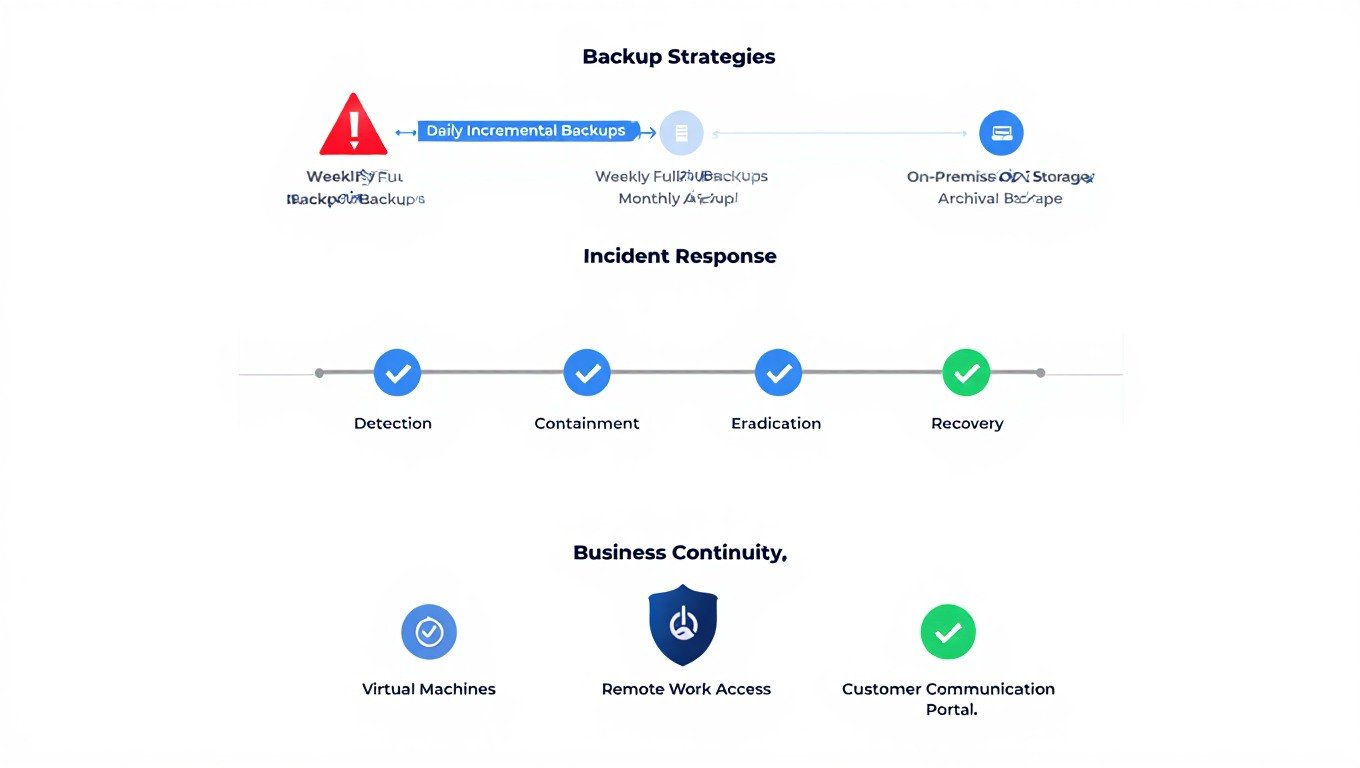
Immutable backups cannot be deleted, changed, or encrypted by ransomware. This gives you guaranteed data recovery even if attackers break into your entire network. These backups use write-once technology or air-gapped storage to keep data safe.
Understanding Immutable Storage Technology
Immutable storage systems prevent any changes to backed-up data for set time periods. This protection works at the hardware or software level, making it impossible for ransomware to encrypt or delete your backup files.
Object lock features in cloud storage services create immutable backups by stopping file deletion or changes until specific dates. These systems ignore all deletion requests, even from admin accounts, during the protection period.
Air-gapped backups provide physical separation between your active network and backup storage. These systems disconnect from the network after backup completion, making them unreachable by ransomware that spreads through network connections.
Understanding what is data encryption and why is it important helps you see why immutable backups work so well against ransomware attacks.
Implementing the 3-2-1 Backup Strategy
The 3-2-1 backup rule requires keeping three copies of important data on two different storage types, with one copy stored offsite. This plan ensures data availability even if ransomware breaks into your main systems and local backups.
Multiple backup copies reduce the risk of total data loss from hardware failures, natural disasters, or smart attacks that target backup systems. Store copies in different geographic locations to protect against regional disasters.
Different storage media types protect against various failure modes and attack methods. Mix local disk storage for fast recovery with cloud storage for off-site protection and tape storage for long-term keeping.
For organizations looking at best free cloud storage options, remember that free services may not offer the immutable backup features needed for ransomware protection.
Testing Backup Recovery Procedures
Regular backup testing checks that your data can actually be recovered when needed. Many organizations find backup failures only during real emergencies, when it’s too late to fix the problems.
Automated testing procedures should check backup completion, data integrity, and recovery functionality on regular schedules. Test different recovery scenarios, including partial file restoration, full system recovery, and disaster recovery procedures.
Document recovery procedures and train multiple team members on restoration processes. Recovery speed often determines business impact, so practice these procedures until your team can do them efficiently under pressure.
How Does Multi-Factor Authentication Prevent Ransomware Attacks?
Multi-factor authentication prevents ransomware attacks by requiring additional checks beyond passwords, making it much harder for attackers to gain first access to your systems. Even if passwords get stolen through phishing or data breaches, MFA provides extra protection.
Strengthening Access Controls
Password-only authentication creates single points of failure that attackers can exploit through various methods. Phishing attacks, credential stuffing, and password spraying can break into accounts that rely only on passwords for protection.
Hardware security keys provide the strongest multi-factor authentication by using cryptographic protocols that resist phishing attacks. These devices generate unique codes for each login attempt and cannot be copied or intercepted by attackers.
Biometric authentication adds another security layer by checking physical characteristics like fingerprints or facial features. These factors cannot be easily stolen or shared, though they should add to rather than replace other authentication methods.
Implementing MFA Across All Systems
All remote access points should require multi-factor authentication, including VPN connections, remote desktop access, and cloud service logins. Attackers often target these entry points because they provide direct access to internal networks.
Administrative accounts need stronger MFA protection because they have elevated privileges that attackers value highly. Use dedicated administrative accounts separate from daily-use accounts and require stronger authentication for privileged access.
Email systems should have MFA enabled since they’re common targets for phishing attacks and often contain sensitive business information. Protecting email accounts helps prevent attackers from using them to spread ransomware or steal additional credentials.
What Role Does Employee Training Play in Ransomware Prevention?
Employee training plays a crucial role in ransomware prevention because humans are often the first line of defense against cyber attacks. Most ransomware infections start with someone clicking a malicious link or downloading an infected file.
Phishing Awareness Programs
Phishing awareness training teaches employees how to recognize suspicious emails and messages. This training should cover common phishing techniques, warning signs to watch for, and proper procedures for reporting suspicious messages.
Regular phishing simulations test employee awareness by sending fake phishing emails and tracking who clicks on them. These simulations help identify employees who need additional training and measure the overall effectiveness of your awareness program.
Real-world examples from recent attacks help employees understand current threats. Show examples of actual phishing emails that other organizations received, explaining the tactics attackers used and how employees can spot similar attempts.
Social media safety is also important since attackers often research targets through social platforms. Understanding how to avoid spam and scams on Facebook helps employees protect both personal and work accounts.
Creating a Security-Aware Culture
Security awareness should be part of your organization’s culture, not just an annual training requirement. Regular communication about security threats and best practices keeps security top-of-mind for all employees.
Incident reporting procedures should be clear and easy to follow. Employees need to know who to contact if they suspect a security incident and feel comfortable reporting potential problems without fear of punishment.
Leadership involvement in security training shows that cybersecurity is a priority for the entire organization. When executives participate in training and follow security procedures, it reinforces the importance of these practices for all employees.
Ongoing Education and Updates
Threat landscapes change constantly, so security training must be updated regularly. New ransomware variants, phishing techniques, and attack methods require ongoing education to keep employees informed about current threats.
Department-specific training addresses the unique risks that different roles face. For example, accounting staff might need extra training about business email compromise attacks, while IT staff need to understand advanced persistent threats.
Measuring training effectiveness through tests, simulations, and metrics helps identify areas where additional education is needed. Track metrics like phishing simulation click rates, security incident reports, and employee feedback to improve your training program.
How Can Network Segmentation Limit Ransomware Spread?
Network segmentation divides your network into smaller, isolated sections that limit how far ransomware can spread if it gets into your system. This approach contains attacks and reduces the overall impact on your organization.
Implementing Zero Trust Architecture
Zero Trust architecture assumes that no user or device should be automatically trusted, even if they’re inside your network. Every access request gets checked before allowing access to resources.
Microsegmentation creates very small network zones around individual applications or data sets. This approach limits lateral movement by requiring authentication and authorization for each network connection.
Identity verification happens continuously throughout user sessions, not just at login. If something seems unusual, the system can require additional verification or block access entirely.
Learning about what is privacy engineering helps organizations implement privacy-by-design principles that work well with Zero Trust architectures.
Network Access Controls
Virtual Private Networks (VPNs) provide secure remote access while maintaining network segmentation. Modern zero-trust network access solutions offer more granular control than traditional VPNs.
Firewall rules should follow the principle of least privilege, allowing only the minimum network traffic necessary for business operations. Regular firewall rule reviews help identify and remove unnecessary access permissions.
Network monitoring tools track traffic patterns and can detect unusual activity that might indicate a ransomware attack. These tools can automatically block suspicious connections and alert security teams.
Understanding endpoint protection helps organizations choose the right tools to secure devices that connect to their networks.
Isolating Critical Systems
Critical systems like backup servers, domain controllers, and financial systems should be isolated from general network traffic. This isolation prevents ransomware from easily spreading to your most important resources.
Administrative networks should be separate from user networks to limit the impact of compromised user accounts. Dedicated administrative systems reduce the risk of privilege escalation attacks.
Air-gapped systems provide the highest level of isolation for extremely sensitive data or critical backup systems. These systems have no network connections, making them immune to network-based attacks.
What Monitoring and Detection Tools Help Identify Ransomware?
Monitoring and detection tools help identify ransomware attacks early, when you still have time to respond and limit damage. Early detection can mean the difference between recovering quickly and facing weeks of downtime.
Endpoint Detection and Response
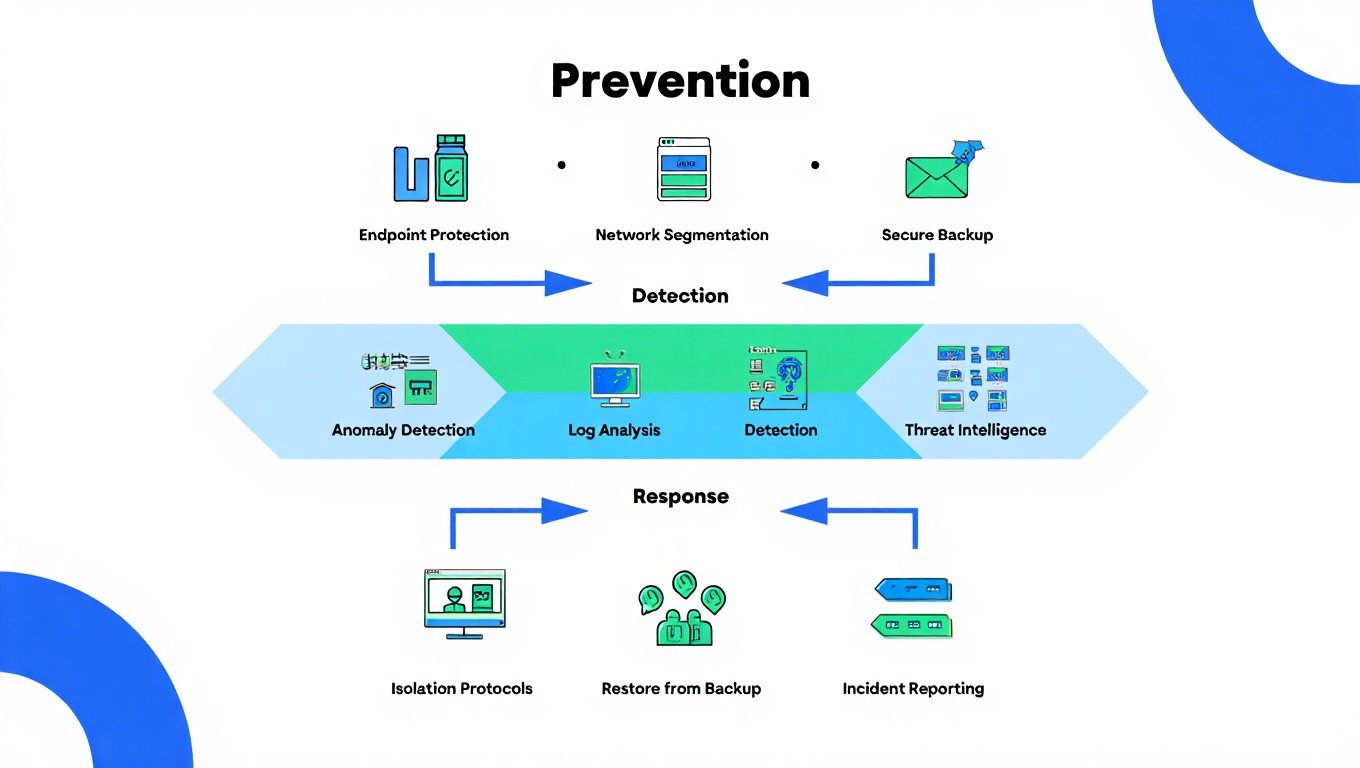
Endpoint Detection and Response (EDR) tools monitor individual computers and servers for signs of malicious activity. These tools can detect ransomware behavior patterns like rapid file encryption or suspicious network communications.
Behavioral analysis looks for unusual patterns in system activity rather than relying only on known malware signatures. This approach can catch new ransomware variants that haven’t been seen before.
Automated response capabilities can immediately isolate infected systems from the network to prevent ransomware from spreading. Quick isolation can save thousands of files from being encrypted.
Understanding what is cyber security provides the foundation for choosing appropriate monitoring and detection tools.
Network Traffic Analysis
Network traffic analysis monitors data flows across your network to identify suspicious patterns. Ransomware often creates unusual network traffic as it spreads and communicates with command and control servers.
DNS monitoring can detect connections to known malicious domains or suspicious domain generation algorithms used by ransomware. Blocking these connections can prevent ransomware from operating effectively.
Data loss prevention tools monitor for large amounts of data being copied or transmitted, which might indicate data theft before ransomware encryption begins.
Security Information and Event Management
SIEM systems collect and analyze security logs from across your IT environment to identify potential threats. These systems can correlate events from multiple sources to detect complex attack patterns.
Log aggregation from all systems provides a complete picture of what’s happening in your environment. Centralized logging makes it easier to investigate incidents and understand attack timelines.
Threat intelligence feeds provide information about current ransomware campaigns and indicators of compromise. This intelligence helps security teams recognize attacks faster and respond more effectively.
How Should Organizations Respond to Ransomware Attacks?
Organizations should have a well-planned incident response process for ransomware attacks. Quick, organized responses can limit damage and speed recovery time significantly.
Immediate Response Actions
Isolate infected systems immediately to prevent ransomware from spreading to other computers and servers. Disconnect network cables or disable wireless connections on affected systems.
Assess the scope of the attack to understand which systems and data have been affected. This assessment helps prioritize recovery efforts and determine what resources you’ll need.
Contact law enforcement and cybersecurity professionals for help with the investigation and recovery process. The FBI’s Internet Crime Complaint Center provides resources for reporting cyber crimes.
Document everything about the incident for insurance claims, legal requirements, and post-incident analysis. Good documentation helps with recovery and prevents similar attacks in the future.
Recovery and Business Continuity
Activate your business continuity plan to maintain critical operations while recovering from the attack. This might include switching to backup systems or manual processes.
Restore data from clean, verified backups rather than paying ransoms. NIST guidance recommends against paying ransoms because it doesn’t guarantee data recovery and funds criminal activities.
Scan all restored systems for malware before bringing them back online. Ransomware might have been present for weeks before activation, so thorough scanning is essential.
Test all restored systems thoroughly before returning them to production use. This testing ensures that systems work properly and don’t contain hidden malware.
Post-Incident Analysis
Conduct a thorough post-incident review to understand how the attack happened and what can be improved. This analysis should examine both technical and process failures.
Update security measures based on lessons learned from the incident. This might include additional security tools, policy changes, or enhanced training programs.
Share information about the attack with relevant authorities and industry groups to help others protect against similar threats. Information sharing strengthens the entire cybersecurity community.
Plan for long-term recovery activities like rebuilding trust with customers, addressing regulatory requirements, and strengthening security posture.
What Advanced Security Measures Provide Additional Protection?
Advanced security measures provide extra layers of protection beyond basic security controls. These measures are especially important for organizations that handle sensitive data or face higher risk levels.
Artificial Intelligence and Machine Learning
AI-powered security tools can detect new and unknown ransomware variants by analyzing behavior patterns rather than relying on signature databases. These tools learn from experience and improve over time.
Machine learning algorithms can identify subtle anomalies in network traffic, user behavior, and system activity that might indicate the early stages of a ransomware attack.
Automated threat hunting uses AI to proactively search for signs of compromise in your environment. This proactive approach can find threats that traditional security tools miss.
Understanding how AI is revolutionizing business intelligence shows how AI technologies are changing cybersecurity approaches.
Deception Technology
Honeypots and decoy systems attract attackers and provide early warning of intrusion attempts. These systems appear valuable but are actually monitored traps.
Deception networks create fake network segments that normal users never access. Any activity in these segments indicates a potential security breach.
Canary files are fake documents placed throughout your network that trigger alerts when accessed. Since legitimate users shouldn’t access these files, any activity indicates a problem.
Advanced Backup Technologies
Immutable storage with legal hold capabilities prevents data deletion even by system administrators. This provides the strongest protection against ransomware that tries to delete backups.
Blockchain-based backup verification ensures that backup data hasn’t been tampered with. This technology provides cryptographic proof of data integrity.
Cloud-based backup replication stores copies of your data in multiple geographic regions. This geographic distribution protects against regional disasters and provides faster recovery options.
Organizations considering google drive alternatives should evaluate advanced backup features when choosing cloud storage providers.
Frequently Asked Questions
Can antivirus software stop all ransomware attacks?
No, antivirus software cannot stop all ransomware attacks because new variants are created constantly and some use advanced evasion techniques. While antivirus provides important protection, it should be part of a layered security approach that includes backups, user training, and network controls.
Should organizations pay ransomware demands?
No, security experts and law enforcement agencies recommend against paying ransomware demands because payment doesn’t guarantee data recovery and funds criminal activities. Organizations should focus on prevention and recovery from backups rather than paying criminals.
How long does it take to recover from a ransomware attack?
Recovery time from ransomware attacks varies widely depending on the scope of infection, backup quality, and response preparation. Organizations with good backups and incident response plans may recover in days, while others without proper preparation may take weeks or months.
Does cyber insurance cover ransomware attacks?
Yes, many cyber insurance policies cover ransomware attacks, but coverage varies significantly between policies and providers. Organizations should carefully review policy terms and ensure they meet the security requirements that insurers mandate for coverage.
Can small businesses afford effective ransomware protection?
Yes, small businesses can implement effective ransomware protection using affordable tools and services. Basic protection includes regular backups, employee training, software updates, and free or low-cost security tools designed for small organizations.
How often should organizations test their backup systems?
Organizations should test backup systems at least monthly for critical data and quarterly for less critical information. Testing should include both restoration speed and data integrity verification to ensure backups will work when needed during an actual incident.
What is the difference between ransomware and other malware?
Ransomware specifically encrypts files and demands payment for decryption keys, while other malware may steal data, provide remote access, or perform other malicious activities. Ransomware’s primary goal is financial gain through extortion rather than espionage or system control.
How can organizations detect ransomware before encryption begins?
Organizations can detect ransomware before encryption through behavioral monitoring tools that watch for suspicious file activity, network monitoring that identifies command and control communications, and endpoint detection systems that recognize ransomware execution patterns.
Ransomware protection requires ongoing attention and investment, but the cost of prevention is much lower than the cost of recovery. Organizations that implement comprehensive protection strategies significantly reduce their risk of successful attacks and minimize impact when attacks do occur. Regular review and updates of security measures ensure continued effectiveness against evolving threats.
You May Also Like
 Cyber Security
Is KashKick Legit in 2026? An In-Depth KashKick Review for Earning Real Money
 Cyber Security
Is Kinguin Legit? An Honest 2026 Review With Real Data and Buyer Insights
 Network Security
How to Transfer Files Between Two Laptops Over Wi-Fi: What Actually Works
 Cyber Security
How to Stay Safe with Online Banking and Protect Your Account Information
 Tiktok
Is Urlebird TikTok Online Viewer Safe and Legal?
 Cyber Security
Is Buster Captcha Solver for Humans Safe?
 Data Security & Privacy
Beyond the Perimeter: The Architecture of Production-Grade Data Security (2026)
 Cyber Security
URLVoid: How to Detect Malicious Websites and Verify Safety
 Cyber Security