Forward proxy and reverse proxy servers are two important tools that help keep your internet connection safe and fast. These types of proxy servers work in different ways, but both help protect your data and make websites load faster.
In this guide, we’ll explain how these proxy servers work, why they’re useful, and when you should use each one.
What Is a Forward Proxy?
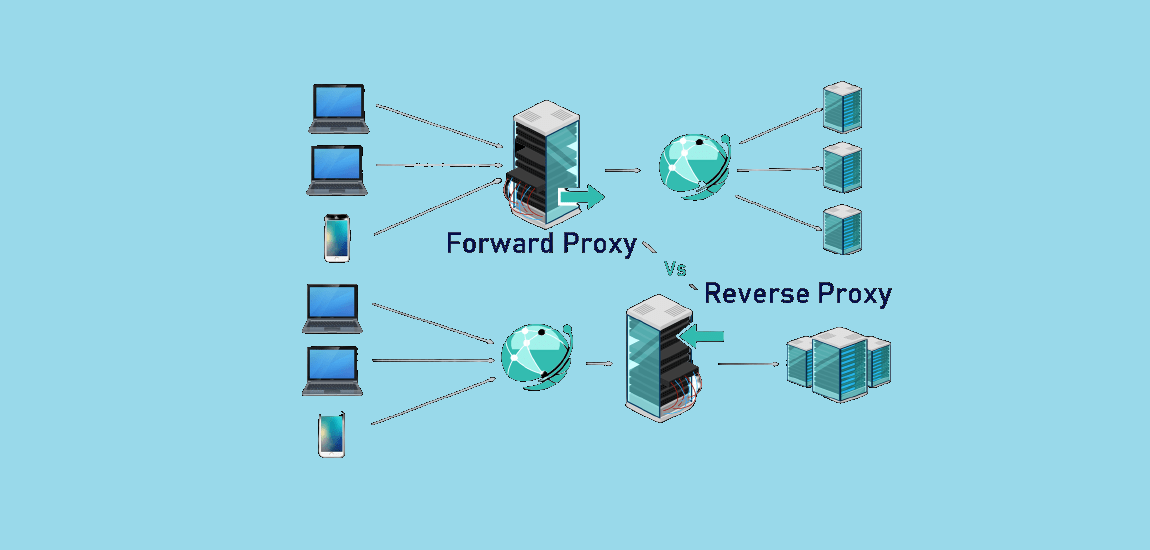
A forward proxy sits between you and the internet. Think of it like a helpful middleman. When you want to visit a website, your request goes to the forward proxy first. The proxy then visits the website for you and brings back the information you wanted.
Here’s how it works:
- You click on a website link
- Your request goes to the forward proxy server
- The proxy visits the website using its own IP address
- The website sends information back to the proxy
- The proxy sends that information to you
The website never sees your real IP address – it only sees the proxy’s address. This keeps your identity hidden.
Why Use Forward Proxies in 2025?
Forward proxies help in several ways:
- Stay Anonymous: Websites can’t see who you really are
- Block Bad Websites: Companies use them to stop employees from visiting dangerous sites
- Save Internet Speed: They store copies of popular websites so they load faster
- Monitor Usage: Companies can see what websites their workers visit
- Stop Malware: They can block viruses before they reach your computer
What Is a Reverse Proxy?
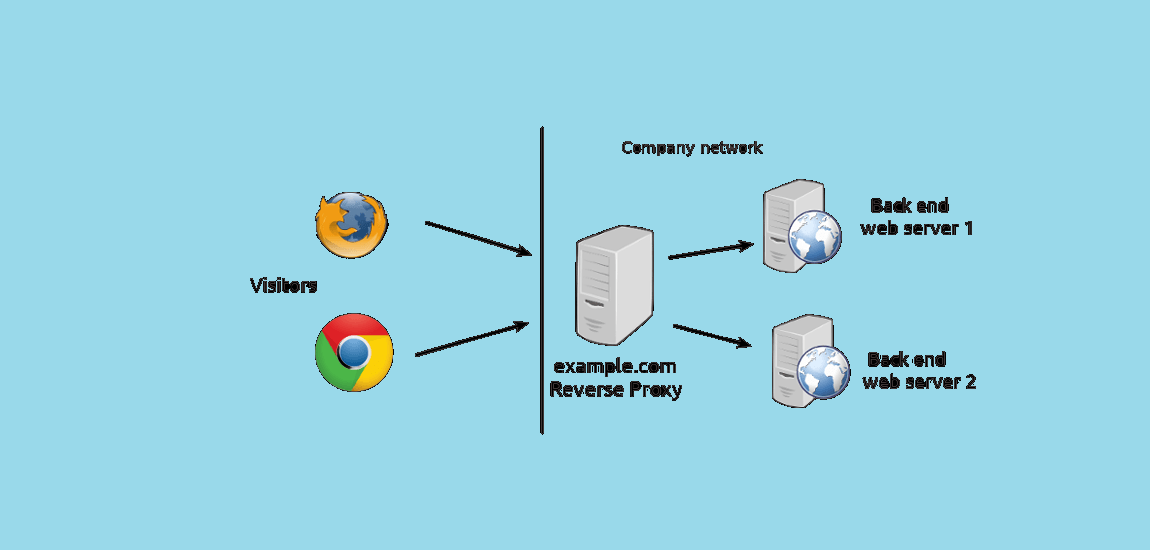
A reverse proxy works the opposite way. Instead of hiding users from websites, it hides websites from users. It sits in front of web servers and handles all the incoming requests from people trying to visit those websites.
When you visit a website that uses a reverse proxy:
- You send a request to visit the website
- The reverse proxy receives your request
- The proxy decides which server should handle your request
- The proxy gets the information from that server
- The proxy sends the website back to you
You never talk directly to the actual web server – you only talk to the reverse proxy.
Why Websites Use Reverse Proxies
Reverse proxies help websites in many ways:
- Handle More Visitors: They can spread visitors across multiple servers
- Stay Safe: They hide the real servers from hackers
- Load Faster: They keep copies of popular pages ready to serve quickly
- Handle Security: They can block DDoS attacks and other threats
- Manage Certificates: They handle all the security certificates in one place
Forward vs Reverse Proxy: What’s the Difference?
The main difference is direction:
Forward Proxy:
- Helps users connect to websites
- Hides the user’s identity from websites
- Used by companies to control what employees can access
- Good for privacy and security when browsing
Reverse Proxy:
- Helps websites serve users better
- Hides the website’s servers from users
- Used by website owners to improve performance
- Good for handling lots of visitors and staying secure
Think of it this way: A forward proxy is like having a friend buy something for you at a store so the store doesn’t know who you are. A reverse proxy is like having a receptionist at a big company who decides which employee should help each visitor.
Security Differences
Both types of proxies improve security, but in different ways.
Forward Proxy Security
Forward proxies protect users by:
- Requiring Login: Users must prove who they are before accessing the internet
- Blocking Bad Sites: They maintain lists of dangerous websites and block access to them
- Scanning Files: They check downloads for viruses before letting them through
- Monitoring Traffic: They watch for suspicious activity and data theft
Reverse Proxy Security
Reverse proxies protect websites by:
- Hiding Servers: Hackers can’t attack servers they can’t see
- Blocking Attacks: They stop web attacks before they reach the real servers
- Rate Limiting: They prevent too many requests from the same person
- SSL Protection: They handle all the encryption and security certificates
Performance Benefits
How Forward Proxies Improve Speed
Forward proxies make browsing faster by:
- Caching Content: They save copies of popular websites locally
- Compressing Data: They make files smaller before sending them to you
- Reducing Requests: If someone else already visited a site, you get the cached copy
But they can also slow things down by:
- Adding Steps: Your request has to make an extra stop at the proxy
- Processing Time: The proxy needs time to check and filter content
How Reverse Proxies Improve Speed
Reverse proxies usually make websites much faster by:
- Load Balancing: They send visitors to the server that’s least busy
- Caching Pages: They keep popular pages ready to serve instantly
- Compressing Content: They make web pages smaller so they load faster
- Handling SSL: They take care of encryption so the main servers don’t have to
Benefits of Forward Proxies
Here are the main benefits of using a forward proxy:
1. Privacy Protection Your real IP address stays hidden from websites you visit. This makes it harder for companies to track your online activity.
2. Better Security The proxy can block malicious websites and scan downloads for viruses before they reach your computer.
3. Faster Browsing Popular websites get cached, so they load faster when you visit them again.
4. Content Control Companies can block access to certain websites during work hours.
5. Usage Monitoring IT departments can see what websites are being visited and how much bandwidth is being used.
Benefits of Reverse Proxies
Here are the main benefits websites get from using reverse proxies:
1. Better Security The proxy acts like a shield, protecting web servers from direct attacks and hiding their real locations.
2. Handle More Traffic Multiple servers can work together to handle lots of visitors at the same time.
3. Faster Loading Popular content gets cached and served quickly to visitors.
4. SSL Management All security certificates are managed in one place, making setup easier.
5. Better Monitoring Website owners can track visitor patterns and server performance more easily.
Common Uses Today
Forward Proxy Uses
- Schools and Companies: Block social media and inappropriate websites during work/study hours
- Privacy: Browse the internet without websites knowing your real location
- Public WiFi Safety: Add extra security when using coffee shop or hotel internet
- Parental Controls: Parents can control what websites their kids can visit
Reverse Proxy Uses
- E-commerce Sites: Handle Black Friday traffic spikes without crashing
- News Websites: Serve breaking news to millions of readers quickly
- Streaming Services: Deliver videos from servers closest to viewers
- API Services: Manage and secure connections to web services and apps
How to Choose the Right One
Choose a Forward Proxy When:
- You want to browse the internet privately
- Your company needs to control employee internet access
- You want to block certain websites or content
- You need to monitor internet usage
- You want extra security when browsing
Choose a Reverse Proxy When:
- You run a website that gets lots of visitors
- You want to protect your web servers from attacks
- You need your website to load faster
- You have multiple servers and need to balance the load
- You want to manage SSL certificates easily
Popular Proxy Solutions
Forward Proxy Options
Free Options:
- Squid: Open-source proxy that’s free to use
- Public Proxies: Free but often slow and unreliable
Paid Options:
- Zscaler: Cloud-based security for businesses
- Blue Coat: Enterprise security with advanced features
- Forcepoint: Complete web security solution
Reverse Proxy Options
Free Options:
- NGINX: Popular web server with built-in reverse proxy features
- HAProxy: Reliable load balancer that’s free to use
Paid Options:
- Cloudflare: Global network with security and speed improvements
- AWS Load Balancer: Amazon’s managed service
- F5 BIG-IP: Enterprise solution with many features
Common Problems and Solutions
Forward Proxy Issues
Problem: Slow internet because everything goes through the proxy Solution: Use a faster proxy server or cache more content locally
Problem: Some websites don’t work properly through the proxy Solution: Add those websites to a bypass list
Problem: Users complain about blocked websites Solution: Review and update your blocking policies regularly
Reverse Proxy Issues
Problem: One server goes down and affects the whole website Solution: Set up health checks to automatically remove failed servers
Problem: Cached content becomes outdated Solution: Set proper cache expiration times and update rules
Problem: SSL certificate management becomes complex Solution: Use automated certificate renewal services
Security Best Practices
For Forward Proxies
- Use Strong Authentication: Require users to log in with secure passwords
- Update Regularly: Keep your proxy software updated with security patches
- Monitor Logs: Watch for unusual activity or security threats
- Limit Access: Only give proxy access to people who need it
For Reverse Proxies
- Hide Server Information: Don’t let visitors see details about your backend servers
- Use Rate Limiting: Prevent anyone from making too many requests too quickly
- Regular Security Scans: Check for vulnerabilities in your proxy setup
- Keep Certificates Current: Make sure SSL certificates don’t expire
Future Trends to Watch
What’s Coming in 2025 and Beyond
Better Security:
- Smarter threat detection using machine learning
- Integration with zero trust security models
- Better privacy protection as regulations get stricter
Improved Performance:
- Faster HTTP/3 protocol support
- Edge computing bringing content closer to users
- AI-powered caching that predicts what content people will want
Easier Management:
- Cloud-based proxy services that are easier to set up
- Better integration with existing security tools
- Automated configuration and maintenance
Conclusion
Forward and reverse proxies are both useful tools, but they solve different problems. Forward proxies help users browse the internet safely and privately. Reverse proxies help websites handle more visitors and stay secure.
If you’re a regular internet user, you might benefit from a forward proxy for privacy and security. If you run a website or web service, a reverse proxy can help you handle more visitors and protect your servers.
Both types of proxies are becoming more important as the internet gets more complex and security threats increase. Understanding how they work can help you make better decisions about your online security and website performance.
Whether you choose a VPN or proxy, need web scraping protection, or want to improve your website’s speed, knowing the difference between forward and reverse proxies will help you pick the right solution for your needs.
You May Also Like
 VPN
VPNCloudflare WARP as a Free VPN Alternative: Review After Months of Daily Use
 Proxies
10 Best Public DNS Servers for Faster Browsing and Lower Gaming Latency in 2026
 Proxies
Residential Proxies vs. ISP Proxies: What Actually Sets Them Apart
 Proxies
REST APIs Explained: Everything You Need to Know to Build and Use Them
 Proxies
Is CroxyProxy Safe to Use for YouTube? Privacy, Security, and Risks
 Proxies
Top 10 Free Proxy Websites in 2026: My Complete Testing Guide
 Proxies
What Are Residential Proxies: Use Cases and Best Providers in 2026
 WordPress
10 Best Free Online Server Status Checker Websites: Complete Guide to Monitor Your Server Health
 VPN
VPN


