Softonic is a website where you can download free software. It can be safe to use. But you need to be careful. Some downloads might have malware or viruses.
The safety of Softonic depends on what you download. It also depends on how careful you are. Many people use Softonic without problems. Others have had issues with viruses and unwanted programs.
What is Softonic?
The History of Softonic
Softonic is a website from Spain. It started in 1997. A man named Tomás Diago created it. The website helps people find and download software for free. Today, Softonic has offices in Spain and California. Millions of people visit the site each month to download software and games.
Softonic makes money from ads and partnerships (AdSense). They offer both free and paid software. Most of what they offer is free to try. The website sorts software by type and popularity. This helps users find what they need. Softonic also shows user reviews. These reviews help people decide if they want to download something.
How Softonic Works
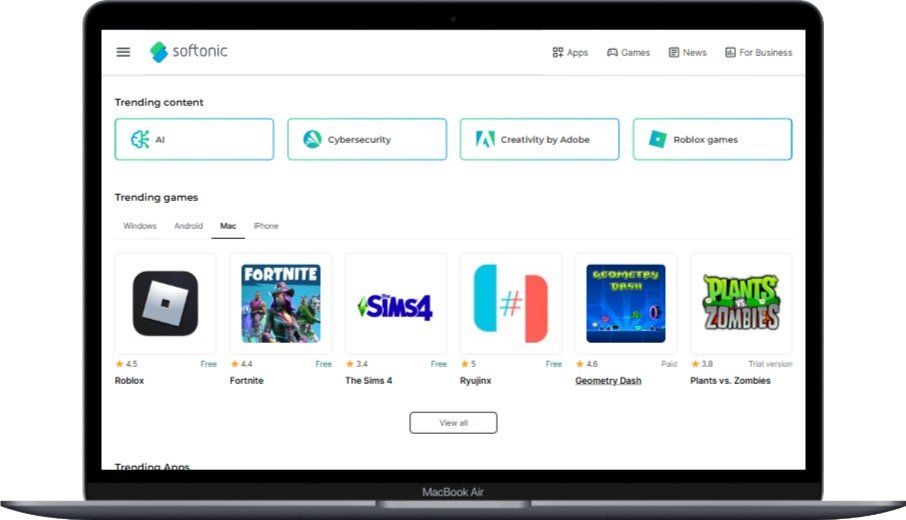
Softonic works with software makers. These makers send their software to Softonic. Softonic then checks the software. They create a page for each program. This page has information about the software. It also has screenshots and user reviews.
Softonic either hosts the download files. Or they link to the maker’s website. The site sorts software by what it does. It also shows which programs are popular. This helps users discover new apps. Softonic has its own download manager. Some users choose to install this manager. But some people worry this manager might come with extra software.
What Users Say About Softonic
Good Experiences with Softonic
Many people like using Softonic. They find it easy to use. They like that they can find many programs in one place. Good experiences include:
- Downloading software without getting viruses
- Reading helpful reviews before downloading
- Finding old versions of programs
- Discovering new software they didn’t know about
One user said: “I’ve used Softonic for years. I’ve never gotten a virus from it. The site is easy to use. I like reading what other people think about programs before I download them.”
Another user shared: “Softonic helped me find an old photo editor. It worked great on my old computer. The download was simple.”
Problems People Have with Softonic
But some users have had bad experiences. Common problems include:
- Extra software: Many downloads come with other programs. These install unless you uncheck boxes during setup
- Browser changes: Some users find their browser settings changed after downloading
- Lots of ads: The site shows many ads. Some might lead to bad websites
- Unwanted programs: Antivirus software often warns about programs from Softonic
- Old software: Some programs on Softonic are outdated. They might not have the latest security updates
One user complained: “I downloaded a media player from Softonic. It came with so many extra programs. I spent hours cleaning my computer. My antivirus found many unwanted programs.”
Another person warned: “After downloading a game, my browser homepage changed. I got lots of pop-ups. It took me time to fix this problem.”
Understanding the Risks: Malware and Viruses
What Are Malware and Viruses?
Malware means bad software. It’s made to harm computers. Viruses are a type of malware. They can copy themselves and spread to other computers. Common types of malware include:
- Viruses: Programs that attach to good software. They spread when people share the software
- Worms: Malware that spreads to other computers by itself
- Trojans: Malware that looks like good software. It tricks you into installing it
- Ransomware: Malware that locks your files. It demands money to unlock them
- Spyware: Malware that watches what you do. It steals your information
- Adware: Malware that shows you unwanted ads
Malware can cause many problems. It can slow down your computer. It can steal your personal information. It can damage your files. It can let bad people access your system. The damage can be small or very serious.
Potentially Unwanted Programs (PUPs)
PUPs are programs that might not be malware. But they can still cause problems. Unlike malware, PUPs often come with good software. They’re part of the installation process. Common PUPs include:
- Browser toolbars: These add toolbars to your browser. They often change your search settings
- System optimizers: These claim to make your computer faster. But they often don’t help much
- Download managers: These manage downloads. But they might come with extra software
- Ad-injectors: These show extra ads on websites you visit
- Browser hijackers: These change your browser’s homepage without asking
PUPs can cause several issues:
- They make your computer slower
- They use up system resources
- They show too many ads
- They track what you do online
- They change your settings without permission
- They can collect personal information
PUPs aren’t as bad as malware. But they can still make your computer experience worse. They might also create security holes. Bad software could use these holes to attack your computer.
How Softonic Keeps Downloads Safe
Softonic’s Safety Checks
Softonic uses several methods to keep users safe. They check downloads before letting people download them. These methods include:
- Virus scanning: All files are scanned with many antivirus programs. This finds known malware and viruses
- Human review: People check each software submission. They look for suspicious behavior
- Digital signatures: Softonic checks if software has a digital signature. This helps verify it’s real
- Regular re-scanning: Files get scanned again later. This makes sure they stay safe as new threats appear
- User reports: Softonic watches for user reports. They quickly check claims of malware
Softonic shows safety information for each download. This tells you if the file passed virus scans. It also shows if the file has a digital signature. Softonic uses a traffic light system to show safety:
- Green: The file passed all checks. It’s considered safe
- Yellow: The file has minor concerns. It’s mostly safe
- Red: The file failed security checks. It might be dangerous
Safety Certifications
Softonic has several safety certifications. These show they care about security. These certifications include:
- Web of Trust (WOT): Softonic has a trust score of about 85-86% on WOT. WOT is a service that rates website safety
- Google Safe Browsing: Google checks Softonic regularly. They haven’t flagged it as dangerous
- McAfee Secure: Softonic has this certification. It means the site meets certain security standards
- TRUSTe: This certification shows Softonic follows good privacy practices
These certifications suggest Softonic takes security seriously. But they mainly apply to the Softonic website itself. They don’t guarantee that all software on Softonic is safe.
How to Download Safely from Softonic
Safe Downloading Tips
To stay safe when downloading from Softonic, follow these tips:
- Use good antivirus software: Install antivirus software from companies like Norton or McAfee. Keep it updated
- Read reviews: Check what other users say about the software. Look for mentions of viruses or extra programs
- Check the source: See if the download comes from Softonic or the software maker
- Pay attention during installation: Read each screen. Uncheck any extra programs you don’t want
- Choose custom installation: Pick custom installation instead of express. This gives you more control
- Scan downloads: Before opening any download, scan it with your antivirus software
- Update your system: Keep your operating system and browser updated. Install security patches
- Use a separate email: Use a different email for downloads. This protects your main email from spam
Signs of Suspicious Software
When downloading from Softonic, watch for these warning signs:
- Too many permissions: If the software asks for permissions it doesn’t need, be careful
- Bad spelling: Good software usually has well-written text. Many errors might mean it’s not trustworthy
- Too many ads: If the software or its page has too many ads, be cautious
- Fake reviews: If all reviews are perfect with no criticism, they might be fake
- Rushing you: If the software tries to make you download quickly without thinking, be suspicious
- Vague developer info: Good software tells you clearly who made it
- Unexpected redirects: If download buttons send you to different sites, be careful
- System changes: If your browser or settings change after installation, the software might have unwanted parts
If you see these warning signs, consider finding another source for the software. Or contact the software maker directly for a safe download.
Other Places to Get Software Safely
Official Websites
The safest place to get software is from the official website. Downloading directly from the maker has several benefits:
- It’s authentic: You get the real software from the source. No one has changed it
- It’s up to date: Official sites have the newest versions. These include important security updates
- No extra software: Makers usually don’t include third-party software in their downloads
- Direct help: If you have problems, you can get help from the people who made the software
- Clear information: Official sites give accurate information about features and requirements
To find the official website, search for the software name plus “official website” in a search engine. Be careful of results that look official but might be third-party sites.
Other Safe Software Sites
If you like using software download sites, consider these alternatives to Softonic:
- SourceForge: This site hosts open-source software. It has stricter safety rules now
- GitHub: This is mainly for developers. But many software projects offer downloads here
- Microsoft Store: Windows users can get apps here. Microsoft checks these apps for safety
- Mac App Store: Apple’s store for Mac apps. It has strict safety requirements
- FossHub: This site focuses on free and open-source software. It promises clean downloads
- Ninite: This service lets you install many programs at once. No bundled software or toolbars
- FileHippo: This site offers software downloads without extra software or ads
Each of these sites has its own safety rules. But they generally have better reputations for clean downloads than many third-party sites.
Final Thoughts: Is Softonic Safe?
Yes, Softonic can be safe if you’re careful. But it does have risks that you need to watch for. The site has safety measures and certifications. These show they care about user safety. Many people download software from Softonic without any problems.
But Softonic makes money from ads and partnerships. This sometimes means downloads come with extra software. The site also has thousands of programs. It’s hard to check every single one for safety.
Your safety on Softonic depends on:
- Which software you download
- How careful you are
- How good your antivirus protection is
- How much attention you pay during installation
If you know about security and have good antivirus, Softonic can be useful. But if you’re new to computers or want zero risk, you might prefer downloading from official websites or safer platforms.
In the end, Softonic is in the middle. It’s not completely safe. But it’s not completely dangerous either. Your experience will depend on how carefully you use the site and how well you protect your computer.
Frequently Asked Questions About Softonic
Is Softonic a legal website?
Yes. Softonic is a legal website. It started in 1997 and follows international laws. The company is properly registered. Softonic works with software makers and has permission to distribute their programs.
Does Softonic have viruses?
Sometimes. Softonic scans files for viruses and malware. But some downloads might still have viruses. The site can’t promise every file is 100% safe. New threats appear all the time. Always scan downloads with your own antivirus before opening them.
Is the Softonic download manager safe?
It depends. The Softonic download manager is a real tool for managing downloads. But it has come with extra software in the past. If you install it, read each screen carefully. Say no to any extra software offers.
Can I get malware from Softonic?
Yes, it’s possible. Softonic tries to prevent malware. But the site hosts thousands of programs from many makers. It’s impossible to check every download completely. Some users have found malware, adware, and unwanted programs from Softonic downloads.
Is Softonic safer than other download sites?
Sometimes. Softonic has safety measures and certifications. This makes it generally safer than many unknown download sites. But official websites and stores like Microsoft Store or Mac App Store are usually safer.
Does Softonic sell user data?
No. Softonic says in its privacy policy that it doesn’t sell personal user data. The site collects some information to work properly. It might share some anonymous data with partners. But it claims not to sell individual user information.
Can I trust Softonic reviews?
Partially. Softonic shows user reviews and expert reviews of software. Many reviews are real. But people have criticized Softonic for possibly removing negative reviews. Or giving better treatment to advertisers. Read reviews from multiple sources to get a full picture.
Is it safe to download games from Softonic?
With caution. Games from Softonic have the same risks as other software. Many games are safe. But some might come with extra software or unwanted programs. Always scan games with antivirus before installing. Pay attention during installation to avoid extra software.
How do I remove Softonic from my computer?
Use standard uninstall methods. To remove Softonic or its downloads, use your computer’s uninstall feature. On Windows, go to Control Panel > Programs > Programs and Features. Select the software you want to remove. Click Uninstall. For browser changes, you might need to reset your browser or remove unwanted extensions.
Is Softonic safe for Mac users?
Relatively safer. Mac users face fewer security threats in general. macOS has built-in safety features. But Softonic downloads for Mac can still have unwanted software or adware. Mac users should be just as careful as Windows users. Use good antivirus software for Mac.
Can Softonic harm my computer?
Potentially, yes. Many Softonic downloads are safe. But some might have malware, adware, or unwanted programs. These could slow down your computer. They might steal your information. Or cause other problems. Good antivirus software and safe downloading habits can lower this risk.
Is Softonic safe for children?
With supervision. Softonic has software for all ages. This includes games and educational programs for kids. But the site also has software for adults. It shows ads that might not be appropriate for children. Parents should watch their children’s use of Softonic. Consider using parental control software to limit access to certain content.
For more information on protecting your computer, check out our guides on malware removal and antivirus protection. You can also learn about Windows security to keep your system safe.
You May Also Like
 Online Services
8 Best Sites Like Fiverr (Fiverr Alternatives) To Earn Money As A Freelancer
 Online Services
20 Best Sites To Download Free Stock Photos For Personal and Commercial Use
 Cyber Security
Is Temu Legit or a Scam? The Complete Truth You Need to Know
 Online Services
How to Use WhatsApp on PC & Laptop (Easy 2026 Guide)
 Online Services
10 Best Free PDF Editor Tools Online And Offline For Windows 10/11
 Computer Security
10 Best Portable Antivirus Software for Windows in 2026
 Online Services
22 Best Free Sites to Receive SMS Online for Verification Without a Phone
 Online Services
15 Free Movie Apps for Android: Your Complete Guide to Legal Streaming in 2026
 Cyber Security