Looking for the best free Youtube downloader converter mp3 mp4? If you spend most of your time on YouTube, then you probably should know about some of the best YouTube converter sites that can help you save your favorite videos offline on a smartphone or computer in mp3, mp4, or another format.
YouTube is undoubtedly has become one of the most popular sites that provide free videos and interesting content. Although you can subscribe to it or create your own playlist, you can’t actually download the videos which are kind of annoying for those who want to save and keep the videos within their personal possession.
That’s why there are several service providers that are offering their help. Through their website, you can download the YouTube videos and keep them in your computer’s memory or folders. Be advised, though, as not all YouTube downloader sites are safe or even good. Some may have limited services and abilities. So, what are your options for reliable downloader websites?
10 Best Free YouTube Downloader & Converter Mp3, Mp4, Reels
1. Any Video Converter

Any Video Converter
They have a free service as well as a paid one. Even the free service enables you to download and then convert videos to mp3, if you want to, along with the addition of some special effects. As one of the best YouTube downloader platforms, you can use it with macOS and Windows. One of the specialties of the site is the built-in (video) editor that can help you with easy operation and use. And you can choose different kinds of video formats.
When you edit the videos, the process will be simple, straightforward, and fast. And the fact that the service is free is just another plus point that you will love the site. However, be prepared for some of the downsides. For a starter, the user interface isn’t the most favorable thing that everyone likes. And you can only download one video a day which is pretty limited. And you should also be aware of the bundled extra programs that may come with the service. As long as you can be careful when operating the site, you should have no problems maneuvering your way around.
2. ClipConverter: YouTube to MP4 & MP3 Converter

clipconverter cc youtube video converter and download
This isn’t only a powerful website, but also a handy one. You can use it to download videos not only from YouTube but also from other sites. They provide different kinds of resolutions, even up to 1080p full HD, 4K, and also the ultimate 8K. The site also provides its own converter so you can change the videos to other formats. If you want to choose a downloader that is quite different from the others, then ClipConverter would be your best option.
As if it weren’t enough, this site has its own add-ons for Safari, Chrome, and Firefox. This is also a site that can be used with mobile devices operating systems, such as iPhone or Android phones as well as the OS from Mac and Windows. With the combination of various formats, simple and easy operation, its own converter, and a plugin service, it is no wonder that this downloader is becoming more and more popular each day.
3. Turboscribe

If you want to save YouTube videos to watch later without internet, TurboScribe’s Free YouTube to MP4 Converter is a great tool. It’s totally free, works fast, and doesn’t show any annoying ads. Just copy the link of the YouTube video you like, paste it, and you can download it as an MP4 file in just a few seconds. It’s perfect for saving videos for school projects or just to watch offline whenever you want.
Using this converter is super easy and doesn’t require any special skills. You don’t even need to create an account or remember a password. All you do is paste the video link, pick MP4, and click download. The website does all the work for you, so you can have your video saved and ready to go in almost no time at all.
It’s important to use this tool only for legal purposes. Don’t download copyrighted music or videos without permission. Creators can add #nodownload to their video description if they want to block downloads. Always respect the rules and the rights of others when using this tool.
TurboScribe also lets you convert the audio from videos into written text. This is helpful for studying, taking notes, or translating the video into another language. So, you can save your favorite videos and get their words, making this tool great for school and personal projects.
4. Notube

If you want to download YouTube videos as audio MP3 or video files, noTube is a helpful tool. It converts any YouTube video into MP3 (audio only) or MP4 (full video) format. This is great for listening to music offline or saving videos to watch later without the internet. It’s free and works quickly, so you can get your files in just a few clicks.
Using noTube is easy. Just copy the link of the YouTube video you want. Then, paste it on the noTube website. Choose whether you want it as an MP3 or MP4. You don’t need to sign up or share personal info. Plus, there are no annoying ads. The whole process is quick and simple, perfect for those who aren’t very tech-savvy.
One of the best things about noTube is that it has no limits. You can convert as many videos or playlists as you want, up to 100 videos in a single playlist. It’s also secure because noTube doesn’t keep your files on its server, so your downloads stay private. Plus, the files you get work on almost any device, like your phone, tablet, or computer.
People use noTube for many reasons. You might want to listen to songs without using data. Or, you may need to save a video for a school project. It’s also great for making playlists or keeping videos you love. Just remember to follow the rules. Only download content that’s okay to save and use.
5.Viddly

Free YouTube Download
With Viddly, you can download YouTube videos without hassle or fuss. The site can work with Windows, so this is good news for you’re Windows 11 users. Not only can you enjoy batch download (you can download more than one video), but you can also have the automatic download option. If you enable this option, you won’t even need to click any button at all. Just paste in the link and you are good to go.
The site also provides different kinds of formats, such as iPod/iPhone, mp4, Mkv, and also avi. No wonder if this one is included as one of the best YouTube downloader sites ever existed. But, the only downside is the length of the videos. With this service, you can only download less than 3 minutes of videos which also include music videos.
6. SSVid

SSVid is an easy tool to convert YouTube videos into MP3 audio files. If you want to listen to music, podcasts, or talks from YouTube without watching, this site saves the sound. You don’t need to install software or sign up, making it simple for everyone. Just copy the YouTube link, paste it into the box on the site, and start the conversion. It’s a quick way to get audio files hassle-free.
SSvid works quickly and produces high-quality MP3 files, usually up to 320kbps, for clear sound. You can convert both short and long videos, like full concerts or talks, with no time limits. After you paste the link, the site processes the video and provides a download link for the MP3 file. This is great for anyone wanting audio for offline listening.
The service is free. You don’t need to pay or subscribe to use it. You can access SSvid on devices like computers, tablets, or phones. This lets you convert videos anywhere, as long as you have internet. Plus, you won’t need to share personal details, which helps keep your privacy safe.
SSvid reminds users to follow the rules when downloading audio from YouTube. You should only convert videos if you have permission, especially for copyrighted content. The website does not store the files you download; it simply helps you convert them. This keeps the site legal. However, users must follow YouTube’s rules and copyright laws for personal use.
SSvid is easy and free, but keep a few things in mind. The speed of video conversion can depend on your internet or how busy the site is. Since it’s an online tool, ensure the site is safe to use. Overall, SSvid.net is a great choice for converting YouTube videos to MP3s. It’s simple, works well, and costs nothing, but always use it responsibly.
7. 4K Video Downloader

4K Video Downloader
When compared to other downloaders, this one is compatible with 3 different operating systems, including Linux, macOS, and Windows. Besides the versatile OS, the site also offers a flexible, free, and also fast operation for the download. There are so many things to love about it. It is ads-free so you won’t be bothered with the annoying popup and such thing alike. You can easily custom it to whatever you like. And it doesn’t come with the extra bundled software or whatsoever. Now you can see why it is considered as one of the best YouTube downloader sites that is increasing in popularity.
Whether you are converting audio or video, you can be sure that the quality of the result will remain absolutely perfect. Besides the various format options, the site also supports playlist download that enables you to have so many downloads at the same time. However, such a thing isn’t advisable because your IP address can be blocked by YouTube. But you get the idea, right? This site gives you all the flexibility and easiness in managing your download and conversion.
8. ClipGrab

ClipGrab
This site won’t only download your favorite YouTube videos but it can also download and convert videos from other sites like Facebook and Vimeo. The cool thing is that it is absolutely free and you won’t have to deal with any extra fee or whatsoever. It is currently running on Windows only but it may support other OS later. Besides the easy operation, you can also be sure about the quality of the outcome. Whether you want to stick to the video formats or you want to convert it to other formats, rest assured that you will only get the best.
9. Publer Download YouTube Reels
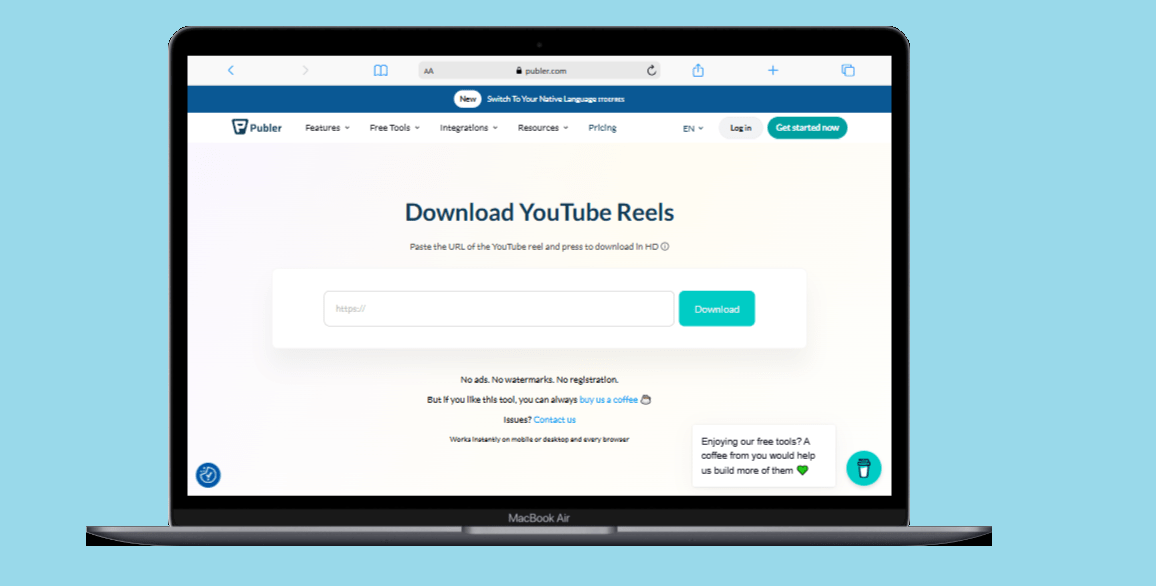
Publer’s YouTube Reel downloader is the best free tool for saving YouTube Reels in HD quality. This online video downloader is easy to use. You don’t need complicated software. Just a few clicks let you download YouTube Reels instantly.
You can save Reels for inspiration, offline viewing, or repurposing content. This no-registration tool works well on all devices and browsers. As a top YouTube Shorts downloader, Publer’s tool stands out for its quality and user experience.
This HD YouTube Reels downloader is a great choice. Unlike many tools, it doesn’t leave watermarks or need subscriptions. You get clear files without any branding or limits. It allows unlimited downloads, which is perfect for social media marketers who regularly save YouTube Reels. There are no ads, no watermarks, and no registration required. It’s truly the best free YouTube Reels downloader available. To use it, simply copy the URL of the Reel, paste it into the input field, and click download.
You can convert YouTube Reels to MP4 instantly. This gives you high-quality video files for offline viewing or content creation. The online video download tool works well on mobile devices, desktops, and all major browsers. It’s the most versatile YouTube Reels downloader for creators on the go.
If you’re asking how to download YouTube Reels in HD, this tool has you covered. Its simple, user-friendly interface makes it easy to use. Trusted by over 520,000 social media managers and marketing agencies worldwide, Publer’s YouTube Reels downloader is reliable and performs well. Plus, it has no watermark.
10. AudioCleaner’s YouTube video downloader

AudioCleaner’s YouTube video downloader provides an easy way to download YouTube videos in high quality. You don’t need to install any software. This online tool supports multiple formats, including MP4 in 4K and 1080p, plus clear MP3 audio extraction. Trusted by over 15,000 podcasters and creators, this free downloader avoids risky downloads and complex setups. Just paste the YouTube link into the secure interface and pick your format. Its cloud-based processing guarantees no quality loss and keeps you safe from malware and annoying ads that other downloaders often have.
This YouTube video downloader stands out for its versatility and ease of use. Whether you need a 4K video for editing or want to extract MP3 audio for music, this tool does all conversions server-side. It won’t strain your device’s resources. The downloader works well on all platforms: Windows, macOS, iOS, Android, and Linux. This makes it a great choice for anyone saving YouTube videos on different devices. It supports 60fps videos and keeps the original color grading. This feature is perfect for filmmakers, gamers, and content creators who want top-quality results.
The applications of this powerful YouTube downloader cover many professional and personal needs. Video editors use the lossless 4K download feature to gather high-quality B-roll footage. Educators take advantage of the 1080p downloader to archive tutorial videos for their students to access offline. Travel enthusiasts often rely on this online downloader to save content during short Wi-Fi connections. This helps ensure smooth playback during flights or commutes with poor internet. Music producers and podcasters appreciate its ability to extract high-quality MP3 audio from live streams. It provides ready-to-edit files that fit perfectly into digital audio workstations.
Bonus Tip
EaseUS Video Editor is a popular video editing software and it also allows you to convert the video downloaded from YouTube. With tons of advantages and features, you do not have to worry to edit videos and upload them on Youtube. So what are you waiting for, for those of you who are looking for video editing tools, I strongly recommend EaseUS Video Editor.
So, there you have it, some of the best youtube downloaders online that you can use for your needs – whether professional or personal.
Conclusion
YouTube downloaders and converters are essential for millions who want to save content for offline use. The 10 best YouTube converter tools we reviewed each have unique features. Some, like Turboscribe and Notube, offer simple, no-registration options. Alternatives, including 4K Video Downloader and AudioCleaner’s YouTube downloader, endorse high-quality formats, featuring 4K resolution.
When choosing a YouTube downloader, think about your needs. Do you want ease of use, format options, fast downloads, or extra features like editors or transcription tools? These tools are handy, but use them responsibly. Follow copyright laws and YouTube’s terms of service. Always get permission before downloading and using content, especially for commercial purposes.
Frequently Asked Questions (FAQs)
Are YouTube downloaders legal to use?
The legality of YouTube downloaders is unclear. The tools are legal, but downloading copyrighted content without permission breaks YouTube’s terms of service and may violate copyright laws. You can usually download content that is public domain, has a creative commons license, or for which you have permission from the creator.
What formats can I download YouTube videos in?
Most YouTube downloaders support various formats. MP4 is the most common for video, while MP3 is standard for audio. Many tools also offer formats like AVI, MKV, MOV, and WEBM. High-end options, like 4K Video Downloader and AudioCleaner, support resolutions up to 4K and even 8K for compatible videos.
Are online YouTube downloaders safe to use?
Many online YouTube downloaders are safe, but some may have ads, pop-ups, or unwanted programs. Reputable tools in our guide focus on user safety. Still, it’s smart to be cautious, avoid suspicious files, and use ad blockers on these sites.
Do I need to install software to use YouTube downloaders?
Not always. Many downloaders, like Turboscribe, Notube, and Publer, work directly in your web browser with no installation needed. However, tools like Any Video Converter and 4K Video Downloader offer desktop apps for extra features and faster downloads.
Can I download entire YouTube playlists with these tools?
Some YouTube downloaders allow playlist downloads, including ClipConverter, 4K Video Downloader, and Notube. Be careful with multiple downloads, as YouTube may block your IP address if it detects too much activity.
What are the limitations of free YouTube downloaders?
Free YouTube downloaders often have limits, such as daily download caps, fewer format options, lower quality, or ads. Some may restrict video length or time. Premium versions usually remove these limits and add features.
How do I choose the right YouTube downloader for my needs?
Think about your operating system, desired quality, and whether you want audio or video downloads. For casual users, simple online tools like Turboscribe or Notube may be enough. Content creators might prefer advanced options like 4K Video Downloader or AudioCleaner.
Can I download YouTube videos on my mobile device?
Yes, many YouTube downloaders work on mobile devices through browsers. Tools like Publer and Notube are optimized for mobile, allowing you to download videos directly to your smartphone or tablet.
What should I do if a YouTube downloader stops working?
YouTube updates its platform often, which can cause some downloaders to stop working. If this happens, try another tool from our list, check for updates, or look for announcements from the service provider about fixes or new versions.
Can I convert downloaded YouTube videos to other formats?
Most YouTube downloaders have built-in conversion options, letting you save videos in various formats. Tools like Any Video Converter and ClipConverter provide extensive choices, while others focus on popular formats like MP3 and MP4.
You May Also Like
 Online Services
8 Best Sites Like Fiverr (Fiverr Alternatives) To Earn Money As A Freelancer
 Online Services
20 Best Sites To Download Free Stock Photos For Personal and Commercial Use
 Cyber Security
Is Temu Legit or a Scam? The Complete Truth You Need to Know
 Proxies
Is CroxyProxy Safe to Use for YouTube? Privacy, Security, and Risks
 Online Services
How to Use WhatsApp on PC & Laptop (Easy 2026 Guide)
 Online Services
10 Best Free PDF Editor Tools Online And Offline For Windows 10/11
 Online Services
22 Best Free Sites to Receive SMS Online for Verification Without a Phone
 Converter
10 Best Free YouTube to MP3 Converter Sites for 2026
 Computer Security


