You’re signing up for a website and it asks for your email. You don’t really trust the site. Maybe it looks sketchy or you just don’t want spam filling your inbox. This happens all the time.
Temporary email addresses solve this problem. They give you a fake email that works for a short time, then disappears. No spam, no tracking, no mess in your real inbox.
But here’s the big question: Are temporary emails actually safe? Can you trust them for verifying accounts? Will they protect your privacy or create new problems? This guide answers everything you need to know about temporary email addresses in simple, clear language.
What is a Temporary Email Address?
A temporary email address is a fake email that works for a short time and then deletes itself automatically. You use it once for signing up somewhere, then throw it away. Nobody can send you emails after it expires.
How Temporary Emails Work
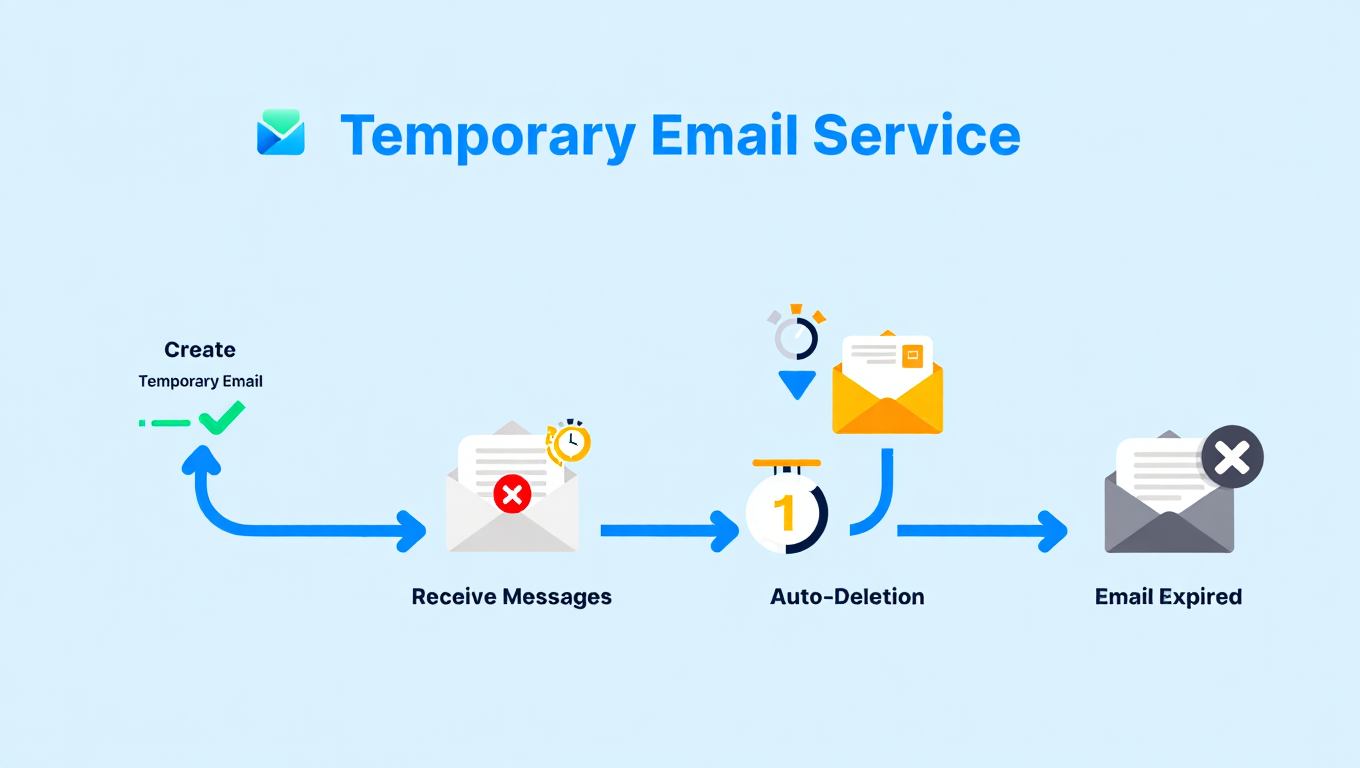
The process is super simple. You visit a temporary email website. The site gives you a random email address instantly. No signup needed, no password required. Just copy the email and use it wherever you need.
When someone sends a message to that address, it appears on the temporary email website. You can read it, click verification links, or download attachments. After 10 minutes to 24 hours depending on the service, the email address stops working. Everything sent to it disappears forever.
These services create millions of email addresses every day. Each person gets a unique address that nobody else can access. The email lives on the website’s servers, not on your computer or phone.
Common Names for Temporary Emails
People call these emails by different names:
- Disposable Email: Because you throw it away after using it once
- Burner Email: Like a burner phone that you use temporarily
- Throwaway Email: Since you don’t keep it long term
- 10 Minute Mail: Named after how long some services keep emails
- Fake Email Address: Though it actually works, unlike truly fake emails
All these names mean the same thing. A real working email that disappears quickly.
Why People Use Temporary Emails
Lots of situations make temporary emails useful:
Protecting your real inbox from spam tops the list. Websites sell your email to advertisers. Soon you’re getting hundreds of junk messages daily. Temporary emails prevent this completely.
Testing websites or apps requires email verification. Developers and testers need many email addresses quickly. Creating real accounts takes forever. Temporary emails speed up the process.
Avoiding tracking and data collection matters for privacy. Companies build profiles about you using your email address. They track which sites you visit and what you buy. Temporary emails break this tracking chain.
Accessing content that requires signup gets easier. Some websites force you to create an account just to read one article. You don’t want an account, you just want the content. Temporary emails let you get past the gate.
Trying services without commitment helps you decide. Maybe you want to test a free trial but don’t want to give real contact info. Temporary emails let you explore without obligation. Learn more about how to create fake email addresses for various purposes.
Is Using a Temporary Email Safe?
Using temporary email is generally safe for low-risk situations like newsletter signups or downloading files. However, they’re not safe for important accounts because anyone can access temporary email services and the emails aren’t encrypted.
Security Risks You Should Know
Temporary emails create several security problems you need to understand:
No Password Protection: Most temporary email services don’t require passwords. Anyone who guesses or finds your temporary email address can read your messages. If you share the link or someone sees it over your shoulder, they have full access.
No Encryption: Messages sent to temporary emails travel without encryption in most cases. Anyone monitoring the network can read them. This includes hackers, your internet provider, or people on public WiFi networks. Understanding what is end-to-end encryption shows why this matters.
Service Shutdowns: Temporary email websites can disappear overnight. If the service closes while you’re using an email address for something important, you lose access immediately. No warning, no way to recover messages.
Data Storage: Some temporary email services keep your messages even after they claim to delete them. Shady operators might sell this data or use it for advertising. You can’t verify what happens behind the scenes.
Phishing Risks: Scammers know people use temporary emails for quick signups. They create fake temporary email sites that steal information or install malware. Always use well-known services.
Privacy Benefits of Temporary Emails
Despite the risks, temporary emails do protect your privacy in specific ways:
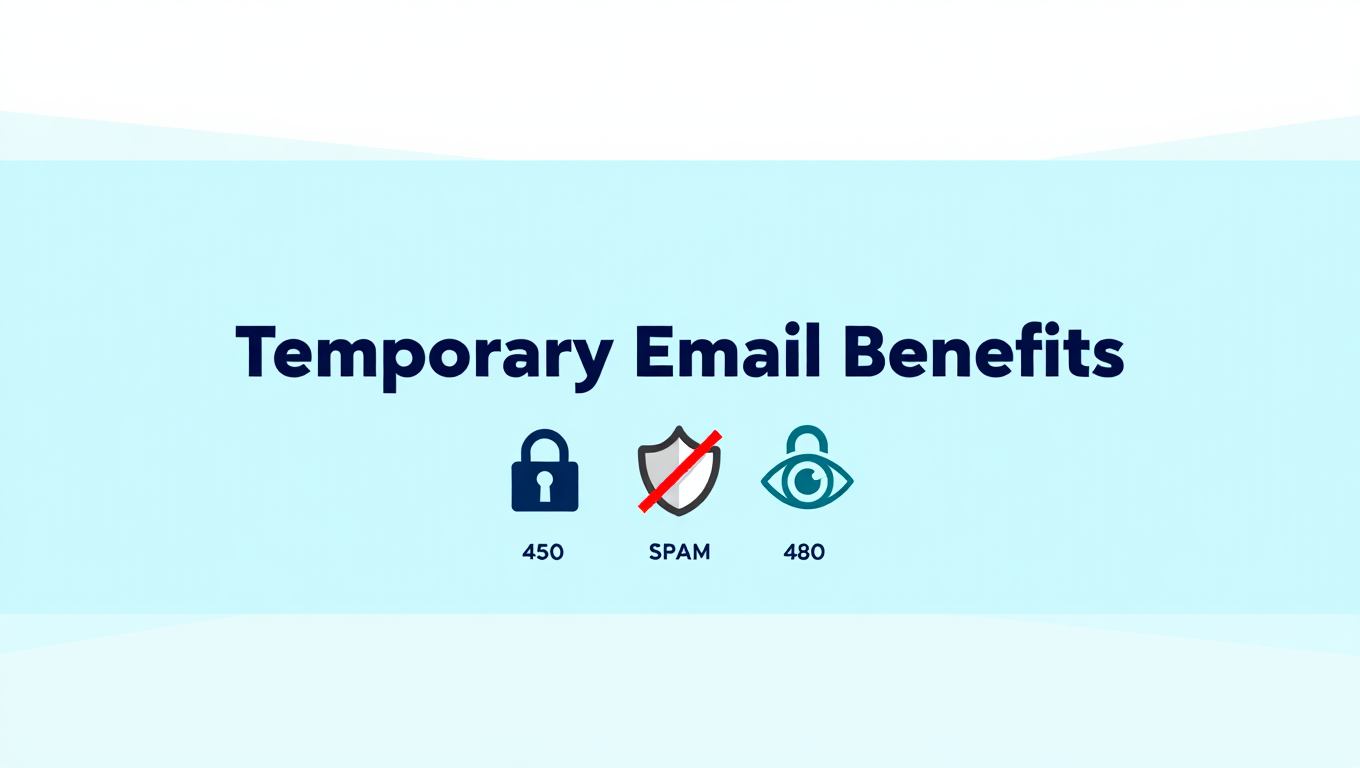
- Hide Your Real Identity: Websites can’t connect the temporary email to your actual identity. They don’t learn your real name, location, or other accounts you own.
- Stop Email Tracking: Companies can’t build a profile about your online behavior. Each temporary email you use is separate, breaking the tracking chain across websites.
- Prevent Spam Forever: Since the email deletes itself, spammers can’t reach you later. Your real inbox stays clean no matter how many sketchy sites you sign up for.
- Avoid Data Breaches: When a company gets hacked and leaks email addresses, yours isn’t included. The temporary email already stopped existing. Understanding what is data security helps you appreciate this protection.
The privacy benefits work best for throwaway situations. Don’t rely on them for anything important or long-term.
Can You Use Temporary Email for Verification?
Yes, you can use temporary email for verification on many websites, but success depends on whether the site blocks disposable email services. About 60% of websites accept temporary emails while 40% detect and reject them.
How Verification Works with Temporary Emails
Here’s what happens when you try to verify with a temporary email:
You enter the temporary email address on a signup form. The website sends a verification message to that address. You go back to the temporary email website and refresh the inbox. The verification email appears within seconds to minutes.
Click the verification link in the email. A new tab opens taking you back to the original website. Your account gets verified and activated. The whole process takes under five minutes usually.
Most small and medium websites accept temporary emails without problems. They just want to confirm you’re a real person, not a bot. The verification link proves you can receive emails.
Websites That Block Temporary Emails
Big companies and important services block temporary email addresses:
- Social Media Platforms: Facebook, Instagram, Twitter, TikTok, and LinkedIn reject most temporary emails. They want real contact information to reduce fake accounts and spam.
- Financial Services: Banks, payment processors, and cryptocurrency exchanges never accept temporary emails. They need to verify your identity for legal reasons. Learn about safer online banking practices instead.
- Email Providers: Gmail, Outlook, Yahoo, and other email services block temporary addresses. They don’t want people creating unlimited accounts for spam or abuse.
- Gaming Services: Steam, PlayStation Network, Xbox Live, and Epic Games detect disposable emails. They protect user accounts and prevent fraud. Check if services like OffGamers are legit before sharing real emails.
- Shopping Platforms: Amazon, eBay, and major retailers block temporary emails. They need real contact info for shipping and customer service. Services like Temu also verify email addresses carefully.
These sites maintain databases of known temporary email domains. When you try to sign up, they check your email against the list. If it matches, they reject it instantly.
Workarounds When Sites Block Temporary Emails
Some tricks help bypass temporary email detection:
Use Lesser-Known Services: Popular temporary email sites like 10MinuteMail get blocked first. Smaller, newer services often slip through detection systems for a while.
Try Custom Domain Services: Some temporary email providers let you create addresses using different domain names. These custom domains aren’t in blacklist databases yet.
Use Email Forwarding: Services that forward emails to temporary addresses work better than direct temporary emails. The forwarding service has a legitimate domain that passes checks.
Get Longer-Lasting Emails: Some services offer temporary emails that last days or weeks instead of minutes. These semi-permanent addresses behave more like real emails.
However, remember that trying to bypass verification systems might violate the website’s terms of service. They could ban your account if caught.
When Should You Use Temporary Email?
You should use temporary email for newsletter signups, downloading free resources, testing websites, and accessing content behind registration walls. These situations don’t require ongoing email access or account recovery.
Safe Situations for Temporary Emails
These scenarios work perfectly with temporary emails:
Newsletter Signups: Websites often force you to subscribe to newsletters just to download an ebook or watch a video. Use a temporary email to get past the gate. You receive the download link, grab what you need, and never hear from them again.
Free Resource Downloads: Companies collect emails when offering free templates, tools, or guides. If you only want the resource once, temporary email makes sense. Check best free tools for resources that don’t require signup.
Content Access: News sites and blogs sometimes hide articles behind email walls. You must provide an email to read beyond the first paragraph. Temporary emails unlock the content without cluttering your inbox.
Software Testing: Developers testing signup forms or email features need multiple addresses quickly. Temporary emails provide unlimited testing accounts without creating permanent clutter.
Contest Entries: Online contests often require email addresses. If you’re entering just for fun and don’t care about winning, temporary emails protect you from marketing spam that follows.
Forum Registration: Small online forums and discussion boards require email verification. If you only plan to post once or ask one question, temporary email works fine.
When You Absolutely Shouldn’t Use Temporary Email
Never use temporary email for these important situations:
- Banking and Financial Accounts: Banks send important security alerts, transaction confirmations, and account updates. Missing these could cost you money or let fraud happen. Always use real emails for anything involving money.
- Work or School Accounts: Professional and educational communications need reliable email addresses. You can’t afford to miss important messages about jobs, projects, or grades.
- Online Shopping: You need order confirmations, shipping tracking, and return information. Temporary emails disappear before your package arrives. You’ll have no way to track or return items.
- Social Media Accounts: If you plan to use the account long-term, you need a real email. Password resets, security alerts, and account recovery all require email access. Losing access means losing the account forever.
- Gaming Accounts: Video game accounts often contain purchased content worth real money. You need a permanent email for account security and recovery. Learn about safe gaming marketplaces that require proper email verification.
- Subscription Services: Netflix, Spotify, or any paid subscription needs a real email. You’ll miss billing notifications, account changes, and customer support messages.
The rule is simple: If you might need the account next week or need to recover it later, don’t use temporary email. Understanding why cybersecurity is important helps you make smart email decisions.
Best Temporary Email Services
The best temporary email services include 10MinuteMail, Guerrilla Mail, TempMail, and Mailinator. These services work reliably, don’t require signup, and protect your privacy better than alternatives.
Top Temporary Email Providers
Here are the most trusted services:
10MinuteMail: Gives you an email address that lasts 10 minutes. You can extend the time if needed. Simple interface with no ads cluttering the screen. The email updates automatically when new messages arrive.
Guerrilla Mail: Offers temporary emails that last one hour. You can create custom addresses by choosing the part before the @ symbol. Supports attachments and has a clean design.
TempMail: Provides random email addresses that last as long as you keep the browser tab open. Generate new addresses instantly with one click. Shows incoming emails in real-time.
Mailinator: Lets you create any email address you want instantly. Just type any name before @mailinator.com and it works. All emails are public though, so never use it for anything private.
Temp-Mail.org: Creates addresses that last indefinitely until you close the browser or manually delete them. Offers mobile apps for iOS and Android. Includes QR codes for easy sharing.
Find more options at free temporary email addresses generator sites that list current services.
Features to Look For
When choosing a temporary email service, check these features:
- No Registration Required: The best services give you an email instantly without asking for any information. No username, no password, no personal details.
- Custom Address Options: Some services let you choose part of the email address. This makes it easier to remember while still being temporary.
- Sufficient Time Limit: Make sure the email lasts long enough for your needs. 10 minutes works for quick verifications. Longer tasks need emails that last hours.
- Mobile Access: If you need temporary emails on your phone, choose services with mobile-friendly websites or dedicated apps.
- Attachment Support: Some temporary emails can receive files, not just text messages. Useful when downloading resources that come as email attachments.
- Privacy Protection: Good services don’t track you or require JavaScript. They respect your privacy while providing the service. Understanding how to protect personal information helps you evaluate services.
Avoid services that show too many ads, require payment, or ask for personal information. These defeat the purpose of using temporary email.
How to Create and Use a Temporary Email
Creating a temporary email takes less than 30 seconds. Visit a temporary email website, copy the generated address, use it for signup, and check messages on the same website.
Step by Step Guide
Follow these simple steps:
Step 1: Choose a Service Pick one of the temporary email services mentioned earlier. Open the website in your browser. No download or installation needed.
Step 2: Get Your Temporary Address The website automatically generates a random email address when the page loads. You’ll see it displayed prominently at the top of the page. It looks like “randomletters123@tempmail.com” or similar.
Step 3: Copy the Email Address Click the copy button next to the email address. Most services provide a one-click copy feature. The address is now saved to your clipboard.
Step 4: Use It for Signup Go to the website where you need an email address. Paste the temporary email into the email field. Complete the rest of the signup form normally.
Step 5: Wait for Verification Email Go back to the temporary email website. Keep that browser tab open. The verification email usually arrives within 1-3 minutes. Some services auto-refresh, others need you to click a refresh button.
Step 6: Complete Verification When the email arrives, open it by clicking on it. Find the verification link or code inside. Click the link or copy the code. Return to the original website and complete verification.
Step 7: Close When Done After verification succeeds, you can close the temporary email tab. The address will delete itself automatically after the time limit expires.
Tips for Better Results
Make temporary emails work more reliably with these tips:
Keep the temporary email tab open until verification completes. If you close it, you might not be able to access the same email address again. Some services assign you a new address each visit.
Check spam folders on the temporary email service. Yes, even temporary emails have spam filters. If the verification email doesn’t appear in the inbox, look in spam or junk folders.
Extend time limits when available. If the verification email is taking longer than expected, use the extend time button. This prevents the email from expiring before you receive the message.
Take screenshots of important information. If the temporary email contains codes, passwords, or download links you need later, screenshot them. You won’t be able to access the email once it expires.
Use email forwarding for important verifications. Some temporary services let you forward messages to your real email. This gives you a permanent record while still protecting your inbox from spam. Similar to how best free file sync software backs up important files.
Temporary Email vs Real Email: Which to Use?
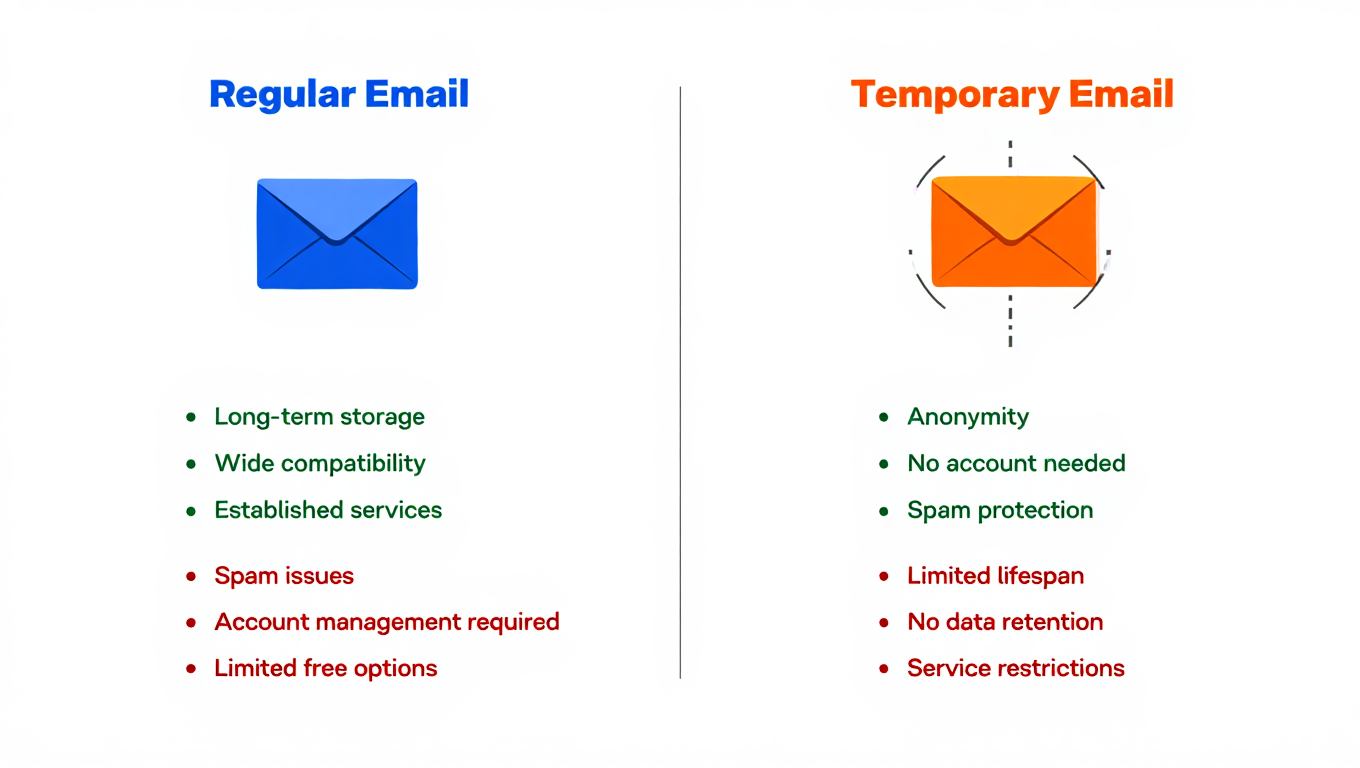
Use temporary email for one-time signups and low-risk situations. Use real email for important accounts, financial services, and anything requiring long-term access. The choice depends on whether you need the account later.
Comparing Both Options
Here’s how temporary and real emails differ:
Account Recovery: Real emails let you reset passwords and recover accounts. Temporary emails disappear, making recovery impossible. If you forget your password after the temporary email expires, you lose the account forever.
Security Features: Real email services offer two-factor authentication, spam filters, and encryption options. Temporary emails have minimal security. Anyone with the link can read your messages. Learn about two-factor authentication for better account protection.
Storage and History: Real emails keep messages for years. You can search old emails anytime. Temporary emails delete everything automatically. No history, no search, no archives.
Professional Use: Real emails look professional and trustworthy. Temporary emails scream “I don’t trust you” to legitimate businesses. Use real email when building relationships matters.
Convenience: Temporary emails require no setup or management. Real emails need passwords, regular checking, and inbox organization. Temporary emails save time for one-off needs.
Cost: Both options are free for basic use. Real email services offer paid upgrades for extra storage or features. Temporary emails stay free always.
Making the Right Choice
Ask yourself these questions:
Will I need this account next month? If yes, use real email. If no, temporary email works.
Does the account involve money? Always use real email for anything financial. No exceptions.
Do I need customer support? Companies send support responses to your email. You need permanent email addresses for ongoing help.
Is account security important? Valuable accounts need real emails with proper security features. Gaming accounts, work profiles, and personal data need protection.
Am I just testing something? Temporary emails are perfect for experiments, tests, and trying new services. You can always create a real account later if you like the service. Check is GroupMe safe before deciding which email type to use for messaging apps.
Common Problems with Temporary Emails
Common problems include websites blocking disposable emails, verification emails arriving late or not at all, temporary addresses expiring too quickly, and limited functionality for attachments or replies.
Solving Verification Issues
When temporary emails don’t work, try these fixes:
Problem: Website Rejects the Email Some sites detect and block temporary email domains. Switch to a different temporary email service with different domain names. Lesser-known services slip past detection more easily.
Problem: Verification Email Never Arrives Wait at least 5 minutes before giving up. Some systems queue emails and send them in batches. Check the spam folder on the temporary email service. Refresh the inbox manually if auto-refresh seems broken.
Problem: Email Expired Before Verification Choose services with longer time limits. 10 minutes isn’t enough for slow verification systems. Pick services offering 1 hour or more. Extend the timer before it runs out if the service allows.
Problem: Can’t Read Attachments Not all temporary email services support file attachments. Switch to a service that explicitly mentions attachment support. Download important files immediately since they disappear with the email.
Problem: Can’t Reply to Emails Most temporary emails only receive messages, they can’t send them. If you need two-way communication, temporary email won’t work. Use a real email address instead.
Security Concerns to Watch
Watch out for these security issues:
- Fake Temporary Email Sites: Scammers create lookalike websites that steal data or spread malware. Only use well-known services with good reputations. Check how to verify if a website is safe before using new services.
- Public Email Access: Some services like Mailinator make all emails public. Anyone can type in your temporary address and read your messages. Never use these for anything sensitive.
- Session Hijacking: If someone sees your screen or accesses your browser history, they might find your temporary email link. Close tabs when done and clear browser history on shared computers.
- Malware in Messages: Temporary emails receive spam and phishing attempts just like real emails. Don’t click suspicious links or download unexpected attachments. Understanding AI phishing attacks helps you spot dangers.
Stay cautious even with temporary emails. They’re disposable but not risk-free.
Legal and Ethical Considerations
Using temporary emails is legal in most countries for personal privacy protection. However, using them to create fake accounts, commit fraud, or violate terms of service can have legal consequences.
When Temporary Emails Are Acceptable
These uses are perfectly legal and ethical:
Protecting your privacy from data collection and tracking is a legitimate right. Companies don’t have automatic entitlement to your personal information. Using temporary emails to maintain privacy breaks no laws.
Avoiding spam and unwanted marketing emails benefits everyone. You’re not required to give real contact information to access content. Temporary emails are a valid tool for inbox management.
Testing services before committing makes sense as a consumer. You have the right to try products anonymously. Companies shouldn’t require full contact details for basic browsing.
Accessing free content and resources causes no harm when the content is freely offered. If a website gives something away in exchange for an email, temporary addresses fulfill that exchange.
When You’re Crossing the Line
These uses create ethical and legal problems:
- Creating Multiple Accounts: Most websites’ terms of service prohibit multiple accounts per person. Using temporary emails to bypass this rule violates their policies. They can ban all your accounts if discovered.
- Fraud and Scams: Using temporary emails to commit theft, fraud, or impersonation is illegal. Law enforcement can track temporary email usage when investigating crimes. The anonymity isn’t absolute.
- Abuse and Harassment: Creating throwaway accounts to harass people or post abusive content violates both laws and platform rules. Temporary emails don’t protect you from consequences of illegal behavior.
- Bypassing Payment Systems: Some people use temporary emails to repeatedly claim free trials without paying. This is theft of service and legally actionable. Companies track and prosecute repeat abusers.
- Academic Dishonesty: Using temporary emails to access educational resources you haven’t paid for violates honor codes and possibly copyright law. Stick to legitimate access methods for school materials.
The ethical rule is simple: Use temporary emails to protect your legitimate privacy rights, not to deceive, steal, or harm others. Understanding what is cyber security includes knowing legal boundaries online.
Alternatives to Temporary Email
Alternatives to temporary email include email aliases, plus addressing, dedicated secondary emails, and email forwarding services. These options provide better long-term functionality while still protecting your primary inbox.
Email Aliases and Plus Addressing
Your regular email service might have built-in privacy features:
Gmail Plus Addressing: Add a plus sign and any text before @gmail.com. For example, if your email is jojo@gmail.com, use jojo+shopping@gmail.com for store signups. All emails reach your regular inbox but you can filter them easily. This helps identify who sells your address.
Email Aliases: Services like Apple’s Hide My Email and Firefox Relay create permanent forwarding addresses. These aliases forward to your real email but can be deleted individually. You maintain access long-term while protecting your actual address.
Outlook Aliases: Microsoft lets you create multiple email addresses that all go to one inbox. Each alias works like a real email address. You can disable aliases that start receiving spam without affecting your main address.
These methods give you temporary email benefits with permanent email reliability. You can recover accounts, receive long-term communications, and manage everything from one inbox. Check best free password managers to store credentials for these accounts safely.
Secondary Email Accounts
Creating a dedicated secondary email offers another solution:
Make a second Gmail, Outlook, or Yahoo account specifically for signups and registrations. Give this email to websites you don’t fully trust. Keep your primary email private for important contacts only.
This approach provides several advantages over temporary emails. The secondary account remains accessible for password resets and account recovery. You can check it occasionally without monitoring constantly. Legitimate companies can still reach you if needed.
However, you’ll need to manage two inboxes. The secondary account will accumulate spam over time. You’ll need to remember which email you used for each service. Consider using a password manager to track this information.
Email Forwarding Services
Specialized forwarding services combine benefits of both approaches:
Services like SimpleLogin, AnonAddy, and Burner Mail create unlimited email aliases. Each alias forwards to your real email. You can reply through aliases without revealing your actual address. Disable individual aliases when they start receiving spam.
These services cost $1-5 monthly for premium features. Free tiers usually offer 10-20 aliases. You get better privacy than secondary accounts with less management hassle than temporary emails.
The forwarding approach works great for medium-term needs. Sign up for monthly services, shopping sites, and casual accounts. You maintain access for password resets while keeping your real email hidden.
Conclusion
Temporary email addresses are useful tools for protecting your privacy online. They work great for newsletter signups, downloading resources, and accessing content behind registration walls. You get instant email addresses that disappear automatically, keeping spam out of your real inbox.
However, temporary emails aren’t safe for important accounts. Never use them for banking, shopping, social media, or anything you’ll need long-term. The lack of password protection and permanent access makes them unsuitable for valuable accounts. They’re tools for throwaway situations only.
The safety question depends entirely on how you use them. Temporary emails protect you from spam and tracking when used correctly. They create security risks when used for important verifications or accounts requiring recovery access.
Choose the right tool for each situation. Use temporary emails for low-risk, one-time signups. Use real email addresses for anything involving money, personal data, or accounts you’ll access regularly. Consider email aliases or secondary accounts when you need something between fully temporary and permanent.
Ready to try temporary email? Start with a trusted service like 10MinuteMail or TempMail. Use it for your next newsletter signup or content download. Experience the freedom of sharing email addresses without worry. Just remember the golden rule: Only use temporary emails for things you can afford to lose access to later.
Protect your online privacy smartly by understanding when to use each type of email. Your inbox will thank you, and your important accounts will stay secure. Visit sites to receive SMS online for verification for similar temporary verification solutions when you need phone numbers instead of emails.
You May Also Like
 VPN
VPNCloudflare WARP as a Free VPN Alternative: Review After Months of Daily Use
 Cyber Security
Can Ransomware Infect iCloud? What Mac and iPhone Users Need to Know
 Data Security & Privacy
Two-Factor Authentication (2FA): How It Works, Which Method to Use, and How to Stay Safe
 Data Security & Privacy
Is a Password Manager Safe? How to Use One Securely
 Data Security & Privacy
19 Best Email Service Providers for Personal and Business Use
 WordPress
12 Best Cheap SSL Certificate Providers To Secure Your Website
 Data Security & Privacy
Is Password Protection the Same as Encryption? Differences in Data Security
 Data Security & Privacy
How Your Digital Footprint Can Make or Break Your Career Opportunities
 Data Security & Privacy


