The best server location for your website is geographically close to your target audience, as physical distance directly impacts page load times and user experience. Every millisecond counts in web performance, and server location represents one of the most critical yet often overlooked factors affecting website speed. Studies show that 53% of mobile users abandon websites that take longer than three seconds to load, making optimal server placement essential for business success.
Server location affects more than just speed. Geographic hosting decisions impact search engine rankings, regulatory compliance, data privacy requirements, and even your website’s reliability during regional network disruptions. Whether you’re launching a local business website, building a global e-commerce platform, or deploying enterprise applications, understanding server location principles helps you make informed hosting decisions.
This comprehensive guide explains everything you need to know about selecting optimal server locations. You’ll learn how geography affects performance, what factors influence location decisions, how content delivery networks enhance global reach, and practical strategies for testing and optimizing your hosting configuration.
Why Does Server Location Matter for Your Website?
Server location matters because physical distance between your server and visitors creates latency that directly impacts page load times, user experience, and conversion rates. Data travels at the speed of light through fiber optic cables, but it still requires measurable time to cross continents and oceans.
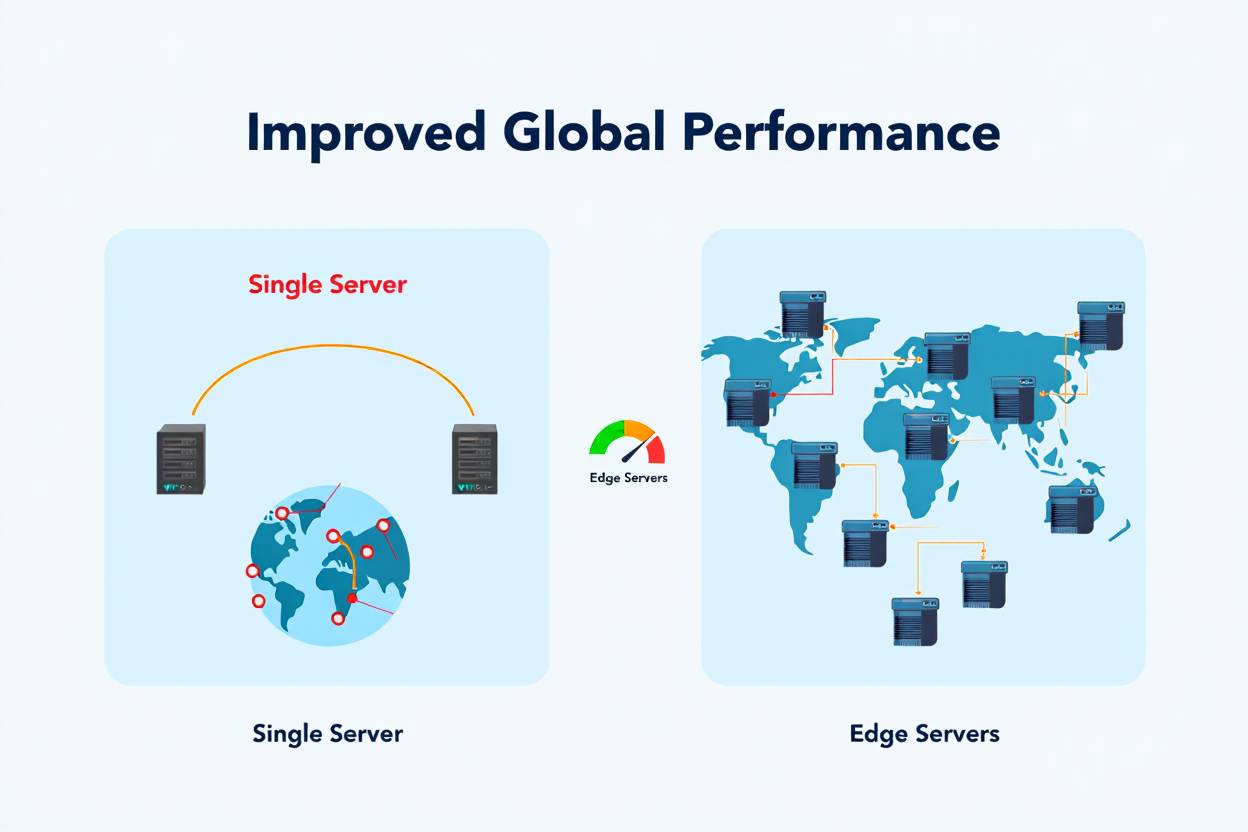
How Does Geographic Distance Affect Website Speed?
Geographic distance creates latency through the fundamental physics of data transmission. When a user in Tokyo accesses a website hosted in New York, data packets must travel approximately 11,000 kilometers each way. Even at the speed of light in fiber optic cables, this round-trip creates roughly 150-200 milliseconds of base latency before any processing occurs.
This latency compounds with every request. Modern websites require dozens or hundreds of requests for HTML, CSS, JavaScript, images, and other resources. Each additional request adds another round-trip delay, multiplying the geographic distance penalty. A website requiring 50 resources experiences 50 separate round-trips, potentially adding several seconds to total load time.
Network routing complexity increases latency beyond theoretical minimums. Data doesn’t travel in straight lines between points. Packets route through multiple internet service providers, exchange points, and network infrastructure, each adding processing delays. A request from London to Sydney might route through Frankfurt, Moscow, Singapore, and other intermediate nodes, significantly increasing total travel time.
Understanding what are the benefits of a paid VPN over a free VPN helps illustrate how network routing affects performance. Premium services offer optimized routing paths, similar to how strategic server placement reduces website latency.
What Business Impact Does Server Location Have?
Server location directly affects revenue, conversion rates, and customer satisfaction. Amazon found that every 100 milliseconds of latency costs them 1% in sales. Google discovered that a 500-millisecond delay in search results caused 20% traffic drop. These statistics from major tech companies demonstrate the real business consequences of poor server placement.
- Conversion rate impact – Each second of load time reduces conversions by 7%
- Bounce rate increase – 32% of users abandon sites loading slower than 3 seconds
- SEO rankings – Google uses page speed as a ranking factor for mobile and desktop searches
- User satisfaction – 79% of disappointed users won’t return to slow websites
- Mobile performance – Mobile users experience 2-3x longer load times, amplifying location effects
E-commerce businesses face particularly severe consequences from poor server placement. Customers shopping online expect instant responses when browsing products, adding to carts, and completing checkouts. Delays during critical conversion moments cause shopping cart abandonment and lost sales. Understanding best practices for vulnerability scanning and network security ensures your hosting infrastructure remains both fast and secure.
What Factors Should You Consider When Choosing Server Location?
When choosing server location, consider your target audience geography, regulatory compliance requirements, data sovereignty laws, and budget constraints. These interconnected factors create a decision matrix that guides optimal hosting placement.
Where Is Your Primary Target Audience Located?
Your target audience geography represents the single most important factor in server location decisions. Place your server as close as possible to where most visitors will access your website. A local business serving customers within a single city should choose local or regional hosting, while global businesses need more complex strategies.
Analyze your audience geography through these methods:
- Google Analytics data – Review geographic reports showing visitor locations
- Customer database analysis – Map existing customer locations from CRM systems
- Market research – Identify target market locations before launching new sites
- Competitive analysis – Study where competitors host their successful websites
- Future expansion plans – Consider planned market expansion when selecting initial hosting
Single-country businesses benefit from straightforward location decisions. A UK-focused e-commerce site should host in London or Manchester data centers to minimize latency for British customers. Multi-regional businesses require more sophisticated approaches, potentially using multiple server locations or content delivery networks.
Understanding hosting domains and servers differences helps you grasp how server location integrates with overall hosting architecture. Your domain registrar may differ from your hosting provider, allowing geographic flexibility.
What Legal and Regulatory Requirements Affect Server Location?
Data protection regulations increasingly mandate where certain data types can be stored. The European Union’s GDPR imposes strict requirements on personal data handling. Organizations serving EU citizens must often store personal data within EU borders or countries with equivalent data protection standards.
Key regulatory considerations:
- GDPR compliance – EU personal data storage and processing requirements
- Data sovereignty laws – Country-specific data storage mandates
- Industry regulations – Healthcare (HIPAA), finance (PCI DSS), education requirements
- Government data localization – Requirements that government data stays within national borders
- Cross-border data transfer restrictions – Limitations on moving data between jurisdictions
Healthcare organizations face particularly strict location requirements. HIPAA regulations in the United States require specific safeguards for protected health information, potentially limiting hosting location options. Financial services dealing with payment card data must ensure PCI DSS compliance regardless of server location. Understanding SOC 2 compliance helps ensure your hosting provider meets required security standards.
How Does Budget Impact Server Location Choices?
Server costs vary significantly by geographic location due to real estate prices, energy costs, tax policies, and market competition. Hosting in major technology hubs like Silicon Valley, London, or Tokyo typically costs 30-50% more than emerging market data centers. Budget constraints may push organizations toward less expensive locations even when they’re not geographically optimal.
Cost considerations include:
- Base hosting fees – Monthly server rental or cloud computing costs
- Bandwidth charges – Data transfer costs that vary by region
- Premium location surcharges – Additional fees for popular data centers
- Currency exchange impacts – International hosting introduces foreign exchange considerations
- Tax implications – Different jurisdictions impose varying tax rates on hosting services
Exploring cheap shared hosting and best DigitalOcean alternatives for cloud hosting reveals pricing variations across providers and regions. Budget-conscious businesses can offset suboptimal server locations with content delivery networks that cache content closer to users at lower costs than multiple full server deployments.
How Do You Determine Your Website’s Geographic Distribution?
To determine your website’s geographic distribution, analyze existing traffic data through Google Analytics, review customer locations from business records, and research target market demographics. This analysis reveals where to prioritize server placement for maximum impact.
What Tools Help Analyze Visitor Geography?
Multiple analytics platforms provide detailed geographic insights about website visitors. Google Analytics offers comprehensive location data available free for any website. The Audience > Geo > Location report shows visitor distribution by country, region, and city, revealing exactly where your traffic originates.
Essential analytics tools for geographic analysis:
- Google Analytics – Free comprehensive visitor location tracking
- Google Search Console – Shows search performance by country
- Cloudflare Analytics – Provides geographic traffic distribution for Cloudflare users
- Server logs – Raw access logs contain IP addresses revealing geographic origins
- Heatmap tools – Services like Hotjar show where engaged users are located
Beyond visitor analysis, business data provides valuable geographic insights. Customer relationship management systems, order databases, and email subscriber lists reveal where your actual customers are located. These conversion-focused metrics matter more than raw traffic, as servers should prioritize paying customers over casual visitors.
Understanding what is an SSID in WiFi and how to find your Comcast router IP address helps you grasp network fundamentals that affect how users connect to your server.
How Do You Predict Future Geographic Expansion?
Launch-stage websites lack historical traffic data for analysis. Business planning documents, market research, and competitive analysis provide initial geographic targeting guidance. Entrepreneurs should identify target markets before launch and select hosting locations accordingly.
- Business plan review – Identify planned market expansion timeline
- Competitor analysis – Research where successful competitors host their sites
- Market size evaluation – Prioritize larger markets for initial hosting placement
- Language considerations – Multi-language sites often target specific geographic regions
- Partnership locations – Business partners and suppliers may indicate target markets
Scalable hosting architectures accommodate geographic expansion. Starting with a single well-chosen location allows future addition of servers in new regions as business grows. Cloud platforms like AWS, Google Cloud, and Azure make adding regional deployments straightforward as traffic patterns evolve.
What Are the Main Server Location Options?
The main server location options include dedicated servers in specific data centers, cloud hosting with regional selection, content delivery networks with global edge locations, and hybrid approaches combining multiple strategies. Each option offers distinct advantages for different use cases.
Should You Choose Dedicated Regional Hosting?
Dedicated regional hosting places your entire website on servers in a specific geographic location. This traditional approach works well for businesses serving concentrated geographic areas. A restaurant chain operating only in Texas should host in Dallas or Houston data centers to serve local customers optimally.
Regional hosting advantages:
- Simple configuration – Single server location requires minimal setup complexity
- Cost-effective – Cheaper than multi-region deployments for localized businesses
- Regulatory compliance – Easier to meet data localization requirements
- Predictable performance – Consistent behavior for all users in target region
- Easier management – Single location simplifies monitoring and maintenance
Regional hosting disadvantages become apparent when serving dispersed audiences. Users outside your hosting region experience higher latency and slower performance. A Europe-hosted website provides poor experience for Australian visitors, potentially losing international business opportunities. Understanding best free backend and database hosting helps you explore regional hosting options at minimal cost.
How Do Content Delivery Networks Solve Geographic Challenges?
Content Delivery Networks (CDNs) cache website content across globally distributed edge servers. When users request content, the CDN serves it from the nearest edge location rather than origin servers. CDNs dramatically reduce latency for global audiences without requiring multiple full server deployments.
CDN benefits for server location optimization:
- Global performance – Serve content from locations near all users worldwide
- Cost efficiency – Less expensive than deploying full servers in every region
- Automatic failover – If one edge location fails, others continue serving content
- DDoS protection – Distributed architecture absorbs attack traffic
- Bandwidth savings – Origin server handles fewer requests as CDN serves cached content
Popular CDN providers include Cloudflare, AWS CloudFront, Akamai, Fastly, and Azure CDN. Most CDN services offer free tiers sufficient for small to medium websites, making global content distribution accessible to businesses of any size. CDN configuration typically requires only DNS changes, allowing easy implementation without server migrations.
CDNs work best for static content like images, CSS, JavaScript, and videos. Dynamic personalized content requires additional strategies since CDNs cannot cache user-specific responses. Combining regional servers for dynamic content with CDN for static assets creates optimal hybrid architectures. Understanding what is endpoint protection ensures your CDN implementation maintains security standards.
What Is Multi-Region Cloud Deployment?
Multi-region cloud deployment distributes full application instances across multiple geographic locations. Major cloud providers offer dozens of regional data centers worldwide. Organizations deploy identical application copies in multiple regions, routing users to their nearest instance automatically.
Cloud platforms with extensive regional coverage:
- Amazon Web Services (AWS) – 30+ regions with 90+ availability zones globally
- Google Cloud Platform – 35+ regions across continents
- Microsoft Azure – 60+ regions serving 140 countries
- IBM Cloud – 19 availability zones in 6 continents
- Oracle Cloud – 41 regions with planned expansion
Multi-region deployment provides optimal performance for truly global applications. Users in Tokyo, London, and New York each connect to local servers delivering consistently fast experiences. This architecture requires sophisticated load balancing, database replication, and deployment orchestration but offers the best possible global performance.
Understanding how to protect your data with Google Cloud Platform and implementing public cloud leakage prevention becomes critical when deploying across multiple cloud regions. Benefits of Azure cloud management include simplified multi-region orchestration for enterprise deployments.
How Do You Test Server Location Performance?
To test server location performance, use speed testing tools that measure load times from different geographic locations, analyze Core Web Vitals metrics, and conduct real user monitoring. Systematic testing reveals actual performance differences between location options.
What Tools Measure Geographic Performance?
Multiple online tools simulate website access from locations worldwide. These services provide objective performance data helping you evaluate server location decisions. GTmetrix, Pingdom, and WebPageTest offer geographic testing showing how different locations experience your website.
Essential performance testing tools:
- GTmetrix – Tests from multiple global locations with detailed performance breakdowns
- Pingdom – Provides synthetic monitoring from key cities worldwide
- WebPageTest – Comprehensive testing with detailed waterfall charts and filmstrip views
- Google PageSpeed Insights – Shows Core Web Vitals performance data
- Uptime monitoring – Services like best uptime monitoring tools track availability from multiple locations
Network testing tools reveal raw connectivity performance. Ping and traceroute utilities show latency and routing paths between locations. Services like LAN speed test software help test internal network performance, while free network protocol analyzers provide detailed packet-level insights.
Real user monitoring (RUM) provides the most accurate performance data. RUM tools collect actual performance metrics from real visitors using your website, revealing true geographic performance patterns. Google Analytics, New Relic, and Datadog offer RUM capabilities showing how different locations experience your site.
How Do You Interpret Speed Test Results?
Speed test results require careful interpretation beyond simple overall scores. Time to First Byte (TTFB) specifically measures server response time, revealing how server location impacts initial response. Lower TTFB indicates servers responding quickly from their geographic position.
Key metrics for evaluating server location:
- Time to First Byte (TTFB) – Server response latency directly affected by location
- First Contentful Paint (FCP) – When first content appears, influenced by server distance
- Largest Contentful Paint (LCP) – Core Web Vital measuring loading performance
- Total load time – Complete page rendering duration
- Geographic variation – Performance differences between test locations
Compare performance across your target markets. If your primary market shows 200ms TTFB while secondary markets show 800ms, consider CDN implementation or additional regional servers. Acceptable performance thresholds depend on your industry and user expectations, but generally aim for under 200ms TTFB for good user experience.
Understanding best internet speed for gaming and streaming provides context for user expectations. Consumers accustomed to fast internet expect equally fast website responses regardless of server location.
What Special Considerations Apply to Different Website Types?
Different website types have varying server location requirements based on their specific performance, compliance, and functionality needs. E-commerce sites prioritize speed and regional payment processing, while content sites focus on global distribution and media delivery.
How Should E-commerce Sites Choose Server Locations?
E-commerce websites require exceptional performance during critical conversion moments. Slow checkout processes directly cause cart abandonment and lost revenue, making server location crucial for online retail success. E-commerce sites should prioritize hosting near primary customer concentrations.
E-commerce location strategies:
- Payment processing proximity – Host near payment gateway servers to minimize transaction latency
- Inventory system integration – Reduce delays between website and warehouse management systems
- Multi-currency support – Regional servers handle local currency processing more efficiently
- Compliance requirements – PCI DSS compliance may dictate acceptable hosting locations
- Peak traffic handling – Regional hosting matches peak shopping hours to server capacity
Large international retailers typically deploy multi-region architectures. Amazon, Alibaba, and other major platforms use regional servers serving local customers from nearby data centers. Smaller e-commerce businesses can achieve similar results using regional hosting plus CDN for product images and static assets. Selecting best invoicing software for small business and best management software for small business ensures your backend systems complement optimal hosting placement.
What About Media-Heavy and Streaming Websites?
Media-heavy websites serving video, audio, and high-resolution images face unique challenges. Large file delivery benefits enormously from CDN usage regardless of origin server location. Streaming services absolutely require CDN to deliver acceptable performance.
Media delivery considerations:
- CDN requirement – Content delivery networks essential for video and large media files
- Bandwidth costs – Media files consume significant bandwidth affecting hosting costs
- Encoding regions – Video transcoding services work best near origin storage
- Live streaming – Real-time content requires sophisticated multi-region architectures
- Copyright restrictions – Geographic licensing may require content blocking in certain regions
Services like Netflix, YouTube, and Spotify deploy content to edge servers worldwide. Even smaller video platforms should use CDN services like Cloudflare, AWS CloudFront, or specialized video CDNs. Origin server location matters less for media sites since CDN handles most traffic, but choose origins with good CDN connectivity and reasonable costs.
Understanding best video format for editing and free movie streaming sites reveals how major platforms optimize media delivery. Legal streaming services typically use sophisticated geographic distribution matching your needs at smaller scale.
How Do SaaS Applications Handle Server Location?
Software-as-a-Service applications serving global users require sophisticated location strategies. SaaS platforms must balance performance, data sovereignty, regulatory compliance, and operational complexity when choosing hosting locations. Many successful SaaS companies start with single regions and expand geographically as they grow.
SaaS location considerations:
- Data residency requirements – Customer contracts often specify data storage locations
- Compliance certifications – SOC 2 compliance may require specific geographic deployments
- Database replication – Multi-region deployments require data synchronization strategies
- Feature deployment – Geographic distribution complicates software updates and rollouts
- Support coverage – Multiple regions may require 24/7 operations teams in different time zones
Many SaaS companies adopt region-per-customer models. Enterprise customers receive dedicated instances in their preferred regions, while smaller customers share regional deployments. This approach balances performance, compliance, and operational efficiency. Understanding what is required for SOC 2 compliance and how to build customer trust through SOC 2 helps SaaS providers make informed location decisions.
How Do DNS and Routing Affect Server Location Strategy?
DNS configuration and traffic routing determine how users connect to your servers, making them critical components of geographic hosting strategy. Even perfectly located servers deliver poor performance with suboptimal DNS and routing configurations.
What Is Geographic DNS Routing?
Geographic DNS routing (GeoDNS) directs users to different server IP addresses based on their geographic location. When Tokyo users query your domain, DNS returns IP addresses for Asian servers, while European users receive European server IPs. This intelligent routing ensures users connect to appropriate regional servers automatically.
GeoDNS implementation methods:
- DNS provider features – Services like AWS Route 53, Cloudflare, and Akamai offer built-in GeoDNS
- Manual geographic rules – Configure specific routing policies for different regions
- Latency-based routing – Automatically direct users to lowest-latency endpoints
- Failover configuration – Redirect traffic when primary locations become unavailable
- Load distribution – Balance traffic across multiple servers in same region
GeoDNS requires multiple server deployments to be effective. Configuring GeoDNS without deploying regional servers provides no benefit. Organizations using multi-region cloud deployments or CDN typically implement GeoDNS to maximize geographic optimization benefits. Understanding best free public DNS servers helps you select DNS providers supporting advanced geographic features.
How Does Anycast Routing Improve Geographic Performance?
Anycast routing allows multiple servers in different locations to share the same IP address. Network routing automatically directs users to the nearest server with that IP address based on BGP routing protocols. Major CDN providers and DNS services use Anycast extensively.
Anycast benefits for geographic distribution:
- Automatic optimal routing – Users reach nearest server without DNS configuration
- Inherent failover – If one location fails, traffic automatically routes to next nearest
- DDoS mitigation – Attack traffic distributes across all Anycast locations
- Simplified configuration – Single IP address serves multiple geographic locations
- Lowest latency paths – BGP routing selects shortest network paths automatically
Anycast implementation requires significant networking expertise and resources. Most businesses leverage Anycast through CDN services rather than deploying custom Anycast networks. Cloudflare, Akamai, and other major CDN providers use Anycast to deliver content from locations nearest to users. Understanding what is Zscaler and Zscaler proxy for secure internet access reveals how enterprise security services use geographic routing for performance and protection.
What Are Common Server Location Mistakes to Avoid?
Common server location mistakes include choosing hosting based solely on price, ignoring target audience geography, neglecting regulatory requirements, and failing to test performance before committing. These errors cause performance problems and potential compliance issues.
Why Is Choosing Hosting Based Only on Price a Mistake?
Price-focused hosting selection often places servers in suboptimal locations. The cheapest hosting usually comes from data centers in low-cost regions that may be geographically distant from your users. A U.S. business choosing Ukrainian hosting because it costs $3/month instead of $10/month sacrifices performance for minimal savings.
Problems with price-only decisions:
- Poor user experience – High latency frustrates visitors and reduces conversions
- SEO penalties – Google penalizes slow sites in search rankings
- Support challenges – Distant time zones complicate technical support interactions
- Regulatory risks – Cheap locations may lack required compliance certifications
- False economy – Lost revenue from poor performance exceeds hosting savings
Calculate total cost of ownership including lost business opportunities. A $100/month hosting plan in your target market that converts 5% of visitors generates more profit than $20/month distant hosting converting 3%. Exploring cheap shared hosting options within your geographic target provides better value than distant bargain hosting.
What Problems Come from Ignoring Mobile Users?
Mobile users experience 2-3x higher latency than desktop users on the same connections. Mobile networks introduce additional delays through cellular towers, carrier gateways, and data plan throttling. Server location impacts mobile users more severely than desktop users.
Mobile performance considerations:
- Cellular latency – Mobile connections add 50-200ms base latency before reaching internet backbone
- Variable connection quality – Mobile users switch between 4G, 5G, and WiFi with different performance characteristics
- Limited bandwidth – Mobile data plans restrict connection speeds more than home broadband
- Geographic movement – Mobile users physically move through different network zones while accessing sites
- Battery constraints – Slow loading drains mobile batteries faster as connections remain open longer
Test website performance specifically on mobile connections from target markets. Desktop testing provides misleading results since mobile experiences differ significantly. Google’s mobile-first indexing makes mobile performance critical for SEO success. Understanding is 500 Mbps fast and is 1000 Mbps fast and good for gaming provides context for user connection speeds.
How Do You Migrate to a New Server Location?
To migrate to a new server location, plan the transition carefully, set up the new server environment, test thoroughly, update DNS records with low TTL values, and monitor closely during the transition period. Proper migration prevents downtime and data loss.
What Steps Ensure Smooth Server Location Migration?
Successful server migrations require systematic planning and execution. Rushing migration without proper preparation causes extended downtime, data inconsistencies, and frustrated users. Follow structured migration processes to minimize risks.
Server migration checklist:
- Audit current configuration – Document all server settings, software versions, and dependencies
- Set up new server – Deploy identical configuration in new location
- Test new environment – Verify all functionality works before switching production traffic
- Reduce DNS TTL – Lower time-to-live to 300 seconds several days before migration
- Sync data – Replicate databases and files to new server
- Update DNS records – Point domain to new server IP addresses
- Monitor performance – Track metrics confirming successful migration
- Maintain old server – Keep original server running for several days as backup
Large-scale migrations benefit from gradual traffic shifting. Route 10% of traffic to new location first, verify correct operation, then gradually increase to 100%. This incremental approach catches problems before they affect all users. Understanding best configuration management tools helps automate complex migration processes.
How Do You Minimize Downtime During Location Changes?
Zero-downtime migration requires running parallel environments temporarily. Maintain both old and new servers operational simultaneously, gradually shifting traffic from old to new location. This approach costs more but eliminates service interruptions.
Downtime minimization strategies:
- Load balancer traffic shifting – Gradually move traffic percentage from old to new servers
- Database replication – Keep databases synchronized between locations during transition
- Content staging – Deploy all content to new server before DNS changes
- Monitoring alerts – Set up alerts detecting problems during migration
- Rollback planning – Prepare immediate rollback procedures if problems occur
Schedule migrations during low-traffic periods when possible. Migrating at 3 AM local time affects fewer users than peak business hours migration. Communicate maintenance windows to users even for zero-downtime migrations, as unexpected issues may still cause brief interruptions. Implementing best uptime monitoring tools provides real-time visibility during migration processes.
Frequently Asked Questions About Server Location
Does Server Location Affect SEO?
Yes, server location affects SEO indirectly through page speed and directly through geographic targeting signals. Google uses page load speed as a ranking factor, and server location significantly impacts speed. Additionally, websites hosted in specific countries may receive slight preference for searches from those countries, though this factor carries less weight than in past years. The most important SEO impact comes from user experience—faster sites keep visitors engaged longer, reducing bounce rates and improving rankings.
Can I Change Server Location After Launching My Website?
Yes, you can change server location after launching your website through server migration processes. Most hosting providers support location changes, though the process varies in complexity. Simple migrations involve copying files and databases to new servers, updating DNS records, and monitoring during the transition. More complex sites with integrations, APIs, and custom configurations require detailed planning. The migration itself typically completes within hours, though DNS propagation takes 24-48 hours to reach all global users.
Should I Use Multiple Server Locations for Global Business?
Yes, global businesses should use multiple server locations or CDN to serve international customers effectively. Single-location hosting creates poor experiences for distant users, limiting international growth potential. Multi-region deployment provides optimal performance but requires more complex architecture and higher costs. Content delivery networks offer cost-effective middle ground, caching static content globally while dynamic content serves from single origin. Most growing businesses start with one location plus CDN, adding regional servers as specific markets become significant.
How Do I Test Which Server Location Is Best?
Test server location by deploying trial instances in candidate regions and measuring performance using speed testing tools from target markets. Services like GTmetrix, Pingdom, and WebPageTest show load times from different global locations. Run tests multiple times at various times of day to account for network variability. Compare Time to First Byte (TTFB) between locations as this metric specifically reflects server response speed. Consider trying hosting in your top choice for one month, analyzing real user performance data before making long-term commitments.
Does CDN Eliminate the Need to Choose Server Location?
No, CDN does not eliminate the need to choose server location, though it reduces its importance significantly. CDN caches and serves static content from edge locations near users, but dynamic content still originates from your server. Database queries, user authentication, personalized content, and real-time features all depend on origin server response time. Optimal architecture combines strategically located origin servers with CDN for static assets, providing fast performance for both dynamic and static content globally.
Can Bad Server Location Be Fixed Without Changing Hosts?
Yes, bad server location can often be fixed without changing hosting providers through CDN implementation or requesting server relocation. Many hosting companies operate multiple data center locations and allow moving your account between them. Cloud providers like AWS, Google Cloud, and Azure make regional migration straightforward. If your current provider can’t accommodate better locations, adding Cloudflare or similar CDN provides significant improvement without host migration. CDN implementation typically takes hours rather than days required for full hosting changes.
Conclusion
Choosing the best server location for your website significantly impacts performance, user experience, search rankings, and business success. Geographic hosting optimization starts by understanding your target audience location, analyzing traffic patterns, considering regulatory requirements, and testing performance from different regions. Most websites benefit from placing servers near their primary user base, with CDN supplementing for global reach.
Implement systematic approaches to server location decisions. Begin by analyzing where your visitors and customers are located using analytics tools and business data. Consider compliance requirements like GDPR, HIPAA, and PCI DSS that may mandate specific locations. Test candidate locations using speed testing tools measuring real-world performance before committing to long-term hosting contracts.
Start optimizing your website’s server location today by auditing current performance across your target markets. Review geographic analytics, test load times from key locations, and explore CDN options to improve global delivery. Whether you’re launching a new website or optimizing an existing one, strategic server placement provides competitive advantages through superior user experience and search engine performance. For additional hosting guidance and performance optimization strategies, visit KeyAnalyzer.com for comprehensive web technology resources.
Remember that server location represents just one component of website performance. Combine optimal geographic hosting with data security best practices, endpoint protection, and comprehensive vulnerability management for robust, secure, and fast website infrastructure.
You May Also Like
 Cloud Storage
Best Photo Backup for iPhone: 7 Reliable Ways to Protect Your Photos
 Cyber Security
Can Ransomware Infect iCloud? What Mac and iPhone Users Need to Know
 Data Security & Privacy
What Is a Cloud Security Scanner for AWS, Azure, and Google Cloud?
 Cloud Storage
The Ultimate Guide to Sending Large Files Online: Top 20 Services for Easy File Sharing
 Cloud Storage
7 Best Photo Backup Solutions in 2026: Which Cloud Storage Should You Trust?
 Network Security
How to Transfer Files Between Two Laptops Over Wi-Fi: What Actually Works
 Data Security & Privacy
How to Protect Your Data With Google Cloud Platform: Complete Security Guide
 Cloud Storage
13 Best Free Cloud Storage Services to Back up & Keep Your Files Secure
 Cloud Storage